










Version: Pandora FMS 800 LTSRelease date: March 2026
There are two types of versions in Pandora FMS: LTS (Long-Term Support) versions, such as 777 LTS «Andromeda», and FR (Feature Release) versions, such as 778, …, 786. This update corresponds to 800 LTS.
LTS versions include frequent and periodic updates (fixes) that correct both security issues and critical bugs detected in the tool. These are the versions we recommend using in production environments. LTS versions are released approximately once a year.
FR versions incorporate new features, improvements, and bug fixes in each release. Due to their evolving nature, they may also include capabilities that are still maturing, as well as experimental features enabled through a setup token. These versions are released approximately every two months and are aimed at users who want to try new capabilities before they are consolidated in an LTS version.
Notices
This version is supported only on Rocky Linux 9 and Rocky Linux 10. Rocky Linux 8 and CentOS 8 are not supported.
This version introduces significant changes in the internal architecture of Pandora FMS. For this reason, we recommend following our upgrade guide from version 777 onwards and contacting the support team if any issues arise during the process.
New features
Improvements and new features since the previous LTS
The following changes were introduced in versions 778, 779, 780, 781, 783, 784, 786 and 800.
Pandora SIEM
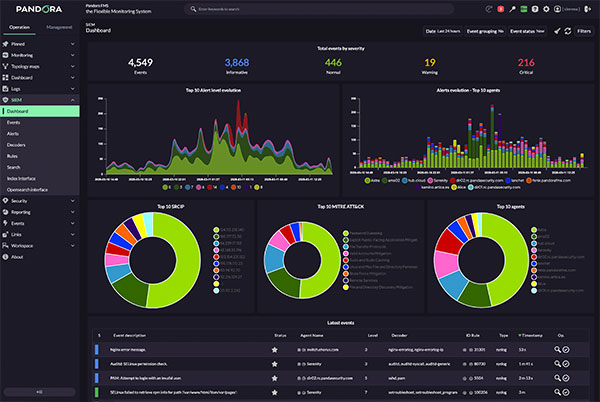
Pandora SIEM is a fully integrated solution that adds a Security Information and Event Management (SIEM) system to the monitoring capabilities of Pandora FMS.
Pandora FMS agents collect information that can now be normalized in order to generate specific security events through the SIEM rules engine. Pandora SIEM can also process information received via syslog by the Pandora FMS Syslog Server.
The Pandora FMS SIEM engine is extensible by users. Custom processing and normalization rules can be defined, as well as event generation rules. This allows the integration of any type of application or appliance that generates security-related information. Pandora SIEM operates independently from raw log collection, which continues to be stored in parallel.
The Pandora FMS SIEM interface allows users to visualize information through several dashboards, an event viewer with filtering capabilities, and a visual management interface for available decoders and rules. Pandora SIEM is partially compatible with Wazuh decoders and rules.
Remote Management and Monitoring (RMM)
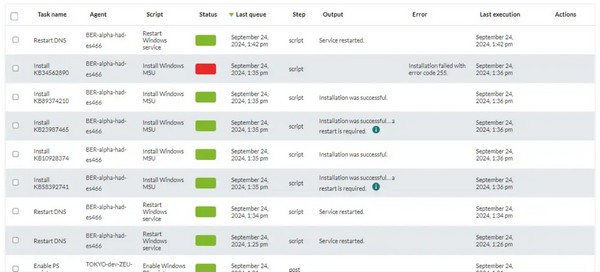
A complete functionality for remote system management has been incorporated, based on the software agent (PFMS EndPoint). A new executable, included with this updated version of the agents, allows immediate management and information gathering from groups of systems connected to the server.
The RMM (Remote Monitoring and Management) functionality allows patching MS Windows® systems, updating packages in Linux®, restarting systems and services, among other operations. It is extensible by users to run custom scripts and supports bulk actions as well as alert-triggered execution.
New Pandora FMS Marketplace
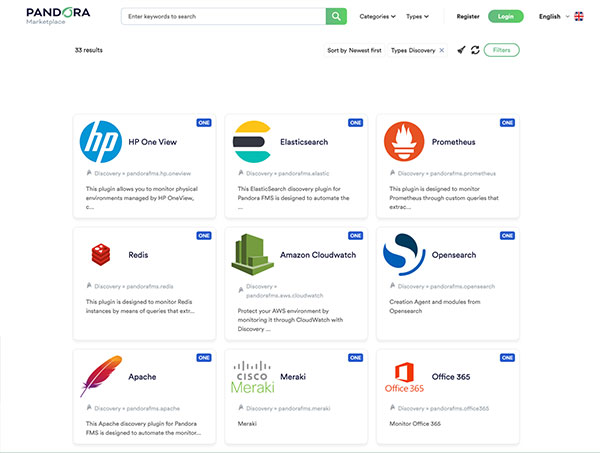
We have created a new website to replace the plugin library, offering improved search capabilities and smoother integration with the Pandora FMS console. It allows not only plugins to be downloaded directly into Discovery, but also report templates, policies, and other configuration items.
The new site is now available at: marketplace.pandorafms.com

We will continue improving this portal to provide new useful components.
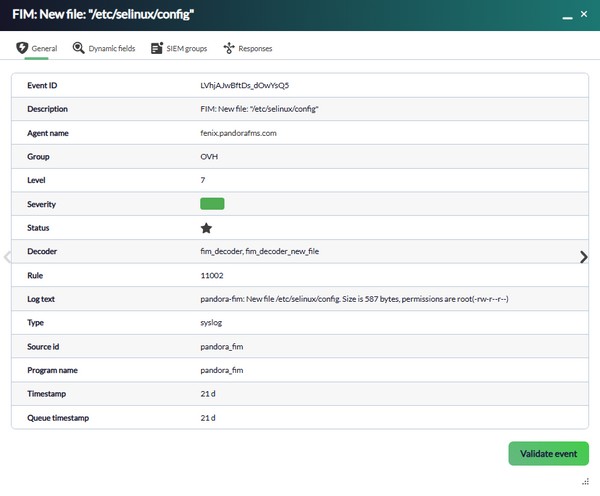
New security monitoring feature – FIM (File Integrity Monitoring)
As part of the expansion of Pandora FMS security monitoring capabilities, a new File Integrity Monitoring (FIM) feature has been incorporated.
It will be available for MS Windows® and Linux® agents running at least version 784, and it will work together with SIEM event monitoring in environments where it is enabled. It allows integration with dynamic IOCs, so that alerts can be generated through file hashing when new files appear on any endpoint.
Network scanning in Discovery
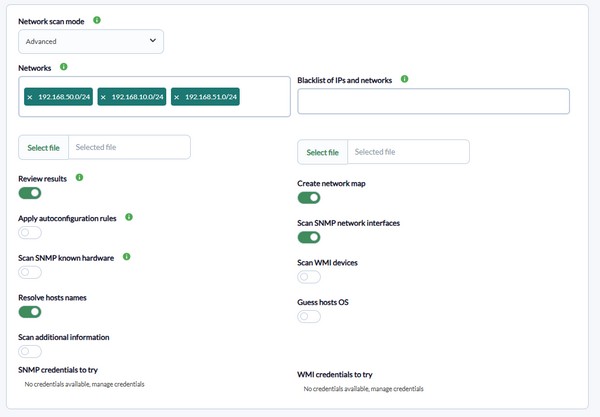
The operation and interface of network discovery from the Pandora FMS server have been improved, making it smarter and providing more information by default.
It is now possible to create discovery tasks without the need to specify multiple parameters, as well as configure more complex tasks to automatically discover networks or run specific scans.
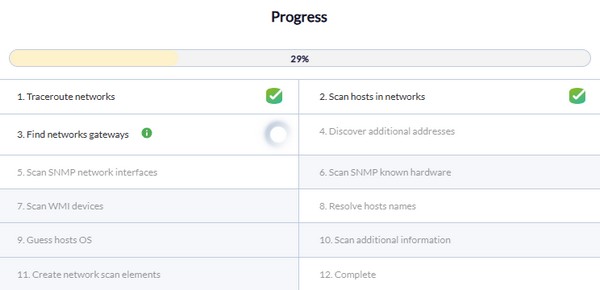
In addition, the process now includes different phases, which are completed progressively and can be viewed from the Pandora FMS console.
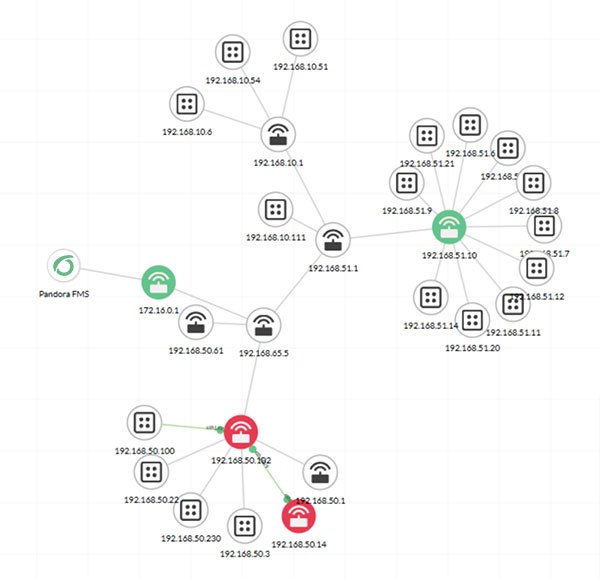
A provisional network map can also be displayed while the scan is in progress, as well as with the final result, making it easier to review the discovered devices. This network map can also be created automatically from the task in the Topological Maps section of the Web Console.
Network maps
Improvements, fixes, and changes have been introduced in the generation and rendering of network maps.
Among the most notable features is the representation of network maps, which will include two visible and delimited areas: one representing the visible area in the minimap, and a larger area with limits that cannot be exceeded (for maps that are larger and require more space).
Regarding map generation, the network map context menu now includes two options: one to load newly discovered nodes into the network map, and another to redraw the position of the elements already present in the network map. Neither option now removes elements or relationships created by the user within the map, preserving any custom configuration that has been defined.
Improvements in vulnerability monitoring
New inventory modules have been added and the existing ones in MS Windows® agents have been improved to monitor installed software and installed patches on the system.
As a result of these changes, vulnerability monitoring has also been improved for both Windows and Linux software agents, displaying more information and expanding the existing vulnerability database.
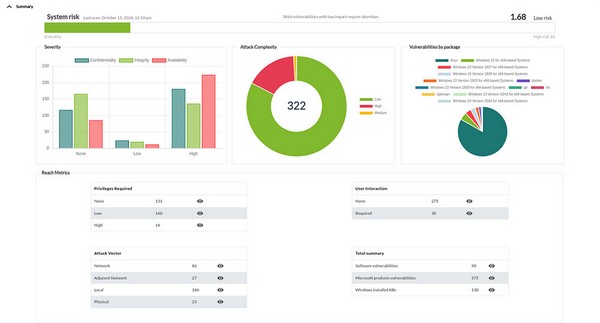
Microsoft® patch management from vulnerability monitoring
Related to the previous point, and integrated with the Pandora FMS RMM capabilities, it will be possible to schedule the update and installation of Microsoft® patches with a click in order to remediate vulnerabilities detected by the monitoring system that can be fixed through official Microsoft® patches.
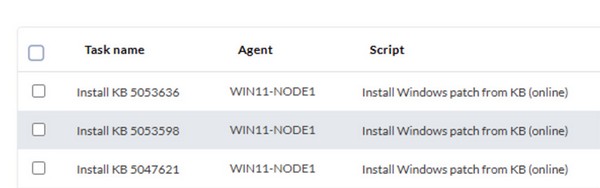
Pandora ITSM installation from the Pandora FMS console
Administrators will be able to install Pandora ITSM directly from the Pandora FMS Web Console, with the system fully configured and ready to use. This installation is carried out entirely within Pandora FMS, so there is no need for an additional server or extra configuration.
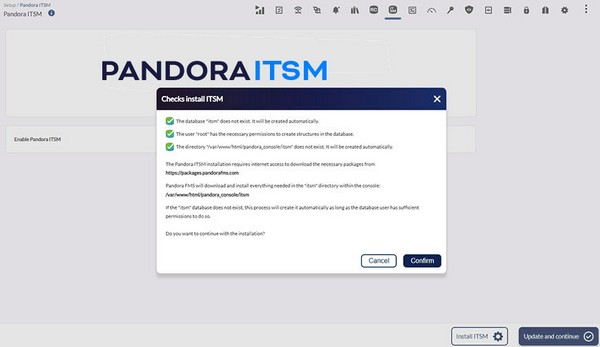
Telegram alert configuration
Pandora FMS includes a default alert command for sending notifications via Telegram FZ-LLC®. Until now, this command required a token to be configured by manually editing the command itself.
To simplify its management, a new field has been added to the General Configuration, allowing this token to be updated centrally.
Automatic default monitoring for new agents
In order to simplify and streamline the deployment of the most essential monitoring, new agents created from the Web Console will include automatically generated default monitoring (Host Alive and Network Latency). This option can be disabled when creating an agent, if preferred.
New report element: Event list
To match the event view as closely as possible, a new report element type has been added, allowing events to be filtered in a way that closely mirrors the event view itself.
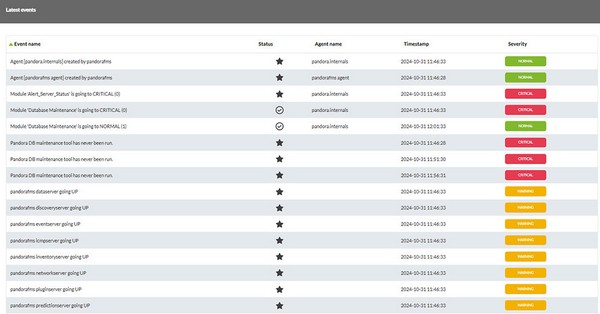
This type of report element will replace the event report elements used up to now in future versions.
Use of stored credentials in WMI monitoring
The credential store allows sets of usernames and passwords to be configured for different types of monitoring. They could already be used in Discovery; they can now also be used for standard WMI monitors.
New endpoints for API 2.0
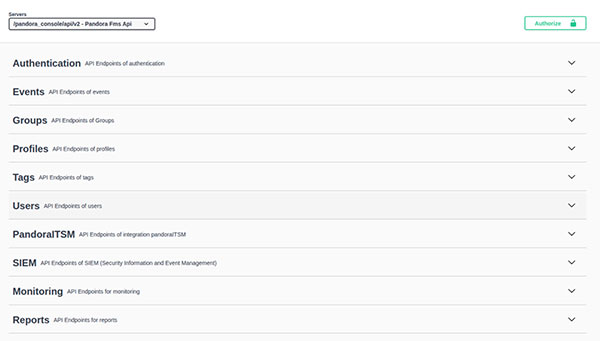
We continue adding endpoints to the new Pandora REST API 2.0, incorporating ITSM and SIEM endpoints, as well as expanding some of the existing ones.
Architecture changes since the previous LTS
The following changes were introduced in versions 784 and 785.
Changes in the PFMS server architecture
The most significant change introduced is the new internal architecture of the Pandora FMS server. This refers to the processes available in the server and the distribution of the different types of monitoring across them.
This is an important change that modifies the distribution of monitoring threads. The objective is to unify tasks of a similar nature in order to optimize the use of server resources and avoid the need to deploy environments with unnecessarily high requirements.
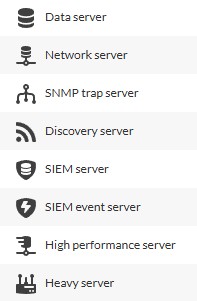
The most visible change is the removal of the following servers, whose functionalities are now handled by other servers:
- ICMP Enterprise Server
- SNMP Enterprise Server
- Web Server
- WMI Server
- Prediction Server
- Inventory Server
- Plugin Server
- NCM Server
- Export Server
And the introduction of the following servers, which will assume the tasks previously handled by them:
The Network Server will handle the following types of monitoring:
- ICMP
- TCP
- SNMP
- Remote execution commands (SSH and Winexe)
- WMI
- Web
- Prediction (services, arithmetic operations, averages, etc.)
The Network High Performance Server replaces the former ICMP Enterprise Server and SNMP Enterprise Server, taking over ICMP and SNMP monitoring tasks (only for numeric values) and allowing modules to be executed at much shorter polling intervals (e.g., 15 seconds).
The Heavy Server will handle the following types of monitoring:
- Plugin
- Inventory
- Vulnerabilities
- NCM
- Exporting monitoring data to another server
The complete list of servers is therefore as follows:
- Data Server.
- Network Server.
- Heavy Server.
- Network High Performance Server.
- SNMP Console.
- Syslog Server.
- Sync Server.
- Discovery Server.
- Event Server.
- Log Server.
- SIEM Server.
- SIEM Events Server.
- NetFlow Server.
- WUX Server.
- MADE Server.
- Alert Server.
- RMM Server.
- Provisioning Server (Command Center only).
- Migration Server (Command Center only).
These changes mean that tasks which previously had dedicated threads will now share the execution queue with other elements. The main advantage of this change is that it removes the need to allocate dedicated servers and threads to monitoring groups that may represent only a small portion of the workload.
For example, if an environment had very little WMI monitoring but a large amount of ICMP or SNMP monitoring, it was still necessary to allocate at least one server with one full thread exclusively for WMI monitoring. By unifying these tasks in the same queue, the same resources of the Network Server can now handle all monitoring workloads.
New high-performance server for short polling intervals
In line with the previous point and the new architecture, Pandora FMS can now execute basic network checks with polling intervals of up to 15 seconds (under certain conditions). This applies to centralized servers; the Satellite Server has always been able to perform checks with polling intervals of up to one second, when required.
New process: pandora_supervisor
In the update procedure through WARP, there was a limitation that in some cases required the pandora_server process to be restarted manually in order to complete the update.
From this version onwards, this will no longer be necessary in most cases, as a process called pandora_supervisor has been incorporated to perform this action automatically when the server is updated through WARP.
This change will be transparent to Pandora FMS users, who will not need to perform any additional configuration.
Complete startup migration to SystemD
All Pandora FMS services have been fully migrated to SystemD, removing the previous startup scripts.
Automatic load balancing in remote checks
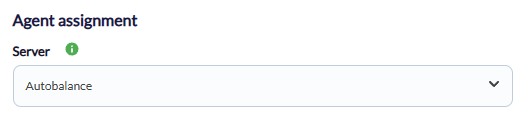
It is now possible to configure an agent so that the execution of its modules is automatically balanced across the available remote servers.
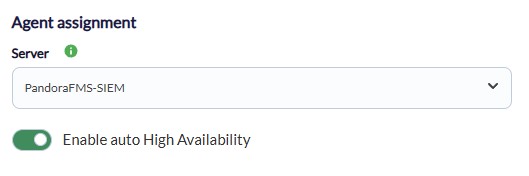
Regarding high availability (HA), it will also be possible to enable or disable it for agents, providing greater configuration flexibility in distributed environments.
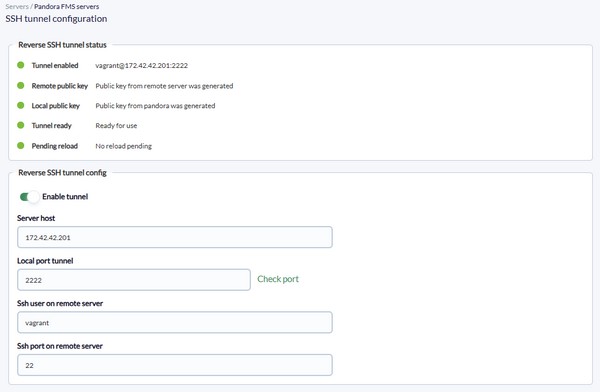
Exec Server – Automatic configuration of a reverse SSH tunnel
Some Console options, such as the SNMP wizard, allow requests to be made from a different server, for example a Satellite Server.
This functionality was handled through the Exec Server, which previously had to be configured manually.
From now on, it will be possible to configure a reverse SSH tunnel directly from the console for any Satellite Server or Pandora FMS Server by entering just a few required parameters. This tunnel will be used for actions performed through the Exec Server.
Improvements and changes in Satellite configuration
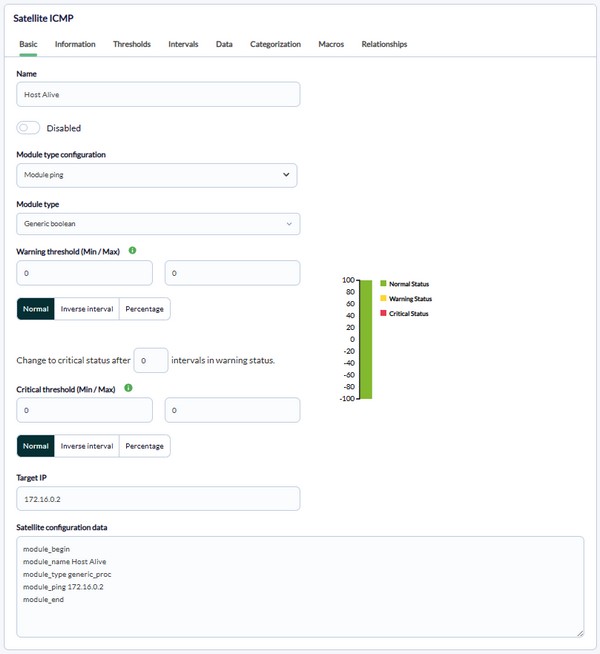
Along with the previous functionality, some options have been added for Satellite Servers to simplify their management and enhance their capabilities. The most notable are:
- Generation of specific remote configuration files for Satellite agents: Until now, since both used the same system, it was not possible to have both a Satellite agent and an Endpoint for the same machine with remote configuration enabled at the same time. The configuration files for Satellite Servers have now been differentiated to make this possible.
- Direct creation of Satellite agents and modules from the interface: Since their configuration has now been separated, specific forms are available to configure individual modules for Satellite agents.
It should be taken into account that, due to these new functionalities, users who deployed monitoring for their Satellite agents through policies will need to redefine those modules using the new forms.
Version support since the previous LTS
The following changes were introduced in versions 778, 784 and 800.
Pandora FMS compatibility with RHEL 9 and Rocky Linux 9
Pandora FMS is now compatible with RHEL 9 and Rocky Linux 9 operating systems.
MySQL 8.4 compatibility
Pandora FMS now provides official support for MySQL 8.4, subject to the following considerations:
- Support: available only for standalone nodes.
- Limitations: it is not compatible with high-availability (HA) environments.
- New installations: the default installed version will remain 8.0. MySQL 8.4 is available for environments that require it or choose to use it.
PHP 8.4 compatibility
The Pandora FMS Web Console is compatible with and supported on PHP 8.4.
Support for security protocols in SNMPv3
With this new LTS version, support for SNMPv3 monitoring has been improved by adding AES and SHA 256/512, resulting in the following supported methods:
- Authentication method: MD5, SHA, SHA512, SHA256
- Privacy method: DES, AES, AES256, AES192
Visual changes since the previous LTS
The following changes were introduced in versions 785, 786 and 800.
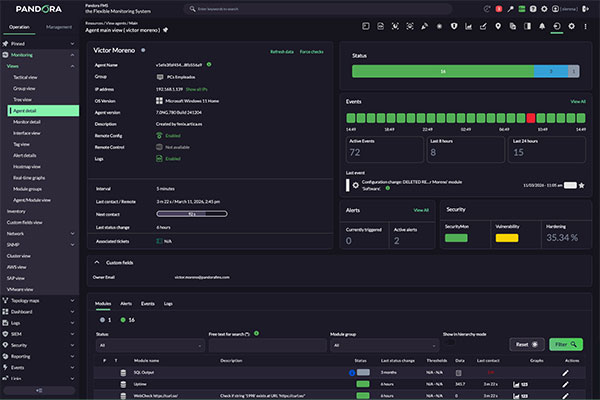
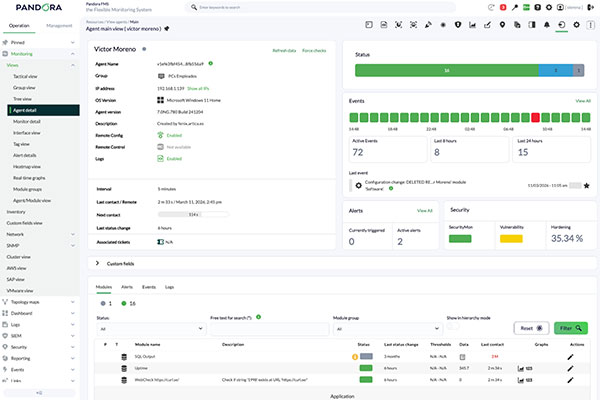
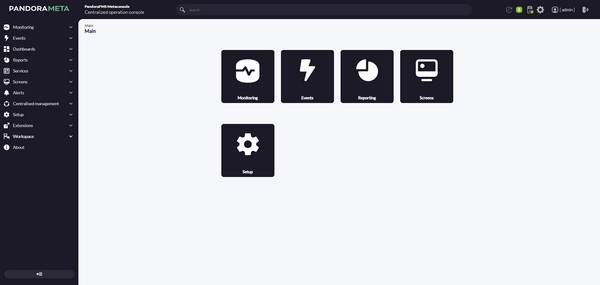
Revised graphical interface
In order to improve the usability of the tool, both the Web Console and the Command Center have been reviewed and updated.
This is not just an aesthetic change, as some menu sections have been reorganized to improve interface usability. In addition, the main filters have been reorganized into a new side menu system, providing more workspace in the main views.
These changes are especially noticeable in the Console’s dark theme, where the color palette has been completely changed.
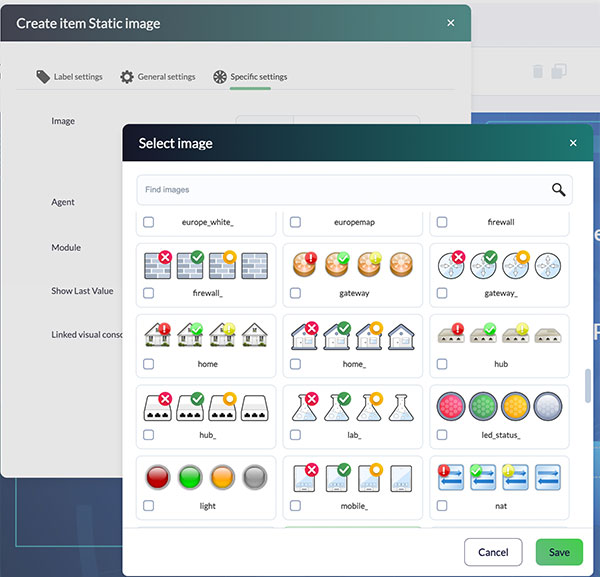
Updated icons for Visual Console
In line with the previous point, we continue working on the modernization of the application interface. In this phase, all icons used in the visual consoles have been redesigned.
If the previous icon set is required, it can be found in our Marketplace. During migrations, the previous images can be preserved by copying the image directory (see the migration guide for more details).
License status notification
In some environments, licenses had expired without users noticing until a couple of days later.
To prevent these situations from leading to more serious issues, we have added a highly visible notice in the console to indicate the status of licenses that are close to expiring or have already expired.

Other relevant changes since the previous LTS
The following changes were introduced in versions 778, 780, 782, 784, 785 and 786.
Permission changes in Dashboards
Permission checks in Dashboards have been modified for both management and visualization, specifically at the widget level.
- Only the RR profile is now required to view widget information, while the RW profile is required to edit widgets.
- For widget visualization, all users with access will see the information configured in each widget, regardless of whether they have direct access to a specific agent or module.
- For widget editing, users will be able to configure widgets as long as they have permission over the elements included in each widget.
- Regarding the ALL group, widgets configured with this group will display information from elements belonging to all groups existing at that time.
Native API monitoring
With a new monitor type, ready to retrieve information from any standard REST API.
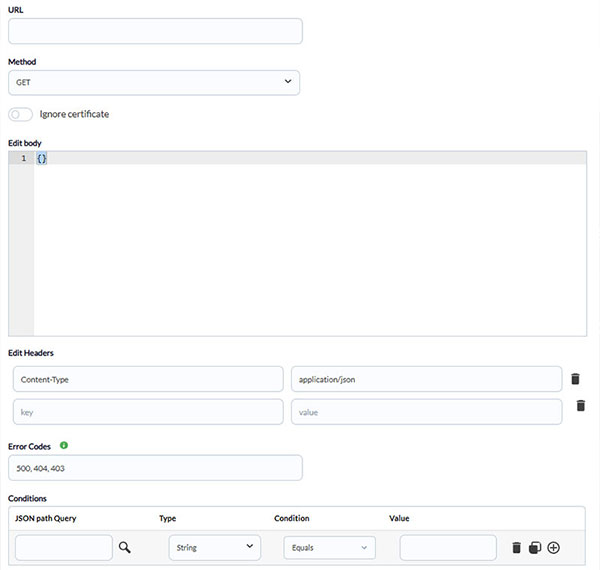
A new API endpoint is also included to queue monitoring data as an alternative to sending it through XML files.
Discontinuation of XML reports
In version 780, the future discontinuation of XML reports in the Pandora FMS console was announced, and this became effective in version 782. Our roadmap already includes the creation of reports in JSON format, using the new reporting engine currently under development.
Terminology change – Endpoint
Traditionally, the software installed on Linux and MS Windows systems for local monitoring has simply been called an Agent, just like the entity used in the Pandora FMS console to represent each monitored system.
This caused confusion in certain cases, so from now on we will use the term Endpoint to refer to what was traditionally called the software Agent.
All .disco packages removed from automatic distribution
To make Pandora FMS installation packages lighter, all PFMS Discovery packages have been removed from the automatic distribution.
This does not mean that these packages will no longer be available, as they can still be accessed through the Pandora FMS Marketplace, either from a web browser or through the connection directly integrated into the Pandora FMS Console.
This change only means that the code of those .disco packages will no longer be updated automatically with each new version, and will instead need to be updated from the Pandora FMS Web Console.
Temporarily removed sections
Due to the improvements being made in Satellite Server management, we have temporarily removed two interface sections for complete renewal: Satellite mass operations and Satellite credential boxes management.
They will be available again soon with optimized functionality.
Other features and improvements
For further features and improvements, please refer to the release notes for each version:
- Improved NCM data collection
- Improvements to log view filters
- Cron scheduling in Discovery (.disco)
- Discovery Selenium 4 (User Experience / WUX)
- Discovery SAP
- Discovery OpenShift
- Discovery DigitalOcean
- Discovery Google Cloud Platform – Compute Engine
- Informix plugin
- Nutanix plugin
- JBOSS 8 plugin
- Google Drive plugin
- Agent network usage plugin
- Markdown formatting in event comments for URLs
- New widget: Audit information
- Improvements to SAML authentication
- New general instructions for events
- Improvements to the IPAM plugin
- IPAM tasks from Satellite Servers
- Improvements to the credential store in Satellite Servers
- Improvement to the MongoDB® Discovery plugin
- Priority for policy application in autoconfiguration
- New macros for network modules
- Improvement to SNMP trap alerts
- Improvement to alert recovery
- Configuration options for log collection
- SIEM monitoring
- Group view
- WUX monitoring view
- Event creation via API
- Microsoft SQL Server® Discovery plugin
- Microsoft Exchange® plugin
- MS Windows® event monitoring
- SIEM: reports, search by dynamic fields, and CLI log parsing
- Redesigned agent view
- More information in module graphs
- Updated filters in event and agent views
- OAuth in Gmail
- Use of custom CSS
- Improvements in agent autoprovisioning
- IoT Discovery Plugin
- VMware Horizon Discovery Plugin
- Groups for Satellite Servers
- SSL in the Pandora FMS database
- Some .disco packages removed from automatic distribution
- SIEM event grouping
- Improvement to user editing
- Creation of incidents in Pandora ITSM from SIEM events
- Default policies for log collection
- More default decoders and rules for SIEM monitoring
- New default log alerts
- View for OpenSearch® index management from the Console
- IoT monitoring from the Console
- New VMware® Horizon Discovery plugin
- New JMX® Discovery plugin
- New servers for WARP connection
- New monitoring graphs
- New data compaction system
- SIEM – Management of decoders and rules from the Console
- Improvements to the default SIEM dashboard
- Agent creation and editing from Command Center
- Refactoring of agent configuration – Basic options
- Configuration of visual styles by group
- New languages for the Console
- New functionality – Force status change to normal
- Add monitoring elements manually from the network map
- SIEM: dynamic rule creation (via API)
- General wizard updated
- New monitoring type: API Request
- Sending monitoring data via API
- Automatic creation of modules detached from policies
- Execute actions manually from the Visual Console
- New interface for configuring log collection
- Browser notification system
- Alert command for sending notifications
- Alert command for making API requests
- New report type: Group alert report
- New report type: General inventory
- Renaming of the pinned items system (favorites)
- Configuration import from Pandora MINI
- PFMS Satellite Server® information in agents
- New console language: Basque
- Optimized restart control in multiprocess servers
- Experimental features: SIEM
Improvements and minor changes
| Case# | GitLab# | Description |
|---|---|---|
|
23300 |
17446
|
Support for SHA, SHA256, and SHA512 has been added to SNMP v3 monitoring. |
|
N/A |
18641
|
In WMI monitoring policies and the creation of WMI-type agent modules, the use of the corresponding Credential Store was enabled. |
Known changes and limitations
| Case# | GitLab# | Description |
|---|---|---|
|
N/A |
17847 |
Added important notification in the header in case the user license has expired. |
|
N/A |
18649 |
Both in nodes and in Command Center, the user Workspace sections were visually reconfigured. |
|
N/A |
18665 |
Graphic design corrections have been made to the Tactical View. |
|
N/A |
18719 |
The favicons used in the Web Console of the nodes and the Command Center have been differentiated. |
Feature extinction
| Case# | GitLab# | Description |
|---|---|---|
|
N/A |
18716 |
Notifications related to servers belonging to the previous PFMS architecture have been removed. |
Bug fixes
| Case# | GitLab# | Description |
|---|---|---|
N/A |
17899
|
New templates for reports have been added to nodes and Command Center, and their correct functioning has been verified with the rest of the related functionalities. |
N/A |
18077 |
MD5 hash change tracking was added to the FIM functionality. |
N/A |
18399
|
Visual Consoles: Linked icons and texts have been corrected. |
N/A |
18635
|
Fixed display and editing error with encrypted database in WMI-type modules created using the wizard for this purpose. |
N/A |
18670
|
The date interface in filters in different sections that use this feature has been corrected. |
N/A |
18704 |
The SNMP wizard has been corrected for use when the SSH Tunnel feature is configured and enabled. |
N/A |
18710 |
In agent management via the web console, the item filter has been corrected. |
N/A |
18711
|
Visually corrected filter section in Agent Detail View. |
N/A |
18718 |
In the administration of PFMS Servers, the distinction between primary and secondary servers has been resolved. |
N/A |
18724
|
The correct functioning of the “Event Storm Protection” token has been restored. |
N/A |
18728 |
FIM: Configuration interface corrected. |
N/A |
18729 |
Fixed filtering by custom fields in the agent details view. |
N/A |
18747
|
The filtering mechanism (and its user interface) has been corrected in the Events, Monitor details, Agent details, monitoring policies and Alert details views. |
N/A |
18763 |
Corrected the remote configuration of Pandora FMS Satellite Server® installed on MS Windows®. |
N/A |
18792 |
For a PFMS environment configured with an OpenSearch server, exception routines were added in case the connection between these servers is lost. |
23541 |
18820
|
Time thresholds applied to alerts through monitoring policies have been corrected. |
23554 |
18851 |
Repaired module event report. |
N/A |
18869
|
Credential settings that enable proper connection were added for the SNMP v3 interface wizard. |
N/A |
18907
|
Graph corrections in tactical view. |
N/A |
18908
|
In remote WMI modules, the connection and query parameters were corrected to accept special characters. |
N/A |
18916 |
All processes that ensure the structure of the historical database versus the main database were corrected. |
N/A |
19117 |
SIEM: Fixed the environment and its connection for the initialization, reception, and data processing process. |
N/A |
19185 |
The automatic and timely renewal of the authentication token used to send emails from the PFMS Server to the Azure platform (OAuth2) has been corrected. |
