










Version: Pandora FMS 785 FRRelease date: December 4, 2025
Notice
Important: To complete the update, pandora_server service must be manually restarted from SystemD: systemctl restart pandora_server. See instructions here →
In this Web Console, cache data must be deleted to correctly display changes in the graphic interface.
New Features and Improvements
Revised Graphical Interface
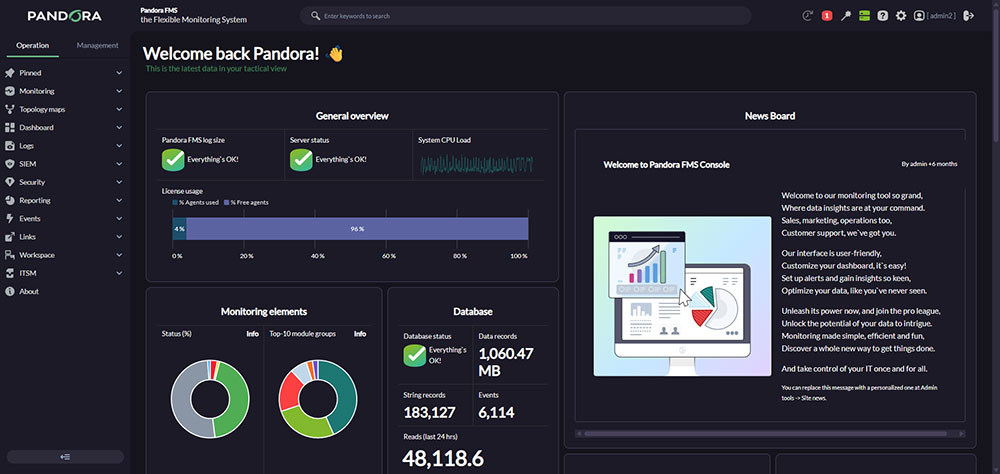
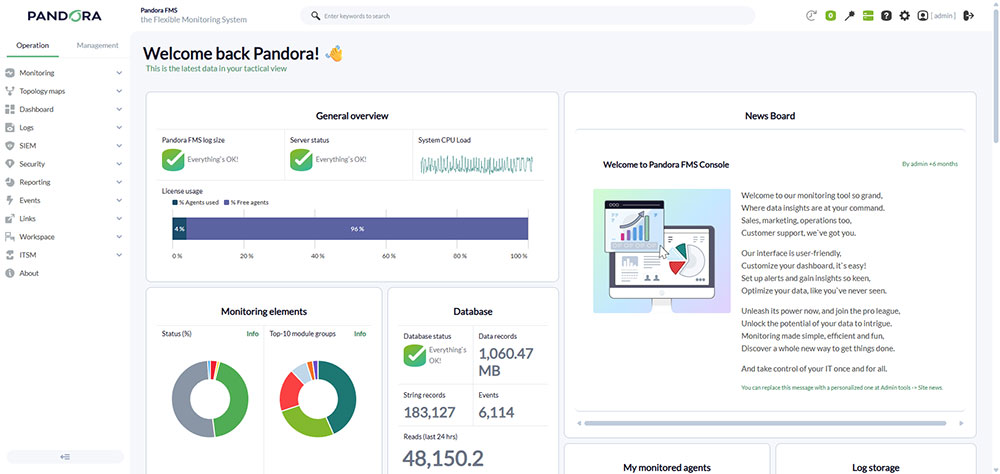
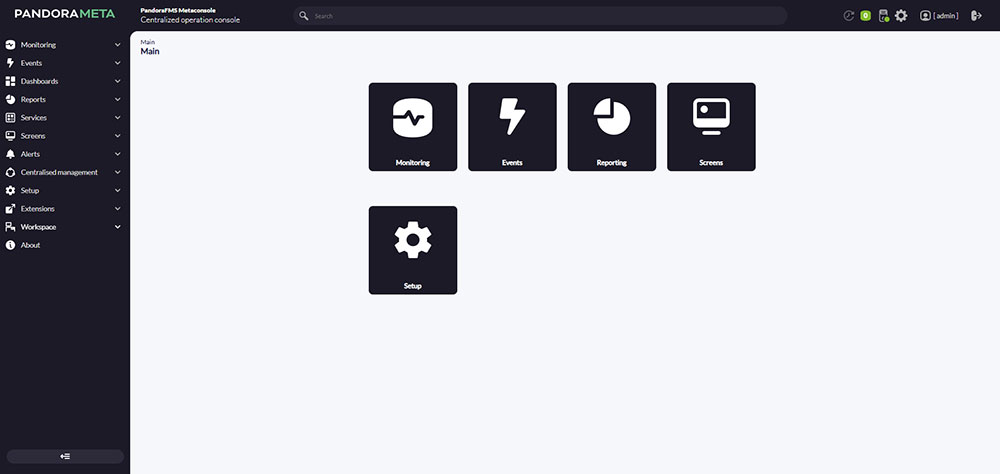
In preparation for the upcoming LTS release and with the goal of enhancing overall usability, both Pandora FMS Web Console and Command Center have been thoroughly reviewed and updated.
This is not just a visual change — several menu sections have been reorganized to make the interface more intuitive and easy to use.
These improvements are particularly noticeable in the Console’s dark theme, where the color palette has been completely redesigned.
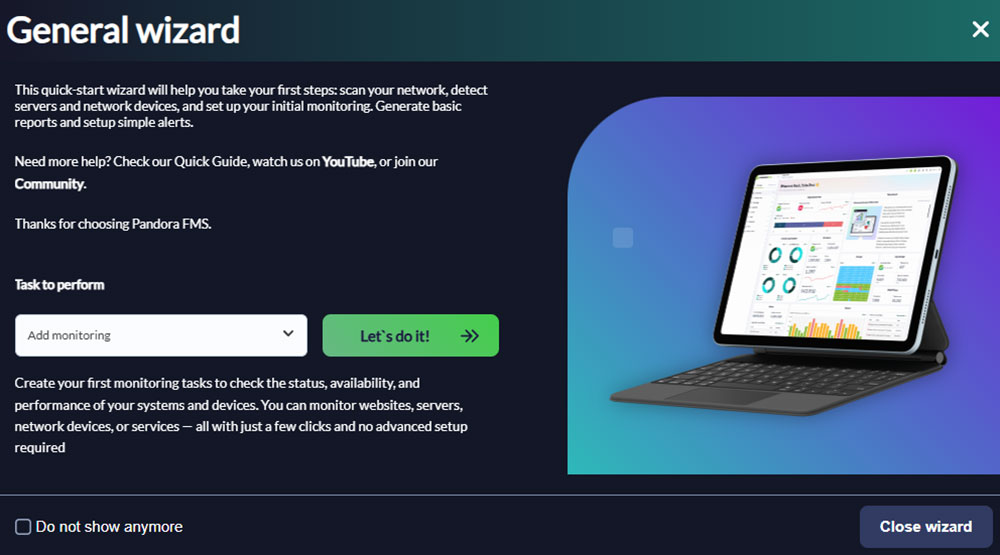
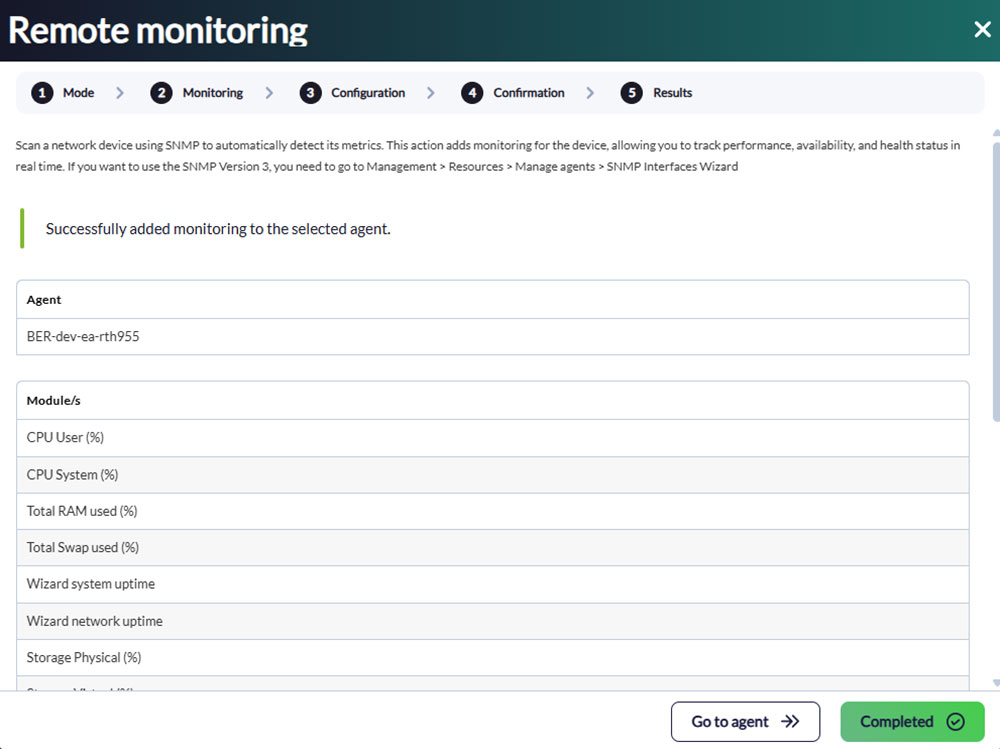
Updated General Wizard
Pandora FMS Console already featured a general wizard for performing some basic actions, but it did not fully meet the needs of our users.
We have now refactored this general wizard to include options that are especially useful for new users, simplifying and streamlining the creation of new monitoring elements, alerts, and general configuration settings, among other operations.

New Monitoring Type: API Request
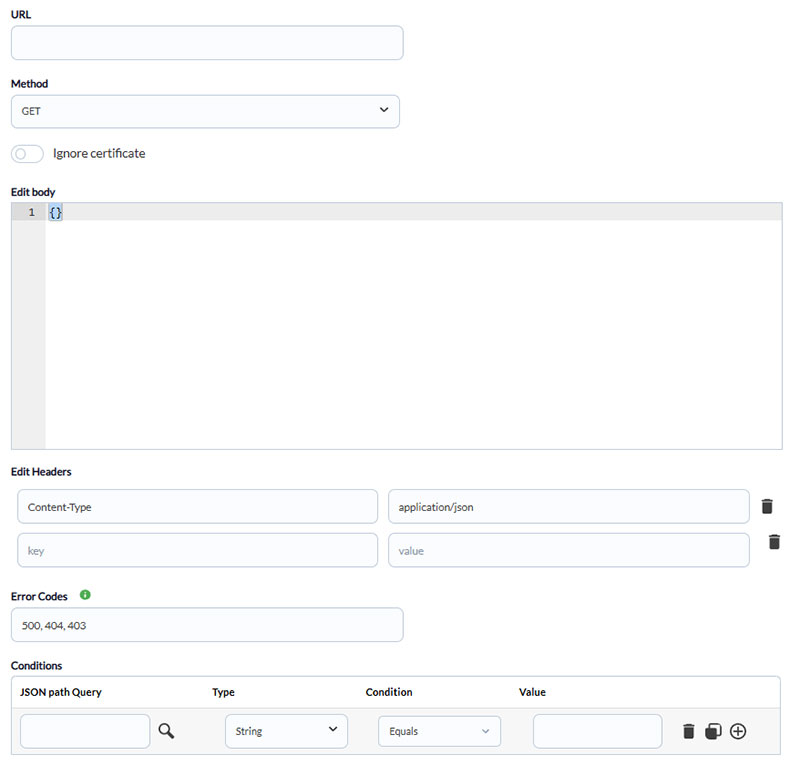
This version includes a new monitoring type that allows requests to API services in order to retrieve and analyze information.
Sending Monitoring Data via API
An API endpoint has been added to the Console that enables queuing monitoring data directly to the server, which will then process it in the same way as the traditional XML-based system.
Check the documentation of the new API endpoint →
This enhancement significantly increases flexibility for monitoring through custom plugins.
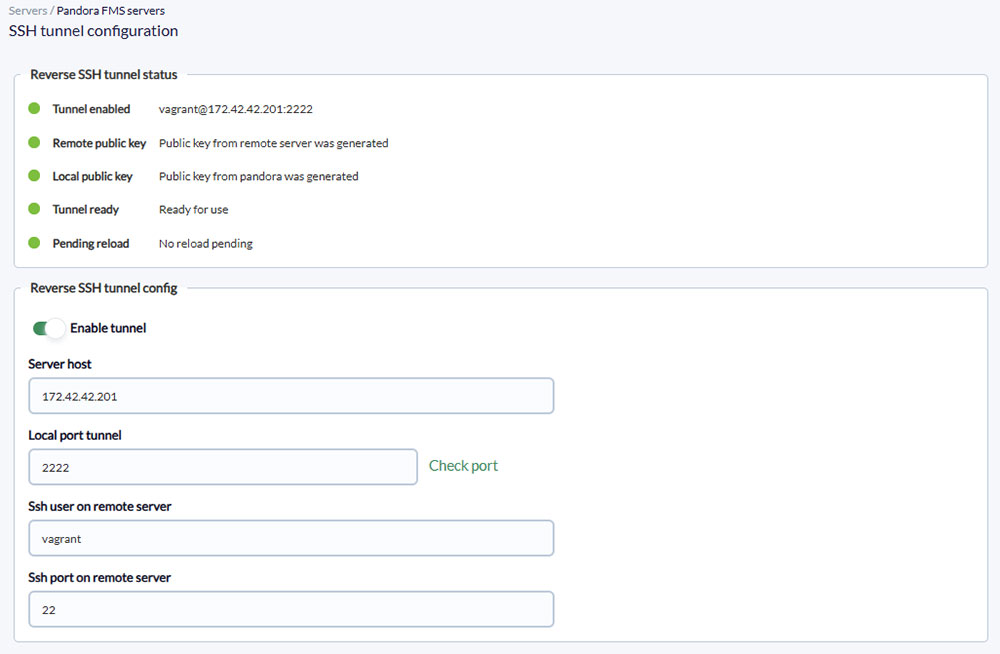
Exec Server – Automatic Reverse SSH Tunnel Configuration
Some Console features — such as the SNMP Wizard — make requests from a different server possible, for example, a Satellite Server.
Previously, this required manual configuration through the Exec Server.
From now on, it is possible to automatically set up a reverse SSH tunnel directly from the Console for any Pandora FMS Server or Satellite by simply providing a few parameters. This tunnel will then be used for all Exec Server operations.
Check the documentation of the feature →
Improvements and Changes in Satellite Configuration
Alongside the previous feature, several new options have been added to enhance Satellite Server management and extend their capabilities, including:
-
Generation of specific remote configuration files for Satellite Agents:
Until now, it was not possible to have both a Satellite Agent and an Endpoint Agent on the same system with remote configuration enabled. This is now supported thanks to the separation of configuration files for Satellite Servers. -
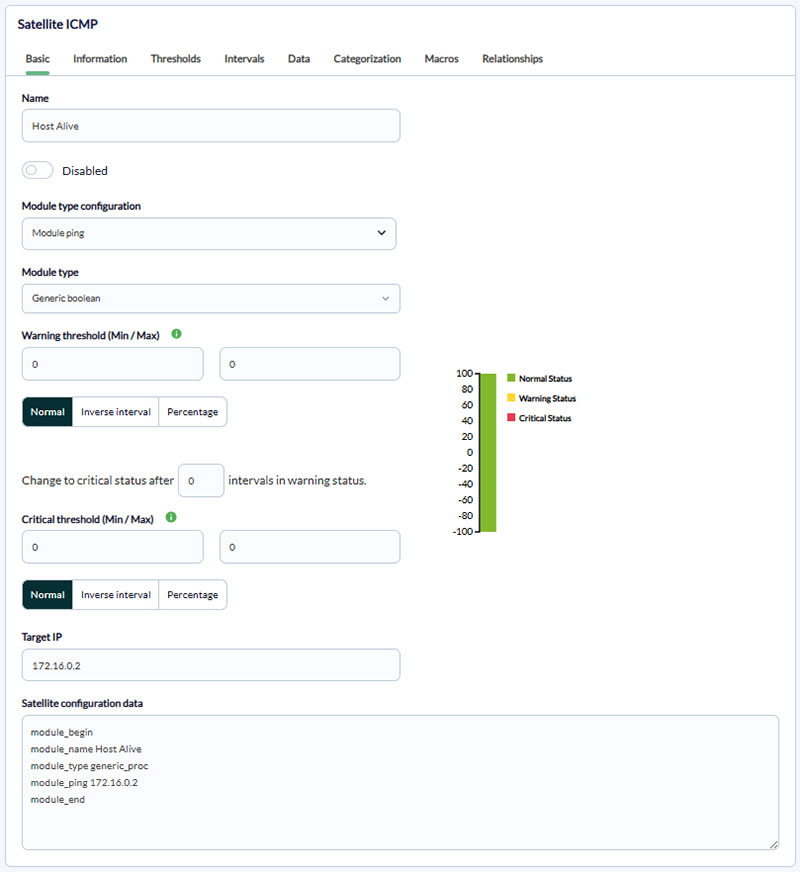
Direct creation of Satellite Agents and modules from the interface:
With the new configuration distinction, specific forms are now available to configure modules directly for Satellite Agents.
Please note that due to these new features, users who previously deployed Satellite Agent monitoring through policies will need to redefine those modules using the new forms.
Automatic Creation of Modules Unlinked from Policies
In previous versions, the ability to add monitoring to agents using module templates was removed to promote monitoring deployment through policies.
This version includes a new option that allows monitoring deployed through policies to automatically create unlinked modules — effectively restoring the flexibility previously provided by module templates and extending that feature to monitoring policies.
Execute Manual Actions from the Visual Console
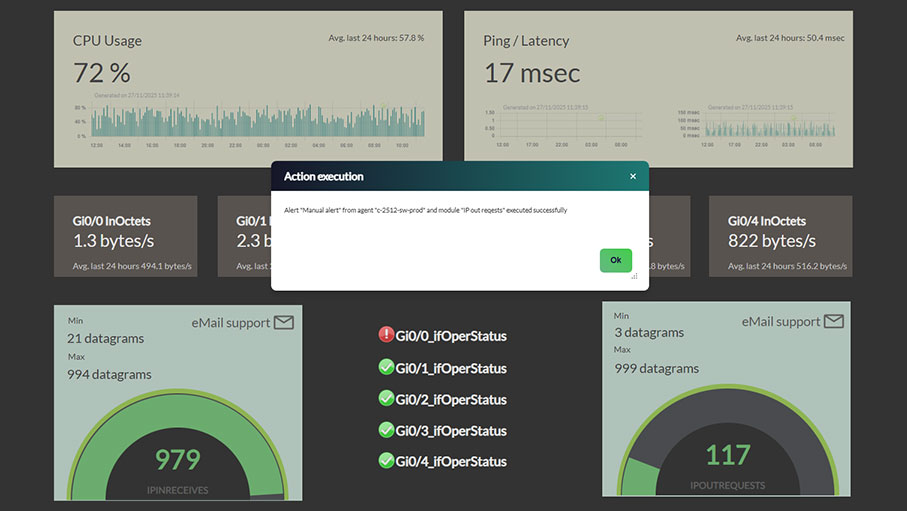
Users have frequently requested the ability to configure elements within Visual Consoles to perform actions such as executing an alert.
It is now possible to configure these types of elements, which not only allows alert execution but enables making custom API service calls directly from the console.
New Interface for Log Collection Configuration
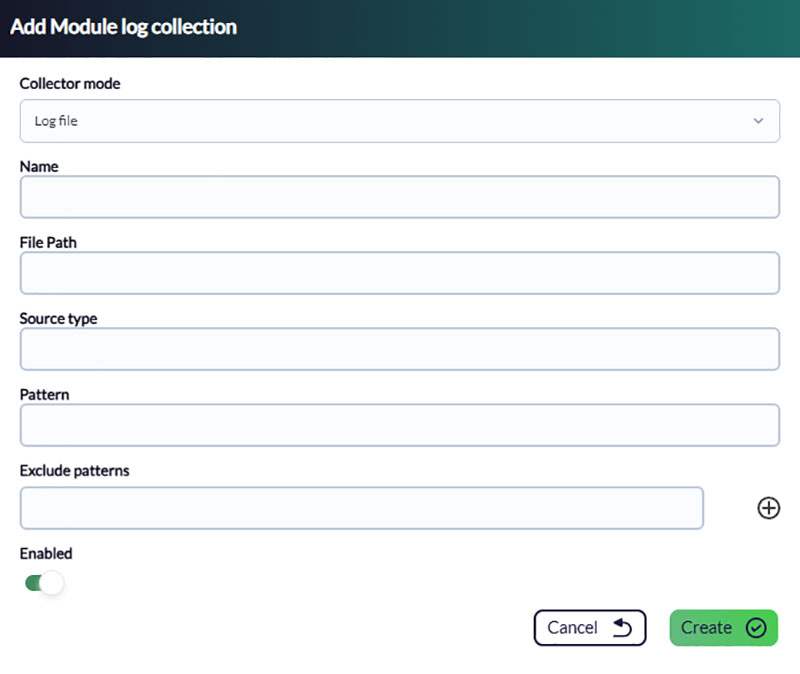
Log collection is a key element in monitoring, also required for features such as SIEM monitoring.
To simplify its deployment and configuration, new options have been added to allow users to enable and configure log collection directly from the Web Console by filling out a specific form.
Browser Notification System
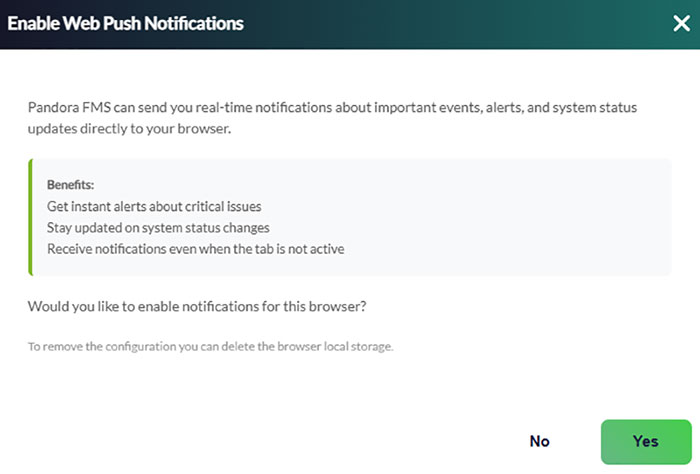
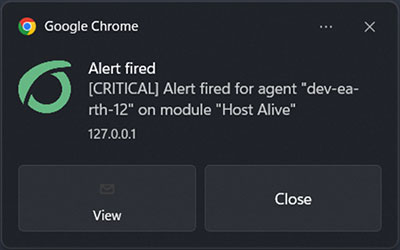
Pandora FMS Console already included an internal notification system, but notifications were not visible when the browser window was minimized.
Users can now enable browser-level notifications so they remain visible even when Pandora FMS is not in the foreground.
Alert Command for Sending Notifications
Regarding the previous feature, a new alert command was added to generate notifications directly in the Pandora FMS Console.
By combining this feature with browser notifications, users may now receive desktop alerts whenever an alert is triggered.
Alert Command for Making API Requests
Continuing the integration of API interactions, a new alert command was added to allow alerts to perform API calls — useful both for monitoring tasks and for interactive elements within Visual Consoles.

New Report Type: Group Alert Report
Until now, reports could only include alert data for individual agents.
From this version onwards, it is possible to configure Group Alert Reports, allowing alerts to be displayed for entire agent groups — increasing reporting flexibility and scope.
New Report Type: General Inventory
Previously, the Web Console included a specific view to display a general inventory of all agents in the environment.
This view has now been incorporated into the reporting system as a new report type.

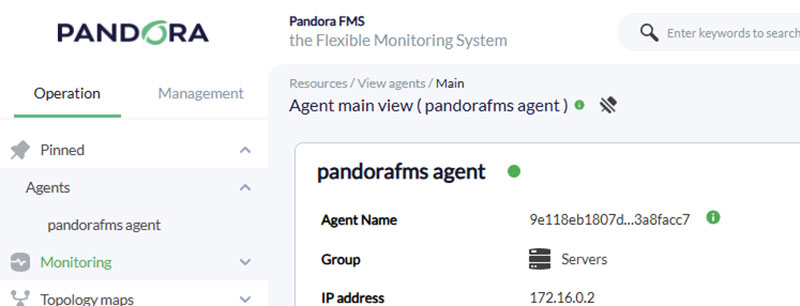
Renaming the Pinned Items System (Favorites)
Pandora FMS Console includes a feature that allows users to mark sections and views for quick access from the main menu. Originally, this feature was called “Favorites”, but it has now been renamed to “Pinned Items” to differentiate it from a similar feature available in Visual Consoles or Services.
New Process: pandora_supervisor
Previously, when updating an environment through WARP, it was sometimes necessary to manually restart the pandora_server process to complete the update successfully.
Starting with this version, that manual step is no longer required in nearly all cases. A new process called pandora_supervisor has been added, which automatically handles this restart whenever the server is updated through WARP.
This change is completely transparent to Pandora FMS users — no additional configuration or manual action is required.
Removal of .disco Packages from Automatic Distribution
To make Pandora FMS installation packages lighter, all Discovery PFMS .disco packages have been removed from automatic distribution.
This does not mean these packages are unavailable — they can still be accessed from the Pandora FMS Marketplace, either through a web browser or directly from the integrated Marketplace connection within the Pandora FMS Console.
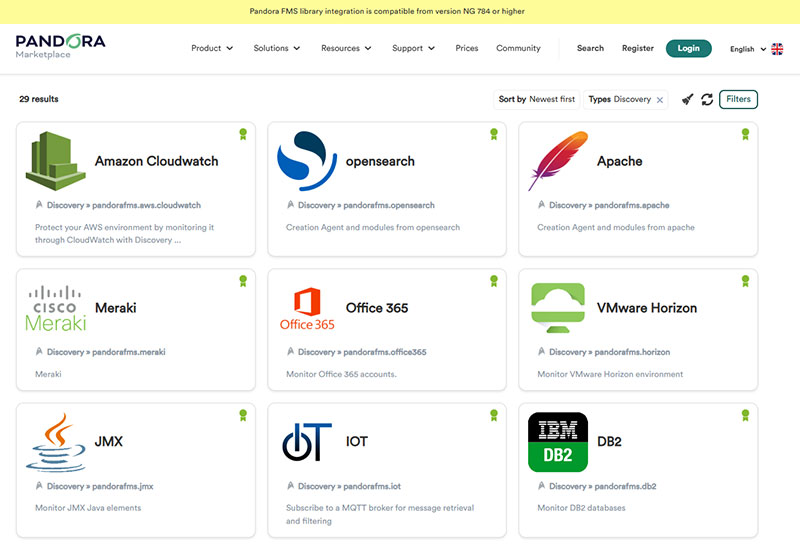
The only implication of this change is that .disco package code will no longer be updated automatically with each new release; instead, updates must be performed manually from Pandora FMS Web Console.
Improvements and small changes
| Case# | GitLab# | Description |
|---|---|---|
19452 |
14989
|
Added “API Request” alert command to perform queries through an alert action using five parameters: URL, header, protocol, query, and an optional SSL flag to encrypt the connection. |
N/A |
15084
|
Added alert command and alert action for dynamic Web Console notifications to selected users and/or groups. |
20118 |
15764
|
Enabled hierarchical mode support in monitoring policies. |
20148 |
15786 |
Allowed item editing and deletion in the Acoustic Console alert configuration. |
20465 |
16201 |
Accepted accented vowels and single/double quotes in module names. |
N/A |
16328
|
Improved Heatmap visual design. |
N/A |
16336
|
Reorganized agent module form layout in the Web Console. |
N/A |
16606
|
Rebuilt graphical interface for selecting background images and icons in Visual Consoles. |
N/A |
16609
|
Added pop-up notification feature in the web browser and operating system. |
N/A |
16674
|
Added Group Alert report type to report templates. |
N/A |
16695 |
Modified column styling in Module Status reports. |
N/A |
16721
|
Entirely refactored the multipurpose welcome wizard in the Web Console. |
N/A |
16803
|
Added option to manage all modules in a monitoring policy as unlinked (by default it remains linked module creation). |
N/A |
16978 |
Improved SNMP v3 credential handling logic and order in both wizard mode and module usage. |
N/A |
16986 |
Created new menu subsections for Discovery PFMS tasks. |
N/A |
17001, 17355
|
Removed obsolete component tokens and comments from the configuration file. |
N/A |
17031 |
Refactored WMI and SNMP wizards from the agent configuration section. |
N/A |
17055
|
Realigned NCM reports with recent changes. |
N/A |
17056
|
Added options in Visual Consoles to run module alerts, validate module alerts, and perform third-party API calls. |
N/A |
17047
|
Improved global module count for future notification accuracy. |
N/A |
17087
|
Added new specialized modules for API-based queries, classified according to the types of responses obtained. |
N/A |
17101 |
Incorporated multiprocess thread error detection event in PFMS Server. |
21128 |
17118 |
Added column sorting capabilities (except for alerts and status) in the Command Center. |
N/A |
17248
|
Improved integration between the Satellite Server and PFMS Server, with fully transparent processes and procedures for users. |
Known Changes and Limitations
| Case# | GitLab# | Description |
|---|---|---|
|
N/A |
14132
|
Added the “Time Threshold” field in monitoring policies for both standard and external alerts. |
|
N/A |
15167
|
Added new network components and removed deprecated ones. |
|
19631 |
15366
|
Removed PHP syntax warnings in reports and graphs, reducing storage usage. |
|
N/A |
16016
|
Refactored agent configuration in the Web Console. |
|
20500 |
16374
|
Renamed most “Favorite” elements to “Pinned Items” in the main menu. |
|
N/A |
16477
|
Refactored General, Advanced, Security, and Email configuration sections. |
|
N/A |
16488
|
Moved Demo Data feature to the Management Tools section. |
|
N/A |
16491 |
Added welcome message to the IPAM feature. |
|
N/A |
16492 |
Displayed explanatory message in Agent Custom Fields when no entries exist. |
|
N/A |
16493 |
Added Web Console warning when no SNMP traps have been generated. |
|
N/A |
16494 |
Included message and link to official documentation in the RMM feature before agent initialization. |
|
N/A |
16495 |
Added “Create Alert” button and alert action list placeholders for empty sections. |
|
N/A |
16496 |
Added introductory guide for creating the first Scheduled Downtime. |
|
N/A |
16619
|
Limited the maximum number of elements within a Group Report to 10. |
|
N/A |
16644
|
Visually enhanced notifications in the Web Console. |
|
N/A |
16696 |
Limited maximum proportional image width to 250px in Advanced Report Options, Report Template Options, and the Visual Style Editor within General Settings. |
|
N/A |
16715
|
Added log collection module management through remote configuration, allowing assisted creation and editing of multiple log collection modules and their parameters. |
|
N/A |
16743 / 16744 / 16745 |
Added information about the last triggered alert in Log Alerts, Event Alerts, and Module Alerts. |
|
N/A |
16746
|
Replaced Management → Alerts → List of Alerts with Management → Alerts → Module Alerts. |
|
21012 |
16960 |
Moved information icon in File Collections. |
|
N/A |
17408
|
Included the specialized service |
|
N/A |
17437 |
Formatted RMM script execution output for improved readability. |
Feature Extinction
| Case# | GitLab# | Description |
|---|---|---|
|
N/A |
17570 |
Removed legacy files used in the creation and editing of modules previously handled by deprecated PFMS Servers. |
|
N/A |
17099
|
Removed Discovery PFMS recognition scripts for Cloud and VMware, replacing them with newer and more advanced features. Contact our Support Department for more details. |
Bug Fixes
| Caso# | GitLab# | Descripción |
|---|---|---|
|
17825 |
13866 |
Removed false positive error when performing bulk deletions without selecting any items. |
|
17846 |
13873 |
Fixed CPU usage reporting ( |
|
18066 |
13959 |
Corrected handling of modules containing commas in their names within Custom Graph reports and the Graph Builder. |
|
18691, 18161 |
14063 |
Fixed access error in ACL Advanced for profiles with AR+LM+ER access bits. |
|
18343 |
14146 |
Removed false positive response error in PFMS API 1.0 command |
|
18397 |
14158 |
Repaired API 1.0 command |
|
18397 |
14159
|
Corrected submenu name in Scheduled Downtimes. |
|
18398 |
14160 |
Fixed creation of standard and external alerts in monitoring policies through PFMS API 1.0. |
|
18444 |
14185 |
Corrected all event-related tabs in the widget Last Events, preserving the comment feature. |
|
18171 |
14186 |
Refactored the Alert Actions view in both the Command Center and nodes. |
|
18481 |
14197 |
Fixed monitoring policy state update when removing an agent from it. |
|
18482 |
14199 |
Prevented duplicate module label names. |
|
18483 |
14200 |
Corrected “Select All” behavior for agents and modules in Mass Module Editing. |
|
18647 |
14274
|
Fixed Linux® EndPoint deployment via SSH to handle extended characters and increased installation timeout. |
|
18803 |
14353 |
Corrected module status icons when disabling modules in monitoring policies across the Command Center and nodes. |
|
19080 |
14721 |
Removed self-recursion in component groups. |
|
19183 |
14811
|
Fixed alert status field export in CSV format within the Alert Details view. |
|
19164 |
14832 |
Updated and fixed Linux® EndPoints installed in custom directories. |
|
19251 |
14928 |
Recovered the feature to store “.side” (WUX) files in monitoring policies. |
|
19301 |
14996 |
Corrected web access scope for Pandora Manager (PM) profiles. |
|
19323 |
15013 |
Fixed Log viewer filtering for combined searches by primary/secondary agent groups and log sources. |
|
19450 |
15107 |
Enabled non-admin users to delete Custom Graph reports they created from the agent view. |
|
19611 |
15307 |
Ensured SNMP module group assignments from monitoring policies are saved properly. |
|
19654 |
15338 |
Restricted Heatmap View access to groups the current user belongs to. |
|
19785 |
15419 |
Fixed agent list pagination for non-admin users. |
|
N/A |
15441 |
Corrected display of disabled modules with unknown status in the Tactical View. |
|
N/A |
15518
|
Fixed character encoding for the Cyrillic alphabet in PFMS EndPoint for MS Windows®. |
|
19976 |
15587 |
Fixed event alert editing. |
|
N/A |
15634 |
Allowed exception for network interfaces containing parentheses in their names (SNMP Trap wizard). |
|
N/A |
15749 |
Allowed multiple-value parameters separated by commas in HA environments to accept spaces (in case they were added accidentally). |
|
20114 |
15759 |
Fixed component filter in module template editor. |
|
20120 |
15768
|
Corrected CSV export in the Web Console Diagnostic Tool. |
|
20150 |
15793 |
Repaired SNMP alert filter and refactored the item list. |
|
20153 |
15810 |
Fixed global searches involving underscores and hyphens in the Command Center and nodes. |
|
20171 |
15815 |
Adjusted Advanced ACL to grant access for users with AR and ER bits. |
|
20251 |
15983 |
Fixed the widget Module by Status to display only enabled agents. |
|
18905 |
15992 |
Added option in Group Report to show agents that belong as secondary members to the selected group. |
|
N/A |
16022 |
Corrected displayed text in Scheduled Downtime selections depending on chosen modules. |
|
N/A |
16028 |
Fixed the display of Disable Module items in the Scheduled Downtime list. |
|
N/A |
16034 |
Removed agent field from single-agent alert filter. |
|
N/A |
16038 |
Fixed prediction module editing in day-based configurations. |
|
N/A |
16069
|
Corrected IPAM submenu alignment. |
|
20354 |
16089 |
Rectified module selectors (module components) in monitoring policies. |
|
N/A |
16091 |
Repaired password visibility toggle in user self-edit panel. |
|
N/A |
16102 |
Fixed credential store to accept special characters. |
|
N/A |
16103 |
Corrected hidden fields for extended characters in the server plugin. |
|
20366 |
16106
|
Fixed “mark as read” process (single/all) for Web Console notification messages. |
|
20373 |
16116 |
Corrected service error when adding an invalid agent. |
|
20401 |
16122 |
Distinguished Active/Active and Active/Passive modules in agent clusters. |
|
N/A |
16125 |
Fixed alert access from the Tactical View. |
|
20408 |
16130 |
Corrected PDF and CSV exports in custom reports (thresholds). |
|
20367 |
16131 |
Fixed |
|
20412 |
16137 |
Prevented creation of Private Enterprise Numbers (PEN) with negative values. |
|
20442 |
16176 |
Initialized PHP variable for SNMP Trap reception parsing. |
|
20450 |
16186
|
Corrected report download actions for all supported formats (Web Console searches). |
|
20449 |
16187 |
Repaired direct access to alert editing from tree-mode monitoring view. |
|
N/A |
16204 |
Set PDF reports to portrait orientation by default (with new landscape selector available). |
|
N/A |
16206 |
Realigned field headers in Event List Report. |
|
N/A |
16242 |
Added encrypted database compatibility for Discovery PFMS tasks. |
|
N/A |
16255
|
Fixed SNMP Wizard and Explorer to accept special characters in credentials. |
|
N/A |
16266
|
Improved dark theme notifications. |
|
20413 |
16268 |
Repaired saving of history database configuration parameters. |
|
N/A |
16272
|
Fixed SNMP v3 credential storage handling. |
|
N/A |
16322
|
Ensured demo-mode agents now support load balancing for remote modules. |
|
20572 |
16335 |
Corrected inventory report display for critical-state agents, regardless of triggered alerts. |
|
20588 |
16369 |
Fixed HTTP 500 error in PDF export of the Web Console Diagnostic Tool. |
|
20591 |
16372 |
Completed profile and group assignment during new user creation. |
|
N/A |
16387 |
Solved false positive version mismatch between nodes and the Command Center. |
|
N/A |
16451 |
Recovered state colors in agent detail view under dark theme. |
|
20640 |
16483 |
Fixed agent custom field icon display in the detail view. |
|
N/A |
16487
|
Repaired remote IPAM task configuration on PFMS Satellite Server from the Web Console. |
|
20665 |
16504 |
Kept the Scheduled Downtime menu highlighted during operations. |
|
N/A |
16517 |
Restricted Dashboards to read-only access when using public links. |
|
N/A |
16518 |
Limited network maps to recognition tasks only for their creation. |
|
20592 |
16535 |
Removed group icon from monitoring policy editor. |
|
N/A |
16563 |
Fixed Pandora ITSM integration linking module state changes to PITSM incidents. |
|
N/A |
16572 |
Reactivated operation limit, keeping the value defined in General Configuration (Limit for bulk operations). |
|
N/A |
16573
|
Rebuilt email alert commands to ensure consistency with alert actions and PFMS API. |
|
20503 |
16608 |
Refactored service editing in the Command Center for nodes with large datasets. |
|
20803 |
16640
|
Fixed module creation in the “Welcome Configuration Wizard”. |
|
N/A |
16645
|
Corrected agent detail view rendering in Mozilla Firefox. |
|
20799 |
16660 |
Fixed relative-to-absolute date conversion in SLA reports. |
|
N/A |
16686
|
Recovered “Add Alert Action” button in the Command Center Alert View. |
|
N/A |
16694 |
Fixed Event List Report creation through report templates. |
|
N/A |
16675 |
Fixed pop-up data display in Agent / module status and Agent module reports. |
|
20753 |
16676 |
Fixed PFMS Server remote configuration when multiprocessing mode is enabled. |
|
20920 |
16806
|
Highlighted IPAM menu options according to user selections. |
|
20919 |
16809 |
Corrected success message text after user deletion. |
|
N/A |
16878 |
Fixed HTTP 500 error when no “.disco” files were stored (Discovery PFMS). |
|
N/A |
16913
|
Improved network map usability for adding monitoring items, along with minor fixes. |
|
N/A |
16916 |
Corrected submenu highlighting behavior per feature. |
|
N/A |
16931 |
Fixed text display in the Web Console when using Mozilla Firefox. |
|
20981 |
16951 |
Resolved font size issues in SLA reports (PDF export). |
|
21014 |
16963 |
Fixed info icon behavior to prevent redirection when clicked. |
|
N/A |
16980 |
Corrected SNMP Walk (v3) procedure to properly use credential storage. |
|
N/A |
17013 |
Fixed text in Web Console notifications. |
|
21063 |
17027 |
Ensured “Force Check” button in Alert Detail view preserves prior filters. |
|
N/A |
17030
|
Changed default plugin executable for WMI® monitoring from wmic to pandorawmic. |
|
N/A |
17089 |
Fixed regular expression searches and syntax instructions in inventory reports. |
|
N/A |
17096 |
Optimized access time in Discovery PFMS tasks. |
|
N/A |
17112
|
Added persistent “No results found” notice for filtering operations. |
|
21165 |
17117 |
The widget Module Status was corrected to show the current module state instead of the last known state. |
|
N/A |
17146 |
Removed repeated uninitialized variable warning in agent group queries. |
|
N/A |
17149 |
Fixed event filtering by comments. |
|
N/A |
17151 |
Updated progress bar for monitoring policy application. |
|
21359 |
17243 |
Corrected module selector in module creation from the agent management view. |
|
N/A |
17287
|
Repaired database backup process for the vulnerability table. |
|
N/A |
17403
|
Fixed special character filtering in grouped event view. |
|
N/A |
17429 |
Implemented multi-keyword search (space-separated) in global Web Console search. |
|
N/A |
17451 |
Rendered PROC module graphs using straight lines. |
|
N/A |
17596 |
Migrated service SLA calculations to the new Network Server. |
|
N/A |
17600 |
Adjusted module count and delay time display in PFMS Server view. |
|
N/A |
17690
|
Removed HTTP 500 error when editing Web Server-type modules. |
|
N/A |
17714 |
Fixed SQL and HTTP errors when creating a template from a Visual Console. |
|
22366 |
17723 |
Prevented SQL errors when discarding updates for agents or modules with null intervals. |
|
N/A |
17729
|
Fixed URL reference for the new element library if misconfigured. |
|
N/A |
17754 |
Corrected WMI module creation wizard to support the new PFMS server architecture. |
|
N/A |
17757 |
Increased FIM editor field width in the Web Console. |
|
N/A |
17807
|
Recovered “Force User Logout” button icon. |
|
N/A |
17926
|
Fixed search by product name in “Marketplace PFMS”. |
|
N/A |
17955 |
Corrected “About” window in Web Console and other minor interface details. |
|
N/A |
17988 |
Rectified the movement and deletion of data older than seven days to use the value specified in the Web Console. |
|
N/A |
18003
|
Fixed the Warp offline update for PFMS on Ubuntu 22. |
