










Version: Pandora FMS 786 FRRelease date: February 3, 2026
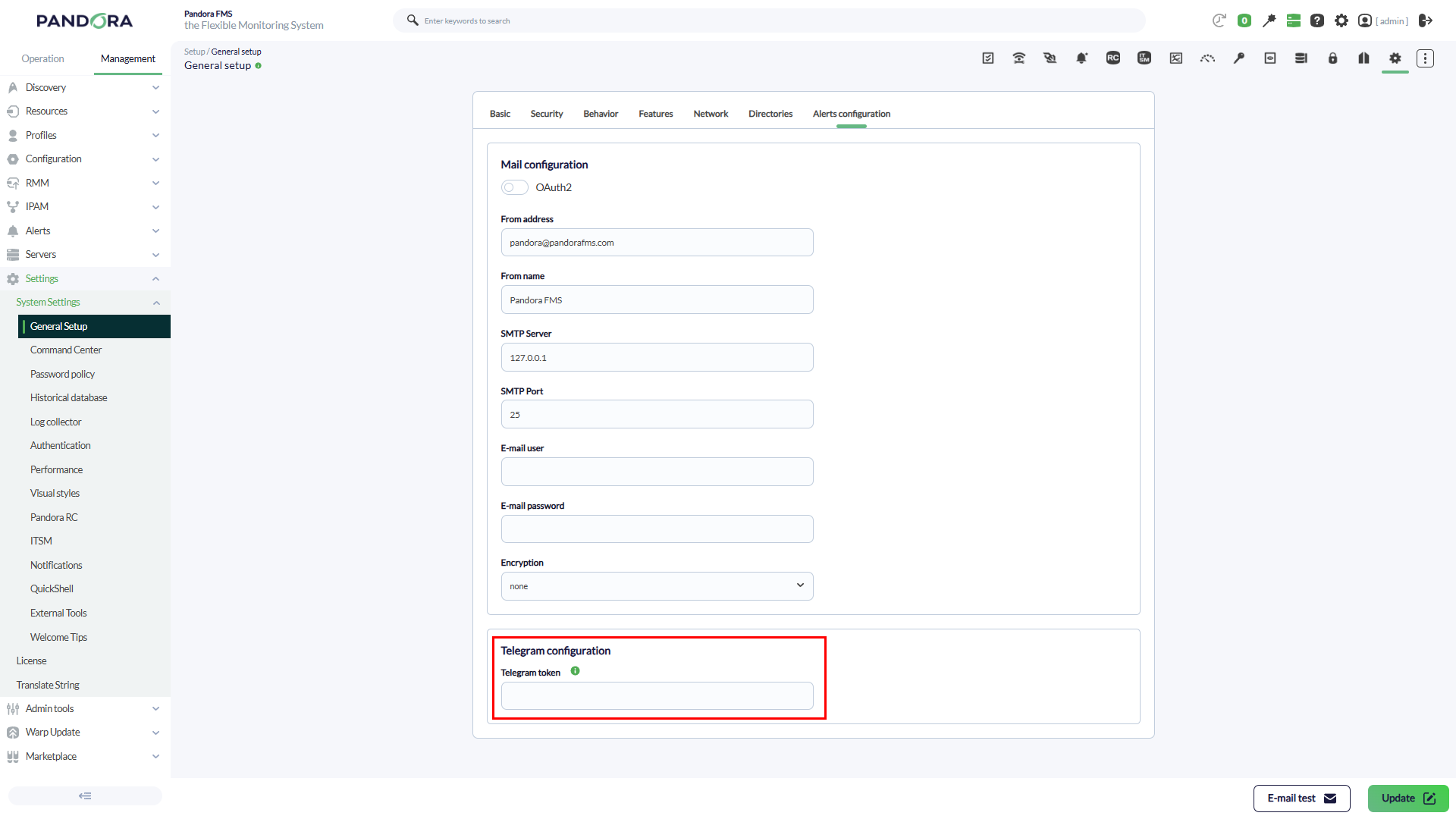
Environments using the default alert command for Telegram notifications must now configure their Telegram token within the console’s general settings.
Additionally, the Satellite Server, Linux Endpoint, and Windows Endpoint components will move to a new versioning scheme, independent of the Pandora FMS console and server versions.
New Features and Improvements
Telegram alert configuration
Pandora FMS includes a built-in alert command to send notifications via Telegram FZ-LLC®. Until now, this command required configuring a token by manually editing the command.
To simplify its management, a new field has been added to the General Configuration section, allowing this token to be updated in a centralized manner.
Updated icons for visual consoles
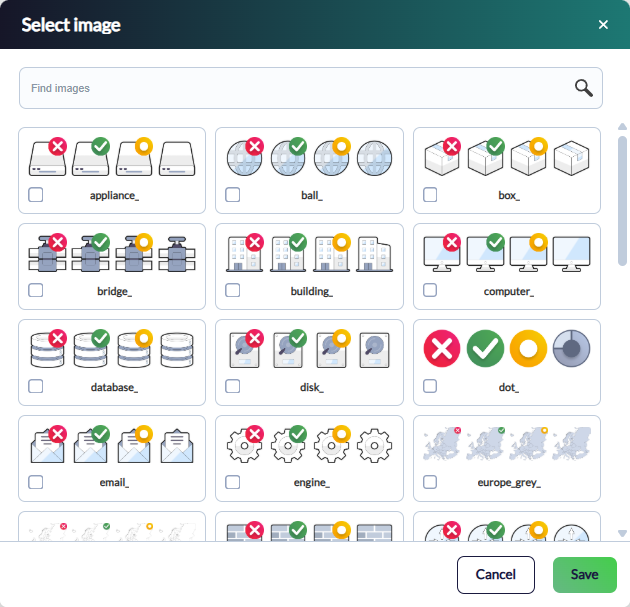
As part of the preparations for the upcoming LTS version, we are working on modernizing the application interface. At this stage, all visual console icons have been redesigned.
If you need the previous icon set, it is still available in our Marketplace.
Configuration import from Pandora MINI
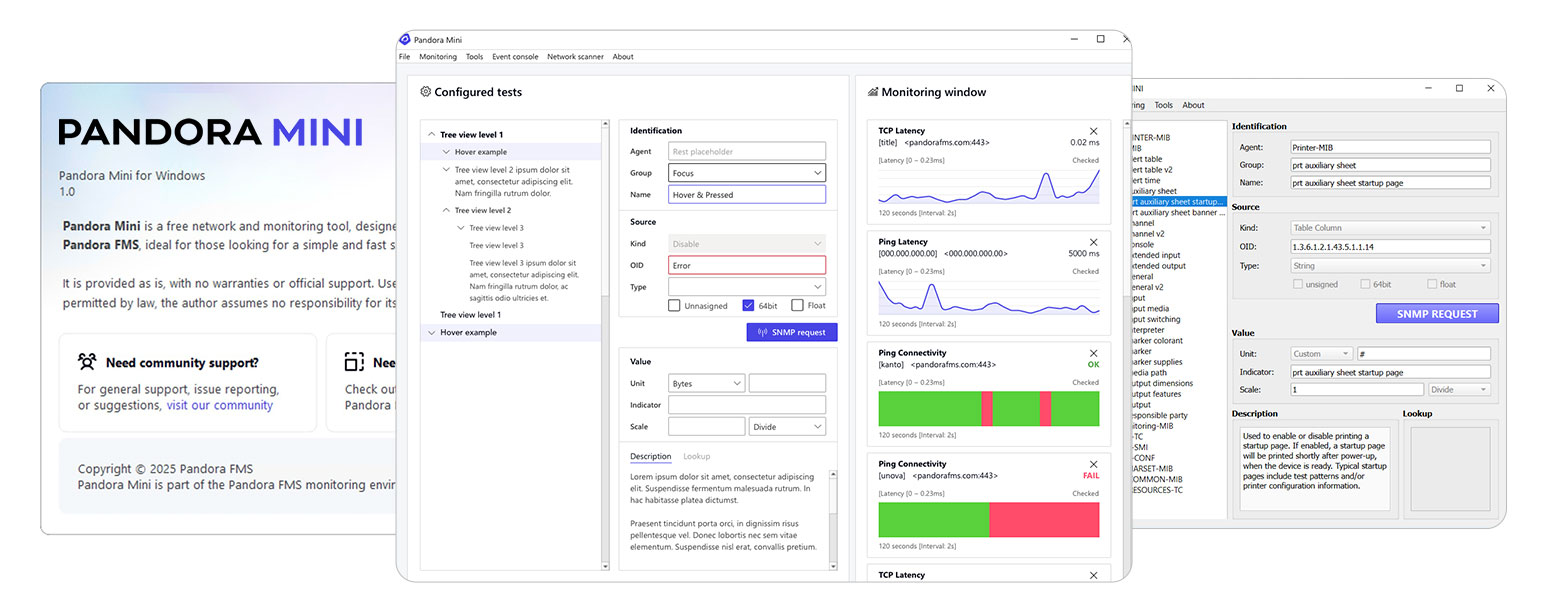
Some users start with Pandora MINI for their monitoring needs and later scale up to a full Pandora FMS environment.
To facilitate this type of transition, the option to import configurations from Pandora MINI directly from the console has been added.
PFMS Satellite Server® information in agents
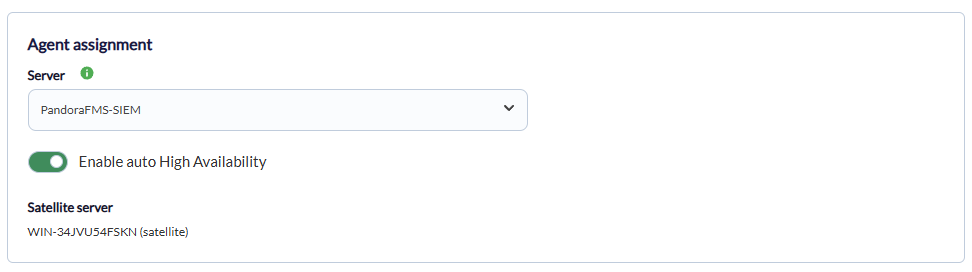
Satellite servers are a critical component in the Pandora FMS architecture. As part of the continuous improvement process for this component, a new information field has been added: the name of the satellite server to which each agent is assigned.
New console language: Basque
We continue to expand the localization options of the Pandora FMS console. In this release, Basque has been added to the list of available languages.
Optimized restart control in multiprocess servers
The multiprocess mode in Pandora FMS, introduced in previous versions, allows independent threads to be executed for each server type (Network, High Performance, etc.) under a single main service.
This architecture makes it possible to restart individual processes without interrupting the global pandora_server service. In this release, the management of these processes has been improved and automated to maximize performance and availability in environments operating under this mode.
Experimental features: SIEM
During 2025, a new SIEM monitoring feature was introduced. Due to its power and complexity, and in order to ensure maximum system stability, this module has been categorized as an experimental feature.
Therefore, users who wish to use it must enable support for experimental features in the general configuration.

Temporarily removed sections
Due to improvements in satellite server management, two interface sections have been temporarily removed for a complete redesign: Satellite bulk operations and Satellite credential box management.
They will be available again soon with optimized functionality.
Improvements and small changes
| Case# | GitLab# | Description |
|---|---|---|
22748 |
16083 |
In string-type modules, their display has been improved by the Web Console, taking into account whether the check result has more than 200 characters and whether it contains line breaks. |
N/A |
16622 |
New download links for EL 9 (PFMS EndPoints). |
N/A |
16678 |
Visual Consoles feature new graphic elements that are installed by default and can also be updated from the PFMS Marketplace. |
N/A |
16683
|
Added server plugin to monitor the number of days SSL certificates are valid. |
N/A |
17119 |
PFMS EndPoints: The configuration file has been reorganized. |
N/A |
17148 |
Added option to import data from Pandora MINI. |
N/A |
17167 |
Improved and unified style and interface for date and time selection controls in the Web Console. |
N/A |
17726
|
Added new scripts for Fortinet®, Dell®, and Huawei® in the NCM functionality. |
N/A |
18106
|
Several sections of the Web Console have been reorganized and redesigned to make better use of screen space. |
N/A |
18107 |
Refactored the “About” view. |
N/A |
18120 |
Visual improvements in user editing view. |
N/A |
18122 |
In the tactical view, notifications section, the dynamic visual interface was adjusted. |
N/A |
18130 |
When opening the details window for any event, the visual interface is highlighted when the pointer is positioned over it. |
N/A |
18411
|
New macro added to configure alerts with notifications in Telegram®. |
Known Changes and Limitations
| Case# | GitLab# | Description |
|---|---|---|
N/A |
17128 |
The option to add new custom monitoring policies has been added to the PFMS Hardening plugin. |
N/A |
17156 |
Changed the help message in the |
N/A |
17217
|
Changed the successful submission message for user feedback to PFMS support. |
N/A |
17396 |
Command Center: Optimized agent queries in the database to configure monitoring policies. |
N/A |
17684
|
Increased storage capacity for SIDE procedures in Selenium (Discover PFMS). |
N/A |
17730 |
The maximum data size in the Tentacle protocol has been increased to 64 megabytes. |
N/A |
17784
|
Basque language added to PFMS web console. |
N/A |
17822 |
The PFMS Server self-monitoring period has been set to 60 seconds (token |
N/A |
17835 |
The |
N/A |
17848 |
Discovery PFMS has implemented one-click plugin installation. |
N/A |
17906
|
Email alerts for XML reports have been discontinued. |
N/A |
17928
|
The menus and graph configuration buttons have been standardized to match the overall visual style of the Web Console. |
N/A |
17956
|
The Discovery PFMS IPAM and IPMI discovery tasks run using the installed version of Perl on the PFMS Server. |
N/A |
18013
|
The graphical interface for web notifications has been standardized to the current general visual style. |
N/A |
18063
|
For new installations, the |
N/A |
18068
|
For new installations, the default value for the |
N/A |
18126 |
Notifications of an informative or successful nature are automatically closed after the time specified in the |
N/A |
18127 |
If no checked custom field has a value, the custom fields box (agent detail view) will remain hidden. |
N/A |
18133 |
The information messages for configuring widgets in Dashboards have been embedded in their corresponding elements. |
N/A |
18135 |
Added application identification in 2FA token generation via QR code. |
N/A |
18140 |
In server administration, the name of the server being edited has been added. |
N/A |
18162 |
The icons for the Discovery PFMS functionality have been updated. |
N/A |
18169 |
At the agent detail level, the NCM section was visually reconfigured. |
N/A |
18193 |
In several features of the Web Console, logical value tokens (true or false) have been updated in their graphical interface (on/off button). |
N/A |
18196 |
In agent management, a column has been added to the list to indicate Satellite PFMS agents. At the agent detail level, a note also appears if the agent belongs to a Satellite PFMS. |
N/A |
18197 |
All sections related to Satellite Server in the Web Console indicate whether that server is compatible with all the features of version 785. If not, you are invited to update the Satellite Server to the latest version. |
N/A |
18321 |
In view of RMM agents, the color of each element's name was changed. |
N/A |
18350
|
SIEM was included in Experimental Features. |
N/A |
18369 |
The list of |
N/A |
18530 |
Access to the credential store from Satellite agents has been removed. |
N/A |
18591
|
A new element for monitoring Fortinet® APs has been added to the NCM functionality. |
N/A |
18594 |
The option to customize the time period has been added (and corrected) in the report display. This option is disabled by default so that each report initially uses its previously established parameters. |
N/A |
18664 |
The views of module groups and agent groups (Operations menu) have been improved and visually optimized. |
N/A |
18695
|
The |
Fixed vulnerabilities
| Case# | GitLab# | Description |
|---|---|---|
|
N/A |
17854 |
For SIEM decoders, the insertion of JavaScript code was restricted. |
Feature Extinction
| Case# | GitLab# | Description |
|---|---|---|
|
N/A |
18349 |
In Web Console, bulk operations for Satellite Server have been removed due to the new features integrated into Satellite agents. |
Bug Fixes
| Case# | GitLab# | Description |
|---|---|---|
N/A |
14157
|
Added connection check with OpenSearch® before performing log collection statistics. |
20780 |
16607 |
The query collected by MySQL transaction agents has been corrected for display by the Web Console. |
N/A |
16653
|
Corrected typo in DISCO file upload dialog box for Discovery PFMS. |
N/A |
17157 |
In the planned stops view, the pagination of results for the details of its elements was corrected. |
21202 |
17159 |
Fixed filtering by groups and agents in monitoring policies. |
21201 |
17160
|
Date and time selectors in Dashboard settings have been corrected. |
N/A |
17178
|
Filter delete button enabled in ticket integration with Pandora ITSM. |
20966 |
17197 |
When sending reports by email, based on the user ID, an exception routine was added. |
21220 |
17205 |
A regular expression syntax check has been added to external monitoring policy alerts. |
21265 |
17206 |
The copying of monitoring policies with advanced add-ons has been resolved. |
21415 |
17318 |
In the agent detail view, filtering by custom fields has been corrected. |
N/A |
17319 |
The causes that triggered warnings when updating via RPM (Major Release application) have been removed. |
N/A |
17331
|
Users with administrator profiles can only edit the groups to which they belong. Deleting groups has been delegated to superadmin users. |
N/A |
17371 |
Corrected module types in node as it is centralized in a Command Center. |
N/A |
17372 |
In Dashboards with event widgets, the visual style has been refined and now displays and maintains all elements in the same way. |
N/A |
17373 |
The time unit in the interval shown in module graphs has been corrected. |
N/A |
17430 |
NetFlow® explorer: Fixed several errors that returned code 500 and prevented data from being viewed. |
21237 |
17485 |
When creating an external alert with a regular expression in monitoring policies, the selected alert action is added correctly. |
N/A |
17495 |
The display of regular expressions in external monitoring policy alerts in the Web Console has been corrected. |
N/A |
17505 |
In the Command Center, the filter by message type in the notification tray has been corrected. |
N/A |
17582
|
Writing to Discovery PFMS macro files has been adjusted so that it always uses UTF-8 character encoding. |
N/A |
17586 |
The process for saving NCM agents has been corrected. |
22375 |
17706 |
Users with LW profiles for viewing and managing alerts can now filter by actions in the alerts view. |
N/A |
17717 |
The display of IP addresses and MAC addresses has been fixed in the SNMP agent interfaces. |
N/A |
17805 |
The creation and editing of filters in the events view has been corrected. |
N/A |
17832 |
Event Graph SIEM reports have been revised and improved in terms of both parameter visualization and visual compatibility in light and dark themes. |
18828 |
17836
|
Clarified record of agent movement between centralized nodes (Command Center). |
N/A |
17838 |
When creating incidents with Pandora ITSM integration, HTML entities were removed from the display. |
N/A |
17853
|
All filtering errors in SIEM and Log views have been corrected. |
N/A |
17879 |
The email send test button has been restored to its correct functioning. |
N/A |
17891 |
Fixed the Discovery PFMS view in the Web Console for all languages. |
N/A |
17894 |
Corrected module edition with built-in server plugin. |
N/A |
17938 |
In Host & Devices tasks (Discovery PFMS), notifications of actions performed (created, enabled, disabled, deleted) were corrected. |
N/A |
17953 |
In Evolution Hardening reports, exception handling has been added when there is no data, and the visual style has been rectified. |
N/A |
17960 |
In the Events view, the opening and reopening of details for the same event (and for all other events) has been corrected. |
N/A |
17975 |
Fixed record filtering in System Audit Log. |
N/A |
17980 |
Fixed button to force alert check in Agent Detail view. |
N/A |
17982 |
The general search now includes results from reports and visual consoles, if available and matching those search cases. |
N/A |
17983 |
In Command Center service creation, the interface for the dark theme was revised. |
N/A |
17985 |
False positive error removed in SLAs that have been 100 percent compliant. |
N/A |
17990 |
In both centralized environments and independent nodes, the application of password policies has been reviewed and corrected, if these have been active and established. |
N/A |
17994 |
Improvements were made to the data compression process in both the main and historical databases. |
N/A |
17995 |
Report creation has been corrected in the Welcome Wizard. |
N/A |
17997 |
Duplicate functionality files removed. |
N/A |
17998 |
The entire filtering process in module graphics has been rectified. |
N/A |
18030 |
The timeout for network recognition was corrected to seconds in the PFMS Satellite Server. |
22856 |
18047 |
In Custom Graphs, gauge charts were corrected. |
N/A |
18051 |
In Command Center, centralized nodes, and independent nodes, the editing and saving of the remote configuration of the Dataserver has been corrected. |
N/A |
18065
|
Accelerated graphics loading in modules with null data during unknown state. |
N/A |
18070
|
In view of servers, filters and shortcut buttons and actions were corrected. |
23093 / 21281 |
18076
|
The filter refresh buttons were corrected in several views of elements in the Web Console. |
N/A |
18088 |
In Visual Consoles, the minimum required fields necessary for new elements to be added have been adjusted. |
N/A |
18094 |
By default, modules created by the Web Console have the option to retain data in the historical database enabled. |
N/A |
18095
|
Adding alerts and editing and deleting alert actions in Command Center have been fixed. |
N/A |
18098 |
Fixed no data warning in custom field view via operations menu. |
N/A |
18100 |
Differentiated background color for options submenu in Web Console. |
N/A |
18104 |
The display of custom agent fields in Command Center has been visually repaired. |
N/A |
18105 |
The software inventory plugin has been fixed in PFMS Endpoints for MS Windows®. |
N/A |
18108 |
Vulnerability report corrected when requesting filtering by groups. |
N/A |
18109 |
Agent filtering was corrected in the vulnerability report. |
N/A |
18112 |
In two-factor authentication, the display of the QR token was corrected and the visual interface was rearranged. |
N/A |
18118 |
In Command Center and its respective nodes, the table view of services was corrected. |
N/A |
18121 |
The event validation button has been fixed so that it remains within the dialog box that contains it. |
N/A |
18123 |
The number of lines in the notification window in the Web Console has been increased so that messages are displayed correctly in their entirety. |
N/A |
18131 |
In the Events view for nodes and Command Center, the columns have been adjusted to dynamically contain the text and complete words for each item in the list. |
N/A |
18134 |
In the Command Center web console, infrastructure tree view, the element icon display has been restored. |
N/A |
18136 |
Added horizontal scroll bar to the general group statistics widget (Dashboards). |
N/A |
18138 |
The pop-up windows for configuring Dashboard widgets have been visually corrected. |
N/A |
18163 |
The validation of events with the same identifier in API version 2.0 has been corrected. |
N/A |
18164 |
Access to the Command Center is guaranteed for users without AR permission (and with additional permissions). |
N/A |
18165 |
Fixed an HTTP 500 error in all vulnerability reports when using the agent group recursion option. |
N/A |
18166 |
Corrected security check verification on Endpoints for MS Windows®. |
N/A |
18188
|
Changing an agent's name is only permitted if it lacks remote configuration or belongs to monitoring with PFMS Satellite Server. |
N/A |
18191 |
Fixed the inclusion of IP addresses when creating modules using the SNMP interface wizard. |
N/A |
18195 |
The deletion of agents through bulk operations has been fixed. |
N/A |
18223 |
Added exception handling to the function for testing email sending with OAuth2. |
N/A |
18225 |
The display of a module's history was adjusted in size and layout to fit the display window. |
23027 |
18226 |
Uninitialized modules belonging to monitoring policies are now displayed in their correct color in the agent view. |
N/A |
18272
|
Added a new plugin called Key Value Pair Decoder to SIEM to debug (and speed up) log monitoring. |
N/A |
18298 |
In PFMS Endpoints for MS Windows®, the sending of data to the secondary server has been corrected. |
N/A |
18301 |
The display of the “List of recent events” widget in Visual Consoles has been corrected. |
N/A |
18302 |
Added scroll bar in Visual Consoles, “Agent/Module View” widget. |
N/A |
18303 |
The adjustable graphics on the Visual Consoles were corrected to fit the presentation frame. |
N/A |
18304 |
Fixed the status calculation in the “General visual maps report” widget in Dashboards. |
N/A |
18305 |
In Agent Security View, Operations menu, vulnerability filtering has been corrected. |
N/A |
18306 |
In Dashboards, Pandora ITSM Tickets widget, the filtering of items has been resolved. |
N/A |
18307 |
Fixed HTTP 500 error in RMM view due to lack of data to display. |
N/A |
18310 |
The text (alignment and summary) in the service tree view has been corrected. |
N/A |
18313 |
Vertical scroll bar added to list and comment details for an event. |
N/A |
18315 |
Visually corrected the main side menu when configured in collapsed mode. |
N/A |
18323 |
Fixed pagination buttons in agent detail module view. |
23319 / 23094 |
18327 |
In the “Log viewer” view, the filter clear button has been fixed. |
23274 |
18329 |
Guaranteed access to report templates for users who are not superadmins. |
N/A |
18348 |
In Command Center, Linked Visual Consoles, it has been corrected that when elements are disabled, they no longer affect higher levels. |
N/A |
18358 |
In network maps, the assignment of agent groups to nodes was corrected. |
N/A |
18360 |
IPAM: Buttons for creating new networks and importing via CSV file restored. |
N/A |
18371 |
Dashboards: In the “List of latest events” widget, the use of custom filters has been resolved. |
N/A |
18374 |
Added link from SSH tunnel configuration to PFMS Server general configuration. |
N/A |
18392 |
In agent editing via Web Console, the WMI® module wizard for Satellite Server running with reverse tunnel was corrected. |
N/A |
18442
|
Fixed JavaScript error in date and time interface in several sections of the Web Console. |
N/A |
18448
|
False positive error removed in |
N/A |
18497
|
In Discovery PFMS, both the online installation and manual installation of DISCO packages were corrected. |
N/A |
18504
|
The use of the Credential Store in Satellite agent modules, including monitoring policies, has been corrected and improved. |
N/A |
18506 |
Fixed date field in report display. |
23271 |
18520
|
In Monitoring Policies, the “Module Parent” field (parent/child relationships between policy modules) was restored. |
23278 |
18534 |
In the token management view for API 2.0 and in the server management view, the item filters were corrected. |
N/A |
18541 |
Translations in the General Welcome Wizard have been corrected. |
23081 |
18569 |
The |
N/A |
18578 |
Fixed absolute date filter in message list (Web Console notifications). |
N/A |
18592
|
For superadmin users, the application of password policies has been corrected. |
23369 |
18596 |
Added exception routine for the |
N/A |
18630
|
In remote WMI modules, the connection and query parameters were corrected to accept special characters. |
