










Version: Pandora FMS 780 RRRRelease date: December 16, 2024
Notice: In the next LTS release, XML reports will be removed from PFMS Web Console.
New Features and Improvements
Pandora SIEM
Pandora SIEM is a complete integrated solution that adds a Security Event Management System (SIEM) to monitoring functions.
Pandora FMS agents collect information, which can now be normalized, to generate specific security events through their rules engine. Pandora SIEM may also work with information that is delivered through syslog to Pandora FMS Syslog server. Pandora FMS SIEM engine is user expandable. You may define your own processing/normalization rules as well as event generation rules. This allows any type of application and/or appliance that generates security information to be integrated. Pandora FMS SIEM is separate from raw log collection, which is stored in parallel.
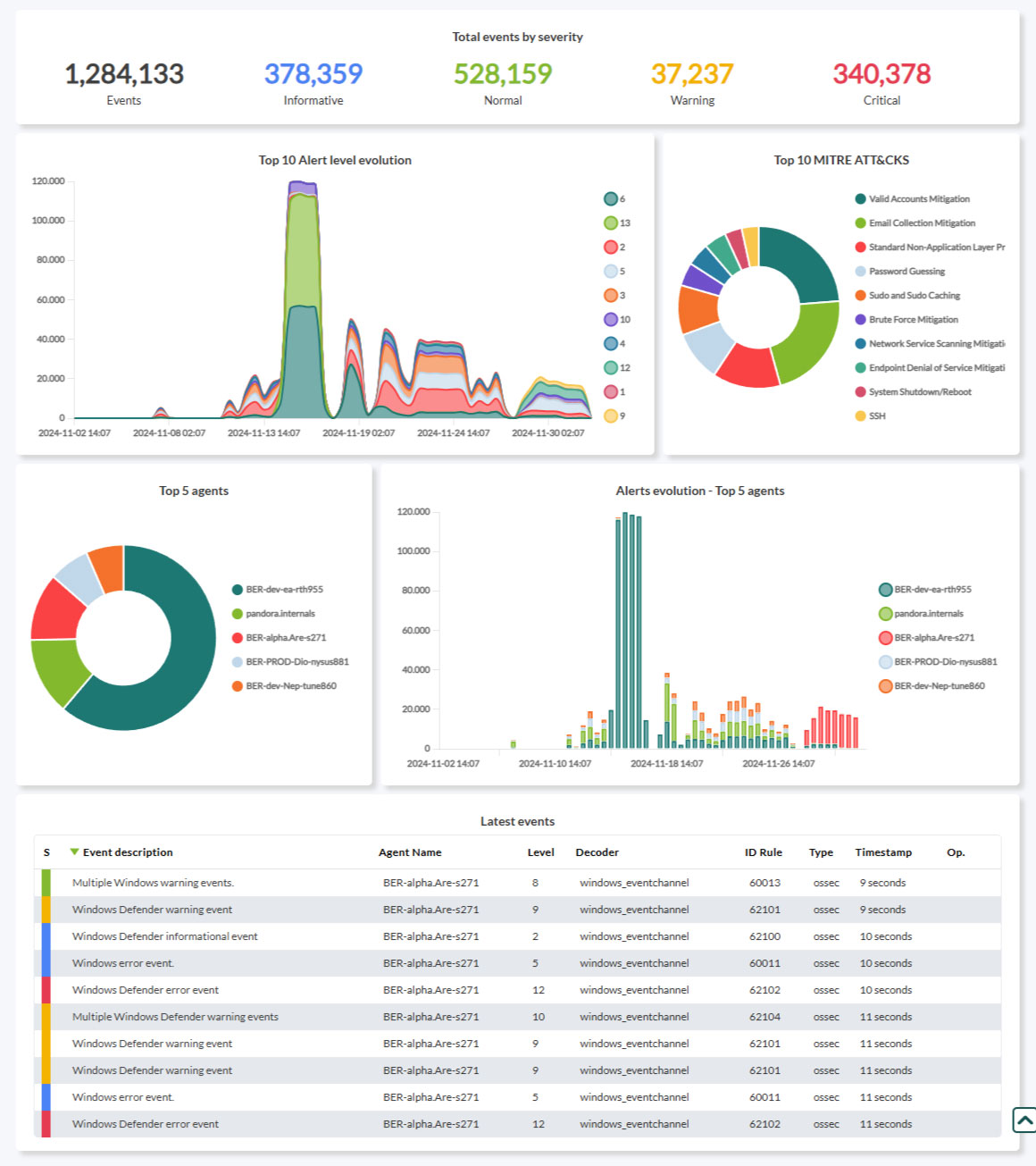
Pandora FMS SIEM interface allows you to view information through multiple Dashboards, a filtered event viewer, and visual management of available set-top boxes and rules. Pandora SIEM supports Wazuh decoders and rules.
Pandora FMS SIEM features will be extended in the following versions. This version is fully functional. To collect security information with agents you will need to upgrade to version 780 and configure the new SIEM server.
Notification of discontinuity of XML reports
Reports in XML format from Pandora FMS console will no longer be available in the next published LTS version.
Improvements and small changes
| Case# | GitLab# | Description |
|---|---|---|
|
N/A |
13907
|
Pandora FMS offers real-time monitoring, combining data collected first-hand through its Software Agents (including software and hardware inventories) and remotely with agents (including SNMP) and log collection. It then has preset schema with rules and regulations to generate events and their alerts. On that basis, a large amount of additional data is generated with many elements outside traditional monitoring. Security information and event management (SIEM), the new Pandora FMS features, normalizes, retrieves and relates useful information from this data to create its own security events that are added to existing alert and notification mechanisms and options. |
Known changes and limitations
| Case# | GitLab# | Description |
|---|---|---|
|
N/A |
12068
|
In the next LTS release, XML reports will be removed from PFMS Web Console. |
|
N/A |
14831 |
Added a new parameter to Cisco Meraki® monitoring by plugin to specify the agent group through the command line. |
|
N/A |
13914 |
If an agent has no Pandora RC identifier, the tab remains hidden until a valid value is entered. |
|
N/A |
12995 |
Changed the filter in Pandora ITSM ticket list shown in Pandora FMS to display unclosed tickets by default. |
Fixed Vulnerabilities
| Case# | GitLab# | Description |
|---|---|---|
|
N/A CVE-2024-11320 Acknowledgement: Mohammad Askar |
14860 |
Fixed the execution of arbitrary code in the operating system through execution statements in PHP files of the Web Console. |
Bug Fixes
| Case# | GitLab# | Description |
|---|---|---|
|
14519 |
9872 |
Fixed the database maintenance process (pandora_db) by adding a buffer that allows tasks to be segmented into steps for each one. |
|
N/A |
13211 |
Fixed header icons for Web Console notifications to always be visible, including its tooltips. |
|
N/A |
13434 |
Fixed agent counting in the Web Console excluding those disabled. |
|
N/A |
13696 |
Fixed Discovery PFMS tasks that belong to groups whose names include extended characters. |
|
N/A |
13948 |
Fixed visual error in Dashboards filter in the Command Center (Metaconsole). |
|
N/A |
13949 |
Fixed severity filter in SNMP Console view. |
|
18069 |
13963 |
Fixed migration of custom fields when switching agents between nodes from the Command Center (Metaconsole). |
|
18081 |
13970 |
Fixed inventory export in CSV to show the corresponding data in the OS field. |
|
18082 |
13971 |
Added option All in Type field in alert template editing. |
|
18083 |
13972 |
Deleted false positive messages in several sections of the Web Console, that indicated that the alleged changes had been saved. |
|
N/A |
13992 |
Added error message if the necessary permissions to access the file config.php are missing. |
|
18107 |
14005 |
Fixed SELinux® detection in Security Check PFMS plugin. |
|
18087 |
14689 |
Fixed the display of the Web Console in old web browsers. |
|
N/A |
14014 |
Fixed SQL error in creating vendors in NCM. |
|
18107 |
14033 |
Fixed Discovery PFMS tasks that belong to groups whose names include square brackets. |
|
N/A |
14034 |
Patched plugin for MS Windows® (Advanced LogParser) in its execution and result delivery. |
|
18124 |
14036 |
Fixed HA Status module in VMware® monitoring plugin. |
|
18149 |
14038 |
Fixed the custom filter date in reports for MaaS, which marked January 1970 in reports. |
|
N/A |
14073
|
Recovered Disable, Standby, Add action and Delete actions in the list of centralized alerts displayed in the Command Center (Metaconsole). Also verified node synchronization (alerts and alert actions) as well as vice versa. |
|
18269 |
14103 and 14104 |
Fixed filter creation with repeated names in the network usage map view. Added the option to remove filters. |
|
N/A |
14120 and 14991 |
Fixed the link of each agent in the agent list to point to display instead of agent edit. |
|
N/A |
14165 |
Fixed the SLA report to be displayed in any order (ascending, descending or none). |
|
18501 |
14210 |
Fixed CSV export with macros in custom reports (date handling). |
|
N/A |
14642 |
Added exception handling in remote authentication (LDAP, SAML, AD). |
|
N/A |
14663 |
When reactivating the connection to the history database, it was fixed to load the last configured values (other than the default values). |
|
N/A |
14695 |
Retrieved the server listing display in the Command Center (Migration server and Provisioning server). |
|
N/A |
14710 |
Fixed Software Agent for MS Windows® installation order generation (Management→Manage agents→Deploy Agent). |
|
N/A |
14716 |
Fixed the display of agent group names in the event view. |
|
N/A |
14737
|
Added module differentiation for arithmetic operations in synthetic modules (agent editing). |
|
N/A |
14739
|
The Warp journal will now display the applied version in the history of updates made. |
|
19091 |
14749 |
Fixed module dynamic thresholds so that the inverse interval value (related to Two tailed) retains its configuration set at each run of pandora_db maintenance utility. |
|
N/A |
14750 |
Visually fixed the diagnostic view in the Web Console. |
|
N/A |
14754 |
Fixed Visual Console public link generation. |
|
N/A |
14762 |
Fixed auto refresh in real-time graphs. |
|
N/A |
14772 |
Fixed event log saving in PFMS API 2.0 to be done in its corresponding category, AUDIT_LOG_EVENT. |
|
N/A |
14782
|
Fixed event comment display, both in nodes and in the Command Center. |
|
N/A |
14791 |
Fixed the audit log view in both the Command Center and nodes. |
|
N/A |
14828 |
Added filter execution button in agents and alerts view. |
|
N/A |
14833 |
Fixed the query to change servers on the Web server. |
|
N/A |
14839 |
Fixed processing of numerical data for CPU and memory lines in Discovery PFMS for VMware® ESX. |
|
19200 |
14840 |
Fixed event comment display with extended characters in Dashboards and event lists. |
|
N/A |
14851 |
Restricted access to monitoring policies (view and edit) to AW permission only. |
|
N/A |
14888 and 14957 |
Restricted access to the Merging Tool in the Command Center only to admin users. |
|
N/A |
15040 |
Added PFMS SIEM compatibility with PFMS RMM. |
|
N/A |
14940 |
Fixed PFMS Satellite server when handling exceptions in order to allow process restart without completely stopping the service. |
