










Notices
In addition to the usual Pandora ITSM update process, this version requires running an attachment migration script. To execute it from the SSH terminal, go to the Pandora ITSM root directory and run the following script:
cd /var/www/html/pandoraitsm

php extras/scripts/107/20250501-000000_attachments/0_main.php
It is important to run this script after completing the database update process for this version; otherwise, the migration script execution will fail.
Once the above script has been successfully executed, all attachments located in the Pandora ITSM “attachment” folder will be organized into subfolders such as Tickets, Inventory, Projects, and others.
New Features and Improvements
SLA Changes
In SLA configuration, starting from this version, it is possible to set different time slots for each day of the week.
The option to configure hours in minutes was also added.
It is recommended to run integria_cron.php every minute to achieve better accuracy in this configuration.
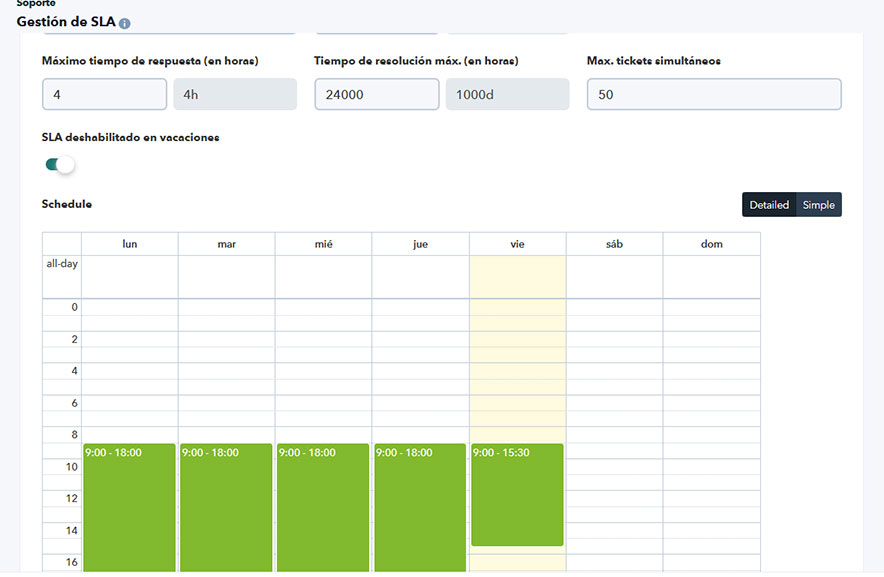
Unlike in previous versions, SLA times for response, inactivity, and closure will now only be counted within the configured time slots.
For example, if 4 days of inactivity are configured, in version 106 it counted 4 full days (24h each) from the last ticket response.
In version 107, it will count the corresponding hours within 4 days, considering only the configured SLA periods.
Therefore, these periods must be reconfigured so that they represent the actual inactivity hours within the configured time frame.
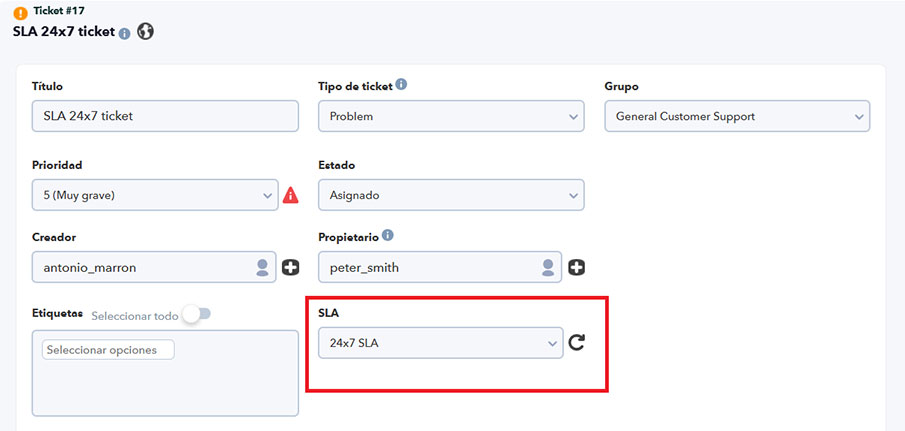
Ability to configure SLA at the ticket level. An option was added to configure a different SLA per ticket. By default, when opening or editing a ticket, the SLA configured in the ticket’s group is automatically assigned.
However, it is possible to edit the SLA so that the ticket works with a different one.
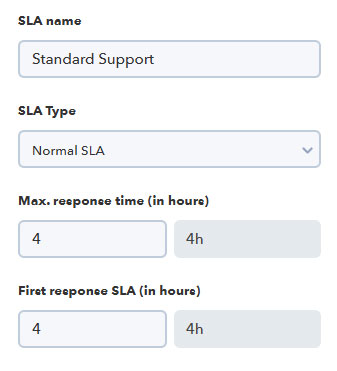
SLA for First Response. In this version, a specific SLA was added that only measures the time until the first response from the ticket’s assigned operator.
If you wish to keep the same time as the existing response SLA, just configure it with the same value.
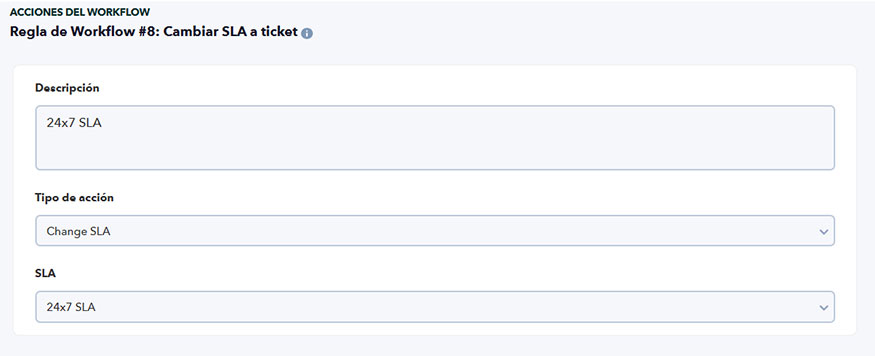
SLA Editing in Workflows. Building on the previously added feature, the SLA of a ticket may now be automatically modified through a workflow. This allows configuring any desired condition within the workflow so that, when the condition is met (e.g., ticket type or severity), the SLA is automatically updated.
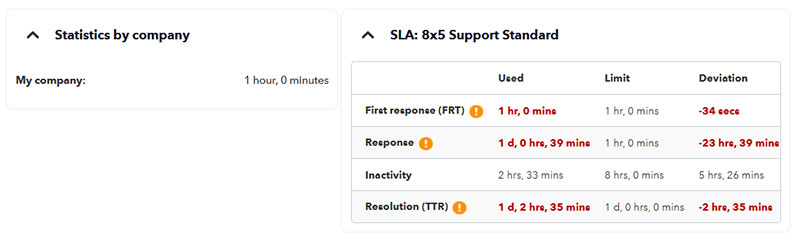
New Times Associated with a Ticket’s SLA. Percentage-based calculations were removed and replaced with the following times:
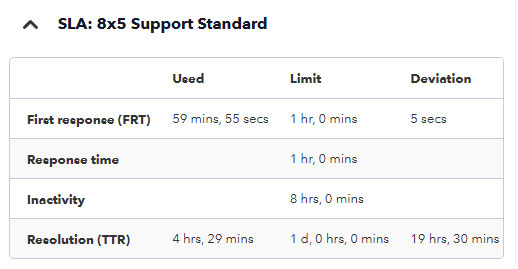
- First response ( FRT). SLA total time computed from the ticket’s creation until the moment the first response is received.
- Response time. Measures the time between responses after the initial one, exchanged between the ticket creator and the agent. For this to be measured correctly, ticket status must be Pending Support.
- Inactivity time. Measures the time since the last ticket update.
- Resolution (TTR). Measures the total time from ticket creation until its resolution. Ensures that incidents are solved within an acceptable timeframe.
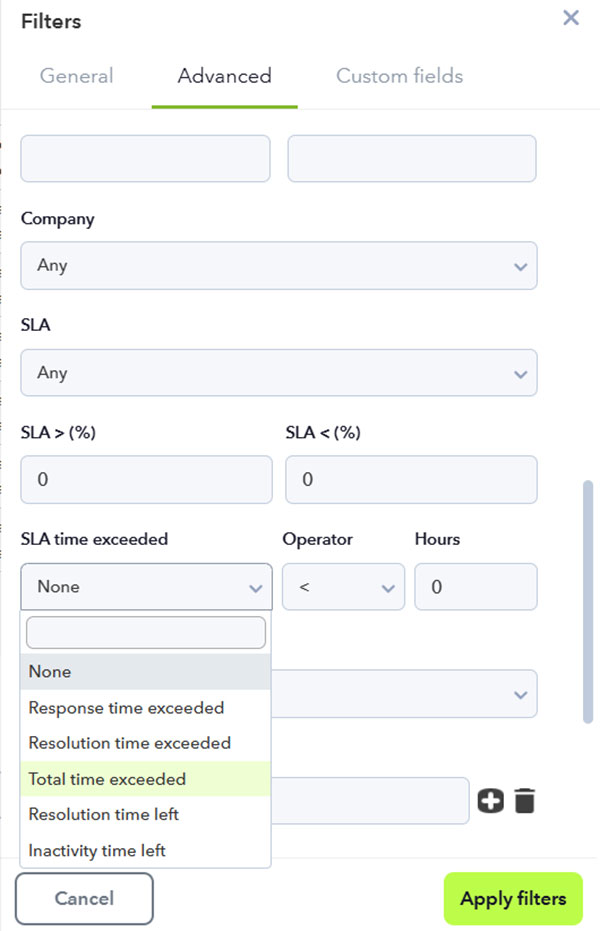
SLA Filters in Ticket View. These new filters were added to the ticket view. It is now possible to filter by the values shown in the screenshot, and by their relation to the entered filter value (greater than, less than, or equal to).
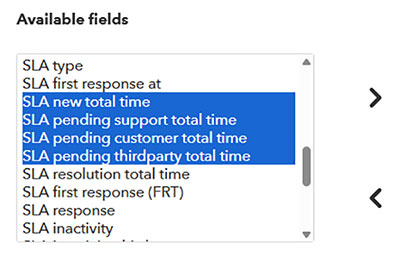
SLA Fields in the Ticket View. New fields were added to the ticket view corresponding to all the SLA metrics included in the feature.
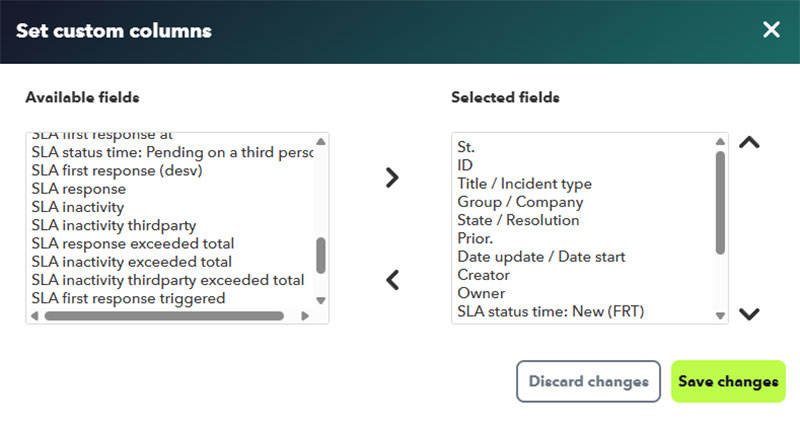
The selected fields will be displayed in the ticket list and may be exported to CSV (values in seconds within the CSV).
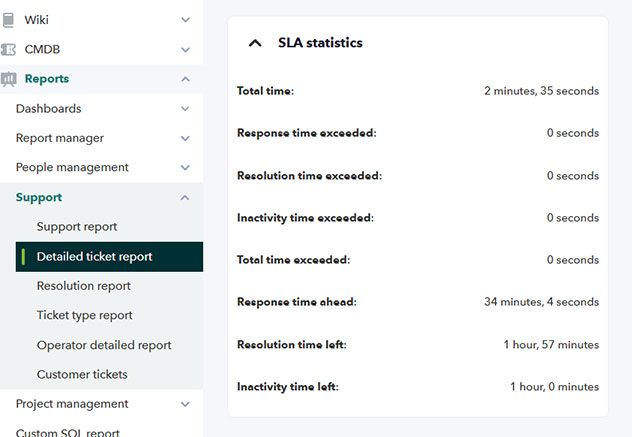
New SLA statistics were added to the “Detailed Ticket Report”.
Edit Ticket Priority Names
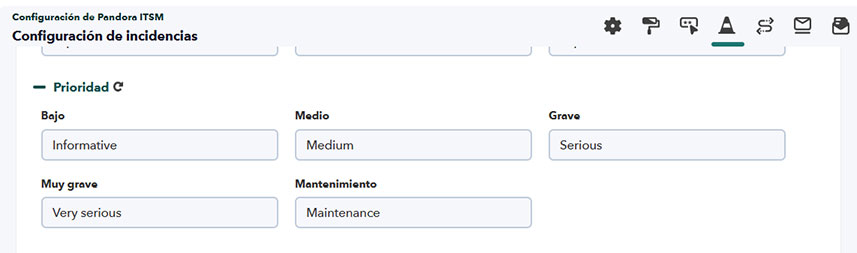
From version 107 onwards, ticket priority names may be edited. This may be done from the Issues Setup section within Pandora ITSM Setup.
New Ticket Statistics.
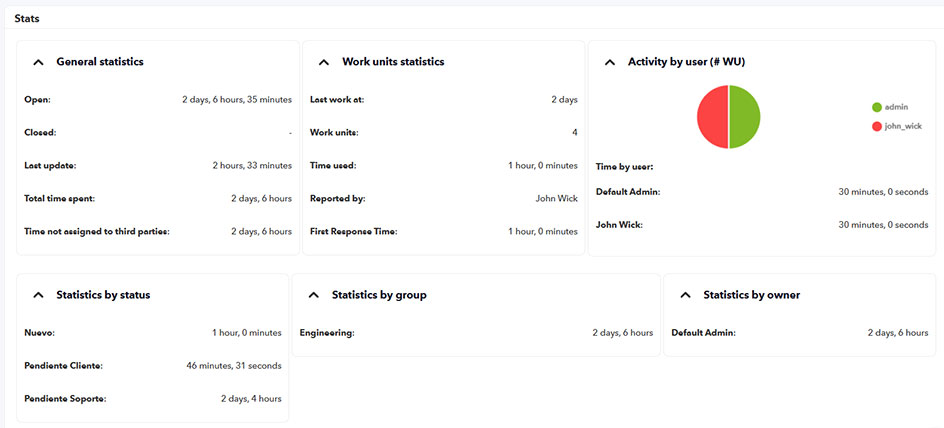
Within the Statistics section of the ticket, you may now see new metrics and enhanced data in this version:
Ticket Statuses
In version 107, the ticket status feature was completely revamped. These are the statuses that will exist in Pandora ITSM from this version onwards:
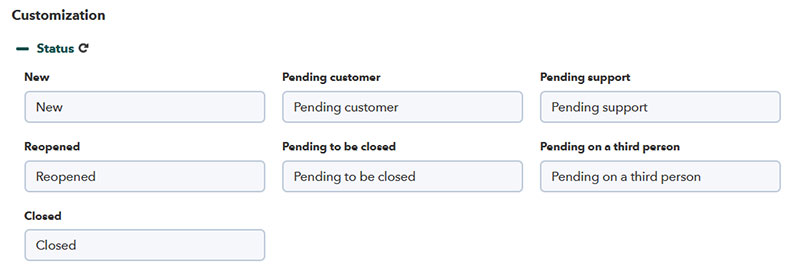
- New. Ticket opening status. During this time, the ticket’s first response SLA will be counted until the ticket owner provides the first reply. Once this first reply is made, the user must select the next status for the ticket. If the ticket owner is the one providing the first response, the ticket should be moved to “Pending Customer” status.
- Pending Customer. When the last reply has been made by the ticket owner and a response from the ticket creator is expected, this should be the status configured on the ticket for proper SLA interpretation and correct status flow. When the ticket owner is expected to make a new reply, this will be the default status set at the time of adding the response.
- Pending Support. This status should be set when a response from the ticket owner is expected. In this status, the response SLA is counted until the reply is made, and actions will be triggered if the limit is exceeded. When the ticket creator responds, this will be the default status the ticket switches to.
- Reopened. Custom status; it will have the same SLA impact as Pending Support.
- Pending to be Closed. Custom status; it will have the same SLA impact as Pending Support.
- Pending on a third person. Custom status; in this status, SLA is not counted, except for the resolution time. Response and inactivity SLAs are paused.
- Closed. Ticket closed; its operation remains the same as in previous versions.
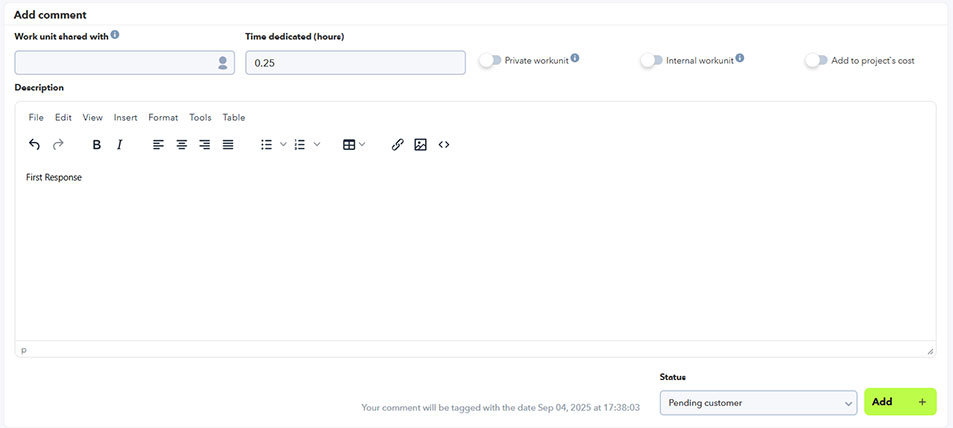
All these changes were implemented to allow better ticket status tracking and statistics. From now on, in the Statistics tab, it will be possible to track for how long the ticket was pending Support or Customer response, allowing for a more accurate resolution time calculation by the support team. Some of these times were also added to the ticket view for direct monitoring.
IT Services
A new section called Services was added within Companies.
Services will allow a new way to classify and organize tickets. Services will be assigned to both the company and tickets. At ACL level, users will only be able to select services in a ticket enabled for their company.
To create services, go to CRM > Company > Services.
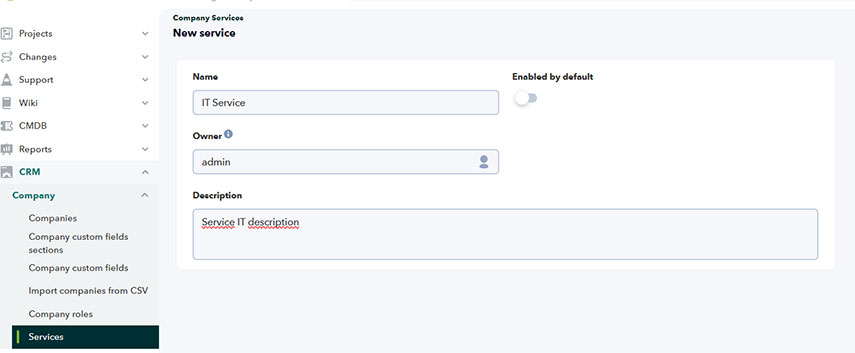
In there, you may configure a name, an owner, and a description. Additionally, you may select default services (so they are automatically enabled when creating a new company) or even enable services immediately for all existing companies.
Once the services are created, they must be associated with the companies.
New Attachment Location in ITSM
Until this version, all ITSM attachments were stored in the attachment directory. From this version onwards, there will be different subdirectories within attachment to organize files based on their source.
To organize existing files, a migration script must be executed from the root PATH of Pandora ITSM console.
php extras/scripts/107/20250501-000000_attachments/0_main.phpWe recommend opening a ticket on our support platform so that the support team may assist you with the file migration process. Back up both the database and the attachment directory before starting any migration procedure.
Improvements and Small Changes
| Case# | GitLab# | Description |
|---|---|---|
|
N/A |
2256 |
Added contract cloning within the same company. |
|
N/A |
2442 |
Changed labels in the Q&A editor of the chat module (Support → Chat → Conversations → Data Management). |
|
N/A |
2447
|
Separated attachments for tickets, invoices, contracts, etc., into individual subfolders within the |
|
N/A |
2246
|
Improved file upload dialog for download folders. |
|
N/A |
2543
|
Added weekly overtime warning option to the Timetracker Workflow. |
|
N/A |
2591 |
Implemented redirection in the Mobile Console after login, allowing users to be taken to the originally requested URL (Timetracker, Incidents, Inventory, Calendars). |
|
N/A |
2864
|
Implemented filter reset and reload in the incident list view. |
|
N/A |
2933
|
Modified invoice behavior when discounts are applied. |
|
N/A |
2609 |
Updated ticket PDF export; added Workunits and more detailed information. |
|
N/A |
2692
|
Extended the feedback comment field in incidents (creator user). |
|
N/A |
2700 |
Enabled viewing of AI chats (ChatGPT) from Channel View (General Chat in manual mode). |
|
N/A |
2811 |
Improved display of the All Projects Report. |
|
N/A |
2826 |
Added option to display each user’s last successful login date and password expiration when password policy is enabled. |
|
N/A |
2836 |
Enabled immediate email delivery when a user requests password recovery. |
|
N/A |
2932
|
Added display of associated Project or Change tasks in the ticket view. |
|
N/A |
2934 |
Added ticket editing capability within Change Tasks and Project Tasks without requiring close permission (permission bit IC) in the user profile. |
|
N/A |
2935 |
Added a new tab in Change Team editing for managing team users. |
|
N/A |
2972 |
Added delete confirmation dialog for Wiki PITSM pages. |
|
N/A |
3180
|
Adjusted SLA behavior for tickets (multiple improvements). |
|
20870 |
3005
|
Enabled editing of ticket priority information (Setup → Setup → Issue setup → Customization). |
|
N/A |
3048
|
Improved contract management usability through custom fields with optional categorization. |
|
20748 |
3084 |
Allowed Standalone users to view and modify tickets created by or assigned to themselves. |
|
N/A |
3097 |
Changed the PHP session cookie name to prevent full session termination when PITSM is installed alongside PFMS. |
|
N/A |
2982 |
Allowed project notes to be associated with project tasks, including filtering functionality. |
|
N/A |
3182
|
Enabled ticket SLA modifications through Workflows. |
|
N/A |
3300
|
Enhanced ticket statistics with new metrics and improved existing data accuracy. |
|
N/A |
3288 |
Added new token to configure default time when adding multiple WorkUnits. |
Changes and Known Limitations
| Case# | GitLab# | Description |
|---|---|---|
|
N/A |
2706
|
Added new performance reports (Team Performance report). |
|
N/A |
2842
|
Created new custom field type URL for projects. |
|
N/A |
2876 |
Added new tab displaying the list of incidents per company (CRM). |
|
N/A |
3099
|
Added new Workflow condition for projects: Task status change. |
|
N/A |
3181
|
Implemented new configurable SLAs per ticket. |
|
N/A |
3285 |
Added macro |
|
N/A |
3294
|
Added new IT services feature linked to companies and tickets (CRM → Company → Services). |
|
N/A |
3295
|
Added new SLA metric: First response time (token First response SLA (in hours)). |
Fixed Vulnerabilities
| Case# | GitLab# | Description |
|---|---|---|
|
N/A |
3314 |
Restricted access to the Warp Update Journal to administrators only. |
|
N/A |
3316 |
Limited visibility in the Time Tracking section so that users without an assigned company may only view their own data. |
Bug Fixes
| Case# | GitLab# | Description |
|---|---|---|
|
N/A |
1776 |
Removed PHP warnings when creating comments via email. |
|
N/A |
2161 |
Fixed “Project not selected” error message in General Project Report. |
|
N/A |
2231
|
Solved issue with incident rating after creating a Knowledge Base entry. |
|
N/A |
2607 |
Fixed Support Statistics widget for tickets (status filtering and linking). |
|
N/A |
2486 |
Solved issue in Timetracker daily hour sum after a break. |
|
N/A |
2602
|
Improved task board tooltip when retrieving Workunit descriptions. |
|
N/A |
2711
|
Fixed login issue for users using mixed uppercase and lowercase letters. |
|
N/A |
2731 |
Adjusted styles in the confirmation dialog for deleting project board cards. |
|
N/A |
2741 |
Fixed display of user lists belonging to a group when dark mode is enabled. |
|
N/A |
2757 |
Corrected Workunit preview display in dark mode. |
|
N/A |
2760 |
Fixed visual issue in linked field types. |
|
N/A |
2814 |
Ensured invoices export with the correct filename when downloaded as PDF. |
|
N/A |
2818 |
Resolved several visual issues in the Knowledge Base. |
|
N/A |
2853 |
Fixed tooltip behavior in Support Report. |
|
N/A |
2854 |
Corrected display of checkbox-type custom fields across multiple menus. |
|
N/A |
2872 |
Fixed email notifications for tickets closed by the user. |
|
N/A |
2931
|
Solved issue linking the username to an email attachment in tickets. |
|
N/A |
2937 |
Fixed behavior for users grouped under a company but with no company assigned. |
|
N/A |
2943 |
Corrected text field filtering for custom ticket types. |
|
N/A |
2955
|
Fixed invoice amount display in invoice list. |
|
N/A |
2969 |
Corrected label description for checkbox custom field filters in Contracts. |
|
N/A |
2988 |
Fixed Send email at start and at end token behavior in project task creation. |
|
N/A |
3013 |
Corrected Back button feature in multiple project sections. |
|
N/A |
3014 |
Fixed visual display of “No members” message in project view. |
|
N/A |
3022 |
Corrected access for restricted users (RR) to SQL reports in HTML format. |
|
N/A |
3051
|
Fixed editing process and requirements in Incident Setup and customization. |
|
N/A |
3066
|
Solved decimal display issue in project task progress bars. |
|
20746 |
3085 |
Fixed retrieval of custom fields in both Inventory View and CSV export. |
|
N/A |
3092 |
Fixed filtering behavior in project view while elements are being edited, saved, and re-filtered. |
|
20824, 20822 |
3098 |
Corrected English and French translations in the Web Console. |
|
N/A |
3171
|
Fixed image attachments in the Workunits of project tasks. |
|
N/A |
3176 |
Removed false positive error message when adding project notes. |
|
N/A |
3199 |
Solved TinyMCE issue preventing inline CSS editing in contract templates. |
|
N/A |
3204 |
Added redirection after user login in the Web Console (returning to the previously accessed link). |
|
N/A |
3214 |
Fixed HTTP 404 error when returning from fullscreen mode in reports. |
|
N/A |
3230 |
Restored save button in quick incident edit mode. |
|
N/A |
3259 |
Fixed HTTP 404 error in pagination of System Events view. |
|
N/A |
3273 |
Corrected task edit behavior reverting to the first state after editing project or support items. |
|
N/A |
3316 |
Fixed ACL issue in Time Tracking / Member List for users without an assigned company. |
|
N/A |
3372 |
Solved ACL issue that allowed deletion of items without explicit permission (Inventory and Reports). |
|
21356 |
3376 |
Fixed mobile app issue preventing users from accessing their own WorkUnits. |
|
N/A |
3388 |
Corrected project ACLs for users with read/write project permissions. |
