










New features and improvements
Pandora ITSM 109 improves the support workflow, introduces a new knowledge base-assisted ticket creation mode, and adds new CRM and marketing capabilities in Beta.
Support module improvements
Smart support mode and simplified ticket creation
We have optimized the support workflow through Smart Mode and an express form. The goal is to resolve doubts before opening a ticket, reduce repetitive requests, and minimize friction during registration.
1. Smart Mode (AI + KB): The user enters their query and the system analyzes the text, checks the knowledge base, and displays possible answers or related articles before creating the ticket. If the answer resolves the query, it can be saved as resolved for later reference. If not, the user can create a ticket while preserving the context generated during the process.

2. Simplified ticket creation: A simplified form has been enabled, showing only the fields required to register a basic request.

Support Teams
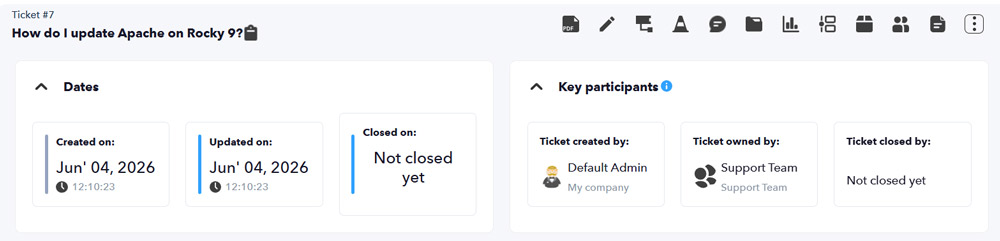
We are introducing Support Teams, made up of several agents, to facilitate collaborative ticket management and distribute workloads through automatic assignment rules and availability checks.
1. Collaborative work: Tickets can be assigned directly to a Team. All group members will have visibility and will be able to work on the ticket jointly and in a coordinated way.
2. Automatic assignment models:
- Round Robin: Fair random/rotating distribution among team members.
- Load Balance: Smart assignment based on the current workload, assigning the ticket to the user with the fewest active cases.

3. Availability management (Timetracker): Integration with time tracking. The system checks each user's Timetracker status in real time; if the agent is unavailable or outside their working hours, the system will avoid automatically assigning the ticket to them.
Negative ticket ratings
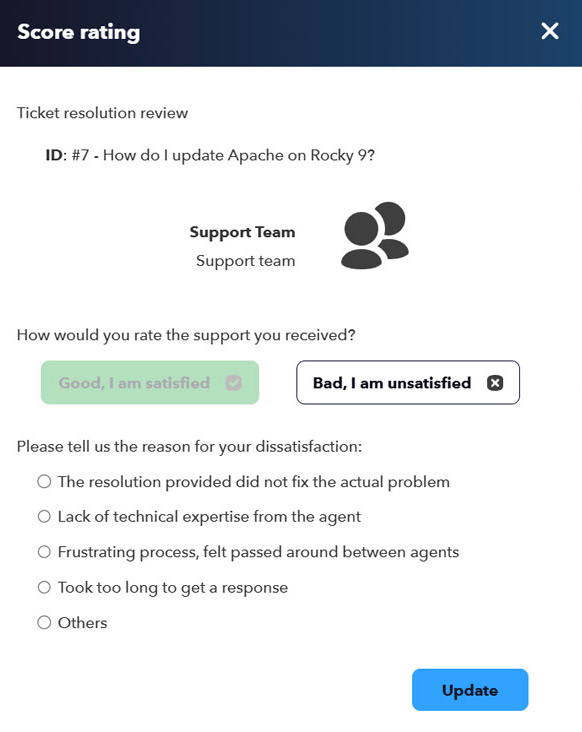
We are adding a layer of analytics and control for satisfaction surveys. From this version onward, administrators will be able to define and customize a list of reasons. If the user rates the service negatively, the system will display the configured options so they can select the reason for their dissatisfaction before completing the survey.
Ticket closure validation by the creator
When the support team considers the case resolved, the ticket creator will have the final say to validate the solution before the ticket is definitively closed.

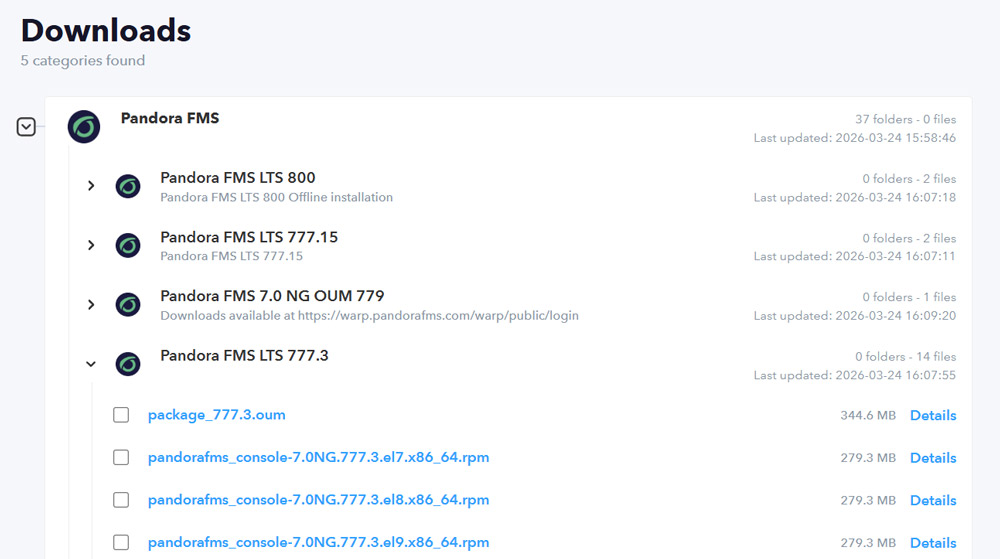
Visual improvement in the downloads section
In addition to visually improving the downloads section within the support area, the path where downloads are stored has been changed.
To migrate all files from this section, if any exist, the following command must be executed:
php /var/www/html/pandoraitsm/extras/scripts/109/downloads.php
New CRM and Marketing module (Beta)
Designed to simplify your day-to-day work, this new CRM allows you to take full control of your business through 9 key pillars:
- Companies and Contacts: Centralize all your customer information and history.
- Deals (Opportunities): Visualize your sales pipeline so you never miss a business opportunity.
- Quotes: Create and send professional quotes in seconds.
- Forms and Web Tracking: Capture leads automatically and analyze how they interact with your website.
- Marketing Campaigns: Attract and nurture your prospects with segmented strategies.
- Contracts and Invoices: Streamline legal closure and manage payments without leaving the platform.
The result: Fewer scattered tools, greater visibility, and flawless tracking of your entire business process.
New 3-column views across the entire CRM section
We have completely redesigned the CRM interface to offer a 3-column view applicable to any element (Company, Contact, Deal, etc.). You no longer need to jump between tabs: now you have a 360° view of each item on a single screen:
1. Essential information: Quickly view and edit basic data, custom fields, and the current status of the element.
2. Centralized history and activity: The heart of the interaction. View everything in a dynamic timeline:
- Sent and received emails.
- Internal notes and call logs.
- Task calendar and scheduled meetings.
- Created support tickets and assigned projects.
3. Related business ecosystem: Everything linked to that item, immediately accessible:
- Associated contacts, Deals (Opportunities), and Quotes.
- Active contracts and issued invoices.

Email sending and tracking through Google Workspace
Connect your sales and support teams' Google Workspace accounts to fully automate communication with your customers. Pandora ITSM links email history without additional manual work.
- Smart bidirectional synchronization: The platform automatically processes inboxes and outboxes. If a customer writes to you or your team replies from Gmail, the email is immediately linked to their contact record in the CRM.
- Direct sending from the platform: Write and send professional emails directly from the CRM using your own Google Workspace account.
- Dynamic email templates: Speed up communication with preconfigured templates for frequent messages (proposals, follow-ups, welcome emails), ensuring consistent and professional communication.

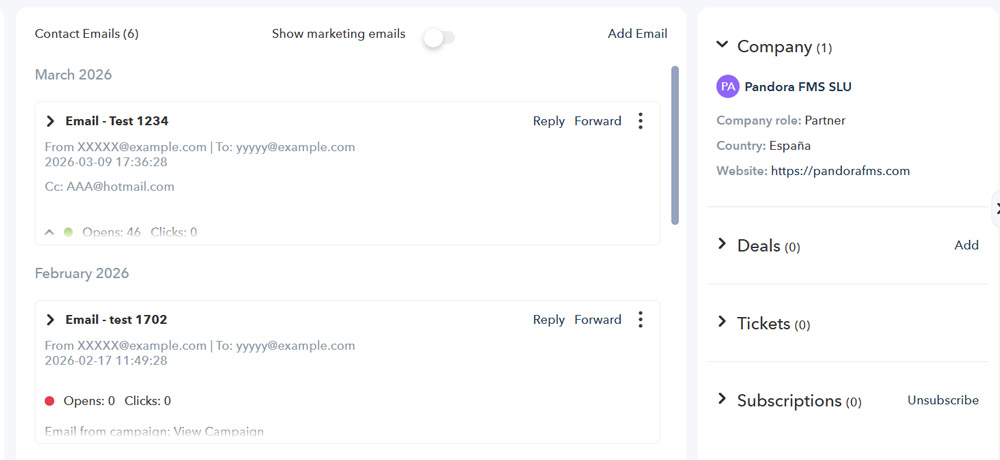
New Deals system
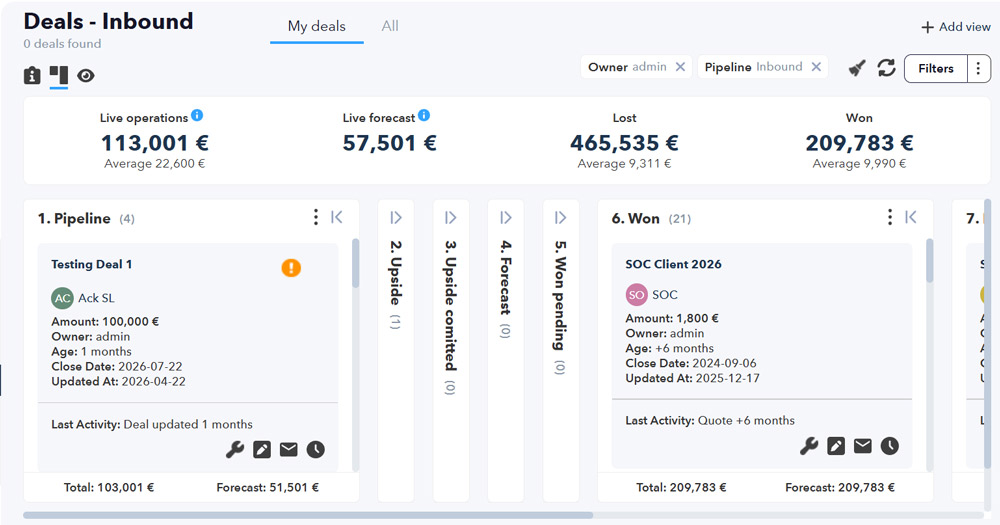
Take full control of your sales with a system designed so no business opportunity is left behind. You can now structure, prioritize, and measure your sales team's performance visually and efficiently.
- Configuration by Company and Contacts: Create specific deals for a company, link key decision-makers from its contacts, and keep the entire context unified.
- Custom pipelines and stages: Design your own sales pipelines and define the stages your commercial process follows, from first contact to contract closure.
- Global board view: Monitor the health of your sales at a glance. Drag and drop your deals between stages to update their status in the most intuitive way possible.
- Powerful advanced filters: Segment your information instantly. Filter opportunities by assigned sales rep, estimated closing date, deal value, or probability of success to focus on what truly matters.
New Quotes system
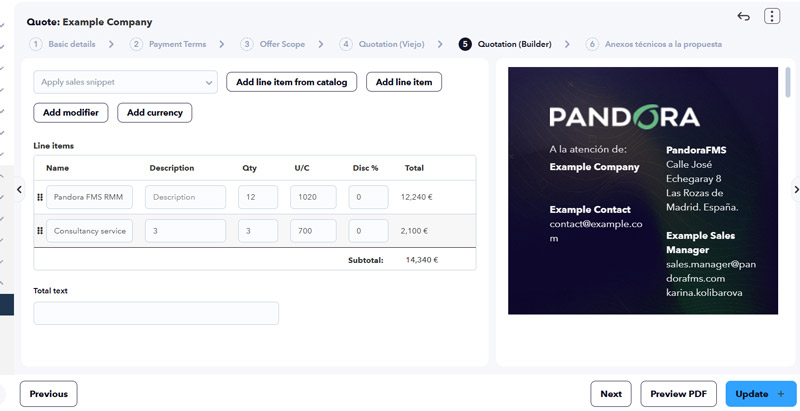
Create commercial proposals in seconds. We have designed a smart quote generator that eliminates repetitive work and reduces manual errors, allowing you to close sales faster.
- Reusable professional templates: Design the base structure of your proposals once. Save your corporate formats and use them as a starting point for any new customer, ensuring a unified brand image.
- Sales Snippets: Save time by storing predefined content blocks, such as legal clauses, service descriptions, or payment terms. Insert them into your quote with a single click according to the customer's needs.
- Advanced personalization with powerful macros: Automate information completion. Use smart variables so the system automatically fills in critical data such as the customer's name, company, deal value, or validity dates.
Marketing campaign sending
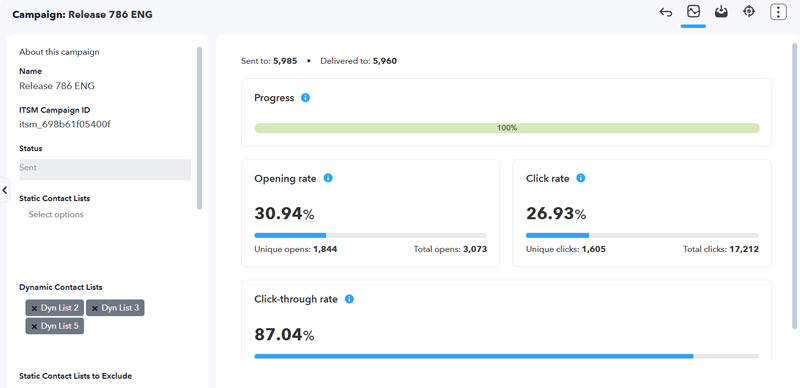
Launch high-impact mass email campaigns directly from the CRM, combining professional design and smart segmentation.
- Powerful editor: Design professional emails with complete creative freedom, controlling style, images, and code so they fit your brand.
- Static and dynamic lists: Segment your audience flexibly, either with lists that update automatically according to the criteria you define or with manually selected fixed lists for specific actions or events.
New forms system
Turn visits to your website into real business opportunities. Design and connect forms directly on your corporate website to capture leads automatically and without friction.
- Direct integration with your website: Easily link forms to your current site. Every time a user completes their data, a new contact will be created automatically inside the ITSM platform, eliminating manual data entry.
- Workflow association: Automate the next step immediately. You can configure automatic workflows so that when the contact enters the platform, a sales rep is assigned, a follow-up task is created, or a welcome email is sent instantly.

Contact web tracking
By connecting web forms and marketing campaigns, this functionality allows you to track your contacts' digital footprint in real time.
- Email click monitoring: You will know precisely who opened your marketing campaigns and which links they clicked.
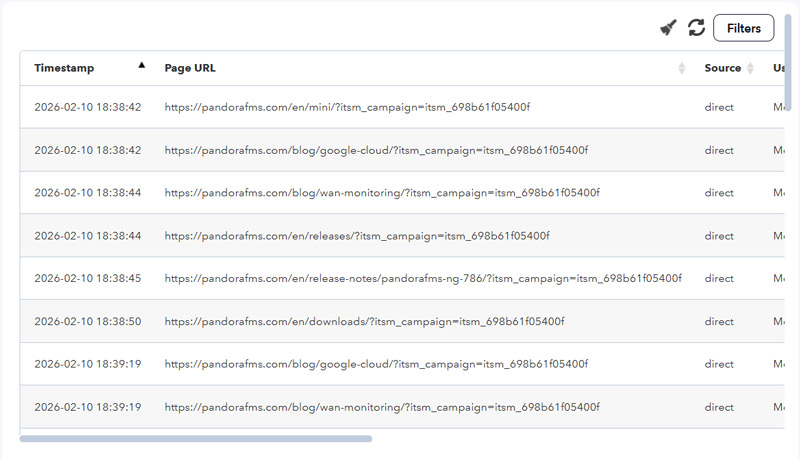
- Web navigation tracking: Identify which pages of your corporate website your contacts visit after interacting with your emails or completing a form. Discover which services, products, or blog articles capture their attention.
Improvements and Small Changes
| Case # | GitLab # | Description |
|---|---|---|
|
N/A |
2027
|
The new ‘Quotes’ system streamlines the creation of error-free commercial quotes through the use of reusable templates, predefined content blocks and automation via macros, enabling sales to be closed quickly. |
|
N/A |
2311 |
New CRM system for companies and contacts to centralise all customer information and history. |
|
N/A |
3361
|
A new CRM and web tracking system that automatically captures leads by analysing how they interact with the company’s website. |
|
N/A |
3364, 3585, 3588
|
The new Deals system for Pandora ITSM replaces the old lead manager, centralising sales operations within a visual pipeline. It includes detail views, a dashboard and a list view with custom fields, enabling sales performance to be measured using forecast metrics and advanced tracking filters. |
|
N/A |
3366
|
Pandora ITSM’s new email system centralises the comprehensive management of campaigns and newsletters within the CRM. It includes a visual editor, dynamic contact lists and configurable mail servers. |
|
N/A |
3385
|
A new feature that allows each user to set up a dedicated connection to their Google Gmail accounts, including Google Calendar, via the Google API. |
|
N/A |
3390, 3411, 3412, 3413, 3414
|
The commenting system of the current technical support service is being extended to cover projects, tasks, opportunities, companies, contracts and contacts, whilst email reporting is being improved. |
|
N/A |
3392 |
The Pandora ITSM web tracking system uses cookies to monitor users’ browsing activity in real time, linking their browsing history to CRM contacts once a form has been submitted. This makes it possible to identify users’ interests, automatically update the ‘Last activity’ fields for contacts, and manage data efficiently when contacts are deleted. |
|
N/A |
3583 |
Implemented a feature for sending emails from companies, contacts or deals; each case has its own specific requirements. |
|
N/A |
3584 |
Functionality has been added to the contacts section, in the right-hand column, to display four additional items: Associated company primary, Deals, Attachments and Support tickets. |
|
N/A |
3639 |
The functionality for designing and sending email campaigns, including newsletters, has been revamped. |
|
N/A |
3361
|
To make it easier to submit quotes, we are introducing a ‘Products’ feature for goods or services, with options for frequency, URL and unit cost, amongst other features. |
|
N/A |
3674
|
A feature has been added to mention users in notes by typing an at sign followed by the first two letters of the user’s name. The corresponding email templates have been added. |
|
N/A |
3682
|
The global search now includes the new CRM, incorporating results for Companies, Deals, Quotes, Tasks and Meetings, with results tailored to each user’s access rights within the system. |
|
N/A |
3684
|
The bulk deletion and editing of companies and contacts has been implemented in the CRM. |
|
N/A |
3686
|
A new feature for merging companies, two or more, which retains the necessary information in the activity history and consolidates all the resources associated with them. |
|
N/A |
3701
|
Task management features have been added to the CRM for each user and can also be managed by superadmin users, if necessary. |
|
N/A |
3731
|
A feature has been added to the contact list that allows you to view the original forms used to create or update each item. The field can be used as a filter and can be shown or hidden via the custom column settings. |
|
N/A |
3733
|
Tag functionality has been added for Contacts and Companies, including a filtering option for the lists in both sections. |
|
N/A |
3743
|
Added email subscription functionality for CRM Contacts, including a history of authorisations, modifications and unsubscriptions. |
|
N/A |
3751 |
Added an option to pin notes that appear in all features using notes, sorted chronologically with the newest first. |
|
N/A |
3788 |
A “Clone” button has been added for Deals from Companies and Contacts, allowing them to be edited and saved later. The readability of the windows has been improved. |
|
N/A |
3789 |
New file attachment feature in Deals within the CRM. |
|
N/A |
3816 |
An advanced line editor has been added to the Quotes section, which updates and displays changes or new items in real time as they are made. |
|
N/A |
3893
|
The support team functionality allows you to define a group as a single user entity so that you can then assign new incidents using various methods, amongst other enhanced features. |
|
N/A |
3913 |
New deal registration feature with the option to track via email. Added a new DRR access bit. |
|
N/A |
3918 |
New dashboard widget displaying a summary of the last 30 days, showing the contacts registered during that period. |
|
N/A |
3919
|
Function for creating public links for downloading files in Support. |
|
N/A |
3954 |
A workflow has been implemented for sending emails as part of marketing campaigns. |
|
N/A |
4035
|
Creating teams as user groups for support and changes, managed as a single user, enabling automated tasks and workload balancing, as well as its management, across team members. |
|
N/A |
4042 |
The CRM Manage profile, CM, has been granted permission to edit and/or add a Company to an Opportunity record. |
Changes and Known Limitations
| Case # | GitLab # | Description |
|---|---|---|
|
N/A |
3515
|
The Pandora ITSM logos and the favicon for its Web Console have been redesigned and updated. |
|
N/A |
3528, 3897
|
A new SLA field type for support tickets, which includes a new critical status. The old field is retained as “SLA Legacy” to ensure compatibility with existing systems. |
|
N/A |
3616 |
Advanced search and filter options have been added to support tickets to help find and link previously created project tasks. |
|
N/A |
3636 |
An event has been added to the calendar and linked to an existing Company, Quote or Contact. |
|
N/A |
3649 |
Quote reports in PDF format now include additional features, such as page number and total number of pages in the footer. |
|
N/A |
3663
|
Global custom fields have been added for each contract type. Each contract has its own custom fields tab based on the selected contract type, changes are saved automatically when editing the field and moving focus away from it, and the filtering options in the contract list adapt to the selected contract type. |
|
N/A |
3723
|
For support tickets, when attaching new files, an option has been added to change the file’s status to a default value, which can be modified before saving together with the comment. |
|
N/A |
3758
|
Tag functionality has been added for Contracts, including a filtering option in the list. |
|
N/A |
3773
|
The way replies and email threads are displayed in the CRM has been changed. |
|
N/A |
3793, 3856
|
Contracts and all their elements related to other features have been rewritten while maintaining backward compatibility, and the visual interface has been refactored to make it more user-friendly and faster to use. The option to insert and edit notes has also been added. |
|
N/A |
3857
|
In Contracts, schedules can now be synchronised with Google Calendar. |
|
N/A |
3858
|
A view of contract activities, including notes, attachments, replies and other elements, has been added to the detail/edit view for each contract. |
|
N/A |
3865, 3906
|
The Downloads section of the Web Console has been redesigned with a smooth and user-friendly interface. |
|
N/A |
3886 |
The Team Performance report now includes useful filtering options and a minimalist visual interface with detailed breakdowns. |
|
N/A |
3891
|
Artificial intelligence has been incorporated into the support ticket opening process to assist with searching for recorded incidents and to conduct a subsequent survey on user satisfaction with the entire process. |
|
N/A |
3892
|
A new token has been added that allows a customer to approve a support ticket just before it is closed or, alternatively, reject it and reopen the ticket. |
|
N/A |
3931 |
The total number of hours spent on tasks is now added up in the Month Calendar view. |
|
N/A |
3995 |
The Companies, Contacts and Opportunities sections have been redesigned and visually enhanced. |
|
N/A |
4021
|
For scheduled reports and their attachments in email messages, the relevant buttons for viewing, downloading and deleting have been implemented. |
Bug Fixes
| Case # | GitLab # | Description |
|---|---|---|
|
22016 |
3312 |
The export and import of inventory via CSV files have been fixed. |
|
N/A |
3537 |
The display and counting of hours worked on subtasks within projects has been corrected. |
|
N/A |
3601 |
The loading and display of the dark theme has been fixed in the Web Console when the general dashboard is configured. |
|
N/A |
3603 |
The project task allocation has been updated so that it only displays users who belong to a project or have specific tasks assigned to it. |
|
N/A |
3612 |
The process for creating and organising custom fields for inventory items has been corrected. |
|
N/A |
3627 |
The export of filtered items and their fields to CSV files in the contract list has been fixed. |
|
N/A |
3632 |
The display of images in report templates has been fixed. |
|
N/A |
3638 |
The CSV export of the Vacation report has been fixed. |
|
N/A |
3675
|
The notes under “Projects”, “Tasks” and “Changes” have been fixed. |
|
N/A |
3739 |
The PITSM logo in the warning message displayed by the active installer has been corrected. |
|
23317 |
3756 |
Translations have been corrected on the Web Console login page. |
|
23460 |
3759 |
The joint installation of Pandora FMS and Pandora ITSM has been fixed, including interconnections and formats. |
|
N/A |
3774
|
The issue regarding the expiry of licences for several sections of the Web Console has been resolved. |
|
N/A |
3777
|
The login process in the Web Console has been fixed for user IDs containing uppercase and/or lowercase letters. |
|
N/A |
3809 |
The display of the time and date in Change Task work units has been corrected. |
|
N/A |
3818 |
The display of images in Change Tasks with the dark theme in the Web Console has been fixed. |
|
23505 |
3861 |
The time and date of completion have been corrected when adding Work Units. |
|
N/A |
3900 |
In Projects, the creation of tasks has been updated to take into account whether there is an association with a company and/or a contract. |
|
N/A |
3944 |
In the “Work Units” section of the “Project Selection” form, the display of each item’s description has been corrected. |
