










Version: Pandora FMS 802 Feature ReleaseRelease date: May 11, 2026
Notices
Known issue: In some environments, when updating to this version, an error has been observed during the update from WARP: “Failed to execute php update file: Unknown column 'cps' in 'field list'".

The web console code has been fully updated, but the update of one database field remains incomplete. As this is an error within the update system itself, if you encounter this error, you will need to complete the update manually via the console terminal, following this step in the official documentation.
Once you have completed the web console update, you will need to update the Pandora FMS server. You can do this via WARP offline or by following the remaining steps in the guide mentioned above.
If you require further assistance with this error, please contact our support team. This error will be resolved in the next version, 803.
New features and improvements
Use of the browser theme in the console interface (light and dark theme)
Changes and improvements have been introduced in the Pandora FMS console interface in recent versions, and we continue working on more and better customization options.
To use this new enhancement, the general, user and group settings now allow the console to use the theme configured by each user in the browser they use to access the tool.

Automatic license renewal from WARP Online
To make license updates easier and faster, from this version onward, environments connected online to WARP will automatically receive license updates without user interaction, although it will also be possible to force this refresh from the license settings.
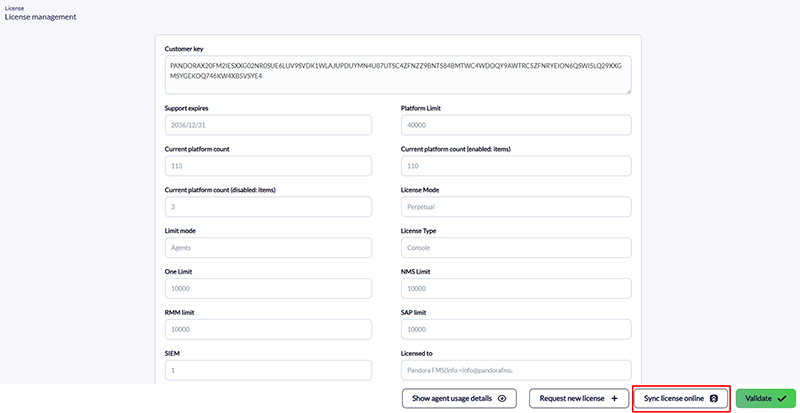
For those environments without online connectivity, we have provided a URL where, by entering the current license, users will be able to obtain the license they should have in the environment if it has been updated:
https://warp.pandorafms.com/warp/public/licenses/check_license
Optimization of basic server tasks
The Pandora FMS server performs some basic tasks related to unknown element detection, self-monitoring, planned downtimes, and more. The execution of these tasks has been optimized for large-capacity environments.
Parameter for the deletion order of Dataserver XML files
The Pandora FMS server now has a parameter to determine when XML files will be deleted by the Dataserver during processing. It will be possible to choose whether to delete them right after they are read into the computer’s memory (new behavior) or when all their information has finished being processed (traditional behavior).
This is a very specific feature for environments that may experience issues when processing XML files, so if no issue is detected in your environment, we recommend not modifying this behavior.
New Features
| Case# | GitLab# | Description |
|---|---|---|
|
N/A |
18913 |
In the PFMS Server, latency monitoring tasks have been grouped together to speed up operations in environments with more than one hundred thousand load modules. |
Improvements and small changes
| Case# | GitLab# | Description |
|---|---|---|
22613, 20827 |
16567, 16667
|
The ability to view and edit agent plugins via the PFMS Web Console has been improved and distinguished from log plugins (monitoring policies). |
N/A |
18457
|
A button has been added to copy the PFMS API tokens recently created via the web console. |
N/A |
19068 |
SIEM: Rules for managing Fortigate® Firewall V7+. |
Changes and known limitations
| Case# | GitLab# | Description |
|---|---|---|
N/A |
16516 |
The results message displayed when copying modules between monitoring policies has been updated to show specific details. |
21186 |
17165 |
The _safesnmp_fx_ macro has been created to handle special characters in the PFMS CLI and PFMS API. |
N/A |
17566 |
For the SNMP trap monitoring process, the size of the OID field was increased. |
N/A |
18125, 19822, 19840 |
A new option has been added to the visual themes for the PFMS Web Console: Browser, which detects the theme used by the web browser and adjusts accordingly. |
N/A |
18805 |
The Pandora FMS HA visual interface has been updated to match the style of the web console. |
23535 |
18809 |
API 2.0 PFMS: When creating events, both the keywords INFORMATIONAL and INFORMATIVE are accepted to assign the number one to the new element. |
23430 |
18979, 19771 |
Added the dataserver_post_delete token to prevent the premature deletion of XML files containing received checks. |
N/A |
19143 |
The default metrics to be collected have been updated and reconfigured in the SNMP wizard. |
N/A |
19612, 19504 |
In Pandora HA, the loading of environment variable values has been corrected. |
Fixed vulnerabilities
See our Common Vulnerabilities and Exposures (CVE®) list.
| Case# | GitLab# | Description |
|---|---|---|
|
Special thanks to: Pedro J. Núñez-Cacho Fuentes |
19166 |
Random password generation has been added to the PFMS API upon installation. For existing installations, a persistent warning has been added until the password is changed. |
|
Special thanks to: Pedro J. Núñez-Cacho Fuentes |
19168, 19163 |
Fixed CSRF validation on PFMS Web Console extension pages. |
|
Special thanks to: Pedro J. Núñez-Cacho Fuentes |
19169
|
Added regeneration of the PHPSESSID cookie after a user successfully logs in to the PFMS Web Console. |
|
Special thanks to: Pedro J. Núñez-Cacho Fuentes |
19171 |
The ability to execute PFMS 1.0 API commands via the web console was restricted to superadmin users. Additional security measures were also implemented. |
|
Special thanks to: Pedro J. Núñez-Cacho Fuentes |
19177 |
Numeric variable types were updated to prevent SQL injection in AJAX. |
Feature Extinction
| Case# | GitLab# | Description |
|---|---|---|
N/A |
18344, 19815 |
The Paginated module view token has been deprecated and removed from the general settings. |
Bug fixes
| Case# | GitLab# | Description |
|---|---|---|
18647 |
14280
|
The remote deployment of PFMS endpoints for MS Windows from the PFMS web console has been fixed. |
N/A |
16531 |
Fixed a false positive message when filtering by custom field (link type) of agents. |
N/A |
17974 |
The export of logs in CSV format has been fixed. |
N/A |
18398 |
Event filtering by severity has been fixed in the Command Center's tactical view. |
N/A |
18503 |
The issue with copying modules from the Satellite Server via the web console has been fixed. |
N/A |
18540 |
In agent management, the filtering process has been updated to remain persistent across changes and refreshes. |
N/A |
18542
|
The addition of ICS-format calendars for special days lists (scheduling) has been fixed. |
23292 |
18552, 19818
|
API 1.0 PFMS: The create_alerts_policy command has been fixed for the creation of external alerts. |
23323 |
18556
|
In the event alerts view, the filtering has been fixed to display the items found (or none of them). |
18828 |
18611 |
Command Center: Fixed the display of agent aliases while they are being migrated between nodes. |
N/A |
18639 |
Credential encryption has been fixed in the WMI module creation wizard. |
23437 |
18680 |
Graph Analytics Feature: Fixed the permanent deletion of items. |
N/A |
18697, 19820 |
In the PFMS API 1.0, the update_agent_field command was fixed. |
N/A |
18706 |
The PFMS IOT Server settings menu has been restored in the web console. |
N/A |
18772 |
The Service Map widget has been fixed (Dashboards). |
N/A |
18787 |
Visual Console: The sizes of the icons and images in the Service widget have been corrected. |
N/A |
18829, 18886, 19747, 19776 |
Groups and subgroups were corrected in the auto-configuration rules for new agents. |
N/A |
18830 |
The EndPoints deployment wizard in the web console agent management interface has been updated to support group management. |
23559 |
18861 |
In the alert details view, the filtering by groups and/or triggered alerts has been corrected. |
23789 |
18864 |
The filter management in the System Audit Log has been fixed. |
N/A |
18870 |
The SNMP Browser has been updated to allow modal inspection of OIDs. |
N/A |
18875 |
The free search in the local components filter has been fixed. |
N/A |
18901 |
The import settings for monitoring policies and visual consoles have been corrected. |
N/A |
18906 |
The Show Projection option has been fixed in the Agent Module Graph widget (Dashboards). |
23564 |
18910 |
In the alert list, the schedules for the alert templates corresponding to each item were fixed. |
N/A |
18933, 18934 |
Read, write, and forced-check permissions have been corrected for all users and agent groups in the Visual Consoles. |
23599 |
18936, 18976 |
The issue regarding the addition of new files (images) for visual styles—both in standard installations and those with custom paths—has been resolved in the PFMS Web Console. |
N/A |
18937, 18946 |
The module count has been corrected in the Group Status and General Group widgets. |
N/A |
18942 |
The icons representing agents' operating systems on the visual maps in Command Center have been updated. |
N/A |
18943 |
The search function in the Agent Interfaces wizard (SNMP monitoring) has been fixed. |
N/A |
18960 |
In the SNMP, WMI, and SNMP interfaces, the assignment of groups for newly selected modules has been fixed. |
N/A |
18963 |
The event counts, number of agents by operating system, and alerts in the tactical view have been corrected. |
N/A |
18969 |
The implementation of monitoring policies for groups of secondary agents (if this option is enabled) has been fixed. |
N/A |
18972 |
In bulk operations, the module selector has been fixed. |
N/A |
18980 |
In Log Viewer, the filtering of items has been fixed. |
N/A |
18982 |
Fixed HTTP 500 error on the PFMS Server running on Ubuntu (Agent Security Hardening view). |
N/A |
18983 |
In the agent detail view, the filtering of items with vulnerability characteristics has been fixed. |
N/A |
18993 |
Fixed an issue with secondary groups in RMM agents regarding the counting of items in different views. |
N/A |
19000 |
In the Agent view, under the Logs section, the modules that are not included by default in the monitoring have been fixed. |
N/A |
19006 |
In the Event List report, access to data stored in the historical database has been fixed. |
N/A |
19008 |
Discovery PFMS: In network discovery tasks, the creation of modules for detected and known hardware has been fixed. |
N/A |
19015 |
NetFlow® data collection has been modified to run in separate processes for each protocol. |
N/A |
19031 |
The Realtime SNMP graph has been fixed, including V3 data visualization. |
N/A |
19051 |
The search options for SNMP Walk results have been fixed. |
N/A |
19052, 19269 |
The creation of SNMP modules using the wizard, both in the agents view and in the monitoring policies view, has been fixed. |
N/A |
19066 |
The agent search, with Pandora RC functionality active, in the detail view, has been fixed. |
N/A |
19067 |
The data post-processing unit has been fixed in the agent modules. |
N/A |
19068 |
The visual configuration of cron in agent modules (Web Console) has been corrected. |
N/A |
19071 |
In light of alert details, the filtering that includes groups of secondary agents has been corrected. |
N/A |
19076 |
The Service tree view in the Web Console has been fixed. |
N/A |
19090 |
The issue with accessing the PFMS API for sending attached charts via email has been resolved. |
N/A |
19094 |
The display of element descriptions has been corrected in the various service monitoring views. |
N/A |
19104 |
Fixed notifications in the web console when Traditional Chinese is enabled. |
N/A |
19106 |
The absolute time selector in the filter calendars has been fixed. |
N/A |
19107 |
The time zone used by each user has been adjusted for the overall display of graphs. |
N/A |
19115 |
The cascading protection of services has been fixed. |
23831 |
19129 |
In the SNMP Remote Monitoring Wizard, the selection and creation of modules have been fixed. |
24120 |
19153 |
In the agent detail view, the issue where the same agent alert was displayed repeatedly has been fixed. |
N/A |
19164 |
The reverse search parameter has been corrected in event filtering. |
N/A |
19347, 14968 |
The option to mark all notifications as read in the Web Console has been fixed, including for duplicate messages. |
N/A |
19350 |
In SNMP modules, the process for entering IP addresses has been corrected; if an IP address is omitted, the modules are now configured to use the IP address of the agent to which they belong. |
19560 |
19421
|
In the scheduled updates, icons and the display of agent names have been fixed across various selected Web Console themes. |
N/A |
19450 |
Discovery PFMS: An additional check for the removal of failed tasks has been introduced five seconds after the timeout period for this process. |
N/A |
19575 |
The search function for custom password fields has been removed from several sections of the Web Console. |
24107 |
19658 |
SIEM: Its connection settings have been updated to use an OpenSearch server independently. |
N/A |
19674 |
Fixed the issue with missing service names and their editing and/or deletion. |
N/A |
19700 |
PFMS NetFlow Live View has been reviewed, reconfigured and corrected so that it progressively loads the data collected during monitoring and processes it correctly for display via the web console. |
