










Version: Pandora FMS 803 Feature ReleaseRelease date: July 7, 2026
New features and improvements
New reporting system
A new reporting system has been developed with greater customization capabilities and more configuration options, designed to create reports adapted to each user’s needs.
This new system allows users to define the number of pages, orientation, position and size of each report element, among other options, through a convenient and intuitive interface.
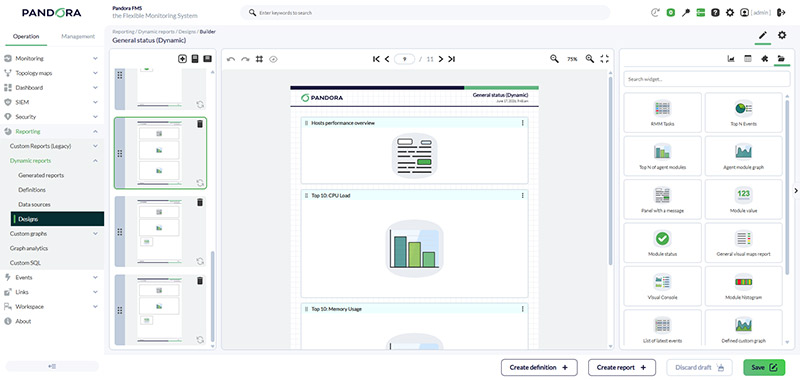

The previous report generation system will remain available if enabled from the general console settings, although it is scheduled to be removed in future LTS versions.
New event tagging system
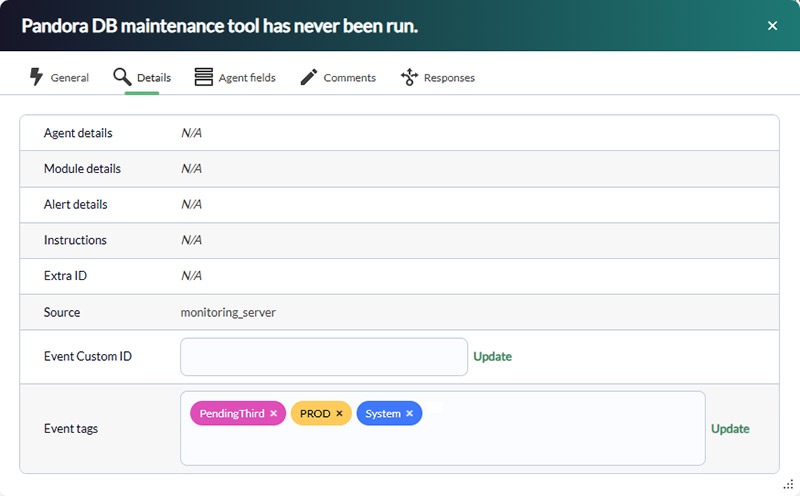
To improve event categorization and operational control, a new tagging system has been introduced for Pandora FMS events.
This improvement enables more accurate management of the information generated by events, making it easier to classify and locate relevant data more efficiently.
New hardware view in agents
Work continues on improving hardware and software monitoring for devices. As a first step, a new section has been added to the agent view, capable of displaying hardware and/or software information associated with each agent.
To use this functionality, it will be necessary to use agent endpoints later than version 7.0.20260127 or develop custom plugins.

Improved network scan heuristics
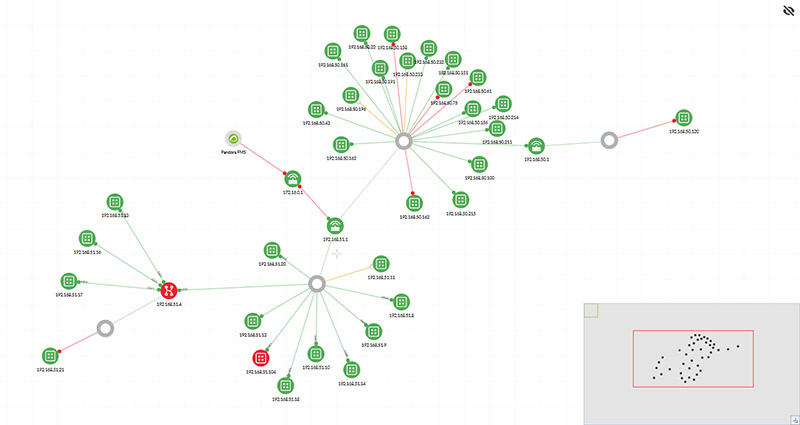
In this version, the heuristics used to detect connections between devices during network scans have been improved.
Thanks to this optimization, Pandora FMS can identify the topology of monitored networks more accurately, improving visibility across the infrastructure.
Improvements and small changes
| Case # | GitLab # | Description |
|---|---|---|
N/A |
15485 |
New hardware reporting feature in agents (EndPoint): It runs daily and provides summary information on installed peripherals, the processor, network interfaces, audio, memory, and storage. |
N/A |
18221 |
The Event Lifecycle feature has been introduced, with the ability to generate reports and/or widgets. New corresponding actions have also been added to the PFMS API 2.0 and the PFMS CLI. |
N/A |
18354 |
New functionality and workflow in the Web Console's general search tool: Any search is first performed in the side submenus, displaying a list of matches that can be selected using the arrow keys; otherwise, a full search is performed in Agents, Modules, Visual Consoles, etc., based on a keyword. |
17586, 19460, 24384 |
18365
|
New Dynamic Reports feature. |
N/A |
20020, 20021 |
In reports, the “Graph analytics” feature has been improved in terms of the speed and visual presentation of search operations. A settings button has also been added, featuring default values (with limited ranges) to make it quicker for users to use. |
Changes and known limitations
| Case # | GitLab # | Description |
|---|---|---|
N/A |
16749, 20144 |
Discovery PFMS's NetScan features a new heuristic for network scanning and discovery. |
N/A |
18757 |
In the Inventory View, the following parameters have been added to the filtering process: by alias, by name, by description, by IP address, and/or by custom fields (the latter applies only to nodes). |
N/A |
18880 |
In Dashboards, under "Widget-Defined Custom Graph," the respective agent names were added to the gauge-type visualization. |
NA |
18954 |
The code, which was no longer necessary and had been executed in versions prior to Perl 5.38, has been removed. |
N/A |
19003, 20383 |
New custom event tag feature. |
N/A |
19295 |
In the Discovery PFMS checks, unhandled exceptions were added by logging STDOUT and STDERR in different areas. |
24108 |
19656
|
In the Dashboards, the widget that reports on triggered alarms has been improved to provide more details about them. |
N/A |
19777, 20388 |
The “Enable Feedback” token has been removed as a configuration option in the general and basic settings. |
N/A |
19951 |
The “About” window in the Web Console has been revamped. |
Fixed vulnerabilities
See our Common Vulnerabilities and Exposures (CVE®) list.
| Case# | GitLab# | Description |
|---|---|---|
N/A |
19836, 15555 |
A vulnerability has been fixed that allowed a standard user to elevate their privileges to superadmin status by manipulating queries. |
Feature Extinction
| Case # | GitLab # | Description |
|---|---|---|
24037 |
19742 |
The general configuration token “Type of view of Visual Consoles” has been removed because the menu section for viewing favourite consoles is already available by default. |
Bug Fixes
| Case # | GitLab # | Description |
|---|---|---|
21082 |
14281 |
An exception handling routine has been added to “SQL Query”-type report queries to fix both syntax errors and cases where no records are found. |
19033 |
14950 |
In the remote agent (EndPoint) configuration, the synchronisation of intervals in the web console has been fixed in relation to whether or not the “module_crontab” command is present. |
20446 |
16219 |
For agents (EndPoints), the “module_unit” command has been fixed so that it synchronizes correctly with the web console. |
20809 |
16648 |
In the Advanced ACL, duplicate entries have been fixed. |
20853 |
16702 |
The copy and delete buttons in Visual Consoles have been fixed when deleting items (automatic deactivation added). |
21092 |
17048 |
In Network Maps, the action for selecting a node type (icon) has been corrected. |
21196 |
17174 |
The display of nodes in the Web Console that make up a high-availability (HA) environment has been fixed for the dark theme. |
21377 |
17247 |
In Remote Components, the unnecessary icon that appeared next to the module protocol has been removed. |
23174 |
17365 |
In the Monitor Detail View, the management and use of item filters have been fixed. |
22302 |
17595 |
In the Agent/Module View, the behavior of the filter (which retains settings) has been corrected when scrolling forward or backward through the horizontal pagination of results. |
21024 |
18035 |
Fixed pandora_manage so that it preserves the owner of each agent configuration file during the module deletion action. |
23370 |
18600 |
The scheduling and sending of reports via email have been fixed. In addition, the visual interface has also been fixed. |
N/A |
18981 |
In the PFMS server view of the Web Console, the "Lag" column has been updated to display time in a user-friendly format. |
23688 |
19023 |
In report scheduling via Discovery Console Tasks, the task name assignment has been corrected. |
N/A |
19127, 20386 |
The menus for accessing the “Demo Data” and “Manage Disco Package” features have been corrected for superadmin users. |
N/A |
19036 |
Fixed a false-positive error message related to disabling SLA calculations for services. |
N/A |
19138 |
Telnet access to devices included in NCM has been fixed. |
NA |
19140 |
The metrics for the bandwidth plugin were corrected in Satellite Server. |
N/A |
19160 |
In SNMP monitoring with Satellite Server, the access parameters were corrected to use single quotes. |
24391 |
19161 |
The pagination in the list of alerts in the agent details view of the Web Console has been fixed. |
N/A |
19182 |
In the report templates, the fields corresponding to the “Event List” type have been corrected. |
N/A |
19184 |
In Command Center, certain types of reports were corrected so that they are configured for the node to which they actually correspond. |
N/A |
19189, 19190 |
Availability Graphs have been fixed both on nodes and in Command Center, including their PDF generation. |
N/A |
19216 |
Event filtering and event deletion via the Web Console have been fixed. |
23749 |
19218 |
The event graph for the last 24 hours in the agent details section of the “Tree View” monitoring view has been corrected to display the dates correctly on the horizontal axis. |
23738 |
19317 |
In the Inventory alerts, the multiple comparison using regular expressions was corrected to ensure that alarms and notifications are triggered. |
N/A |
19367 |
In the Web Console, the online component search in the PFMS Marketplace library has been fixed. |
N/A |
19422 |
In the Command Center Web Console, the application of password policies for superadmin users has been corrected when the corresponding token has been enabled. |
N/A |
19425 |
Fixed the WMI and SNMP handlers in Agent View when multiple IP addresses are being monitored. |
N/A |
19464 |
In Command Center, the hints or pop-up help messages for registered hierarchical services have been corrected. |
N/A |
19470 |
The side menus in the Web Console for accessing reporting features in Command Center have been fixed. |
N/A |
19471 |
The side menus in the Web Console for accessing Discovery PFMS features have been fixed. |
N/A |
19478 |
Fixed an SQL error in the Web Console when editing and saving agent aliases that include quotation marks. |
N/A |
19500 |
On the main dashboard, the group count has been corrected so that it loads quickly and accurately. |
24031 |
19503 |
The (offline) access to the Marketplace settings has been fixed. |
24003 |
19553 |
The process for copying monitoring policies has been updated to include duplicating external alerts. |
N/A |
19571 |
The process of reading, editing, and saving SNMP alerts has been fixed. |
N/A |
19577
|
Throughout the Web Console, numerous display and styling errors have been corrected (colors, images—never the actual information itself). |
N/A |
19586 |
Filter management in the SIEM Events view has been restored, fixed, and improved. |
N/A |
19644, 19652, 19729, 19913, 20093 |
Several translations for various languages were corrected in the Web Console. |
N/A |
19665 |
In Command Center and its associated nodes, the display of the sub-version (where applicable) in the “About” windows of the web consoles has been fixed. |
22704 |
19671
|
In the Tree View, clusters that were grouped as “undefined” have been corrected (false positive resolved). |
N/A |
19672 |
The access bits (which make up each profile) were reviewed and corrected to allow or deny each URL entered directly into the web browser. |
24146 |
19714 |
The use of fonts for reports has been fixed, and the settings have been moved to the global system settings menu in the Web Console. |
N/A |
19715 |
In emails containing scheduled reports, the maximum timeout setting for each send has been fixed. |
N/A |
19721 |
The visual interface of the historical database configuration form has been fixed. |
N/A |
19737 |
The IPAM monitoring has been fixed to ensure that XML files are output with the correct character encoding. |
N/A |
19744 |
In the appeals view with the list of agents, the pop-up window displaying each agent's full name has been corrected. |
N/A |
19746 |
The details and detail filters in the Scheduled Stops section have been corrected and visually enhanced. |
N/A |
19750 |
In the Agent Details view, the item filter has been updated to include the option to select modules with active alerts. |
N/A |
19763 |
The Web Console Welcome Wizard has been fixed with regard to SNMP monitoring. |
24267 |
19865 |
When generating PDF inventory reports (using templates), the blank lines that make the requested document too long have been removed. |
24302 |
19871 |
Fixed search issues (HTTP 500) in general searches for standard users in both Command Center and its nodes. |
N/A |
19880 |
The two-factor authentication verification during login has been fixed for users who have not yet set up their secret key. |
N/A |
19877 |
The editing process using the “Module log collection” wizard (Monitoring policies) has been fixed. |
N/A |
19970 |
A typographical error in the calculation of the time and date when enabling the option to display alerts in “Module Graphs” (the “Agent Detail” view) has been corrected. |
23538 |
20001 |
The option to display the “Remember password” option during Web Console login has been fixed and is now entirely dependent on whether password policies are enabled or not. |
N/A |
20024 |
In the Warp Update On Line, the sequential application of MR elements to update the database structure was corrected. |
24401 |
20026 |
The token count (and its application) regarding the limit on the maximum number of possible transactions in bulk operations has been corrected. |
24422 |
20049 |
The pagination in the list of modules in the agent details view of the Web Console has been fixed. |
N/A |
20219 |
The issue with deleting services has been fixed on both nodes (attached or independent) and in Command Center. |
