









New features and improvements
Pandora ITSM 110 introduces a completely redesigned Inventory module (formerly known as CMDB): a new object view, stock management and object relationships, tags, dedicated dashboards, and a new Pandora FMS integration. This release also continues to polish the CRM, Support and Reports modules with new capabilities and a long list of fixes.
The new Inventory module
The Inventory module has been completely redesigned. Alongside a modernised visual interface, the section changes its designation from CMDB to Inventory, focusing on three primary objectives: offering a detailed, self-contained view for each asset; monitoring the full history of elements and sub-elements; and managing stock levels as well as inter-object relations.
Inventory overview and new views
- The module is renamed from CMDB to Inventory throughout the entire web application.
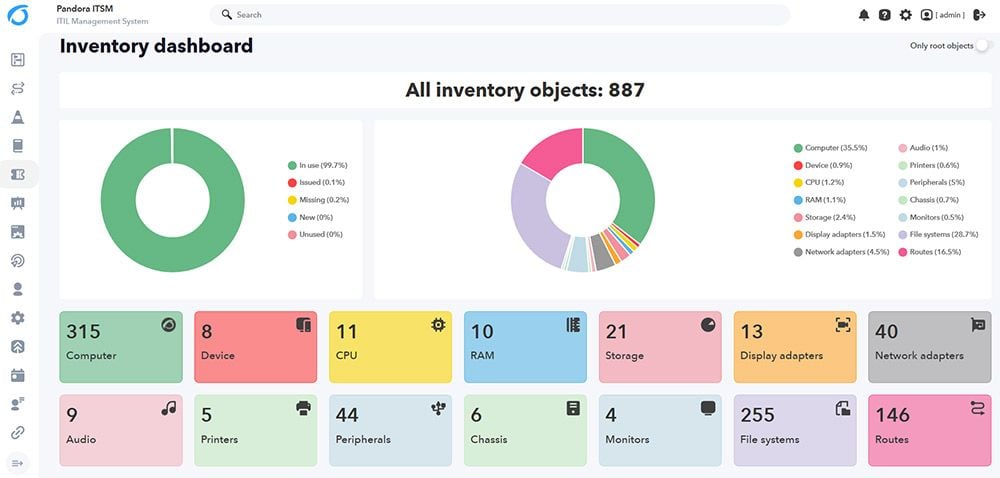
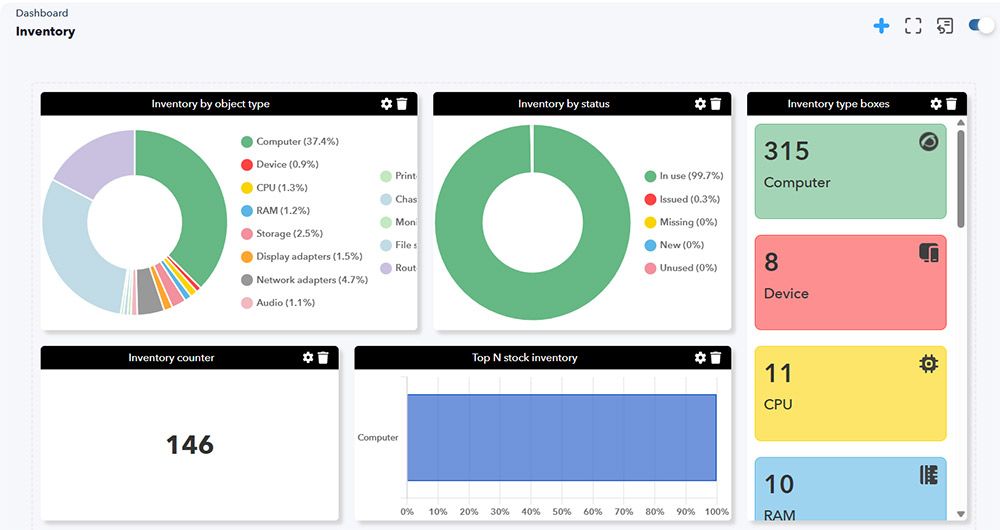
- Inventory Dashboard: New main dashboard for Inventory that offers an immediate overview of registered items.
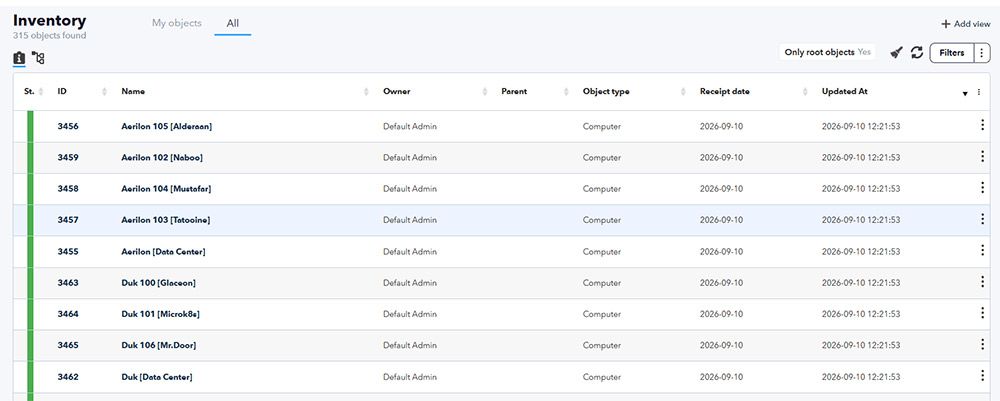
- New datatable list with new filters: the main list is now rendered using an interactive data table with enhanced filtering capabilities. Filters apply automatically when accessing specific object types (e.g. selecting "PCs" pre-filters the view immediately upon opening).
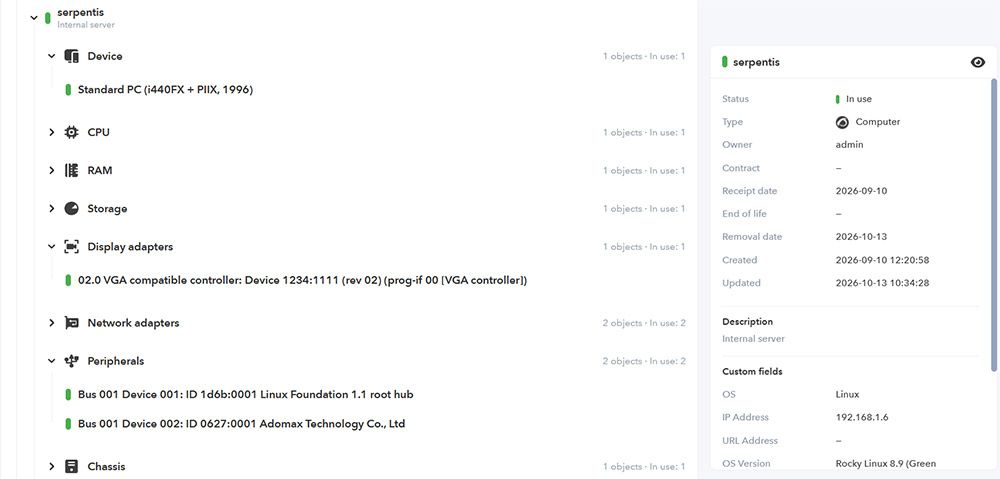
- New tree view: an intuitive hierarchical display that accurately reflects parent/child dependencies among items.
- Object history (tracker): a comprehensive tracking log registers every modification carried out on an item and its nested components. For instance, if a workstation contains a "DDR4 RAM module" as a child element, the history records precisely when that component was updated.
- Related tickets and changes: active and closed support tickets or changes linked to an asset and its sub-elements can now be monitored directly from the asset detail panel.
New object view
The detail window has been reconstructed with a dual-column layout, maintaining consistency with the new CRM interfaces:
- Right panel displays key summary attributes: title, ID, thumbnail image (or default category icon when no custom image is available), a QR button launching a pop-up code viewer, editable title, owner, parent node, type (read-only), class, operational status, notes, public visibility toggle, receipt date, EOL date (a new field marking the end-of-life timeframe, blank by default), linked organisations and associated contract.
- Center/left panel organizes primary details into dedicated tabs:
- Custom fields.
- Tickets — complete ticket log associated with this element, placing open items at the top.
- Changes — history of change requests linked to the item, highlighting active requests first.
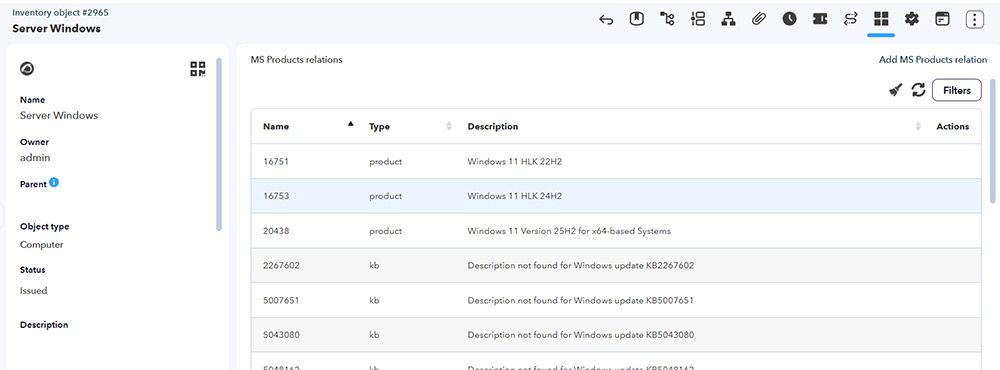
- Relationships — table of connected inventory items, where new links can be created or deleted.
- Tracker — the event timeline for the asset.
- Associated users — directory of assigned users linked to the item.
- Image upload and QR: item photos can be uploaded or changed by clicking a control below the image area; an adjacent button generates the QR code pop-up. If no graphic is uploaded, the default category icon is displayed.
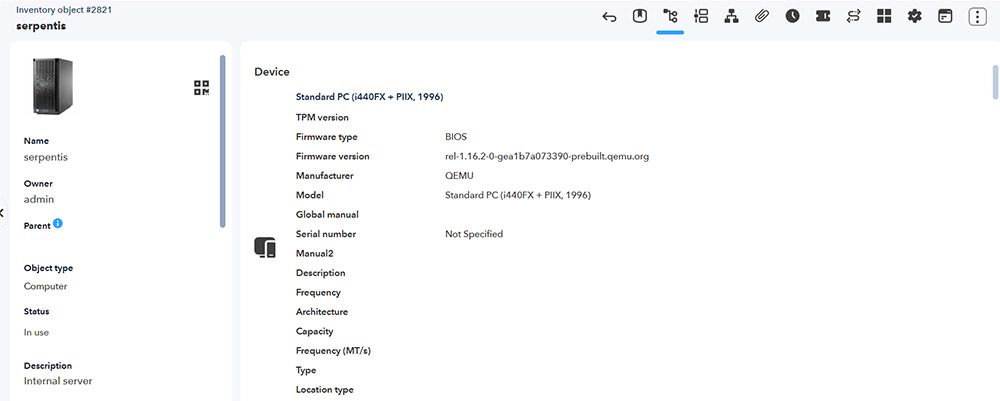
- Pandora FMS agents: for assets categorized under Pandora agents, three extra tabs are enabled to display metrics gathered from the Pandora FMS platform: Hardware, Software and Extended Info.
Stock management and object relationships
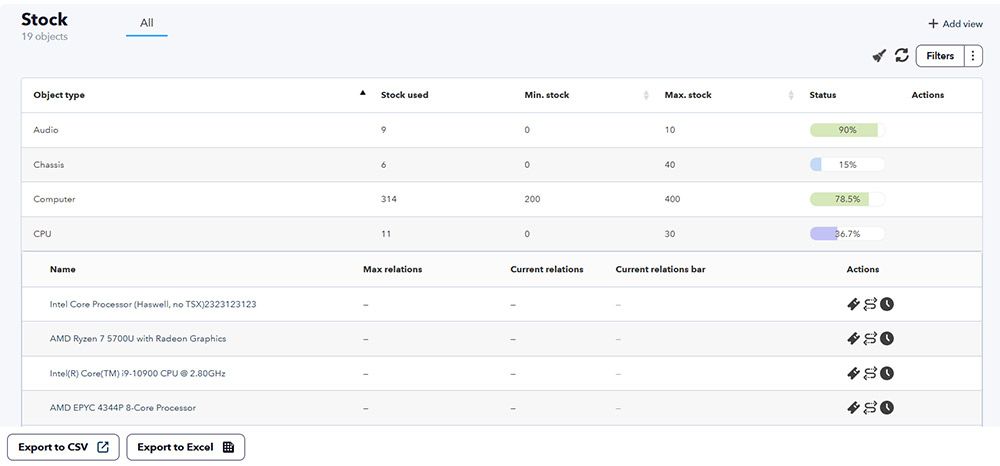
A dedicated stock control section has been introduced across both list and tree views, introducing new configuration parameters:
- Every asset includes a new max_relations attribute:
- When configured to 0, the item counts as 1 unit of stock and permits unrestricted links.
- When set to 1 or higher, total connections are restricted to that maximum figure (e.g. setting 1 restricts it to a single connection).
This enables efficient capacity tracking for single entities: for example, a company antivirus license covering 10 devices can be configured once using max_relations = 10, avoiding the need to create 10 identical entries.
CSV import and export
The CSV import pipeline for Inventory has been fully updated:
- A pre-formatted template file (Excel/CSV) can now be downloaded to ensure correct formatting before importing.
- Since required fields vary per category, the system prompts you to select the target asset type before generating the template.
Tags
Inventory now supports tags across all asset records, featuring customizable color coding; these tags remain hidden in default list views.
Pandora FMS integration
The Pandora FMS integration module has been restructured:
- The predefined Pandora agents category is replaced by a new class named "Computer".
- Inventory entries can now be generated without an assigned category; unassigned items are flagged as undefined across charts and selectors.
- Assets can be reclassified and assigned custom fields manually based on their selected item type.
- Telemetry data (Hardware/Software/Extended Info) gathered from Pandora FMS is saved in a dedicated database table
- Default object types and fields: a rich selection of asset types and custom fields is now included out of the box. Preconfigured options encompass Computer, Device, CPU, RAM, Storage, Display adapters, Network adapters, Audio, Printers, Peripherals, Chassis, Monitors, File systems, Routes (hardware structures synced directly with Pandora FMS), alongside versatile types such as Phones, Certificates, Networking hardware, Software, Vehicles & Fleet and SIM.
Inventory dashboards and widgets
A series of new reporting widgets has been created for Inventory monitoring:
- % Inventory by status (supports filtering by item type, item class, or global overview).
- % Inventory by object type (all types or custom selection; items missing a category are grouped as undefined).
- % Inventory by object class (provides breakdown metrics grouped by asset class).
- Top N inventory stock (renders bar charts ranking highest utilization percentages by category).
- Stock relations (select an asset type — such as Licenses — to generate a widget summarizing total capacity alongside individual items where max_relations != 0; supports filtering by specific assets).
IMPORTANT: Inventory data migration
The Inventory objects and object types are NOT migrated automatically when upgrading to Pandora ITSM 110.
During the upgrade to v110, the old Inventory tables are renamed to backup tables (*_bkp) and new tables with a different schema are created, seeding only the internal values (object types 1–20, fields 1–62, statuses 1–5). Your custom data is preserved but left in the backup tables.
Action required: please contact the support team to request the migration of your Inventory data. The support team will run the corresponding migration script (which remaps your custom object types, fields and objects into the new schema) and verify the result.
Improvements and Small Changes
| Case # | GitLab # | Description |
|---|---|---|
N/A |
4112 |
New dashboard widget that renders the output of a Custom SQL report (area chart, donut, column chart or data table with CSV download). |
N/A |
4066 |
CRM: option to export the full CSV of emails from dynamic and static campaign lists. |
N/A |
4043 |
CRM: company tasks are now automatically set to the "Expired" state (via cron) when their date is more than 7 days in the past. |
N/A |
4011 |
CRM: new owner-assignment system for contact forms (static user, rotating team, or rotating team with online indicator), with a fallback user and an optional "send email to new owner" action. |
N/A |
4008 |
CRM: the company view now also shows the ITSM users (not just contacts) associated with the company, in a dedicated "Users" box. |
N/A |
3920 |
CRM: workflows extended to Deals (matching internal and custom deal fields plus company internal fields; actions to add a note, send an email or add a tag). |
N/A |
3800 |
CRM: new contact boards. |
N/A |
4207 |
Support: new "Automatic Status Change" token that controls whether adding a workunit automatically changes the ticket status to Pending Customer / Pending Client. |
N/A |
4168 |
CRM: the form info now shows to whom a deal is assigned (owner name, or "Not assigned"). |
N/A |
4154 |
Date-range selectors no longer close when the mouse click ends outside the filter tab. |
N/A |
4144 |
CRM: the Pipeline filter in Deals no longer interprets user input as HTML/JavaScript. |
N/A |
4128 |
Visual styles and colours reviewed and corrected in several sections (About view, official Pandora green, pie chart base colours, etc.). |
N/A |
4115 |
CRM: the company name link in the invoice list now opens the company's invoices view instead of the invoice detail. |
N/A |
4111 |
Setup: the "Default Company" selector in group configuration no longer loads all companies on page load, and shows the company name instead of the ID. |
N/A |
4103 |
CRM: the Campaigns/Templates section header was unified with the rest of the CRM views. |
N/A |
4094 |
The "Cancel" button when generating a Quote PDF is now blue. |
N/A |
4083 |
CRM: new "Allow generic email providers" option in forms to optionally block free/generic email domains (gmail, hotmail, etc.). |
N/A |
4067 |
CRM: optional check and notice in forms when the contact/company already exists in the database (contact, company, deal or deal registration matches). |
N/A |
4065 |
CRM: more reminder options added to company tasks (5, 10, 15 minutes, 1 hour, 2 hours). |
N/A |
4059 |
CRM: the description field for contract attachments has been restored. |
N/A |
4044 |
CRM: the default task view now shows only the active user's tasks instead of everyone's. |
N/A |
4040 |
CRM: the quick search / "go to contract" box now supports text searches (leading to the general search view) in addition to numeric IDs. |
N/A |
4024 |
CRM: simplified delete confirmation dialogs (the strict "type DELETE" confirmation is kept only for bulk operations, invoices and companies). |
N/A |
4007 |
The browser confirm popup was replaced by an ITSM-styled modal window when removing a group/profile assignment from a user. |
N/A |
3566 |
Support: a modal is now shown to add the resolution epilogue when closing a ticket from quick edit. |
N/A |
2936 |
The notification popup window has been redesigned (auto-hides after 3 seconds, keeps the close button, adds a fade-out effect). |
N/A |
2605 |
Support reports: ticket ID (and link) added to the Resolution report; new "Rating" filter in the Support report; operator drill-down link and rename to "Operator report". |
Changes and Known Limitations
| Case # | GitLab # | Description |
|---|---|---|
N/A |
3894 |
The CMDB section has been renamed to Inventory with a new schema. The old hard-coded Pandora agents object type has been replaced by the PandoraFMS Agents object class (synchronized via id_pandora). |
N/A |
4134 |
New ACL model for the Inventory section (Read / Edit / Manager permissions). Existing users may need their Inventory permissions reviewed. |
N/A |
4131 |
New max_relations token on inventory objects and new min_stock / max_stock tokens on object types. |
N/A |
4135 |
Inventory objects can now exist without an object type (shown as undefined). Objects can be reclassified to a different object type. |
N/A |
2420 |
The "Delete this object" button has been removed from the object creation form (a "back to list" action is used instead). |
N/A |
— |
Data migration (see the important note below): custom inventory objects and object types are not migrated automatically during the upgrade to 110. |
Fixed Vulnerabilities
| Case # | GitLab # | Description |
|---|---|---|
N/A |
4245 |
Passwords exposed in datatables: any datatable view allowed obtaining global configuration parameters (including credentials) from the page source (Ctrl+U). |
Feature Extinction
| Case # | GitLab # | Description |
|---|---|---|
N/A |
4135 |
The hard-coded Pandora agents object type has been removed; it is replaced by the new Computer object type with configurable custom fields. |
Bug Fixes
| Case # | GitLab # | Description |
|---|---|---|
N/A |
4240 |
Fixed: it was not possible to create custom fields in inventory object types (global fields worked, per-type fields failed). |
N/A |
4218 |
Fixed the ACL of the Side Menu for Inventory tasks (wrong permission used). |
N/A |
4216 |
CRM: workflows now execute correctly (error evaluating workflow conditions). |
N/A |
4187 |
CRM: CSV export with filters in Contracts now exports only the filtered items. |
N/A |
4185 |
CRM: when a company is created from an opportunity registration, its parent company is now set to the registering company. |
N/A |
4184 |
Support: fixed assigning a parent ticket when custom fields contain special characters like (), .. |
N/A |
4181 |
CRM: clicking a company's contact list no longer adds an unwanted "owner" filter. |
N/A |
4173 |
CRM: the "already exists" notice now only searches after a minimum number of characters. |
N/A |
4171 |
CRM: the general search now also searches deal registrations, and several search UI issues were corrected. |
N/A |
4170 |
Support: fixed the First Response (FTR) SLA repeatedly sending alerts for already-answered tickets. |
N/A |
4167 |
Support: fixed an error in the ITSM Dashboard view. |
N/A |
4161 |
Support: simplified tickets now apply the group SLA correctly. |
N/A |
4155 |
Projects: hours worked are now removed from the task view when a workunit is moved to another task. |
N/A |
4152 |
Support: fixed opening simplified tickets associated with a Team (wrong team ID was used). |
N/A |
4139 |
CRM: contact workflows now trigger correctly when field values contain spaces. |
N/A |
4136 |
Support: fixed combo values with spaces in simplified ticket mode. |
N/A |
4127 |
Setup: the Mail configuration view no longer renders oversized. |
N/A |
4125 |
Support: fixed the owner breaking for standalone users when the default owner is a Team. |
N/A |
4124 |
Reports: the Team performance report schedule now saves switch-type filters. |
N/A |
4110 |
Support: the "Read More" button no longer overlaps text and images in workunits. |
N/A |
4105 |
Reports: SQL reports rendered in HTML no longer appear split as if paginated. |
N/A |
4102 |
CRM: date selector button colours fixed in the Campaigns side editor (black theme). |
N/A |
4101 |
The header logo now loads correctly in System mode. |
N/A |
4100 |
CRM: a quote without a template now shows a clear message instead of a fatal error when generating its PDF. |
N/A |
4097 |
CRM: cloning a quote now sets the creation date to the clone time instead of the original. |
N/A |
4095 |
CRM: the Deals view now displays deals correctly when a stage is expanded after being collapsed. |
N/A |
4073 |
Fixed the collapsed menu cutting off options at the footer (menu items can now be scrolled). |
N/A |
4049 |
CRM: fixed the hours-selection control limitation. |
N/A |
4001 |
Inventory: global fields are now correctly added to default-created elements (e.g. Computer). |
N/A |
3971 |
Support: fixed the "Blocked" token behaviour when a ticket is set to Closed (and allowed superadmin to disable it again). |
N/A |
3940 |
CRM: the campaign template editor was reviewed and improved (links, text blocks and preview fidelity). |
N/A |
3928 |
Inventory: fixed the RC (remote control) connection and clarified the eHorus ID field handling. |
N/A |
2367 |
Inventory: the option/button to connect to the agent now appears after setting the eHorus ID. |
N/A |
4086 |
Inventory: inventory objects added to a change are now correctly reflected in the change and its Inventory view. |
