









Version: Pandora FMS 803 Feature ReleaseRelease date: August, 2026
Notices
This version is supported only on Rocky Linux 9 and Rocky Linux 10. Rocky Linux 8 and CentOS 8 are not supported.
An error has been detected in some environments at update time. If the error “ACL forbidden user does not have permission tried to execute php update manager” appears, it can be easily resolved by updating again to this version 804 via WARP offline.

New features and improvements
Improvements to the new reporting system
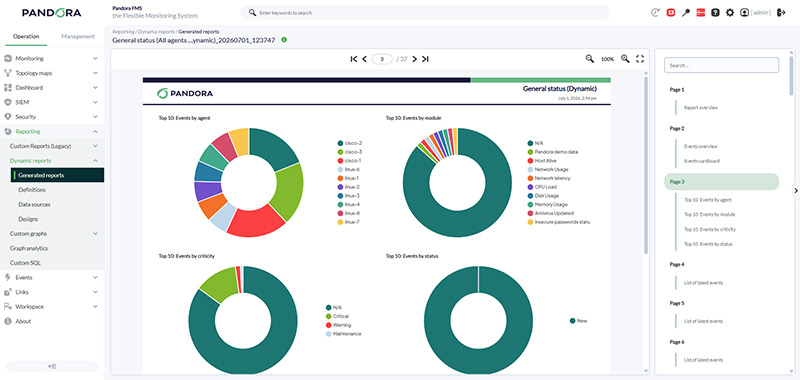
A new report generation system was introduced in the previous version, and this version brings several improvements to make report generation, viewing and reuse easier.
HTML report generation is now dynamic, allowing completed pages to be viewed progressively without having to wait for the entire report to finish generating.
HTML report viewing has also been updated to include a more convenient table of contents and individual page-by-page viewing. This also speeds up report loading.
When generating a report from an existing definition, it is now possible to select a different time period or data source from the one originally configured, without having to modify the definition.
In addition, the Pandora FMS resource import/export system now supports the new reporting system. Different report layouts can also be downloaded from our Marketplace.
WARP API configuration
Console updates via WARP need to run certain functions through API calls to the console itself.
Since access to the Pandora FMS API is configurable, new WARP configuration options have been added to specify how to connect to the API.

Data translation and visual post-processing of modules
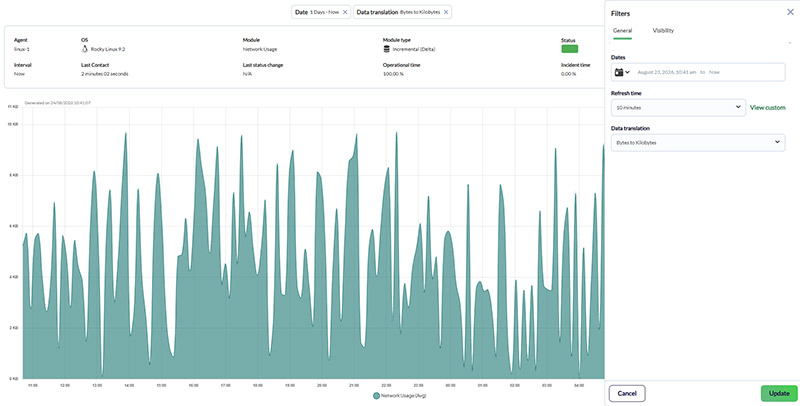
Modules can now translate the numeric values they return into readable text, such as SNMP codes, or apply visual post-processing through custom mathematical functions, without modifying the data stored in the database.
Until now, understanding what each code returned by a module represented, such as 0, 1 or 2, required documenting it separately in the module description. With this new feature, it is possible to define relationships between a dynamic unit, the module value and the translated value. For example, value 0 can be displayed as “Down” and value 1 as “Running”, so the console directly displays the translated information.
The same mechanism also supports mathematical functions for visually post-processing data, such as converting Bytes to GB, without altering the original stored values. This visual post-processing is also applied when drawing graphs.
Alerting and error capture in Discovery
Discovery now includes a dedicated alerting system to detect failures in a task’s own execution, such as expired credentials or firewall blocks, together with a more visible representation of this failure state.
Until now, when a Discovery task failed to execute, monitoring switched to unknown without directly indicating that the cause was the failure of the task itself. This could make diagnosis more difficult, especially in environments with many Discovery plugins in use.

High availability for the historical database
A standalone service has been added to manage the high-availability cluster of the historical database, with its own configuration and based on the same approach used by pandora_ha.
Some environments already had high availability for the historical database under the old Pacemaker-based model, where cluster replication and management were external. When high-availability management was migrated to pandora_ha, the historical database was left out of that service. The new service specifically covers this historical database.
This service is available for download from our Marketplace.
It is compatible with MySQL 8.0 and MySQL 8.4.
Support for Ubuntu 24.04
Pandora FMS adds support for Ubuntu 24.04.
Support targets version 24.04 and not Ubuntu 26.04, since the latter is still in a phase that is too early.
Improvements and small changes
| Case# | GitLab# | Description |
|---|---|---|
N/A |
16085
|
Custom field values of an agent are preserved when moving it between Metaconsole nodes. |
22405 |
9291 |
A notification is added in the policy view when there is synchronization queuing in the Metaconsole. |
N/A |
18945 |
The Interface Wizard modal uses internal scrolling and keeps the confirmation button visible when creating many modules. |
N/A |
15880 |
A search filter by agent is added in the monitor view. |
N/A |
16805 |
Editing the HTML content of an alert opens in a larger modal window. |
N/A |
17753
|
Bulk agent selection/filtering is added when configuring alerts for a module. |
N/A |
19193 |
Relative date range selectors no longer close when releasing the click outside their box. |
N/A |
19296
|
A macro is added to extract the level of a SIEM event and use it in alert commands. |
N/A |
19769
|
Status and enabled/disabled filters are added in the module configuration view of an agent. |
N/A |
19821 |
Satellite ARM download links are added in the console's Downloads section. |
N/A |
15469
|
The deprecated module template application section is removed. |
N/A |
16133
|
Obsolete event reports, except "Events list", are removed in templates and reports. |
N/A |
16555 |
Global administrators are notified when an RRR version keeps the Limit to LTS updates token active, to avoid being left without updates. |
N/A |
18437 |
A notification is shown when creating a service in the Metaconsole if the prediction server is not enabled. |
N/A |
18782 |
The "master" state shown for the Satellite server in the server view is fixed. |
N/A |
18790 |
A back button is added and the persistent popup in the advanced view of an alert is fixed. |
N/A |
18898 |
The actual discoverer error is shown when a Discovery task fails, instead of a screen with no information. |
N/A |
19175
|
The color of the status icons (correct/incorrect) is changed to differentiate them better. |
N/A |
19179 |
The admin user is forced to change their password after the first login in a clean installation. |
N/A |
19449 |
The logo shown in the Warp Update Online registration popup is updated. |
N/A |
19552
|
Images uploaded as group or operating system icons are automatically resized. |
N/A |
19565 |
The text of the password reset form by email is clarified. |
N/A |
19578 |
The visual misalignment of the Discovery execution summary is fixed when the information field contains content. |
N/A |
19711 |
The Deploy EndPoint section of Manage Agents is updated: macOS is removed and the Linux startup command (systemctl) is fixed. |
N/A |
20013 |
"Agente software" is renamed to "Endpoint" in the BADXML error notification in data_in. |
N/A |
20033
|
A dedicated block for the historical database maintenance options is restored in Performance. |
N/A |
20265 |
The loading order of the custom CSS, which was being overridden by the base CSS, is fixed. |
N/A |
14857 |
The Teams plugin is incorporated into the product instead of keeping it only available for alerted users. |
N/A |
17760 |
A temporary folder that should not be included is removed from the server tarball. |
N/A |
19717
|
The "Session timeout" help icon is standardized when authentication is SAML. |
N/A |
20031
|
The text and title of the centralized user synchronization message at login are updated. |
N/A |
17383
|
Fixed an agent custom field allowing both "password" and "combo" types to be enabled at once, when they are mutually exclusive. |
N/A |
17769 |
The "Zoom" filter in the Custom Graphs view, which produced no visual change when selecting the different zoom levels, is fixed. |
N/A |
20293
|
The new reporting system is improved: PDF generation in page blocks to avoid timeouts in very large reports, the ability to change the period and data source when generating from a definition without editing it, a notice when no layouts are available, and several minor widget fixes. The failure that prevented generating the reports of the new reporting system is fixed. |
N/A |
17976
|
The ability to export all on-screen SIEM events to CSV is added. The date and time of the event itself are added to the exported SIEM event CSVs. |
N/A |
17823
|
Monitoring of swap usage and low free memory is added to the internal self-monitoring. Lag and queue metrics for each server are added to pandora.internals. |
Fixed vulnerabilities
See our Common Vulnerabilities and Exposures (CVE®) list.
| Case# | GitLab# | Description |
|---|---|---|
N/A |
18987
|
In Web Push Notifications, their administration has been limited only to superadmin users. In addition, the URLs included in notification messages are always set securely for the Web Console. |
N/A |
20101
|
Removed the privilege escalation of normal users with the "Pandora Administrator" profile to superadmin user. |
N/A |
20391
|
Fixed the ACLs of module data displayed via AJAX in the Web Console. |
Bug fixes
| Case# | GitLab# | Description |
|---|---|---|
N/A |
19973
|
Fixes the recursion token of the Visual Consoles filter, which did not show the consoles of the child groups. |
N/A |
20243
|
Fixes Windows log collection when there are several sources configured and a high volume of events. |
20784 |
14055
|
Fixes the PFMS CLI: |
21087 |
17046 |
Prevents interacting with the background while popups are open when editing elements of a service. |
18481 |
17200 |
Fixes the state of a policy not updating visually when removing it from an agent via Manage policy. |
22226 |
17498 |
Fixes the group filter and agent duplication in the Custom Graphs Wizard. |
22477 |
17767 |
Aligns the "Module status = Not initialized" filter with the "Show non-initialized modules" filter, which previously returned different results. |
22620 |
17934 |
Fixes the rounding of thresholds with decimals (including critical ones) in the agent view. |
23173 |
18421 |
Fixes the automatic insertion of line breaks when adding a table in Site News. |
23975 |
19712 |
Fixes the Metaconsole slow loading caused by a high volume of records in the |
N/A |
19830 |
Allows viewing traps from agents whose group with permission is secondary, not only primary. |
24269 |
19838
|
Fixes disabled critical-state modules still being counted as critical in the group view. |
24276 |
19849
|
Allows leaving the information fields (description and instructions) of a module empty. |
24272 |
19863
|
Fixes a 500 error in Monitor Detail when "Last status change" is not among the selected fields. |
22137 |
19868
|
Fixes the weekly backup Discovery task being disabled without running and not responding to manual execution. |
24303 |
20032
|
Fixes the loading of event comments in the last events widget, which only worked once per page refresh. |
24395 |
20082
|
Fixes the escaping of single quotes in the plugin definition, which broke the plugin list view. |
24541 |
20171
|
Fixes the link to an agent from the Metaconsole general search, which led to a page without access. |
N/A |
20284
|
Fixes editing a network map (zoom or node radius) resetting the source group to All and changing the auto-refresh time. |
N/A |
20160
|
Fixes a superadmin without an assigned profile not seeing visual consoles outside the All group. |
20899 |
16737
|
Fixes an incorrect "Fail try to create tag" entry in the Audit Log when canceling the creation of a Module Tag without data. |
N/A |
18431
|
Fixes the lack of redirection to the agent/module view when clicking the severity breakdowns in the custom fields view in the Metaconsole. |
N/A |
19814 |
Fixes the SQL error when adding many common modules to a Custom Graph. |
N/A |
19873
|
Removes the "None" and "All" condition states in alert templates, which did not execute any real action. |
N/A |
19915
|
Fixes the Metaconsole online update manager not offering updates to 800.2 and 802 to the nodes. |
N/A |
20065
|
Fixes the size of the "Vulnerabilities by package" report item, which was shown too small to use. |
N/A |
20066
|
Fixes the filtering parameters overlapping the results in the Monitor Detail view when there were many. |
N/A |
20187 |
Fixes the module pagination disappearing when returning from the alerts tab after applying a filter. |
N/A |
20330
|
Fixes the loading of iframes in URL-type event responses, broken since version 801 by single quotes. |
N/A |
20344
|
Fixes the "Change timezone" button in Setup, which performed no action. |
N/A |
20364 |
Fixes the API v2 error when creating events without indicating severity. |
N/A |
20392 |
Fixes legacy RMM reports showing the agent name instead of its alias. |
N/A |
20664
|
Fixes event merging staying blocked indefinitely in centralized environments (Command Center). |
N/A |
20359
|
Fixes Update Manager Client always calling |
N/A |
19975
|
Fixes the demo data creation wizard (Demo data) not finishing and giving errors when using the default values. |
N/A |
20292
|
Fixes the Warp update (offline and online) failing when the admin user was disabled, even when logging in as superadmin. |
24690 |
20257
|
Fixes the graph problems of Selenium 4 modules in unknown state. Fixes the optional watermark chart that showed the old logo. |
