









New Features and Improvements
New Global Inventory Field Management
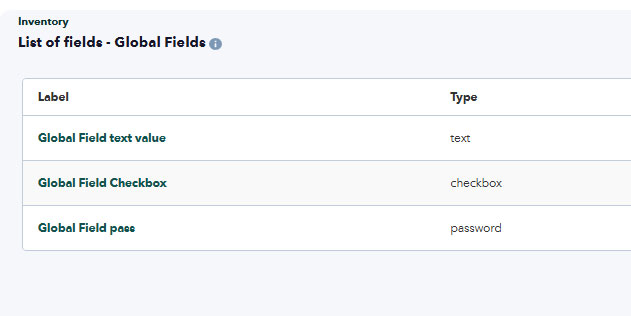
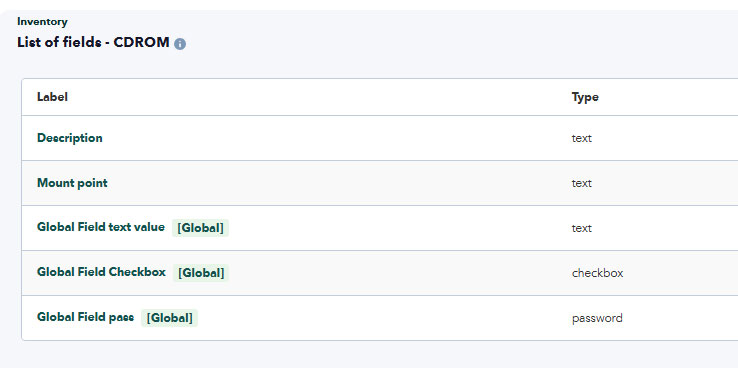
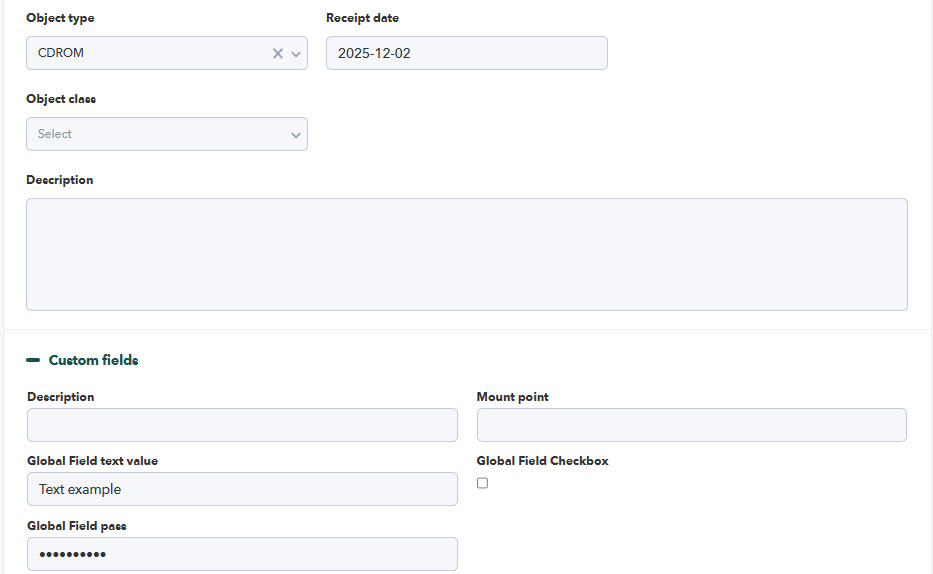
We have made a significant improvement to the management of global inventory fields. Starting with this version, these fields are managed from a new centralized section, avoiding the duplication that existed until now in each Object Type.
With this change, we achieve:
- Greater consistency in configuration.
- Reduction of errors by avoiding duplication.
- More agile and efficient management.
New Task Types in Project Tasks
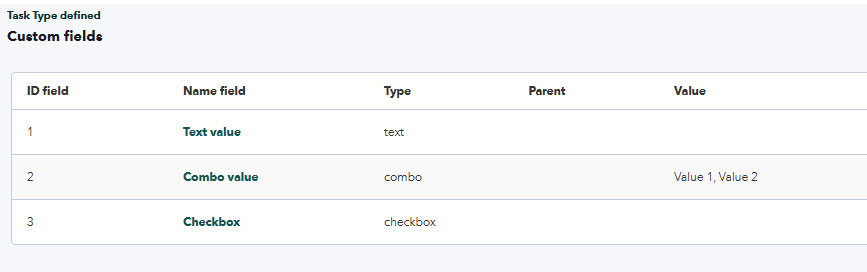
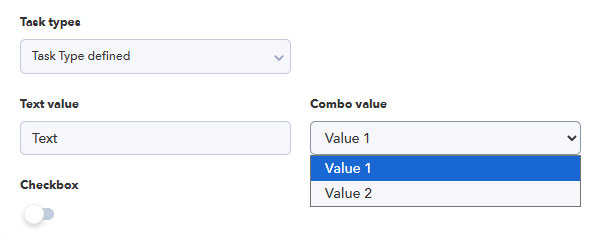
With the aim of offering greater customization in Project Tasks, we have incorporated new Task Types that allow you to add specific custom fields for each need, enabling more flexible, accurate, and comprehensive task management.
Now you can:
- Select the desired Task Type within each task.
- Configure the available fields according to the selected type.
- Add additional information tailored to the project context.
OAuth 2.0 integration for sending and reading email
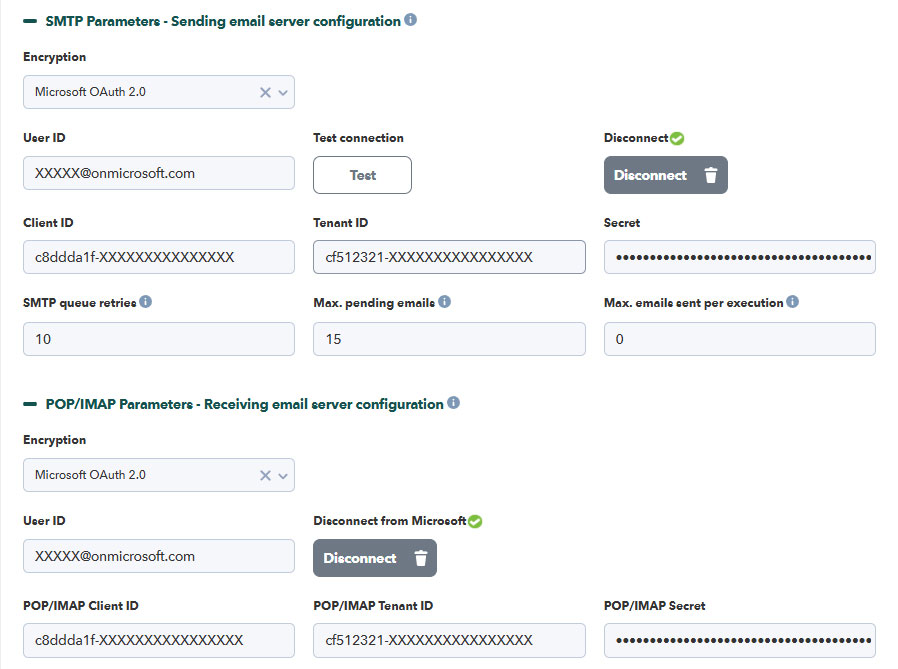
Due to new Microsoft O365 security policies, traditional connection methods for sending and reading email are no longer supported. In this version, we have incorporated integration via OAuth 2.0, allowing secure authentication with Microsoft servers.
Improvements and small changes
| Case# | GitLab# | Description |
|---|---|---|
|
N/A |
3008 |
A contract end date parameter has been added to the contract list filter. |
|
16429 |
1845
|
Compatibility for sending and receiving email via Microsoft® OAuth 2.0. |
|
N/A |
3100
|
Custom fields have been added to project tasks. |
Known Changes and Limitations
| Case# | GitLab# | Description |
|---|---|---|
|
N/A |
2978 |
The focus behavior has been changed when pressing the CTRL+f key combination on pages with list filtering options. |
|
N/A |
2991 |
In project tasks, the option to add multiple users at once has been enabled. |
|
N/A |
3004 |
Visual adjustments have been applied to the GitLab integration settings for PITSM. |
|
N/A |
3012 |
In the project list, the Group column no longer contains a link and now displays an informational pop-up message. |
|
N/A |
3018
|
Filtering in the Operator detailed report has been improved with a clean and intuitive interface. |
|
N/A |
3030 |
True/false custom fields have been updated for incident creation and editing. |
|
N/A |
3088 |
A confirmation message has been added when deleting a team in the Changes functionality, if the team has assigned items. |
|
N/A |
3207 |
Visual adjustments have been applied to PDF-generated invoices. |
|
N/A |
3209 |
The minimize and maximize button in the left sidebar of the Web Console has been relocated and redesigned. |
|
N/A |
3226 |
A total time consumed field has been added to the advanced incident details. |
|
N/A |
3287 |
A Spanish translation has been added to the Statistics section in projects. |
|
N/A |
3292 |
For project tasks, the behavior has been updated so that changing the progress bar does not alter the task status. |
|
N/A |
3306
|
An option has been implemented to force users to configure their second authentication factor when 2FA is enabled globally. |
|
N/A |
3384 |
Additional functionalities have been added to the mobile Web Console for incident creation. |
|
N/A |
3427 |
The application name has been implemented as a constant to ensure consistent display across the PITSM Web Console. |
|
N/A |
3534 |
For new PITSM installations, default fields in the incident view have been updated, and the description SLA affected has been changed to SLA triggered. |
|
N/A |
3450 |
In performance reports, a column has been added to describe non-billable work hours, and the user interface has been reviewed and redesigned. |
Fixed vulnerabilities
See our Common Vulnerabilities and Exposures (CVE®) list.
| Case# | GitLab# | Description |
|---|---|---|
|
N/A |
3399 |
Fixed involuntary access to menu options explicitly marked as hidden items. It is now ensured that groups and users with view permissions continue to have access to them. |
Bug Fixes
| Case# | GitLab# | Description |
|---|---|---|
N/A |
2958
|
Authentication and user creation via LDAP® and MS AD® have been rectified, including visual adjustments. |
N/A |
2960 |
The external link in the PITSM Wiki (syntax reference) has been replaced with an internal link. |
N/A |
2973 |
Fixed text and image size issues in the weekly time log section. |
N/A |
2974 |
In the operator support report, only active users are displayed. |
N/A |
2975 |
The general support report now displays correct percentage values in charts. |
N/A |
2987 |
Corrected label description in the Budget section of project details (Total per profile having cost). |
N/A |
2994 |
Card editing in Board View has been fixed to allow a resizable window. |
N/A |
2999 |
Corrected the previous and next links in the workflow rule assistant. |
N/A |
3006 |
Fixed issues when disabling user logins in the Web Console. |
N/A |
3019 |
The Project expense report now renders correctly in full-screen view. |
N/A |
3053 |
Filtering by date, type, and users works correctly in the Detailed user report. |
N/A |
3054 |
Fixed hour counting in the project view to consider assigned tasks and members. |
N/A |
3078 |
Removed overflow in the task member list in Board View. |
N/A |
3090 |
The date section in Changes administration has been improved. |
N/A |
3166 |
The Support statistic by priority widget now displays correctly in Mozilla Firefox. |
N/A |
3168
|
ACL restrictions have been applied to user mentions across Incidents, Projects, and Changes. |
N/A |
3169 |
The user list in the general project view has been optimized based on available screen space. |
20824 |
3184 |
The task delay calculation has been adjusted based on task status and last Work Unit date. |
N/A |
3211 |
The contract link in the project view has been fixed. |
N/A |
3218 |
Quick project editing (dates and members) has been repaired. |
N/A |
3237 |
Mobile interface terminology has been corrected. |
N/A |
3254 |
Fixed invoice filtering by amount. |
N/A |
3255 |
The closure satisfaction dialog has been removed from the detailed incident report request. |
N/A |
3257 |
Corrected user access in assigned tasks (People → My task assignments). |
N/A |
3269 |
Global custom fields are now displayed in a single column in the project list. |
N/A |
3271
|
Fixed text formatting in project descriptions and task comments. |
N/A |
3276 |
Added a group-by-company filter to the user list. |
N/A |
3283 |
Corrected image handling in email template editing. |
21236 |
3284
|
Automatic password generation has been added when password policy is enabled. |
N/A |
3290 |
Fixed 404 errors in file download links. |
N/A |
3293 |
Corrected incident filtering based on ACL permissions. |
N/A |
3302 |
Project custom fields are now displayed in a clean and summarized layout. |
N/A |
3305 |
The temporary password email now displays the associated username. |
N/A |
3308 |
Fixed saving of user data with custom fields. |
N/A |
3309 |
Resolved issues with custom user avatars. |
N/A |
3313 |
Updated descriptive text in audit access logs. |
N/A |
3323 |
Added exception handling for invalid HTML/CSS in incident descriptions. |
N/A |
3326 |
Updated translations in the Web Console item load notification. |
N/A |
3332 |
Resolved access to project views with custom fields for standard users. |
N/A |
3333 |
Corrected the task copy process between projects. |
N/A |
3344
|
Fixed CSV inventory export with global custom fields. |
N/A |
3347 |
Fixed several visual issues in the Detailed ticket report when in full-screen mode. |
N/A |
3348 |
Corrected inclusion of attached images in the Detailed ticket PDF report. |
N/A |
3350
|
Added data indexing to the Changes functionality to improve performance. |
N/A |
3352 |
Fixed filtering and tree view in inventory with custom fields. |
N/A |
3353
|
Added support for link-type custom fields in inventory items. |
N/A |
3359 |
Corrected time totals in the monthly user calendar view. |
N/A |
3547 |
Fixed modal Work Unit creation and link handling in Board View for projects. |
N/A |
3375 |
When a user is disabled (except superadmin), all active sessions are closed. |
N/A |
3400 |
Disabled users have been excluded from the tactical view. |
N/A |
3401 |
Removed the ability to post duplicate comments in Work Units. |
N/A |
3416 |
Removed duplicate incident saved successfully messages. |
N/A |
3419 |
Corrected the sum of worked hours in team performance reports. |
N/A |
3426 |
Implemented ACL inheritance in the mobile Web Console. |
N/A |
3428 |
Added an expiration date to session cookies. |
N/A |
3431 |
Corrected the display of roles in the project detailed view. |
N/A |
3432 |
Fixed HTML rendering in the Work Unit detail view. |
N/A |
3434 |
Added read-only permissions to directories for email image attachments. |
N/A |
3440 |
Added a database index to speed up access to project tasks. |
N/A |
3444 |
Fixed attachment file permissions for project administrators. |
N/A |
3443 |
Resolved SQL query errors in the general ticket view. |
N/A |
3451 |
Fixed HTTP 404 errors in group management with pagination. |
N/A |
3452 |
Corrected descriptions and filenames of ticket attachments in comments. |
N/A |
3453 |
Project group icons are now limited to 20×20 px. |
N/A |
3458 |
Visual corrections applied to the PITSM About window. |
N/A |
3464 |
Corrected the default time value for Work Units created in projects. |
N/A |
3465 |
Fixed the filtering mechanism in the user group list. |
N/A |
3466 |
Enabled item deletion in email templates. |
N/A |
3516 |
Corrected the display of user initials without avatars in project members view. |
N/A |
3557 |
Fixed PDF support report generation to include only filtered items. |
