
Configuration in Pandora FMS: creating an alert action
The Telegram® plugin is fully integrated into Pandora FMS 800.
Go to the Management→Alerts→ Actions menu and in Filter select Pandora Telegram in the Command or search field. The alert actions that use the Pandora Telegram command will be displayed:

You may:
- Use the default action on Pandora FMS.
- Copy the previous action and customize it as needed. (It may be the case that several groups of agents use different alert actions configured according to each case)
- Create an action based on the Telegram alert command (read-only).
In any case, the configuration is similar:
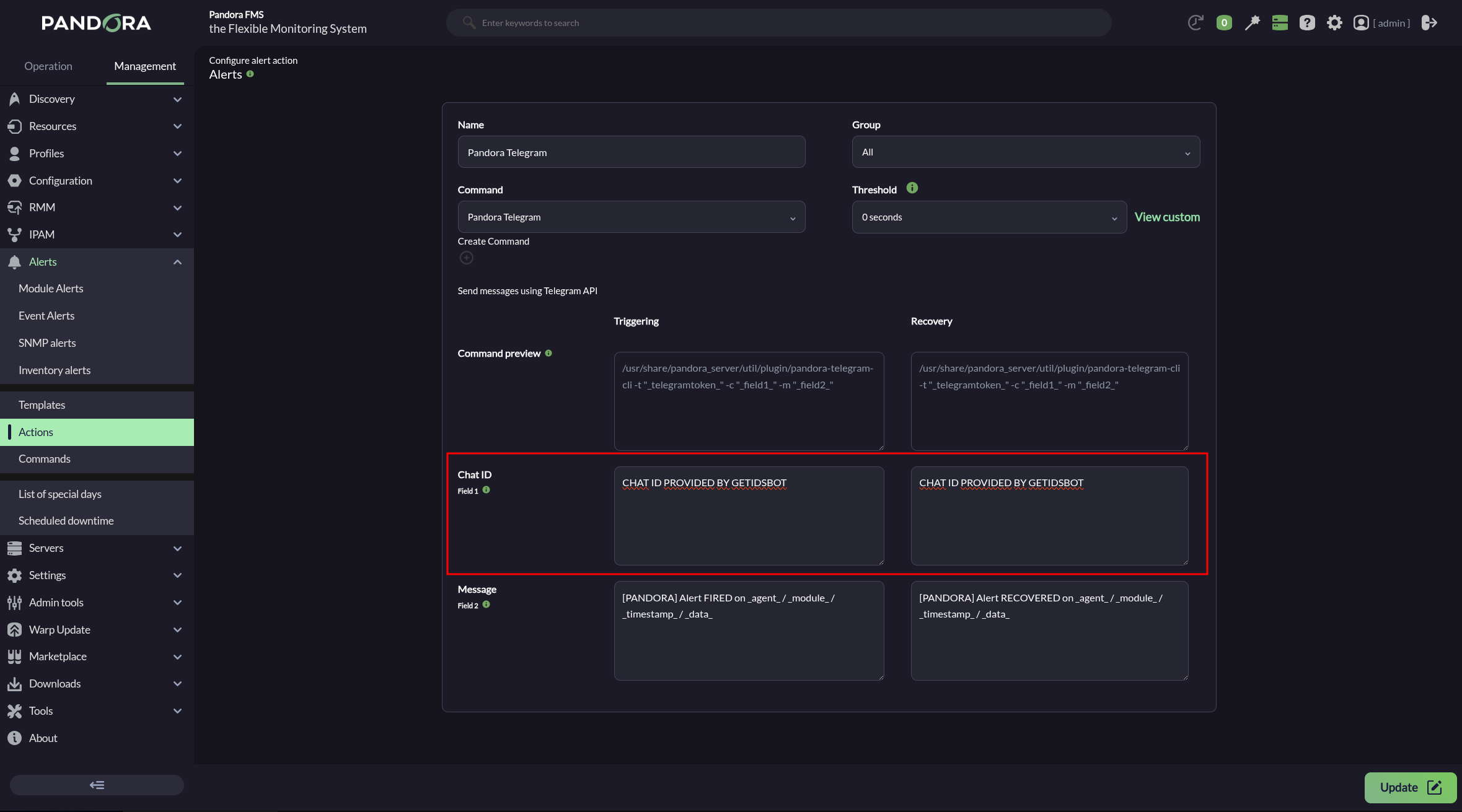
- Indicate and select the name and group.
- Ensure that Pandora Telegram is selected in Command list.
- In Chat ID, enter the corresponding identifier.
- The default Message field for Triggering is
[PANDORA] Alert FIRED on _agent_ / _module_ / _timestamp_ / _data_. See the other macros available to insert more information. - The default Message field for Recovery is
[PANDORA] Alert RECOVERED on _agent_ / _module_ / _timestamp_ / _data_. See the other macros available to insert more information. - Press the Create button if you are creating an alert action or Update if you are editing to save the parameters.
Click Create. Once you have created this alert action, it can be included in a policy, a template, or Module.
Sometimes it may take a while for a newly created bot to work properly.