
Welcome to Pandora FMS Community › Forums › Community support › Alert format output problem
-
Alert format output problem
Posted by alexandre-vaz on January 29, 2019 at 17:16Hello everyone.
I noticed the following situation when comparing the FMS version 5.1 and the new version 7.
In version 7.0 the following command was created.
/ usr / bin / mysql -u _field1_-p_field2_ -D _field3_ -N -s -h _field4_ -e “_field5_”
But I saw in the log that the output of the SQL statement there are characters entered by FMS 7.0 that did not previously exist in version 5.1.
Version 7.0 Log
2019-01-28 12:07:25 PAND-SP1 [V8] Command ‘/ usr / bin / timeout 15 / usr / bin / mysql -u pandora -pxxxxxxx -D comnect_production -N -s -h 172.16.40.10 -e “INSERT INTO comnect_production.environment_events (account_type_id, status_event, time_event, event_message, company_code, external_id) VALUES (‘2’, ‘1’, ” ‘2019-01-28 12:07:22’ ” ” ‘Fortinet Ipsec Tunnel Status SP2 ” ” ” ” ” ” ”; ” for action ‘Mysql Client’ alert ‘Critical condition generic’ agent ‘IBM-DC’ returned with errorlevel 1
What I expected in the output of the command was equal version 5.1 like this:
2019-01-28 12:16:00 PAND-SP1 [V8] Command ‘/ usr / bin / timeout 15 / usr / bin / mysql -u pandora -pxxxxxx -D comnect_production -N -s -h 172.16.40.10 -e “INSERT INTO comnect_production.environment_events (account_type_id, status_event, time_event, event_message, company_code, external_id) VALUES (‘2’, ‘1’, ‘2019-01-28 12:15:57’, ‘ Fortinet Ipsec Tunnel Status SP2′ , ”, ’17’);
This is a problem or was a change in version 7.0
Great day to everyone
 jose.almendros replied 7 years, 5 months ago 3 Members · 6 Replies
 -
6 Replies

-
::

Hello everyone.
I noticed the following situation when comparing the FMS version 5.1 and the new version 7.
In version 7.0 the following command was created.
/ usr / bin / mysql -u _field1_-p_field2_ -D _field3_ -N -s -h _field4_ -e “_field5_”
But I saw in the log that the output of the SQL statement there are characters entered by FMS 7.0 that did not previously exist in version 5.1.
Version 7.0 Log
2019-01-28 12:07:25 PAND-SP1 [V8] Command ‘/ usr / bin / timeout 15 / usr / bin / mysql -u pandora -pxxxxxxx -D comnect_production -N -s -h 172.16.40.10 -e “INSERT INTO comnect_production.environment_events (account_type_id, status_event, time_event, event_message, company_code, external_id) VALUES (‘2’, ‘1’, ” ‘2019-01-28 12:07:22’ ” ” ‘Fortinet Ipsec Tunnel Status SP2 ” ” ” ” ” ” ”; ” for action ‘Mysql Client’ alert ‘Critical condition generic’ agent ‘IBM-DC’ returned with errorlevel 1
What I expected in the output of the command was equal version 5.1 like this:
2019-01-28 12:16:00 PAND-SP1 [V8] Command ‘/ usr / bin / timeout 15 / usr / bin / mysql -u pandora -pxxxxxx -D comnect_production -N -s -h 172.16.40.10 -e “INSERT INTO comnect_production.environment_events (account_type_id, status_event, time_event, event_message, company_code, external_id) VALUES (‘2’, ‘1’, ‘2019-01-28 12:15:57’, ‘ Fortinet Ipsec Tunnel Status SP2′ , ”, ’17’);
This is a problem or was a change in version 7.0
Great day to everyone
Good morning Alexandre Vaz,
As we can see the problem must be with the ” in the macros…
Can you please use the sentence without the plugin to see if it works?
Alberto
-
 ::
::Hello everyone.
I noticed the following situation when comparing the FMS version 5.1 and the new version 7.
In version 7.0 the following command was created.
/ usr / bin / mysql -u _field1_-p_field2_ -D _field3_ -N -s -h _field4_ -e “_field5_”
But I saw in the log that the output of the SQL statement there are characters entered by FMS 7.0 that did not previously exist in version 5.1.
Version 7.0 Log
2019-01-28 12:07:25 PAND-SP1 [V8] Command ‘/ usr / bin / timeout 15 / usr / bin / mysql -u pandora -pxxxxxxx -D comnect_production -N -s -h 172.16.40.10 -e “INSERT INTO comnect_production.environment_events (account_type_id, status_event, time_event, event_message, company_code, external_id) VALUES (‘2’, ‘1’, ” ‘2019-01-28 12:07:22’ ” ” ‘Fortinet Ipsec Tunnel Status SP2 ” ” ” ” ” ” ”; ” for action ‘Mysql Client’ alert ‘Critical condition generic’ agent ‘IBM-DC’ returned with errorlevel 1
What I expected in the output of the command was equal version 5.1 like this:
2019-01-28 12:16:00 PAND-SP1 [V8] Command ‘/ usr / bin / timeout 15 / usr / bin / mysql -u pandora -pxxxxxx -D comnect_production -N -s -h 172.16.40.10 -e “INSERT INTO comnect_production.environment_events (account_type_id, status_event, time_event, event_message, company_code, external_id) VALUES (‘2’, ‘1’, ‘2019-01-28 12:15:57’, ‘ Fortinet Ipsec Tunnel Status SP2′ , ”, ’17’);
This is a problem or was a change in version 7.0
Great day to everyone
Good morning Alexandre Vaz,
As we can see the problem must be with the ” in the macros…
Can you please use the sentence without the plugin to see if it works?
Alberto
Good morning, Alberto.
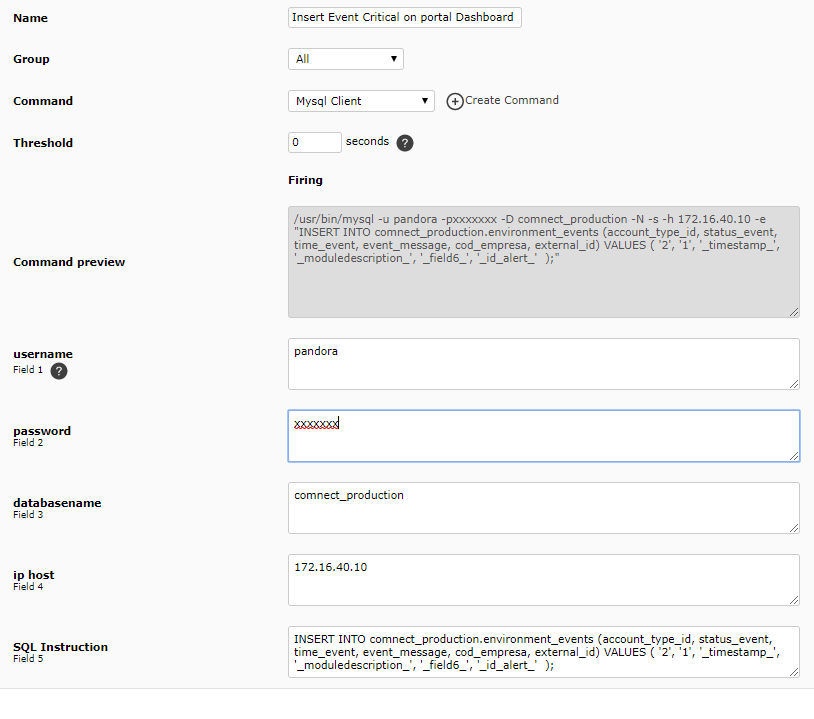
If I understood in version 7, it is including some additional “” ones in executing the command in the shell, so the MYSQL client can not execute the command correctly.
If I remove change “_field_5_” in my configuration to _field5_ without the “then the command does not execute because in the MYSQL cli I need – and” insert …. xxxx “so in version 5 that I am using is with” _field5_ “.
The test I already performed was to remove “_field5_” and left _field5_ in the configuration of the command, and in the configuration of the action I inserted “INSERT …. xxxxx” but still the output in the error log.
598/5000
-
::
Hello everyone.
I noticed the following situation when comparing the FMS version 5.1 and the new version 7.
In version 7.0 the following command was created.
/ usr / bin / mysql -u _field1_-p_field2_ -D _field3_ -N -s -h _field4_ -e “_field5_”
But I saw in the log that the output of the SQL statement there are characters entered by FMS 7.0 that did not previously exist in version 5.1.
Version 7.0 Log
2019-01-28 12:07:25 PAND-SP1 [V8] Command ‘/ usr / bin / timeout 15 / usr / bin / mysql -u pandora -pxxxxxxx -D comnect_production -N -s -h 172.16.40.10 -e “INSERT INTO comnect_production.environment_events (account_type_id, status_event, time_event, event_message, company_code, external_id) VALUES (‘2’, ‘1’, ” ‘2019-01-28 12:07:22’ ” ” ‘Fortinet Ipsec Tunnel Status SP2 ” ” ” ” ” ” ”; ” for action ‘Mysql Client’ alert ‘Critical condition generic’ agent ‘IBM-DC’ returned with errorlevel 1
What I expected in the output of the command was equal version 5.1 like this:
2019-01-28 12:16:00 PAND-SP1 [V8] Command ‘/ usr / bin / timeout 15 / usr / bin / mysql -u pandora -pxxxxxx -D comnect_production -N -s -h 172.16.40.10 -e “INSERT INTO comnect_production.environment_events (account_type_id, status_event, time_event, event_message, company_code, external_id) VALUES (‘2’, ‘1’, ‘2019-01-28 12:15:57’, ‘ Fortinet Ipsec Tunnel Status SP2′ , ”, ’17’);
This is a problem or was a change in version 7.0
Great day to everyone
Good morning Alexandre Vaz,
As we can see the problem must be with the ” in the macros…
Can you please use the sentence without the plugin to see if it works?
Alberto
Good morning, Alberto.
If I understood in version 7, it is including some additional “” ones in executing the command in the shell, so the MYSQL client can not execute the command correctly.
If I remove change “_field_5_” in my configuration to _field5_ without the “then the command does not execute because in the MYSQL cli I need – and” insert …. xxxx “so in version 5 that I am using is with” _field5_ “.
The test I already performed was to remove “_field5_” and left _field5_ in the configuration of the command, and in the configuration of the action I inserted “INSERT …. xxxxx” but still the output in the error log.
598/5000
Good morning Alexandre Vaz,
What i can see the problem aint in the field_5, but it the 6 and the macros. What version for pandora 7 are you using?
Alberti
-
::
Hello everyone.
I noticed the following situation when comparing the FMS version 5.1 and the new version 7.
In version 7.0 the following command was created.
/ usr / bin / mysql -u _field1_-p_field2_ -D _field3_ -N -s -h _field4_ -e “_field5_”
But I saw in the log that the output of the SQL statement there are characters entered by FMS 7.0 that did not previously exist in version 5.1.
Version 7.0 Log
2019-01-28 12:07:25 PAND-SP1 [V8] Command ‘/ usr / bin / timeout 15 / usr / bin / mysql -u pandora -pxxxxxxx -D comnect_production -N -s -h 172.16.40.10 -e “INSERT INTO comnect_production.environment_events (account_type_id, status_event, time_event, event_message, company_code, external_id) VALUES (‘2’, ‘1’, ” ‘2019-01-28 12:07:22’ ” ” ‘Fortinet Ipsec Tunnel Status SP2 ” ” ” ” ” ” ”; ” for action ‘Mysql Client’ alert ‘Critical condition generic’ agent ‘IBM-DC’ returned with errorlevel 1
What I expected in the output of the command was equal version 5.1 like this:
2019-01-28 12:16:00 PAND-SP1 [V8] Command ‘/ usr / bin / timeout 15 / usr / bin / mysql -u pandora -pxxxxxx -D comnect_production -N -s -h 172.16.40.10 -e “INSERT INTO comnect_production.environment_events (account_type_id, status_event, time_event, event_message, company_code, external_id) VALUES (‘2’, ‘1’, ‘2019-01-28 12:15:57’, ‘ Fortinet Ipsec Tunnel Status SP2′ , ”, ’17’);
This is a problem or was a change in version 7.0
Great day to everyone
Good morning Alexandre Vaz,
As we can see the problem must be with the ” in the macros…
Can you please use the sentence without the plugin to see if it works?
Alberto
Good morning, Alberto.
If I understood in version 7, it is including some additional “” ones in executing the command in the shell, so the MYSQL client can not execute the command correctly.
If I remove change “_field_5_” in my configuration to _field5_ without the “then the command does not execute because in the MYSQL cli I need – and” insert …. xxxx “so in version 5 that I am using is with” _field5_ “.
The test I already performed was to remove “_field5_” and left _field5_ in the configuration of the command, and in the configuration of the action I inserted “INSERT …. xxxxx” but still the output in the error log.
598/5000
Good morning Alexandre Vaz,
What i can see the problem aint in the field_5, but it the 6 and the macros. What version for pandora 7 are you using?
Alberti
Good morning Alberto
My version is :
Pandora FMS Server 7.0NG.730 Build 181217 Copyright (c) 2004-2018 Artica ST
This program is OpenSource, licensed under the terms of GPL License version 2.
You can download latest versions and documentation at official web page. -
::
Hello everyone.
I noticed the following situation when comparing the FMS version 5.1 and the new version 7.
In version 7.0 the following command was created.
/ usr / bin / mysql -u _field1_-p_field2_ -D _field3_ -N -s -h _field4_ -e “_field5_”
But I saw in the log that the output of the SQL statement there are characters entered by FMS 7.0 that did not previously exist in version 5.1.
Version 7.0 Log
2019-01-28 12:07:25 PAND-SP1 [V8] Command ‘/ usr / bin / timeout 15 / usr / bin / mysql -u pandora -pxxxxxxx -D comnect_production -N -s -h 172.16.40.10 -e “INSERT INTO comnect_production.environment_events (account_type_id, status_event, time_event, event_message, company_code, external_id) VALUES (‘2’, ‘1’, ” ‘2019-01-28 12:07:22’ ” ” ‘Fortinet Ipsec Tunnel Status SP2 ” ” ” ” ” ” ”; ” for action ‘Mysql Client’ alert ‘Critical condition generic’ agent ‘IBM-DC’ returned with errorlevel 1
What I expected in the output of the command was equal version 5.1 like this:
2019-01-28 12:16:00 PAND-SP1 [V8] Command ‘/ usr / bin / timeout 15 / usr / bin / mysql -u pandora -pxxxxxx -D comnect_production -N -s -h 172.16.40.10 -e “INSERT INTO comnect_production.environment_events (account_type_id, status_event, time_event, event_message, company_code, external_id) VALUES (‘2’, ‘1’, ‘2019-01-28 12:15:57’, ‘ Fortinet Ipsec Tunnel Status SP2′ , ”, ’17’);
This is a problem or was a change in version 7.0
Great day to everyone
Good morning Alexandre Vaz,
As we can see the problem must be with the ” in the macros…
Can you please use the sentence without the plugin to see if it works?
Alberto
Good morning, Alberto.
If I understood in version 7, it is including some additional “” ones in executing the command in the shell, so the MYSQL client can not execute the command correctly.
If I remove change “_field_5_” in my configuration to _field5_ without the “then the command does not execute because in the MYSQL cli I need – and” insert …. xxxx “so in version 5 that I am using is with” _field5_ “.
The test I already performed was to remove “_field5_” and left _field5_ in the configuration of the command, and in the configuration of the action I inserted “INSERT …. xxxxx” but still the output in the error log.
598/5000
Good morning Alexandre Vaz,
What i can see the problem aint in the field_5, but it the 6 and the macros. What version for pandora 7 are you using?
Alberti
Good morning Alberto
My version is :
Pandora FMS Server 7.0NG.730 Build 181217 Copyright (c) 2004-2018 Artica ST
This program is OpenSource, licensed under the terms of GPL License version 2.
You can download latest versions and documentation at official web page.Alberto
You are correct, I noticed two problems in Action the ‘_field6_’ field should actually be ‘_agentcustomfield_6_’, that was the main reason for the error.
But I noticed that by inserting a blank before ” also solved the error was having in the log, so changed from
” INSERT …. xxxxx ”
to:
(blank)” INSERT … XXXX (blank) ”and I stopped strange characters in the log and execution of the command.
Thanks.
Alexandre.
-
::
Good morning Alexandre Vaz,
As we can see the problem must be with the ” in the macros…
Can you please use the sentence without the plugin to see if it works?
Alberto
Good morning, Alberto.
If I understood in version 7, it is including some additional “” ones in executing the command in the shell, so the MYSQL client can not execute the command correctly.
If I remove change “_field_5_” in my configuration to _field5_ without the “then the command does not execute because in the MYSQL cli I need – and” insert …. xxxx “so in version 5 that I am using is with” _field5_ “.
The test I already performed was to remove “_field5_” and left _field5_ in the configuration of the command, and in the configuration of the action I inserted “INSERT …. xxxxx” but still the output in the error log.
598/5000
Good morning Alexandre Vaz,
What i can see the problem aint in the field_5, but it the 6 and the macros. What version for pandora 7 are you using?
Alberti
Good morning Alberto
My version is :
Pandora FMS Server 7.0NG.730 Build 181217 Copyright (c) 2004-2018 Artica ST
This program is OpenSource, licensed under the terms of GPL License version 2.
You can download latest versions and documentation at official web page.Alberto
You are correct, I noticed two problems in Action the ‘_field6_’ field should actually be ‘_agentcustomfield_6_’, that was the main reason for the error.
But I noticed that by inserting a blank before ” also solved the error was having in the log, so changed from
” INSERT …. xxxxx ”
to:
(blank)” INSERT … XXXX (blank) ”and I stopped strange characters in the log and execution of the command.
Thanks.
Alexandre.
Hello Alexandre Vaz,
I’m glad you finally found the solution, hope you can continue using Pandora FMS without problems.
Please, do take a few minutes to write a Pandora FMS review in order to help us confinue monitoring systems… https://bit.ly/2S9Y2kp
Thank you.


Log in to reply.