Enable monitoring in ldap.
It is a prerequisite that the OpenLDAP monitoring module is enabled and configured.
Check if your monitoring module is enabled in your OpenLDAP installation:
ldapsearch -Y EXTERNAL -H ldapi:/// -b "cn=module{0},cn=config"IfolcModuleLoad: {1}back_monitor is included in the response, the monitoring module is enabled. You can skip to step 3.
To enable the monitoring module, create a module_monitoring.ldif file
dn: cn=module{0},cn=config
changetype: modify
add: olcModuleLoad
olcModuleLoad: {1}back_monitor
and execute the command:
ldapmodify -Y EXTERNAL -H ldapi:/// -f module_monitoring.ldifCreate an encrypted password for the monitoring user:
slapdpasswd -s <MONITOR_USER_PASSWORD>If this does not work, try the following:
sudo -i slappasswdCreate a cn_monitor.ldif file
dn: <NEW_MONITORING_USER_DISTINGUISHED_NAME>
objectClass: simpleSecurityObject
objectClass: organizationalRole
cn: <COMMON_NAME_OF_THE_NEW_MONITORING_USER>
description: LDAP monitor
userPassword: <ENCRYPTED_PASSWORD>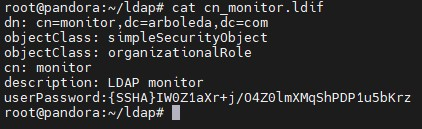
and run the following command to add the supervisory user:
ldapadd -x -D <ADMIN_DISTINGUISHED_NAME> -w <ADMIN_PASSWORD> -f cn_monitor.ldifCreate a database_monitor.ldif file
dn: olcDatabase={2}Monitor,cn=config
objectClass: olcDatabaseConfig
objectClass: olcMonitorConfig
olcDatabase: {2}Monitor
olcAccess: {0}to dn.subtree="cn=Monitor" by dn.base="<NEW_MONITORING_USER_DISTINGUISHED_NAME>" read by * none
and run the following command to configure the monitoring database:
ldapadd -Y EXTERNAL -H ldapi:/// -f database_monitor.ldifView of all commands used

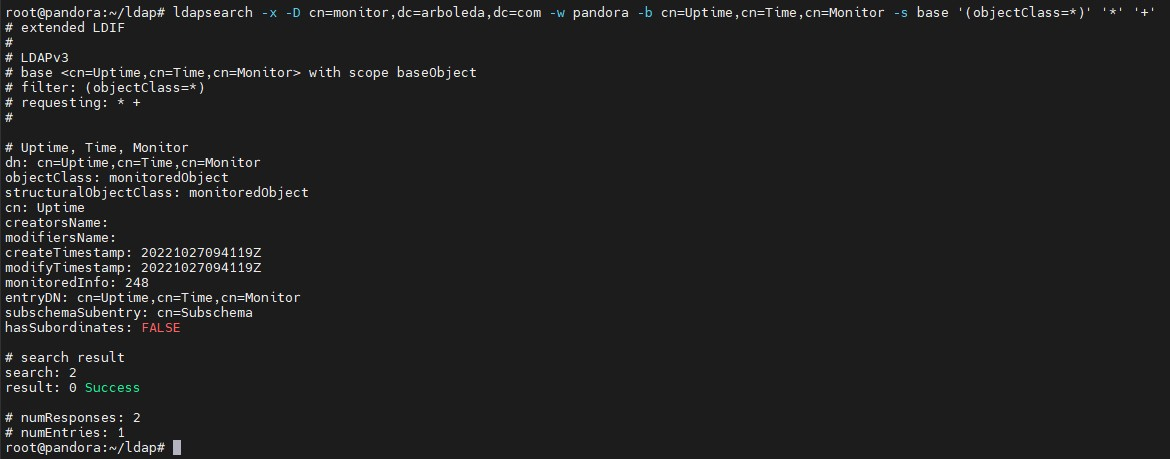
To test the monitoring module, run the following command:
ldapsearch -x -D <NEW_MONITORING_USER_DISTINGUISHED_NAME> -w <MONITOR_USER_PASSWORD> -b cn=Uptime,cn=Time,cn=Monitor -s base '(objectClass=*)' '*' '+'