
2. Basic Architecture
Pandora FMS serversServers
The Servers are integrated into a single application, usuallygenerically called PandoraPFMS Server,Server, which is a multithreadedmulti-threaded application that concurrently executes different instances or specialized Pandora FMS servers at the same time.servers. These are the elements in charge of performing the existing checks,checks as they verify and change their status accordingbased toon the results obtained. They are also inresponsible charge offor triggering the alerts that are established to control data status.
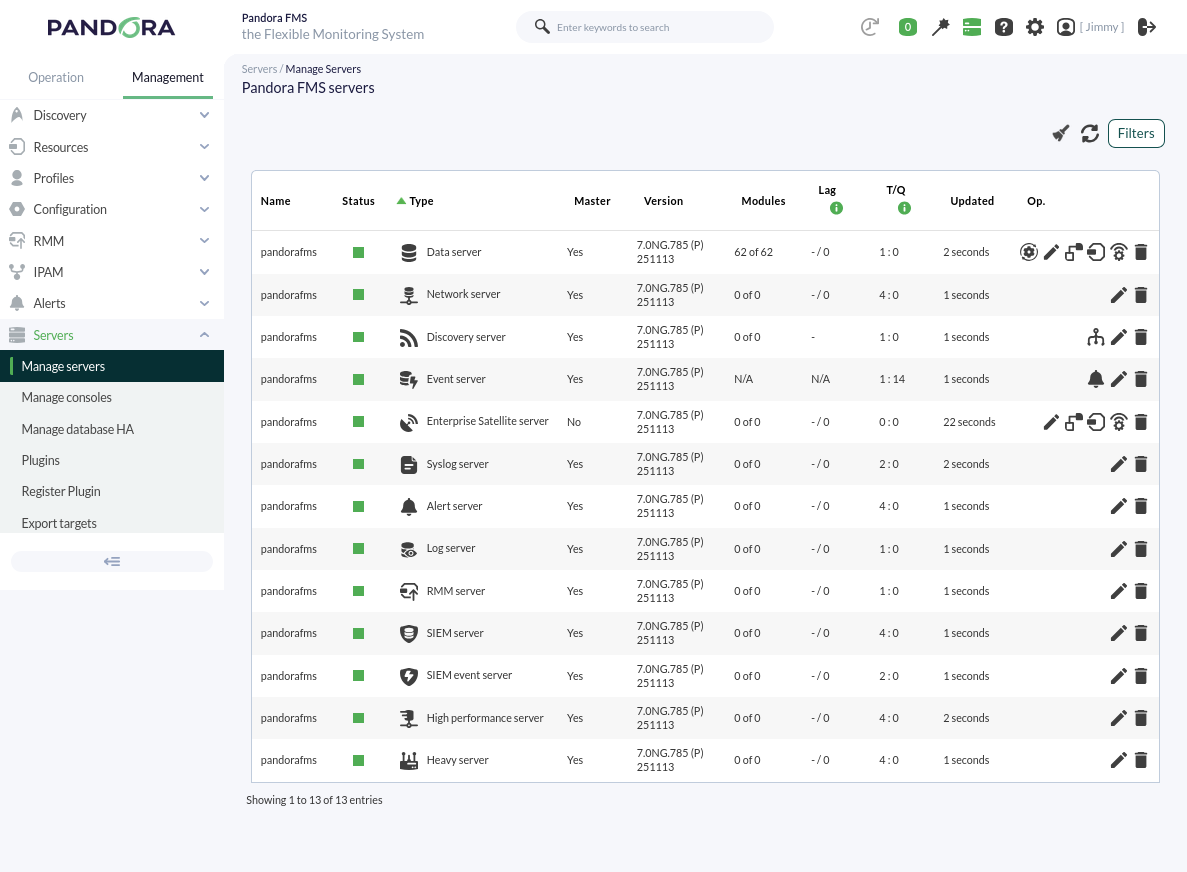
Pandora FMS automatically manages the status of each server, its load levellevel, and other parameters. UsersThe user can monitor the status of each server through the server status section of the Web Console.Console:
The
Basic basic servers are the following ones:Servers
Open
Data server:Server (enabled by default): It is inresponsible charge offor processing the information sent by the EndPoints (in XML format),; the server processes it and stores the result in the database. It is also inresponsible charge offor generating alerts and events accordingbased toon thisthat data.data, the latter being of critical importance. To enable the server, it is necessary to configure the line dataserver 1 in the file line/etc/pandora/pandora_server.conf file..
In the remote configuration (Web Console) of the Data Server, the rest of the servers can be visually activated. It also has the extra option of viewing and editing the file /etc/pandora/pandora_server.conf.
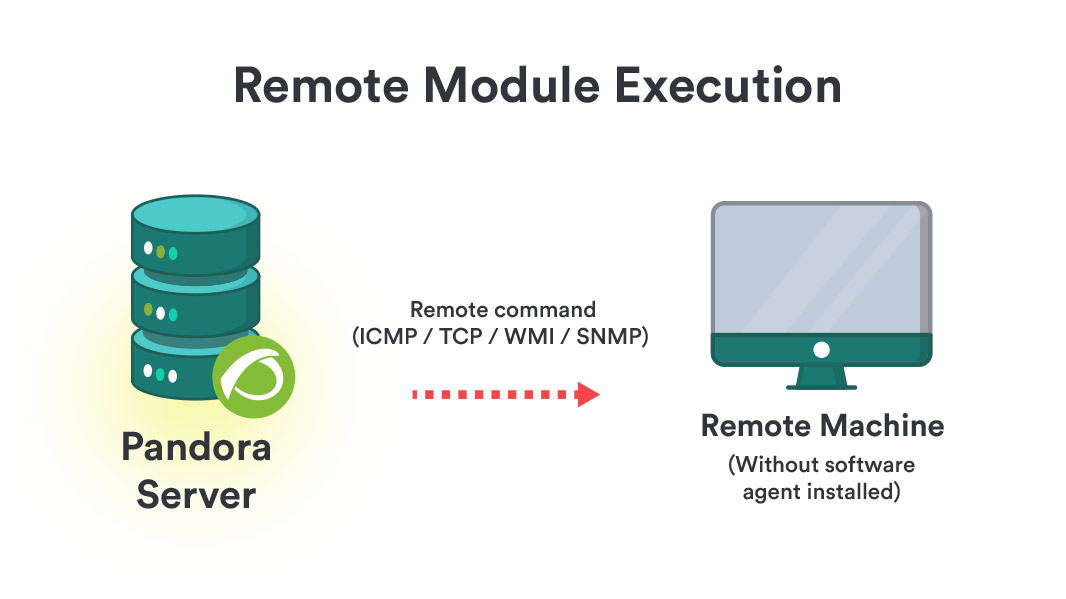
Network server:Server (enabled by default): This server executesperforms remote monitoring tasks through the network, itwhich couldcan be ICMP checks, TCP requestsrequests, and SNMP requests. The server and the remote machines must have communication to executeperform these checks. To enable the server, it is necessary to configure the networkserver 1 line in the /etc/pandora/pandora_server.conf file.
Discovery server: It allows to explore networks to detect computers and apply monitoring templates to them quickly. It also allows quick deploymentAs of specificversion monitoring785, ofthis databases,server cloud systems and virtual environments. Italso includes the necessaryfollowing tools to discover or import devices and equipment in the network. To enable the server, it is necessary to configure the discoveryserver 1 line in the /etc/pandora/pandora_server.conf file.tasks:
Plugin
server: It allows complex remote monitoring, since it runs complex checks from Pandora FMS server by means of custom scripts. It is a centralized process, integrated into Pandora FMS interface. This server allows advanced users to define their own checks, developed by themselves, and integrate them into the application so that they can be used easily from Pandora FMS. To enable the server it is necessary to configure the pluginserver 1 line in the file /etc/pandora/pandora_server.conf.
Prediction server: This server predicts
WMI server: This server allows remote monitoring of WindowsWindows® systems using the WMIWMI® protocol. This is done by executing WMI sentences,statements, remote sentencesstatements supportedcompatible bywith any Windows system with WMI enabled that allow to obtainobtaining Hardware and Software information.
Inventory server: The inventory server obtains and displays system inventory information: installed software, hardware item model, hard disks, services running on the system, etc. This information can be obtained both remotely (from Pandora server) and locally (through EndPoints). It does it by using the same monitoring agents or remotely, with extensions developed by the user, both for Windows and Unix. To enable the server it is necessary to configure the inventoryserver 1 line in the /etc/pandora/pandora_server.conf file.
Web server: It is used to perform fullcomplete web checks, from the user identification process,process to parameterpassing transferparameters throughvia a form,forms, content checking, menu navigation, etc. It allows performingfor availability checks (workingworks or does not working)work) and obtaining latency times (in seconds) of the complete browsing experience, including resources associated towith the page (images, full texts, etc)etc.).
Discovery Server (enabled by default): Allows exploring networks to detect equipment and apply monitoring templates quickly. It isalso basedallows the rapid deployment of specific monitoring for databases, cloud systems, and virtual environments through DISCO packages. It includes the necessary tools to discover or import devices and equipment on Goliaththe (Web audit server), which is OpenSource.network. To enable the server, it is necessary to configure the webserverline discoveryserver 1 in the file line/etc/pandora/pandora_server.conf file..
SNMPHeavy Trapsserver Console:(enabled by default): performs complex checks remotely through customized scripts, managed centrally. This server usesallows an advanced user to define their own checks, developed by themselves, and integrate them into the standardapplication trapso collectionthey systemcan daemon,be snmptrapd.used Thisconveniently daemon receives SNMP traps andfrom Pandora FMSFMS. SNMPIt consolealso processeshas andseveral storesother themimportant infunctions:
- It is
alsoresponsibleinforchargemanaging monitored devices through NCM. - If data export has been enabled and configured, basic information can be forwarded to another higher-level PFMS Server so that the latter has concentrated information to be analyzed and visualized (without altering the operation of
launchingthe lower-level PFMS Server). - Obtains and visualizes system inventory information: installed software, hardware element models, data storage devices, services running on the
alertssystem,associatedetc.toThisSNMPinformationtrapscanwerebedefined.obtainedTobothenableremotely (from theserver,PFMSconfigureServer) and locally (via thesnmpconsoleEndPoints).1Itlinedoesinthis with extensions developed by the/etc/pandora/pandora_server.confuser,file.for both MS Windows® and Linux®.
EnterpriseHigh Performance Server
Enterprise(enabled ICMPby server:default) This server multiplieshandles the efficiencyworkloads of ICMP checks.and ItSNMP useschecks:
- ICMP: Uses the nmap binary version 5.5 or later that is installed with Pandora
FMSFMS.EnterpriseTheyversion.makeIt uses nmap version 5.5. or higher. To enableup theserver,basic monitoring checks such as connectivity and response time; by default, when creating an agent via the Web Console, itiscomesnecessarywithtotwoconfigurepre-configured modules for this. - SNMP: Uses the
inventoryserver 1 line in the /etc/pandora/pandora_server.conf file.Enterprise SNMP server:braa binary which is also installed with Pandora FMS. Thisserver increases the efficiency of SNMP checks. It uses thebraa binaryinstalled with the Enterprise version of Pandora FMS. The braa binary, used by the enterprise SNMP serveris locatedatin/usr/bin/braaby default. It is compatible with SNMPV1v1 and v2.SNMP v3 checks will be performed by the network server.It requiresforthenetworkNetworkserverServer tooperatebesimultaneously,operating simultaneously to be able to translate the received OIDs.
Syslog server: This component allows Pandora FMS to analyze the syslog of the machine where it is located, analyzing its content and storing the references in the corresponding ElasticSearch server. The main advantage of the syslog server is to complement log merging. With the support of the exporting features of the syslog server of Linux® and Unix® environments, it allows log consultation regardless of the source, searching in a single common point (Pandora FMS console log viewer). To enable the server, it is necessary to configure the syslogserver 1 line in the /etc/pandora/pandora_server.conf file.
You may set the number of threads that the processes will use in the instance where Pandora FMS is installed can be set for each server.
Pandora FMS webWeb consoleConsole
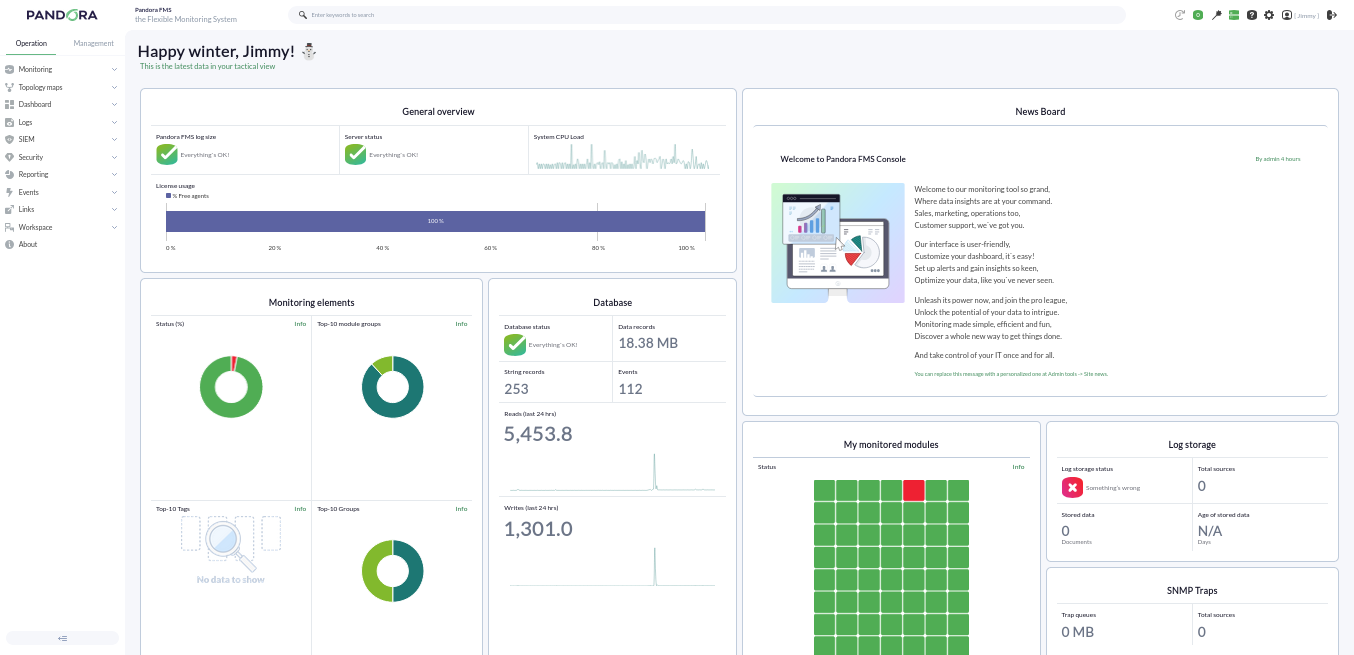
It is the Pandora FMS user interface of Pandora FMS,interface, it allows tomonitoring controlthe Agentstatus status,of seethe Agents, viewing statistical information, generateand generating graphs and data tables. It is also ablecapable toof generategenerating reports and centrally definedefining new agents, modules, alertsalerts, and createcreating other users and profiles.
Pandora FMS databaseDatabase
Pandora FMS uses a MySQL database in whichwhere all the information received in real real-time is stored, normalizing all the data from the differentvarious sourcessource origins (server, agents...agents, etc.).
Currently Pandora FMS only supports MySQL, MariaDBMariaDB, and Percona.
Agents
In Pandora FMS there are two types of agents and they can runexecute remote and local modulestype: modules:
- Remote Agent:
Console,Console; it usually containsremoteremote-type modules that arerunexecuted by those servers that obtain information remotely, such as thenetworkNetworkserver.Server.
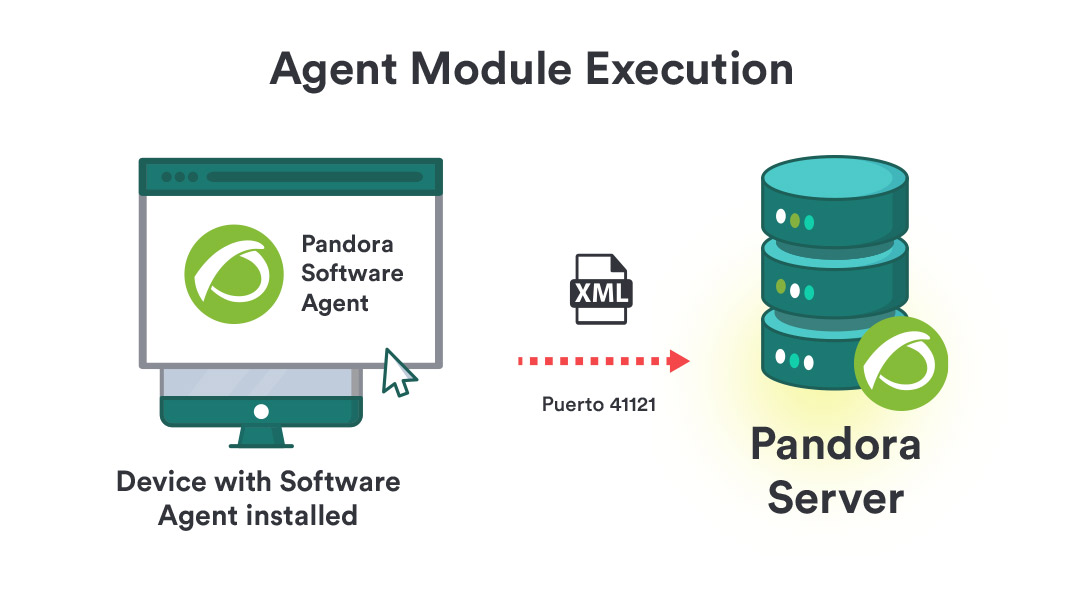
- EndPoint: It is
asoftware installed on the equipment to be monitored locally,retrievingextracting information from thecomputerequipmentitself,itself; it allows monitoring machine resources (CPU, RAM, disks...) andtheinstalled applications (MySQL, Apache, JBoss). Alltheinformation collected by the EndPoints is sent to the server in XML formatthroughvia the Tentacle protocol (SSH or FTPiscanallowed)be used) at apredetermineddefault interval of 5 minutes (300 seconds).from their respective agent.
Overall,
Generally, the monitoring of servers and computer monitoringequipment will be carried out with EndPointsEndPoints, while the monitoring of network equipment monitoring will be done remotely without installingthe installation of any software.
Topologies, overviewsSchemas, and monitoringMonitoring modulesModels
IdeallyIdeally, all monitored computersequipment mustshould behave connectedcommunication towith the Pandora FMS server, but sometimesoccasionally youwe will findencounter cases inwhere which youwe do not have totalfull communication between the different elements youwe wishwant to monitor,monitor. se weWe are going to mention different situations youwe may face and how to solvefix them.
Accessible networksNetworks
AccessibleNetworknetworkaccessible for centralized remote monitoring: The Pandora FMS server has communication with allnetworkmachinesmachines.on the network.AccessibleNetworknetworkaccessible forAgent-Agent and EndPoint-based monitoring: It is the EndPointsare thosethat have communication with the Pandora FMS server.
Hard-to-accessNetworks networkswith Access Difficulty
- Remote network not reachable by Pandora FMS remote checks:
It usesUse the broker agent mode.
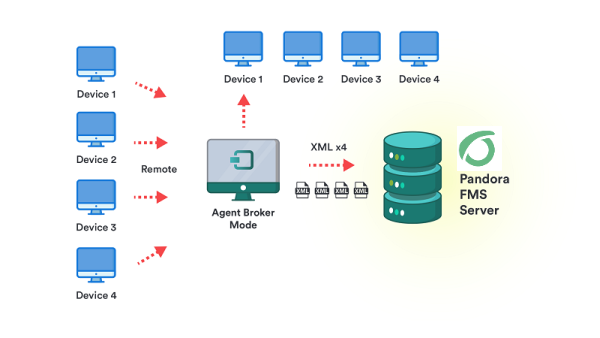
- EndPoints that do not have access to the Pandora FMS server:
casecase,it usesuse the proxy feature of the EndPoints or a SatelliteserverServer asaan EndPoint proxy.
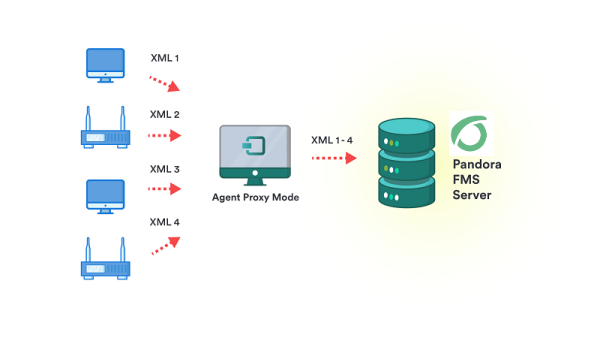
Different networks to monitor remotely with the server:
database can be used.You may use theSatellite Server or several different Pandora FMS servers connected to the samedatabase.
DidAre youthe results explained in the chapter not achievebeing achieved? Access the expected results? Go to help or support sections.section