
Welcome to Pandora FMS Community › Forums › Community support › Checking a domain availability
-
Checking a domain availability
Posted by zarzuelo on December 14, 2011 at 12:59Hi again!
I had a new idea, imagine that you want to buy a domain that is busy but is near to expire. Could be great to check the availability of the domain.
You can do it in many ways with Pandora FMS, I will show one of them using Goliat, if you know any more methods, show us 🙂
There is a Website that offers whois service and the domain can be passed through the URL. It’s http://www.domaintools.com.
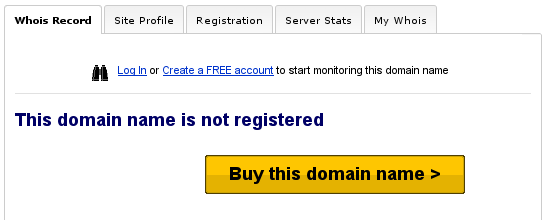
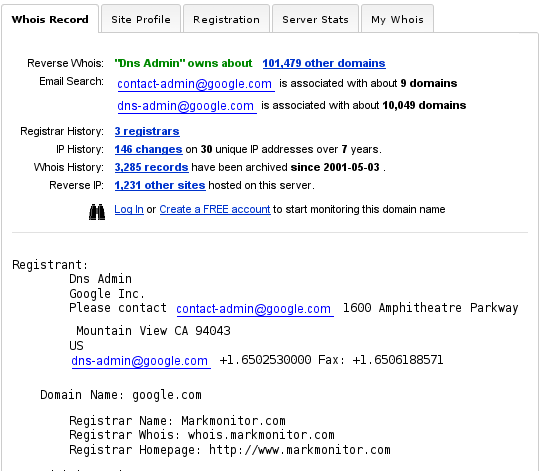
We’re going to check to domains, only one of them is registered.
Registered domain: http://google.com
Unregistered domain: http://iiinnnvvveeennnttteeeddd.comWe pass the domains to the whois tool with the following result:
Registered domain: http://whois.domaintools.com/google.com
Unregistered domain: http://whois.domaintools.com/iiinnnvvveeennnttteeeddd.com
We can parse the string: “This domain name is not registered” in a Web server module and when the domain will be free, the module turn from critical to normal status. Then we can configure an alarm that send us an email, for example.
The process to create this module is the following:
- Create a “Web server module” of the type “Remote HTTP module to check server response”
- Fill the Web checks box with the following data:
task_begin
get http://whois.domaintools.com/iiinnnvvveeennnttteeeddd.com
check_string This domain name is not registered
task_endChanging the domain for that you want to monitor.
Simple!
This is not the best method because we depend on an external tool, and if domaintools.com change their system, our module could fail.
Any better idea? 🙂
More info about Goliat: http://www.openideas.info/wiki/index.php?title=Goliat
 BrookDle replied 13 years, 2 months ago 4 Members · 6 Replies
 -
6 Replies
-

-
::
Hi Zarzuelo,
You can use whoiscl. a utility for command line in windows. ( There are an utility for windows too )
http://www.nirsoft.net/utils/whoiscl.html
Only you have to do is to parse the result with the grep command.
————————————————————————————-
C:Tempwhoiscl>WhoisCL.exe -r google.com
WHOIS Server: whois.markmonitor.com
Registrant:
Dns Admin
Google Inc.
Please contact [email protected] 1600 Amphitheatre Parkway
Mountain View CA 94043
US
[email protected] +1.6502530000 Fax: +1.6506188571Domain Name: google.com
Registrar Name: Markmonitor.com
Registrar Whois: whois.markmonitor.com
Registrar Homepage: http://www.markmonitor.comAdministrative Contact:
DNS Admin
Google Inc.
1600 Amphitheatre Parkway
Mountain View CA 94043
US
[email protected] +1.6506234000 Fax: +1.6506188571
Technical Contact, Zone Contact:
DNS Admin
Google Inc.
2400 E. Bayshore Pkwy
Mountain View CA 94043
US
[email protected] +1.6503300100 Fax: +1.6506181499Created on…………..: 1997-09-15.
Expires on…………..: 2020-09-13.
Record last updated on..: 2011-07-20.Domain servers in listed order:
ns4.google.com
ns3.google.com
ns2.google.com
ns1.google.com -
::
Hi Zarzuelo,
You can use whoiscl. a utility for command line in windows. ( There are an utility for windows too )
http://www.nirsoft.net/utils/whoiscl.html
Only you have to do is to parse the result with the grep command.
————————————————————————————-
C:Tempwhoiscl>WhoisCL.exe -r google.com
Yeah! This is a great method to do it from Windows. Could be used in Pandora FMS from configuring a Win Agent Plugin, in example.
Thank you for the contribution 🙂
-
::
Nice idea zarzuelo,
It’s informative.Here i want to share my own experience.
Nowadays there are lot of sites available to check the availability of domain name for free.Recently i found this site Whoisxy.com through Google search
Here i checked the domain availability for toyshop.com
My results are,
Whois Search results for Domain Name TOYSHOP.COMWHOIS Server: whois.moniker.com
Domain Name: TOYSHOP.COM
Registrar: MONIKER
Registrant [4462]:
Internet Admin (not for sale) [email protected]
Reflex Publishing Inc.
301 W. Platt Street #510
Tampa
FL
33606
US
Administrative Contact [4462]:
Internet Admin (not for sale) [email protected]
Reflex Publishing Inc.
301 W. Platt Street #510
Tampa
FL
33606
US
Phone: +1.8133544500
Billing Contact [4462]:
Internet Admin (not for sale) [email protected]
Reflex Publishing Inc.
301 W. Platt Street #510
Tampa
FL
33606
US
Phone: +1.8133544500
Technical Contact [4462]:
Internet Admin (not for sale) [email protected]
Reflex Publishing Inc.
301 W. Platt Street #510
Tampa
FL
33606
US
Phone: +1.8133544500
Domain servers in listed order:
NS1.DIGIMEDIA.COM
NS2.DIGIMEDIA.COM
NS3.DIGIMEDIA.COM
Record created on: 1999-03-22 00:00:00.0
Database last updated on: 2012-11-26 18:51:10.307
Domain Expires on: 2020-03-22 00:00:00.0
I like their services. -
-
::
There are many site available online for checking the domain availability, You can use http://www.checkdomain.com, instantdomainsearch.com , whois.net etc.


Log in to reply.