
i will sum up my current situation i followed your post, which made it impossible to do even pandoraagent --test-ssh. Prolly coz it missed one or several rights (chown/chmod) to receive the message. after that i tried (with tips of mostly steve-o, marostegui and slerena via IRC) to restart sshd, which didnt went well, to restart (reinstall) cygwin) but in the end it still didnt worked well... I have the feeling that sshd doesnt want to start, still coz of missing several rights. I dont know ..peep.. about ssh nor cygwin.
Installation problems (Server on Windows) -- NOT SUPPORTED
Rob · 16 sept 2006, 16:17 · 23 mensajes · 119 visitas
Following the instruction I gave you, you'll have: [code:1]bash-3.1$ pwd /etc bash-3.1$ ls -la ssh* -rwxrwxrwx 1 SYSTEM mkpasswd 1353 Sep 21 18:23 ssh_config -rw------- 1 SYSTEM mkpasswd 668 Sep 6 16:32 ssh_host_dsa_key -rw------- 1 SYSTEM mkpasswd 606 Sep 6 16:32 ssh_host_dsa_key.pub -rw------- 1 SYSTEM mkpasswd 979 Sep 6 16:32 ssh_host_key -rw------- 1 SYSTEM mkpasswd 643 Sep 6 16:32 ssh_host_key.pub -rw------- 1 SYSTEM mkpasswd 1675 Sep 6 16:32 ssh_host_rsa_key -rw------- 1 SYSTEM mkpasswd 398 Sep 6 16:32 ssh_host_rsa_key.pub -rw-rw-rw- 1 SYSTEM mkpasswd 2866 Sep 26 15:19 sshd_config bash-3.1$ cd /var bash-3.1$ ls -la bash-3.1$ ls -la total 0 drwxrwxrwx+ 8 raul Users 0 Sep 6 16:42 . drwxrwxrwx+ 11 raul Users 0 Sep 26 15:50 .. drwxrwxrwx+ 3 raul Users 0 Jul 19 12:00 cache drwxr-xr-x+ 2 SYSTEM mkpasswd 0 Sep 6 16:42 empty drwxrwxrwx+ 3 raul Users 0 Jul 19 12:00 lib drwxrwxrwx+ 2 raul Users 0 Sep 26 15:58 log drwxrwxrwx+ 2 raul Users 0 Sep 26 18:01 run drwxrwxrwx+ 2 raul Users 0 Jul 19 11:52 tmp bash-3.1$ ls -la empty/ total 0 drwxr-xr-x+ 2 SYSTEM mkpasswd 0 Sep 6 16:42 . drwxrwxrwx+ 8 raul Users 0 Sep 6 16:42 .. bash-3.1$ ls -la log total 517 drwxrwxrwx+ 2 raul Users 0 Sep 26 15:58 . drwxrwxrwx+ 8 raul Users 0 Sep 6 16:42 .. -rw-rw-rw- 1 raul mkpasswd 0 Sep 6 16:32 lastlog -rwxrwxrwx+ 1 raul Users 527828 Sep 13 12:47 setup.log.full -rw-r--r-- 1 SYSTEM Administrators 110 Sep 26 17:02 sshd.log bash-3.1$ cd /etc bash-3.1$ tail -1 passwd pandora:unused_by_nt/2000/xp:1:513:pandora_demo,U-EDDIEpandora,S-1-5-21-2157 488890-195784573-2809259899-1021:/home/pandora:/bin/bash bash-3.1$ cd /home bash-3.1$ ls -la total 0 drwxrwxrwx+ 4 raul mkpasswd 0 Sep 26 15:28 . drwxrwxrwx+ 11 raul Users 0 Sep 26 15:50 .. drwxrwxrwx+ 3 raul mkpasswd 0 Sep 21 18:06 raul drwxrwxrwx+ 3 pandora mkpasswd 0 Sep 26 15:28 pandora bash-3.1$ cd pandora bash-3.1$ ls -la total 0 drwxrwxrwx+ 3 pandora mkpasswd 0 Sep 26 15:28 . drwxrwxrwx+ 4 raul mkpasswd 0 Sep 26 15:28 .. drwx------+ 2 pandora mkpasswd 0 Sep 26 17:01 .ssh bash-3.1$ cd .ssh/ bash: cd: .ssh/: Permission denied bash-3.1$ chmod 777 .ssh bash-3.1$ ls -la total 0 drwxrwxrwx+ 3 pandora mkpasswd 0 Sep 26 15:28 . drwxrwxrwx+ 4 raul mkpasswd 0 Sep 26 15:28 .. drwxrwxrwx+ 2 pandora mkpasswd 0 Sep 26 17:01 .ssh bash-3.1$ cd .ssh/ bash-3.1$ ls -la total 9 drwxrwxrwx+ 2 pandora mkpasswd 0 Sep 26 17:01 . drwxrwxrwx+ 3 pandora mkpasswd 0 Sep 26 15:28 .. -rw------- 1 pandora mkpasswd 606 Sep 26 13:33 authorized_keys bash-3.1$ cd .. bash-3.1$ chmod 700 .ssh bash-3.1$ ls -la total 0 drwxrwxrwx+ 3 pandora mkpasswd 0 Sep 26 15:28 . drwxrwxrwx+ 4 u094596 mkpasswd 0 Sep 26 15:28 .. drwx------+ 2 pandora mkpasswd 0 Sep 26 17:01 .ssh At services Control Panel, the Cygwin Service had to be inited as Local System Account. Verify it: regedit go to HKEY_LOCAL_MACHINESYSTEMCurrentControlSetServicessshd ObjectName LocalSystem go to HKEY_LOCAL_MACHINESYSTEMCurrentControlSetServicessshdParametersEnvironment You'll see CYGWIN binmode ntsec tty Let's go to MSDOS: As you can see, I don't have anything at the Pandora user folder: [code:1] C:Documents and Settingspandora> ls -la total 0 drwxrwxrwx 1 user group 0 Sep 26 15:30 . drwxrwxrwx 1 user group 0 Sep 28 18:43 .. Init service: [code:1] net start sshd The CYGWIN sshd service is starting. The CYGWIN sshd service was started successfully. The Pandora Agent: [code:1] C:SVNpandoratrunkpandora_agentswin32bin>dir El volumen de la unidad C es System El número de serie del volumen es: 3595-2F52 Directorio de C:SVNpandoratrunkpandora_agentswin32bin 28/09/2006 19:25
. 28/09/2006 19:25
.. 21/09/2006 18:00
key 06/07/2006 15:55 831.488 libeay32.dll 20/09/2006 15:49 5.432.664 PandoraAgent.exe 28/09/2006 19:25 2.307 pandora_agent.conf 27/09/2006 20:06 2.301 pandora_agent.old 20/09/2006 19:58 1.854 README 06/07/2006 15:55
util 06/07/2006 15:55 74.752 zlib1.dll 6 archivos 6.345.366 bytes 4 dirs 30.851.489.792 bytes libres C:SVNpandoratrunkpandora_agentswin32bin>cd key C:SVNpandoratrunkpandora_agentswin32binkey>dir El volumen de la unidad C es System El número de serie del volumen es: 3595-2F52 Directorio de C:SVNpandoratrunkpandora_agentswin32binkey 21/09/2006 18:00
. 21/09/2006 18:00
.. 26/09/2006 13:33 668 id_dsa 26/09/2006 13:33 606 id_dsa.pub 07/07/2006 09:02 0 PUT_SSH_KEYS_HERE 3 archivos 1.274 bytes 2 dirs 30.851.489.792 bytes libres C:SVNpandoratrunkpandora_agentswin32binkey The id_dsa.pub file is the same as the /home/pandora/.ssh/authorized_keys file With this post, as a resume, I finish the CYGWIN-SSHD installation thread. Raul
Well, after reading more mails and POSTs about the question. I'll try to write step by step the solution of adding the keys (it's written as a FAQ, http://pandora.sourceforge.net/en/print.php?sec=docs/faq\_answers#q23 but it looks like nobody read it!) - First, use puttygen.exe (available at the .util folder of your pandora_agent_for_windows directory) - Generate keys, SSH-2_DSA:
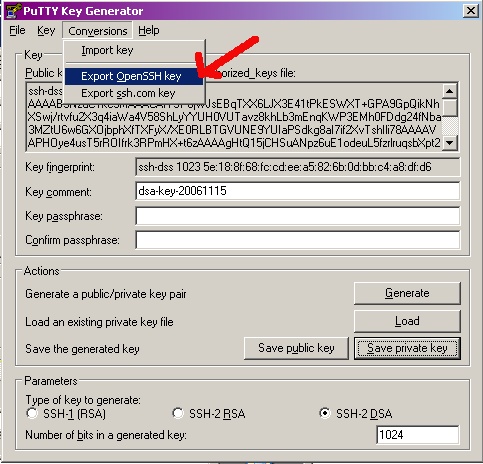
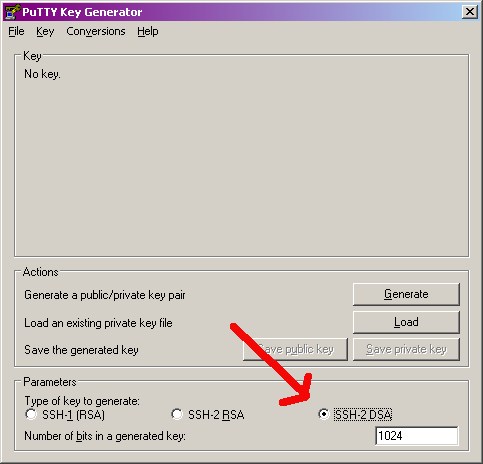 - Press Generate :-D - Export key to OpenSSH key (Cygwin uses a port of OpenSSH):
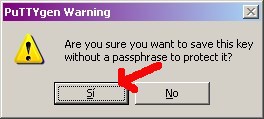
 - We have no chosen password, so press YES:
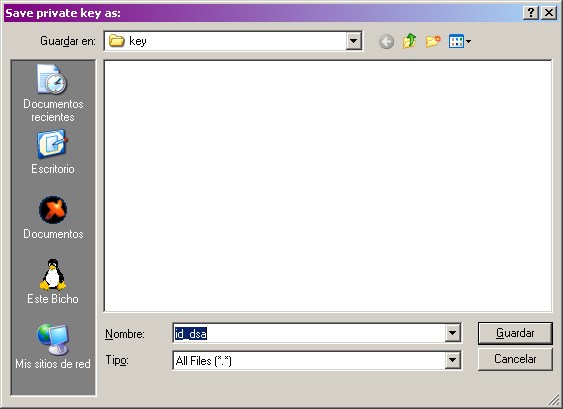
 - Save it as c:pandora_agentkeysid_dsa:
 - Now let's copy the public key to clipboard:
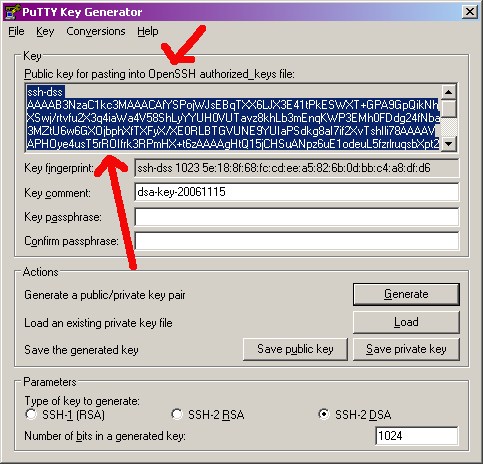 - and paste it as c:pandora_agentkeysid_dsa.pub, after that we'll copy add it at the /home/pandora/.ssh/authorized_keys file:
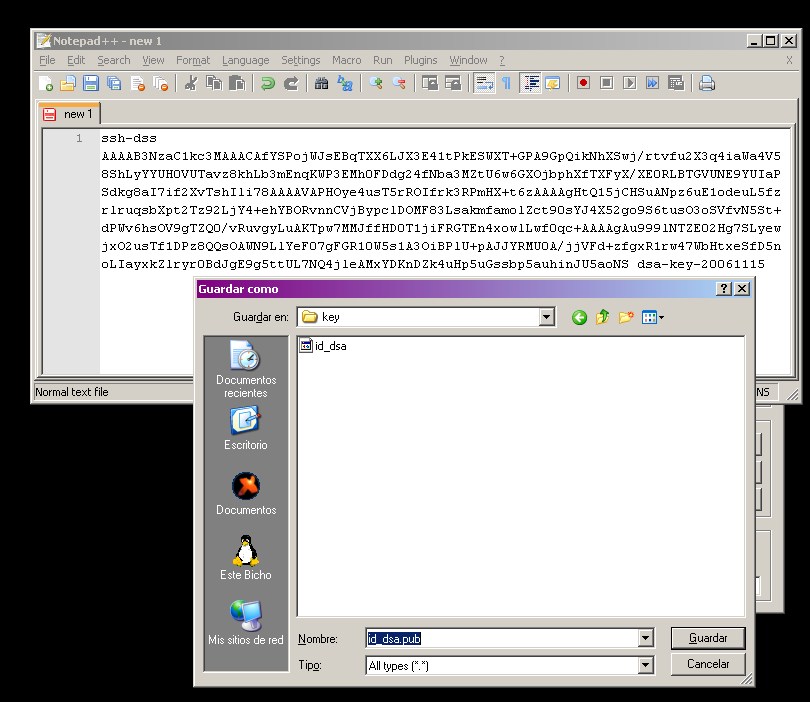 [code:1] cat /c/pandora_agent/keys/id_dsa.pub > /home/pandora/.ssh/authorized_keys Please, review permissions, at the end, you should have: [code:1] drwx------+ pandora mkpasswd .ssh -rw------- pandora mkpasswd authorized_keys NOTE The private key, should be something like: [code:1]-----BEGIN DSA PRIVATE KEY----- MIIBugIBAAKBgQDTFcDxg..... ...... -----END DSA PRIVATE KEY----- and public key something like [code:1]ssh-dss AAAAB3NzaC1k......... Raúl
Entra en tu cuenta para publicar.