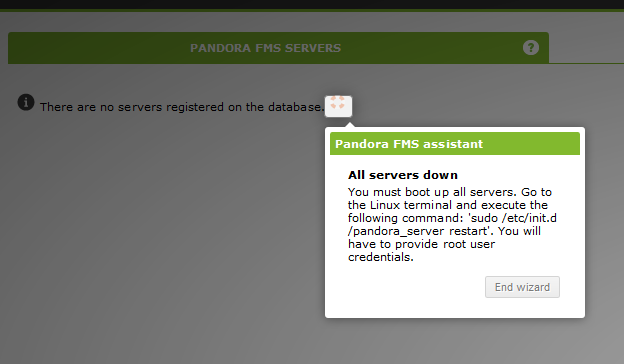
Hello everyone, I'm having the same looking issue as Eugene. I cannot see any server on Pandora FMS Servers list. (see attached screenshot) However, I've managed to start server Pandora FMS pro tip: You have to update database user password in /etc/pandora/pandora_server.conf with password displayed to you during installation.
:~$ sudo /etc/init.d/pandora_server restart
Stopping Pandora FMS Server

Pandora FMS Server 7.0NG.732 Build 190227 Copyright (c) 2004-2018 Artica ST
This program is OpenSource, licensed under the terms of GPL License version 2.
You can download latest versions and documentation at official web page.

  Backgrounding Pandora FMS Server process.


Pandora FMS Server is now running with PID 30793
- I include log about started server
2019-03-18 13:24:57 pandora [V1] Launching 7.0NG.732 190227
2019-03-18 13:24:57 pandora [V1] Config options: Logfile at /var/log/pandora/pandora_server.log, Basepath is /etc/pandora/pandora_server.conf, Checksum is 0, Master is 1, SNMP Console is 0, Server Threshold at 5 sec, verbosity at 3, Alert Threshold at 60, ServerName is 'pandora'
2019-03-18 13:24:57 pandora [V1]   Pandora FMS Enterprise module not available.

2019-03-18 13:24:57 pandora [V1]  [E] wmic not found. Pandora FMS WMI Server needs a DCOM/WMI client.
2019-03-18 13:24:57 pandora [V1]   Netflow daemon disabled.

2019-03-18 13:24:57 pandora [V3] Warmup mode for unknown modules started.
2019-03-18 13:24:58 pandora [V1] Server pandora is the current master.
Any idea what might be causing server to be unavailable? Cheers
[
](//pandorafms.com/community/media/forum/11392/28013=2745-2019-03-18-15_04_15-Pandora-FMS-the-Flexible-Monitoring-System-Firefox-Developer-Edition.png)


