Pandora FMS Community

Windows Server Installation

llartey · 3 oct 2017, 12:39 · 4 mensajes · 55 visitas

  1. Inicio del debate

    Hi guys, I am having trouble installing pandorafms server for windows server 2012. I keep getting this error message upon completion of installation: https://ibb.co/gcH78w. This does not allow me to access http://localhost/pandora\_console/index.php. Thanks in advance

    [

    ](//pandorafms.com/community/media/forum/8704/21565=1123-pandorafms-error.png)

  2. Hi llartey, These are the dependencies you need in Windows Visual C ++. For access the Pandora console you need to start the Ngix server which is the web server. Best regards, vic

  3. Hi llartey, These are the dependencies you need in Windows Visual C ++. For access the Pandora console you need to start the Ngix server which is the web server. Best regards, vic

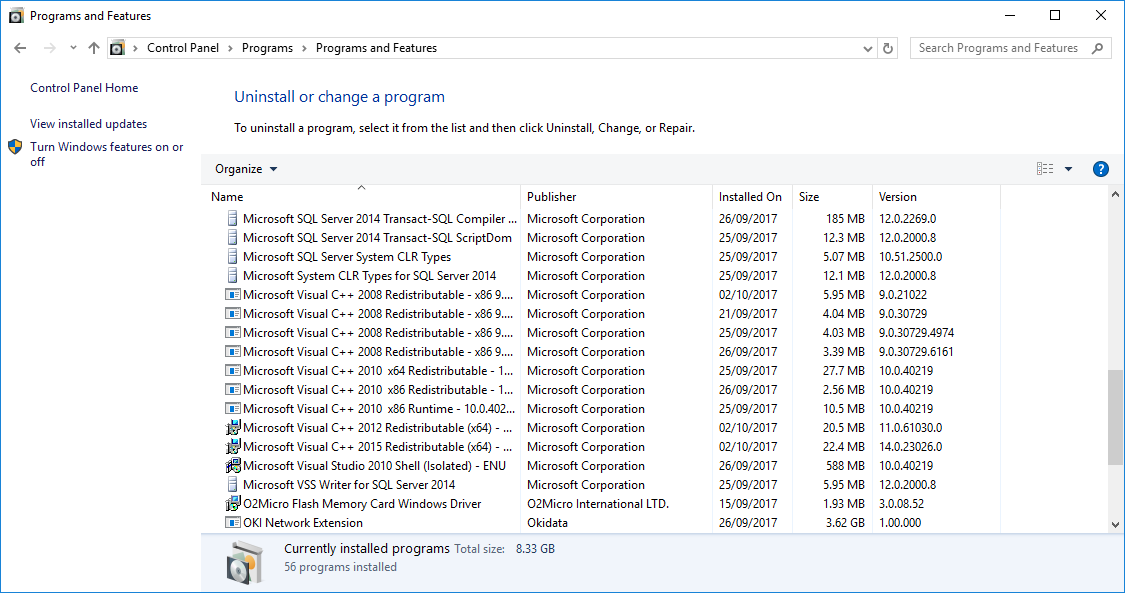
    Hey Vic, I forgot to mention that I have downloaded them(attached), I know you don't need all of them but as the error message still came after i installed c++ 2012 and reinstalled pandora fms. I then decided to install all of them to make sure. What I want pandorafms to do for me is to monitor activity on my windows server 2012 system and then I am able to look and analyse the data from my laptop. Is this the right way I am going about it??

    [
    ](//pandorafms.com/community/media/forum/8704/21567=1124-pandorafms-error2.png)

  4. Hi llartey, Yes, the message always appears at the end of the installation. Restart the Nginx server and install an agent on your laptop. Redirect the agent of the laptop to the Pandora server Access your browser and insert in the URL the ip of your pandora server. Example: http://xx.xx.xx.xx/pandora\_console/ Best regards, vic.

Entra en tu cuenta para publicar.