Pandora FMS Community

monitoring filesize on a windows server

exact-abacus · 20 ene 2016, 23:24 · 7 mensajes · 55 visitas

  1. Inicio del debate

    Hello, We need to monitor the size of a specific file on a Windows server.  the file is a SQL server log file.  the path to the file we need to monitor is E:Program FilesMicrosoft SQL ServerData3exnet_fchoice_live_log.ldf Is there a way to do this? regards spencer

  2. We have made some progress. Using WMIExplorer2.0 we have inserted this WQL Query select FileSize from CIM_DataFile where name="E:\Program Files\Microsoft SQL Server\Data\3exnet_fchoice_live_log.ldf" Gives us the filesize in bytes. However when we use this in PandoraFMS we cannot get the module to initialise. Forgot to mention We are using PandoraFMS 6.0 on ubuntu 14.04

  3. Hello exact abacus, Do you have WMI activated at the Windows machine? I guess that you're creating the WMI module through "WMI server module", aren't you? (just checking, that's the way to so at Open version). I'm attaching a screenshot of the process, remember to fill the gaps, specially the user and password ones! Hope this helps, let me know if you're not able to solve it. Regards, Emilio.

    [

    ](//pandorafms.com/community/media/forum/0/19185=919-800px-Otro.jpg)

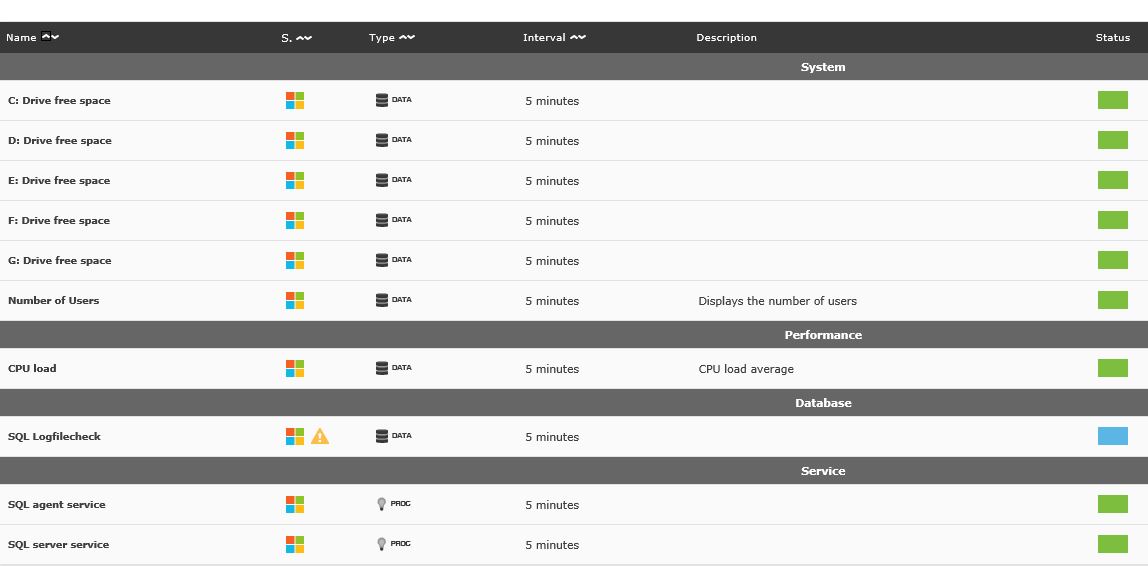
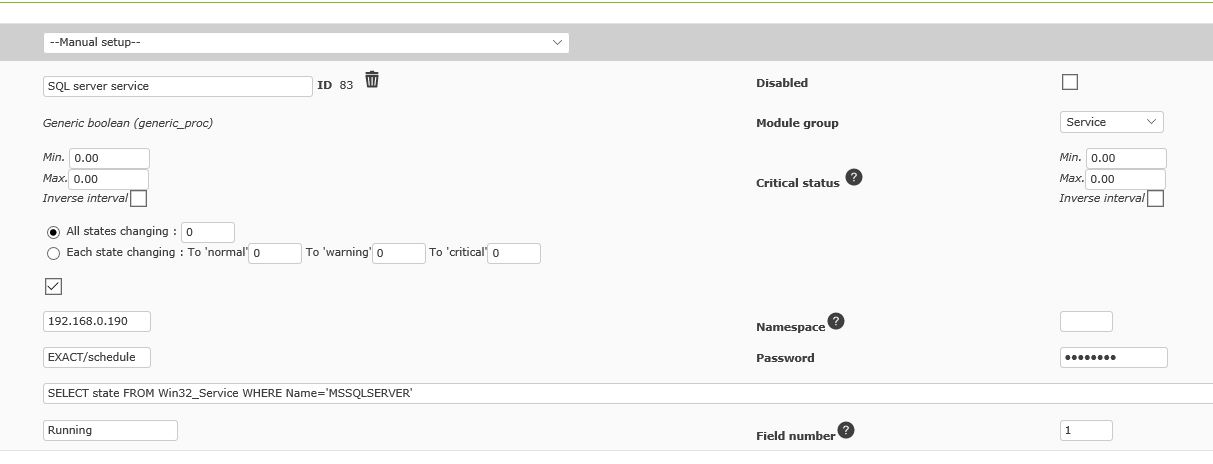
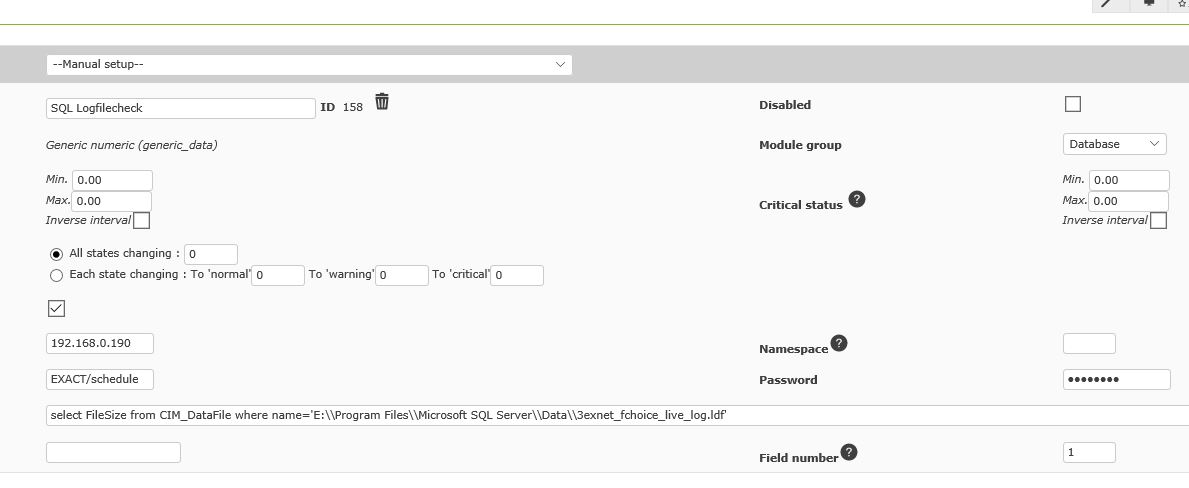
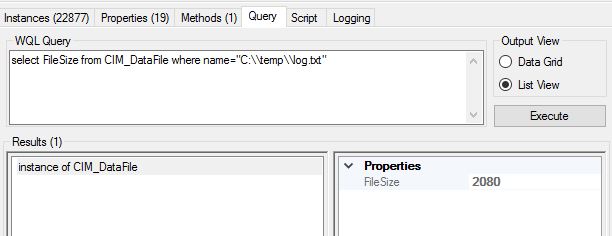
  4. Hello Emilio, Yes we have WMI enabled on the Windows machine.  We have a number of other WMI modules working on the same server. ( screenshot1 ) A specific example is the SQL server service  (screenshot2 ) We setup all of these modules using the WMI Wizard. This is how we have the filesize check setup  ( screenshot3 ) If we issue a wmic command from command line we get an error when trying to retrieve the filesize ( screenshot4 ) If we do the same command from WMIExploer2.0 on a remote pc we get this result ( screenshot5 ) Hope this helps. Regards Spencer

    [
    ](//pandorafms.com/community/media/forum/0/19188=920-screenshot1.JPG)

    [
    ](//pandorafms.com/community/media/forum/0/19188=921-screenshot2.JPG)

    [
    ](//pandorafms.com/community/media/forum/0/19188=922-screenshot3.JPG)

    [

    ](//pandorafms.com/community/media/forum/0/19188=923-screenshot4.JPG)

    [
    ](//pandorafms.com/community/media/forum/0/19188=924-screenshot5.JPG)

  5. Hello exact abacus, It seems to be something wrong about that query that I don't seem to find at first look :/ The fact that the query itself doesn't give any output at the system itself (just reporting from another machine), gives me something to think about. The only think that I can help you with is this (try it at first through console): "Select * from CIM_DataFile where Drive="C:" And Path="\temp\" and Name Like '%log.txt%' and Extension='doc' " Regards, Emilio.

  6. Hello Emilio, We tried your suggestion, however it didn't work.  Searching lead us to some code that sort of works.  We removed the Path section because that causes the query to fail.  We removed the % from around log so it looks for an exact match with log and changed the extension to txt.  This returns the size of every log.txt file on the C: drive "SELECT Filesize from cim_datafile where Drive='C:' and filename like 'log' and extension='txt'" CLASS: CIM_DataFile FileSize|Name 348|c:program files (x86)exact abacusbannedipaddressupdaterlog.txt 2080|c:templog.txt 754|c:windowssyswow64log.txt If we add the path back in we get error 80041017 - which is a badly formed query. We have tried putting Path first and Drive first but neither work. "SELECT Filesize from cim_datafile where Path ='\temp\' and Drive='C:' and filename like 'log' and extension='txt'" [wmi/wmic.c:212:main()] ERROR: Retrieve result data. NTSTATUS: NT code 0x80041017 - NT code 0x80041017 We will continue to search and test things but thought we should update you. Regards Spencer

  7. Hello Spencer, Thanks for the update, I'll try to do some research myself and let you know ;) Regards, Emilio.

Entra en tu cuenta para publicar.