Pandora FMS Community

Number of plays of an Ivoox Podcast Channel

zarzuelo · 15 nov 2011, 14:25 · 2 mensajes · 68 visitas

  1. Inicio del debate

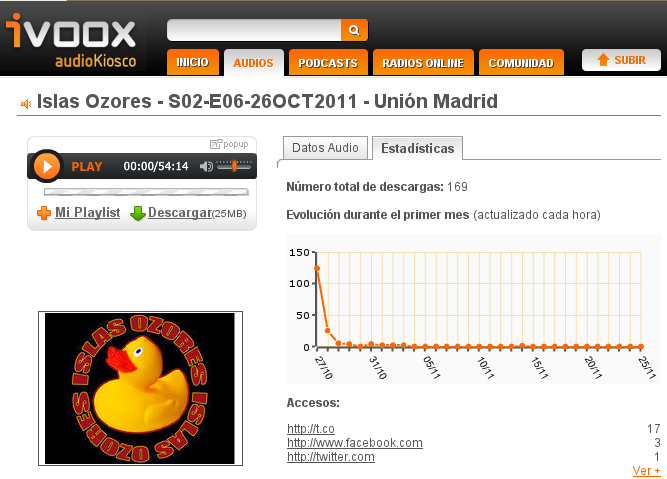
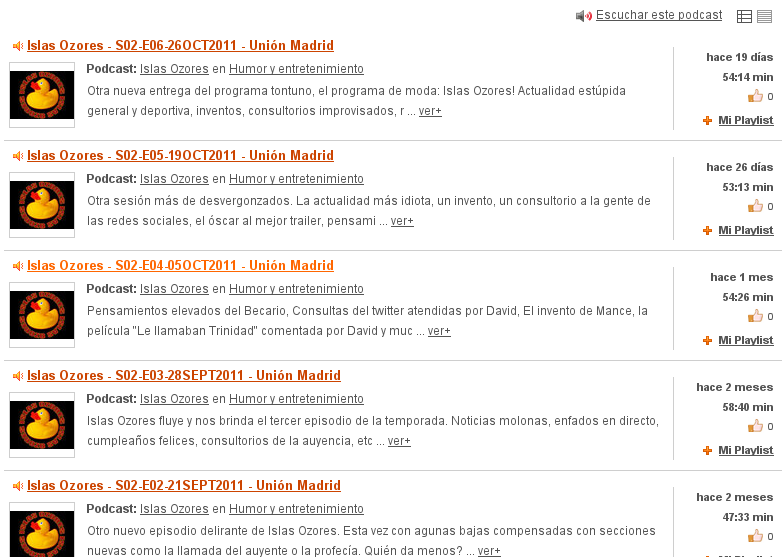
    Hello buddies! The first idea for this section is here! Monitoring the plays of a Podcast Channel. Introduction Ivoox is a Podcast's website. A lot of Radio shows and other kind of audio documents are posted there by their creators. The users create one Podcast Channel and post the audio files when he wants. Each audio file has a plays counter updated every hour. We're going to monitor a full podcast channel with Pandora FMS to have all the plays statistics available without enter the site. Purpose In this example we're going to monitor the plays of the Podcast Channel "Islas Ozores (Link not available anymore)": A stupid comedy radio show of one of our team members :P. Procedure

    • Create an agent in Pandora FMS (We named it 'podcast-islas-ozores')
    • Create a perl script in the server that parse all the current audio file names and their number of plays. We configure it with the main podcast URL.
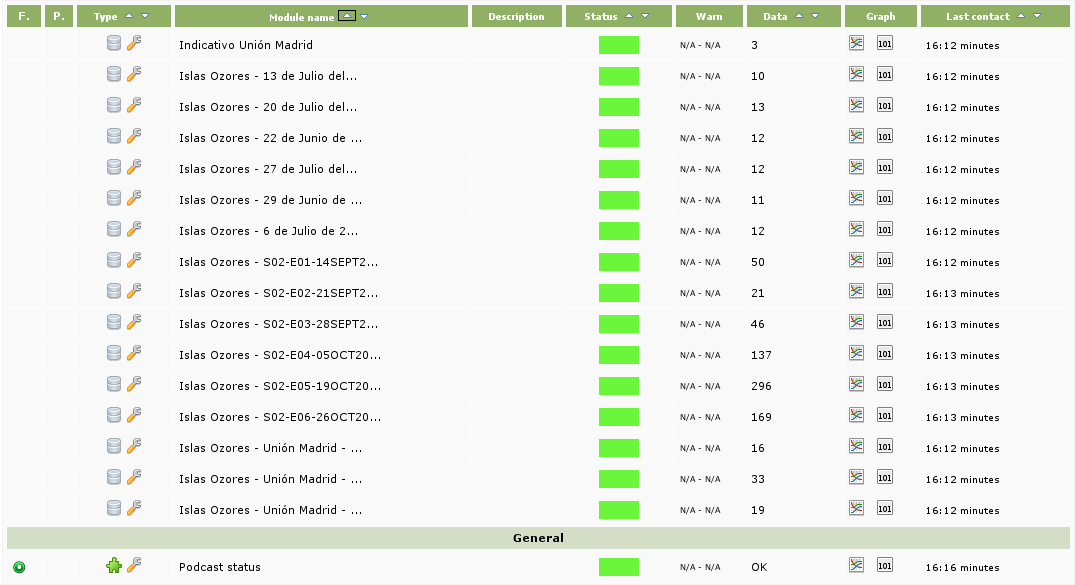
      From this string, we parse the name and URL of the current audio files. (Link not available anymore) From each URL and investigating the Ivoox source code, we discovered the URL that contains the plays data: In example for audio file URL http://www.ivoox.com/islas-ozores-s02-e06-26oct2011-union-madrid-audios-mp3\_rf\_861842\_1.html the URL of the plays data is (Link not available anymore). Is easy to see that we can extrapolate this procedure with the ID of each audio file: 861842 for this case. (Link not available anymore) This script obtains all the audio files names for this channel and their number of plays. Then build a XML file with our agent name ('podcast-islas-ozores') and a module for each audio file with the name of the file as name, the data of type 'generic numeric' and the current number of plays as data. Then copy this XML file to data_in path of the Pandora Installation. The scripts returns 'OK' to know if it has been finished the execution. Download the script (Link not available anymore)- Create a plug-in module that execute the script with a 3600 seconds (1 hour) interval.

    Finally we can view in a Pandora FMS agent all the audio files plays easily. (Link not available anymore) This method is improvable adding parameters to script to do it more generic, building visual maps and reports with graphs, configuring alerts etc. But is a good beginning to work on it.

    [
    ](//pandorafms.com/community/media/forum/0/10280=173-ivoox_lista_podcasts.png)

    ivoox.pl

    [

    ](//pandorafms.com/community/media/forum/0/10280=175-ivoox_visitas.png)

    [
    ](//pandorafms.com/community/media/forum/0/10280=176-ivoox_pandora.png)

  2. Hello buddies! The first idea for this section is here! Monitoring the plays of a Podcast Channel. Introduction Ivoox is a Podcast's website. A lot of Radio shows and other kind of audio documents are posted there by their creators. The users create one Podcast Channel and post the audio files when he wants. Each audio file has a plays counter updated every hour. We're going to monitor a full podcast channel with Pandora FMS to have all the plays statistics available without enter the site. Purpose In this example we're going to monitor the plays of the Podcast Channel "Islas Ozores (Link not available anymore)": A stupid comedy radio show of one of our team members :P. Procedure

    • Create an agent in Pandora FMS (We named it 'podcast-islas-ozores')
    • Create a perl script in the server that parse all the current audio file names and their number of plays. We configure it with the main podcast URL.
      From this string, we parse the name and URL of the current audio files. (Link not available anymore) From each URL and investigating the Ivoox source code, we discovered the URL that contains the plays data: In example for audio file URL http://www.ivoox.com/islas-ozores-s02-e06-26oct2011-union-madrid-audios-mp3\_rf\_861842\_1.html the URL of the plays data is (Link not available anymore). Is easy to see that we can extrapolate this procedure with the ID of each audio file: 861842 for this case. (Link not available anymore) This script obtains all the audio files names for this channel and their number of plays. Then build a XML file with our agent name ('podcast-islas-ozores') and a module for each audio file with the name of the file as name, the data of type 'generic numeric' and the current number of plays as data. Then copy this XML file to data_in path of the Pandora Installation. The scripts returns 'OK' to know if it has been finished the execution. Download the script (Link not available anymore)- Create a plug-in module that execute the script with a 3600 seconds (1 hour) interval.

    Finally we can view in a Pandora FMS agent all the audio files plays easily. (Link not available anymore) This method is improvable adding parameters to script to do it more generic, building visual maps and reports with graphs, configuring alerts etc. But is a good beginning to work on it.

    더킹카지노 (Link not available anymore) 월드카지노 (Link not available anymore) 33카지노 (Link not available anymore) 아시안카지노 (Link not available anymore) 바카라사이트 (Link not available anymore) 카지노사이트 (Link not available anymore) 다빈치카지노 (Link not available anymore) 에비앙카지노 (Link not available anymore) F1카지노 (Link not available anymore) 개츠비카지노 (Link not available anymore) 에프원카지노 (Link not available anymore) 엠카지노 (Link not available anymore) 코리아카지노 (Link not available anymore) 라이브카지노 (Link not available anymore) 마카오카지노 (Link not available anymore) M카지노 (Link not available anymore) 모바일카지노 (Link not available anymore) 필리핀카지노 (Link not available anymore) 삼삼카지노 (Link not available anymore) 슈퍼카지노 (Link not available anymore) 트럼프카지노 (Link not available anymore) 베가스카지노 (Link not available anymore) 우리카지노 (Link not available anymore) 마카오카지노에이전트 (Link not available anymore)

Entra en tu cuenta para publicar.