(function (global, factory) { typeof exports === 'object' && typeof module !== 'undefined' ? factory(exports) : typeof define === 'function' && define.amd ? define(['exports'], factory) : (global = global || self, factory(global.ka = {})); }(this, function (exports) { 'use strict'; var fp = typeof window !== "undefined" && window.flatpickr !== undefined ? window.flatpickr : { l10ns: {} }; var Georgian = { weekdays: { shorthand: ["კვ", "ორ", "სა", "ოთ", "ხუ", "პა", "შა"], longhand: [ "კვირა", "ორშაბათი", "სამშაბათი", "ოთხშაბათი", "ხუთშაბათი", "პარასკევი", "შაბათი", ] }, months: { shorthand: [ "იან", "თებ", "მარ", "აპრ", "მაი", "ივნ", "ივლ", "აგვ", "სექ", "ოქტ", "ნოე", "დეკ", ], longhand: [ "იანვარი", "თებერვალი", "მარტი", "აპრილი", "მაისი", "ივნისი", "ივლისი", "აგვისტო", "სექტემბერი", "ოქტომბერი", "ნოემბერი", "დეკემბერი", ] }, firstDayOfWeek: 1, ordinal: function () { return ""; }, rangeSeparator: " — ", weekAbbreviation: "კვ.", scrollTitle: "დასქროლეთ გასადიდებლად", toggleTitle: "დააკლიკეთ გადართვისთვის", amPM: ["AM", "PM"], yearAriaLabel: "წელი", time_24hr: true }; fp.l10ns.ka = Georgian; var ka = fp.l10ns; exports.Georgian = Georgian; exports.default = ka; Object.defineProperty(exports, '__esModule', { value: true }); }));

Operation Tips

Operation on the UI is similar to operating system's standard file manager. However, Drag and Drop is not possible with mobile browsers.

/* CSS for adverts */ .updraft_notice_container { height: auto; overflow: hidden; } .updraft_review_notice_container { padding: 12px; display: -webkit-box; display: -ms-flexbox; display: flex; } .updraft_advert_button_container { margin-bottom: 10px; display: -webkit-box; display: -ms-flexbox; display: flex; -webkit-box-align: center; -ms-flex-align: center; align-items: center; } .updraft_advert_button_container .dashicons { margin-left: 10px; } .updraft_advert_content_left { float: none; width: 80px; padding-top: 9px; margin-right: 9px; } .updraft_advert_content_left_extra { float: none; width: 100px; padding-right: 15px; display: -webkit-box; display: -ms-flexbox; display: flex; -webkit-box-align: center; -ms-flex-align: center; align-items: center; } .updraft_advert_content_left img { min-height: 72px; min-width: 72px; } .updraft_advert_content_right { float: none; width: auto; overflow: hidden; font-size: 16px; } .updraft_advert_content_right p { font-size: 16px!important; } .updraft_advert_bottom { margin: 10px 0; padding: 10px; font-size: 140%; background-color: white; border-color: #E6DB55; border: 1px solid; border-radius: 4px; } .updraft-advert-dismiss { float: right; font-size: 13px; font-weight: normal; } h3.updraft_advert_heading { margin-top: 5px !important; margin-bottom: 5px !important; } h4.updraft_advert_heading { margin-top: 2px !important; margin-bottom: 3px !important; } .updraft_center_content { text-align: center; margin-bottom: 5px; } .updraft_notice_link { padding-left: 5px; } .updraft_text_center { text-align: center; } @media screen and (min-width: 560px) { .updraft_advert_content_left, .updraft_advert_content_left_extra { float: left; } } Sending email and alerts using Zimbra email - Pandora FMS Community

Welcome to Pandora FMS Community!

Find answers, ask questions, and connect with our community around the world.

Welcome to Pandora FMS Community Forums Community support Advanced troubleshooting Sending email and alerts using Zimbra email

  • Sending email and alerts using Zimbra email

    Posted by gabriel-m on May 4, 2013 at 01:33

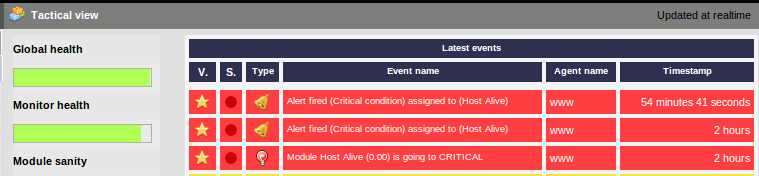
    I have try to install pandora multiple times and everything works fine until i get to the firing alert system, I read quit a bit and although im not expert at all i keep trying because i love this software, i just cant seem to make it work. I have my action, alert and template set up to fire and email to my account when host-live is down, simple for testing and accuracy. The console shows the module going critical, subsequently it fires the alert and it shows an orange bar however, i get no email in my inbox. I was trying to use an external email server called Zimbra that uses imap, smtp and this mail transport lmtp:mydomain.com:7025 . Adter reading i found out that after version 4 pandora includes a smtp feature to avoid all this email madness. I will really appreciate if anybody can advice on what would be the best course of action on either configuring the server with Zimbra or using the internal capabilities of pandorafms (which i prefer) and how. Im running Ubuntu 12.10 and pandora 4.0.3. PLEASE HELP

    mta_address 192.168.0.xx

    mta_port  725

    mta_user pandora

    mta_pass xxxxxx

    mta_auth LOGIN

    mta_from pandora@mydomain.com
    Sancho replied 12 years, 8 months ago 3 Members · 4 Replies
  • 4 Replies

Log in to reply.