Events
What is an event?
An event is everything that happens within the system, from the creation of a module to a user login in the Web Console. The event itself is a descriptive text of the problem, its origin (agent), and its creation date.
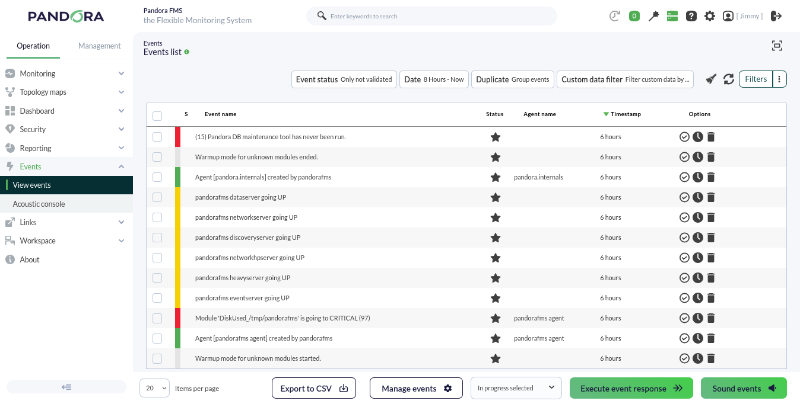
Pandora FMS allows the real-time visualization of all happenings in our monitored systems; with this information, we can perform the necessary actions according to the event created. Information is shown ranging from any change in a module's status, triggered or recovered alerts, to system restarts or custom events. It is one of the most used views by operations teams in any type of professional monitoring software.
An event can have three statuses:
- New: This is an event that has just been created by the system.
- In process: This is an event that a user has seen and is currently performing an action regarding the notification received. This status must be entered manually by a user.
- Validated: This is an event that has been viewed and for which the corresponding actions have already been performed. This status can be entered manually by a user, or automatically by the server when there are two events related to the same notification, where the last event will prevail.
Depending on the information the event carries, it will appear in one color or another. For example, if an information event arrives stating that a module has entered a critical status, this event will appear in red.
When an event is validated, the screen refreshes and the validated event "disappears." This happens because the default event view only shows non-validated or assigned events, but not validated ones, that have occurred during the last 8 hours. Thanks to this default view, we can observe active "problems" in real time.
When events occur due to module status changes, there will generally be two events: a first event for the transition from a normal status to an incorrect one, and a second event for the return to a normal status once the problematic situation is resolved.
In these cases, events transitioning to an incorrect status (critical or warning) are automatically validated upon returning to normality. This is what we call event auto-validation, an essential functionality that allows hiding irrelevant information in the event console.