# Installation
To retrieve all the data from Tomcat you will need:
The role needed for the plugin to get the information from Tomcat is “manager-script”:
```
```
**All the information is retrieved from the Tomcat manager application. Is mandatory to have it**
**enabled in order to monitor the service.**
```
http:///manager/status?XML=true
http:///manager/text/list
```
Note: Tomcat’s default TCP Port: 8080
In case you could find any issue connecting to the service, you can add a new connector to the Tomcatserver. Following you can find a configuration example:
```
/etc/tomcat/server.xml
```
[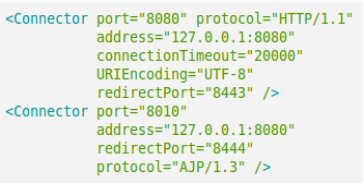](https://pandorafms.com/guides/public/uploads/images/gallery/2022-01/image-1643036449902.png)
Pandora FMS plugin for Tomcat service monitoring. Example configuration:
```
[CONF]
host=localhost
port=8080
user=admin
password=admin
https=0
enable_status_monitoring=1
enable_vminfo_monitoring=1
module_prefix = tc01
agent_name = Tomcat server
agents_group_name = tomcat
interval = 300
temporal = /tmp
transfer_mode = tentacle
tentacle_ip = 127.0.0.1
tentacle_port = 41121
tentacle_opts =
data_dir = /var/spool/pandora/data_in
allow_regexp = .*
deny_regexp =
```
As we had configured the file with the values corresponding to our environment, we can deploy the files to the Pandora FMS agent by using file collections. It is a good practice to test the execution before deploy the plugin for first time.
Plugin execution configuration (agent configuration file):
```
module_plugin /path/to/plugin/pandora_tomcat --conf /path/to/file/pandora_tomcat.conf
```
Binary files are also deployed for Windows Pandora FMS agents (pandora\_tomcat\_x86.exe and
pandora\_tomcat\_x64.exe)
```
module_plugin /pandora_tomcat_x86.exe --conf /pandora_tomcat.conf
```