Tomcat enterprise plugin
With this plug-in we can see the Tomcast stats.
Introduction
Ver. may 2026
With this plug-in we can see the Tomcast stats.
This document explains how to monitor a Tomcat server through the PandoraFMS plugin.
The compatibility matrix for the plugin is shown below:
| Systems where it has been tested |
| Tomcat 6 |
| Tomcat 7 |
| Tomcat 8 |
| Tomcat 9 |
| Systems where it should work |
| Tomcat 6.x and above |
Change log
| Date | Author | Change | Version |
| 09/05/12 | Tomas | First Version | v1r1 |
| 21/12/12 | Tomas | Bug fixed | v1r2 |
| 14/01/12 | Tomas | Bug fixed | v1r3 |
| 12/02/15 | MarioP | Bug fixed | v1r5 |
| 14/04/16 | Borja | New schema | v2r1 |
| 11/05/26 | AlejandroS | New version | v3r1 |
Enviromental configuration
Parameters
| --conf | Path to the configuration file |
Conf file (--conf)
[CONF]
host=<host of Tomcat environment>
port=<port of Tomcat environment>
user=<Tomcat username>
password=<Tomcat password>
https=<Enable to use https>
enable_status_monitoring=<Enable to enable status metric monitoring>
enable_vminfo_monitoring=<Enable to enable VM metric monitoring>
module_prefix=<Prefix for modules>
agent_name=<Name for agent>
agents_group_name=<Group name for agent>
interval=<Agent creation interval>
threads=<Number of threads>
temporary=<Path to temporary directories>
transfer_mode=<Transfer mode>
tentacle_ip=<Tentacle path>
tentacle_port=<Tentacle port>
tentacle_opts=<Tentacle options>
data_dir=<Path to .data files >
allow_regexp = <Regexp pattern. Metrics matching the pattern will be monitored>
deny_regexp = <Regexp pattern. Metrics matching the pattern will be discarded>
Example
[CONF]
host=localhost
port=8080
user=admin
password=admin
https=0
enable_status_monitoring=1
enable_vminfo_monitoring=1
module_prefix = tc01
agent_name = Tomcat server
agents_group_name = tomcat
interval = 300
temporal = /tmp
transfer_mode = tentacle
tentacle_ip = 127.0.0.1
tentacle_port = 41121
tentacle_opts =
data_dir = /var/spool/pandora/data_in
allow_regexp = .*
deny_regexp = - Have the necessary permissions so that from the machine itself you can make a requests to the page
page in question (a username and password in tomcat-users.xml enabled to access the content of the page).
page).
The user must be configured to have the manager-script role, which can also see the list of instances.
<user username="user" password="password" roles="manager-script" />This part of the tomcat-users.xml file looks like this:
<tomcat-users>
<!-- otros roles -->
<role rolename="manager-script"/>
<!-- otros usuarios -->
<user username="username" password="password" roles="manager-script" />
</tomcat-users>
- Enable access to this page as well as roles to assign to users so that they can obtain its content.
content.
- Know Tomcat version to know the scope of monitoring (compatibility mode, for versions <= 6.
versions <= 6.X).
Installation
To retrieve all the data from Tomcat you will need:
The role needed for the plugin to get the information from Tomcat is “manager-script”:
<user username="user" password="password" roles="manager-script" />All the information is retrieved from the Tomcat manager application. Is mandatory to have it
enabled in order to monitor the service.
http://<Tomcat-IP-Address><Puerto>/manager/status?XML=true
http://<Tomcat-IP-Address><Puerto>/manager/text/list
Note: Tomcat’s default TCP Port: 8080
In case you could find any issue connecting to the service, you can add a new connector to the Tomcatserver. Following you can find a configuration example:
/etc/tomcat<version>/server.xml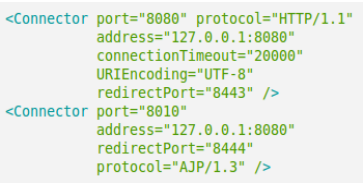
Pandora FMS plugin for Tomcat service monitoring. Example configuration:
[CONF]
host=localhost
port=8080
user=admin
password=admin
https=0
enable_status_monitoring=1
enable_vminfo_monitoring=1
module_prefix = tc01
agent_name = Tomcat server
agents_group_name = tomcat
interval = 300
temporal = /tmp
transfer_mode = tentacle
tentacle_ip = 127.0.0.1
tentacle_port = 41121
tentacle_opts =
data_dir = /var/spool/pandora/data_in
allow_regexp = .*
deny_regexp =
As we had configured the file with the values corresponding to our environment, we can deploy the files to the Pandora FMS agent by using file collections. It is a good practice to test the execution before deploy the plugin for first time.
Plugin execution configuration (agent configuration file):
module_plugin /path/to/plugin/pandora_tomcat --conf /path/to/file/pandora_tomcat.confBinary files are also deployed for Windows Pandora FMS agents (pandora_tomcat_x86.exe and
pandora_tomcat_x64.exe)
module_plugin <ruta-plugin>/pandora_tomcat_x86.exe --conf <ruta-conf>/pandora_tomcat.confModules generated by the plugin
The modules that return the execution of this plugin are the following (you can add a prefix using the module_prefix parameter):
memory_free
memory_total
memory_max

["http-nio-8080"] maxThreads
["http-nio-8080"] currentThreadsBusy
["http-nio-8080"] currentThreadCount
["http-nio-8080"] Threading usage

["http-nio-8080"] maxTime
["http-nio-8080"] processingTime
["http-nio-8080"] requestCount
["http-nio-8080"] errorCount
["http-nio-8080"] bytesReceived
["http-nio-8080"] bytesSent

[workers] Current requests
[workers] Current BytesReceived
[workers] Current BytesSent

vmname
vmversion
vmvendor
uptime
availableprocessors
systemloadaverage

iscurrentthreadcputimesupported
isthreadcputimesupported
isthreadcputimeenabled
isthreadcontentionmonitoringsupported
isthreadcontentionmonitoringenabled

peak
loaded
unloaded
totalloaded
totalcompilationtime
iscompilationtimemonitoringsupported

getcollectioncount
getcollectiontime

heap_init
heap_used
heap_committed
heap_max

non-heap_init
non-heap_used
non-heap_committed
non-heap_max

[CodeHeap 'non-nmethods'] Pool usage
[CodeHeap 'non-nmethods'] Pool commited
[CodeHeap 'profiled nmethods'] Pool usage
[CodeHeap 'profiled nmethods'] Pool commited
[CodeHeap 'non-profiled nmethods'] Pool usage
[CodeHeap 'non-profiled nmethods'] Pool commited
[Compressed Class Space] Pool usage
[Compressed Class Space] Pool commited
[G1 Old Gen] Pool usage
[G1 Old Gen] Pool commited

[Memory] Heap usage
[Memory] Heap committed
[Memory] Non-Heap used
[Memory] Non-Heap committed
[Memory] Non-Heap max