SQLServer
This document describes the SQL Server functionality of PandoraFMS discovery.
- Introduction
- Prerrequisites
- Parameters and configuration
- Manual execution
- Discovery
- Agents and modules generated by the plugin
Introduction
This plugin is designed to monitor SQL Server databases by executing queries that extract information crucial for assessing the performance and status of the databases. This information includes metrics such as the number of connections, query counts, and restart status. These data points will be reflected in PandoraFMS through modules that provide statistical value within an agent representing each database.
It's important to note that this plugin is specifically developed for use with Pandora FMS Discovery. Unlike other plugins, it doesn't generate agents through XML; instead, all the discovered information is returned in the JSON output of the plugin.
Prerrequisites
This plugin establishes remote connections to the databases it monitors, so it's essential to ensure connectivity between the Pandora FMS server and these databases.
In turn the following permissions are required for the user that is used to connect.
VIEW SERVER STATE:
To execute the SELECT @@VERSION query.
To query sys.dm_os_sys_info (server uptime).
To query sys.dm_exec_requests (active requests on the server).
To query @@MAX_CONNECTIONS (maximum connections allowed).
To run sp_who 'ACTIVE' (active sessions on the server).
SELECT:
To execute custom queries on specific database tables or views.
Parameters and configuration
Parameters
| --conf | Path to the configuration file. |
| --target\_databases | Path to the configuration file containing database targets. |
| --target\_agents | Path to the configuration file containing agent targets. |
| --custom\_queries | Path to the configuration file containing custom queries. |
The configuration file (--conf)
agents_group_id= The ID of the group where agents will be created.
interval= The monitoring interval for agents in seconds.
user= The connection user.
password= The password for the user.
threads= The number of threads used for agent creation.
modules_prefix= The prefix for module names.
execute_custom_queries= Activate with 1 to enable the use of custom queries.
analyze_connections= Activate with 1 to enable connection monitoring.
engine_uptime= Activate with 1 to enable runtime monitoring.
query_stats= Activate with 1 to enable query statistics monitoring.
monitor_long_queries = Activate with 1 to enable query statistics long queries.
monitor_latch_requests = Activate with 1 to enable query statistics latch requests.
monitor_full_scans = Activate with 1 to enable query statistics full scans.
count_databases = Activate with 1 to enable databases count.
retrieve_memory_statistics = Activate with 1 to enable memory statistics.
retrieve_locks_statistics = Activate with 1 to enable locks statistics.
check_engine_performance = Activate with 1 to enable engine performance.
retrieve_buffer_statistics = Activate with 1 to enable buffer statistics.
retrieve_users_information = Activate with 1 to enable user information.
retrieve_cluster_state = Activate with 1 to retrieve cluster state.
retrieve_logs_statistics = Activate with 1 to enable logs statistics.
monitor_active_users = Activate with 1 to enable active users.
retrieve_transactions_statistics = Activate with 1 to transaction statistics.
monitor_filegroups_space = Activate with 1 to enable file groups space.
monitor_user_reserved_space = Activate with 1 to enable user reserved space.
monitor_backups = Activate with 1 to enable to monitor backups.
agent_per_database     = Activate with 1 to enable agents creation.
db_agent_prefix        = prefix to the databases
scan_databases         = Activate with 1 to monitor databases

[MODULE_NAMES]
database_size = < Module name, default : database_size >
database_usage = < Module name, default : database_usage >
restart_detection = < Module name, default : restart detection >
queries = < Module name, default : queries >
insert = < Module name, default : insert >
delete = < Module name, default : delete >
update = < Module name, default : update >
session_usage = < Module name, default : session usage >
database_count = < Module name, default : database_count >
server_startup = < Module name, default : server_startup >
lock_memory = < Module name, default : lock_memory >
connection_memory = < Module name, default : connection_memory >
optimizer_memory = < Module name, default : optimizer_memory >
sqlcache_memory = < Module name, default : sqlcache_memory >
total_memory = < Module name, default : total_memory >
deadlocks = < Module name, default : deadlocks >
lock_timeouts = < Module name, default : lock_timeouts >
lock_requests = < Module name, default : lock_requests >
lock_waits = < Module name, default : lock_waits >
buf_cachehit_ratio = < Module name, default : buf_cachehit_ratio >
free_connections = < Module name, default : free_connections >
page_reads = < Module name, default : page_reads >
page_writes = < Module name, default : page_writes >
latch_waits = < Module name, default : latch_waits >
full_scans = < Module name, default : full_scans >
locks_used = < Module name, default : locks_used >
workspace_memory = < Module name, default : workspace_memory >
average_waittime = < Module name, default : average_waittime >
server_cpu = < Module name, default : server_cpu >
server_io = < Module name, default : server_io >
active_connection_ratio = < Module name, default : active_connection_ratio >
locked_users = < Module name, default : locked_users >
blocked_users = < Module name, default : blocked_users >
active_users = < Module name, default : active_users >
long_queries = < Module name, default : long_queries >
long_queries_string = < Module name, default : long_queries_string >
aag_cluster_quorum_state = < Module name, default : aag_cluster_quorum_state >
aag_cluster_members_state = < Module name, default : aag_cluster_members_state >
aag_synchronization_health = < Module name, default : aag_synchronization_health >
aag_replica_synchronization_health = < Module name, default : aag_replica_synchronization_health >
aag_replica_connected_state = < Module name, default : aag_replica_connected_state >
aag_replica_recovery_health = < Module name, default : aag_replica_recovery_health >
aag_replica_operational_state = < Module name, default : aag_replica_operational_state >
aag_db_replica_synchronization_state = < Module name, default : aag_db_replica_synchronization_state >
aag_listener_state = < Module name, default : aag_listener_state >

availability = < Module name, default : availability >
state = < Module name, default : state >
db_active_users = < Module name, default : active users >
transactions = < Module name, default : transactions >
active_transactions = < Module name, default : active_transactions >
log_flush_waits = < Module name, default : log_flush_waits >
log_file_growths = < Module name, default : log_file_growths >
log_file_shrinks = < Module name, default : log_file_shrinks >
logfile_size = < Module name, default : logfile_size >
logfile_usage = < Module name, default : logfile_usage >
log_cachehit_ratio = < Module name, default : log_cachehit_ratio >
backup_status_minutes = < Module name, default : backup_status_minutes >
backup_status_last_backup = < Module name, default : backup_status_last_backup >
fg_free_space = < Module name, default : fg_free_space >
Example
agents_group_id = 10
interval = 300
user = sa
password = HHgD85V@
threads = 1
modules_prefix =
execute_custom_queries = 1
analyze_connections = 1
engine_uptime = 1
query_stats = 1
monitor_long_queries = 1
monitor_latch_requests = 1
monitor_full_scans = 1
count_databases = 1
retrieve_memory_statistics = 1
retrieve_locks_statistics = 1
check_engine_performance = 1
retrieve_buffer_statistics = 1
retrieve_users_information = 1
retrieve_cluster_state = 1
retrieve_logs_statistics = 1
monitor_active_users = 1
retrieve_transactions_statistics = 1
monitor_filegroups_space = 1
monitor_user_reserved_space = 1
monitor_backups = 1
agent_per_database     = 1
db_agent_prefix        = PANDORA-
scan_databases         = 1

[MODULE_NAMES]
database_size = database_size
database_usage = database_usage
restart_detection = restart detection
queries = queries
insert = insert
delete = delete
update = update
session_usage = session usage
database_count = database_count
server_startup = server_startup
lock_memory = lock_memory
connection_memory = connection_memory
optimizer_memory = optimizer_memory
sqlcache_memory = sqlcache_memory
total_memory = total_memory
deadlocks = deadlocks
lock_timeouts = lock_timeouts
lock_requests = lock_requests
lock_waits = lock_waits
buf_cachehit_ratio = buf_cachehit_ratio
free_connections = free_connections
page_reads = page_reads
page_writes = page_writes
latch_waits = latch_waits
full_scans = full_scans
locks_used = locks_used
workspace_memory = workspace_memory
average_waittime = average_waittime
server_cpu = server_cpu
server_io = server_io
active_connection_ratio = active_connection_ratio
locked_users = locked_users
blocked_users = blocked_users
active_users = active_users
long_queries = long_queries
long_queries_string = long_queries_string
aag_cluster_quorum_state = aag_cluster_quorum_state
aag_cluster_members_state = aag_cluster_members_state
aag_synchronization_health = aag_synchronization_health
aag_replica_synchronization_health = aag_replica_synchronization_health
aag_replica_connected_state = aag_replica_connected_state
aag_replica_recovery_health = aag_replica_recovery_health
aag_replica_operational_state = aag_replica_operational_state
aag_db_replica_synchronization_state = aag_db_replica_synchronization_state
aag_listener_state = aag_listener_state

availability = availability
state = state
db_active_users = active users
transactions = transactions
active_transactions = active_transactions
log_flush_waits = log_flush_waits
log_file_growths = log_file_growths
log_file_shrinks = log_file_shrinks
logfile_size = logfile_size
logfile_usage = logfile_usage
log_cachehit_ratio = log_cachehit_ratio
backup_status_minutes = backup_status_minutes
backup_status_last_backup = backup_status_last_backup
fg_free_space = fg_free_space
List of target databases (--target_databases)
The file will contain a list of target instances, with each database separated by commas or lines. The format for a database can be any of the following:
ip
ip:puerto
ip\instancia
Example
172.17.0.4:1433\DEVENV
172.17.0.2:1433\PRODENV
If you want to monitor specific databases of an instance, you must specify them with "|" and separate each database with ";".
Example :
172.17.0.4:1433\DEVENV|pandora;testing;model
If you want to monitor all the databases of an instance, but discard some, you must specify “!” before the “|”.
Example:
172.17.0.4:1433\DEVENV!|pandora;testing;model
List of target agents (--target_agents)
The file will contain a list of agent names, separated by commas or lines. These agent names will be used to dump the information from each target database into the corresponding agent name, instead of letting the plugin generate the agent names automatically.
The position of each agent name in the list must match the position of the target database in its own list, i.e., the name for the first target database will be the first name in this list, bearing in mind that blank lines are ignored.
Example
agente1,,agente3
agente4
agente5,agente6,agente7,,agente9
Custom Queries (--custom_queries)
One module must be defined for each custom query to be monitored. Modules must follow this structure:
check_begin      --> Module opening tag
name             --> Module name
description      --> Module description
operation        --> Operation type: value (returns a single value) | full (returns all rows as string).
datatype         --> Module type: generic_data | generic_data_string | generic_proc.
min_warning      --> Minimum warning threshold
max_warning      --> Maximum warning threshold
str_warning      --> Warning string threshold
warning_inverse  --> Set to 1 to invert the warning threshold interval
min_critical     --> Minimum critical threshold
max_critical     --> Maximum critical threshold
str_critical     --> Critical string threshold
critical_inverse --> Set to 1 to invert the critical threshold interval
module_interval  --> This interval is calculated as a multiplier of the agent interval.
crontab          --> 5-field cron expression (minute, hour, day of month, month, day of week).
                    The query only runs when the current date/time matches the expression.
                    If not specified, the query runs on every interval.
                    Format: crontab <minute> <hour> <day_of_month> <month> <day_of_week>
                    Examples:
                      * * * * *      → every minute (always)
                      0 9 * * 1-5    → Monday to Friday at 09:00
                      */15 * * * *   → every 15 minutes
                      * 12-15 * * 1  → Mondays between 12:00 and 15:59
target           --> Custom query (only SELECT statements are allowed).
target_databases --> Instance agents where the module will be created, or database names where the module will be created.
                    To apply to all elements, specify "all" or leave it unspecified.
target_scope     --> Target element to which the custom query will be applied.
                    Can be: instances, databases, or all (default).
                    If not specified, it applies to both instances and databases.
ignore_databases --> Instance agents where the module should NOT be created, or database names to skip.
check_end        --> Module closing tag
Examples
Basic module (no crontab, runs on every interval)
check_begin
name Select 1
description Number of invalid objects
operation value
datatype generic_data
min_warning 5
target SELECT 1;
target_databases all
check_end
Module with database scope and ignore list
check_begin
name ConnectionCount
description Number of connections
operation value
datatype generic_data
min_warning 10
target SELECT COUNT(*) AS ConnectionCount FROM sys.dm_exec_sessions WHERE is_user_process = 1;
target_databases all
target_scope databases
ignore_databases master
check_end
Full operation module against a specific database
check_begin
name list_table_size_MB
description table size in MB
operation full
datatype generic_data
target SELECT SUM(reserved_page_count) * 8 / 1024.0 AS SizeMB FROM sys.dm_db_partition_stats WHERE object_id = OBJECT_ID('list');
target_databases pandora
check_end
Module with crontab (runs only Monday to Friday at 09:00)
check_begin
name daily_report
description Daily report query
operation value
datatype generic_data_string
target SELECT COUNT(*) AS today_records FROM daily_log WHERE date = CAST(GETDATE() AS DATE);
target_databases all
crontab 0 9 * * 1-5
check_end
Module with crontab (only during office hours 8:00–18:00)
check_begin
name active_office_users
description Active users during office hours
operation value
datatype generic_data
target SELECT COUNT(*) FROM users WHERE active = 1;
target_databases all
crontab * 8-17 * * 1-5
check_end
Module with crontab every 30 minutes
check_begin
name check_every_half_hour
description Check every 30 minutes
operation value
datatype generic_data
target SELECT COUNT(*) FROM sys.dm_exec_sessions;
target_databases all
crontab */30 * * * *
check_end
Crontab filter behavior
- At the beginning of each plugin execution, all custom queries are evaluated.
- Queries without the
crontabfield always run (classic behavior, backward compatible). - Queries with
crontabare only included if the current date/time matches the cron expression. - Queries rejected by crontab do not generate database connections or SQL queries.
- The filter runs once before spawning monitoring processes.
Cron expression format
The expression follows the standard 5-field format separated by spaces:
| Field | Allowed values |
|---|---|
| Minute | 0-59 |
| Hour | 0-23 |
| Day of month | 1-31 |
| Month | 1-12 |
| Day of week | 0-7 (0 and 7 = Sunday, 1 = Monday) |
Each field supports the following formats:
-
*— any value -
N— exact value (e.g.5) -
N-M— range (e.g.9-17) -
*/N— every N units (e.g.*/15= every 15 minutes) -
N-M/N— range with step (e.g.0-30/10= 0, 10, 20, 30) -
A,B,C— comma-separated list of values
Manual execution
The plugin execution format is as follows:
./pandora_mssql \
--conf < path to the configuration file > \
--target_databases < path to the configuration file containing the target databases > \
[ --target_agents < path to the agent configuration file > ] \
[ --custom_queries < path to the configuration file containing the custom queries > ]
For example:
./pandora_mssql \
--conf /usr/share/pandora_server/util/plugin/mssql.conf \
--target_databases /usr/share/pandora_server/util/plugin/targets.conf \
--target_agents /usr/share/pandora_server/util/plugin/target_agents.conf \
--custom_queries /usr/share/pandora_server/util/plugin/custom_queries.conf
Discovery
This plugin can be integrated with Pandora FMS Discovery.
To do this, you should load the ".disco" package, which you can download from the Pandora FMS library.
https://pandorafms.com/library/mssql-discovery/
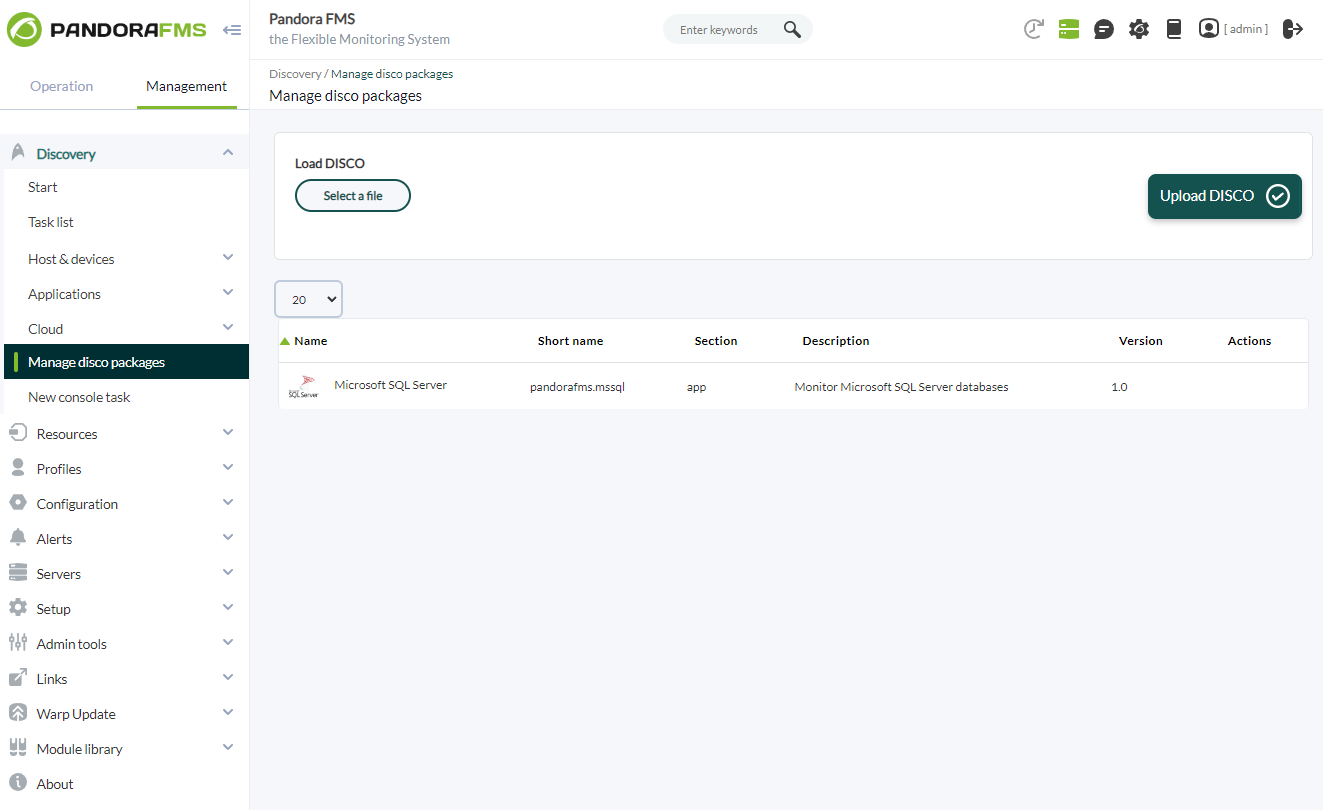
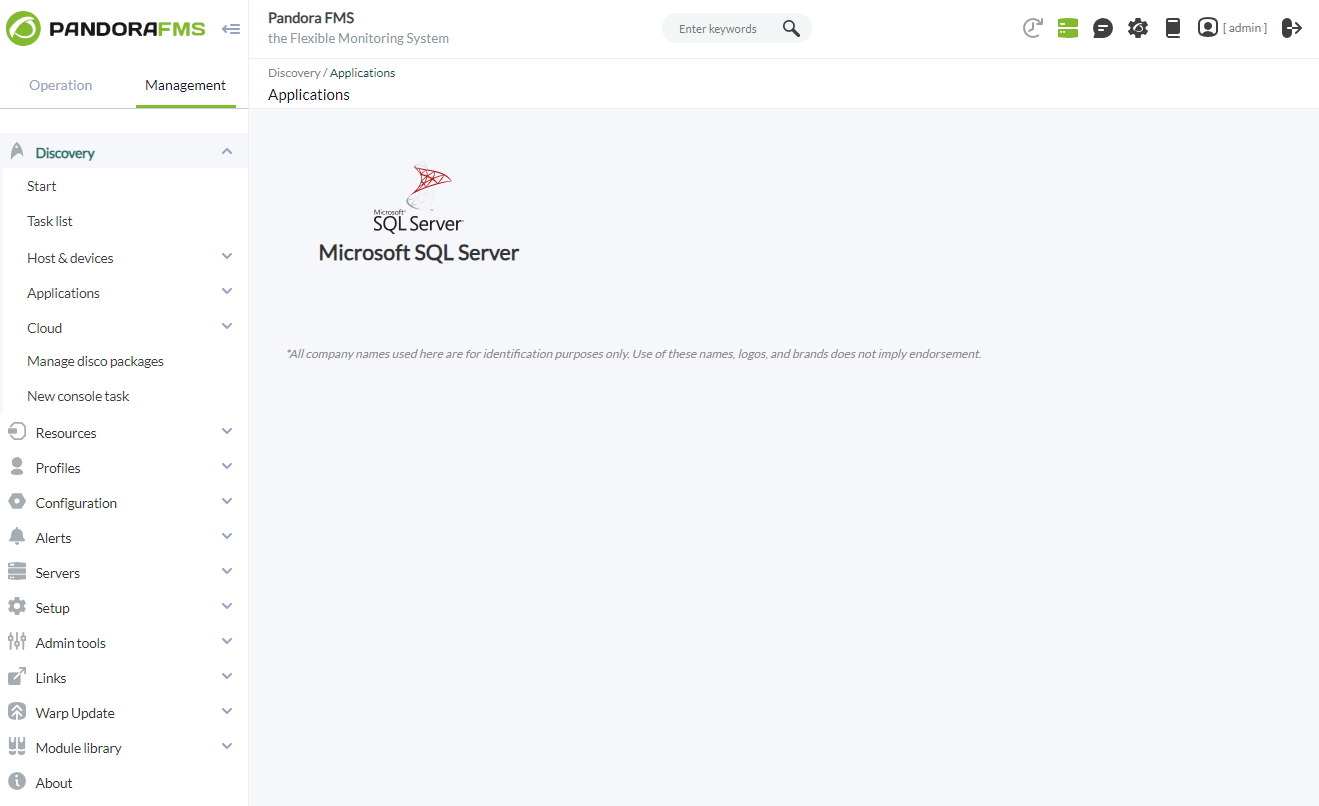
Once loaded, you can monitor Microsoft SQL Server environments by creating Discovery tasks from the Management > Discovery > Applications.
For each task, the following minimum information will be requested:
- Microsoft SQL Server target string: A list of Microsoft SQL Server targets to be monitored by the task. It will be a comma-separated or newline-separated list. Each target database can be defined in the format IP:PORT\INSTANCE, IP:PORT, IP\INSTANCE, or IP.
If you want to monitor specific databases of an instance, you must specify them with "|" and separate each database with ";".
Example :
172.17.0.4:1433\DEVENV|pandora;testing;modelIf you want to monitor all the databases of an instance, but discard some, you must specify “!” before the “|”.
Example:
172.17.0.4:1433\DEVENV!|pandora;testing;model - User: The connection user for the target databases.
- Password: The password for the specified user.

You can also adjust the task configuration to customize the desired monitoring:
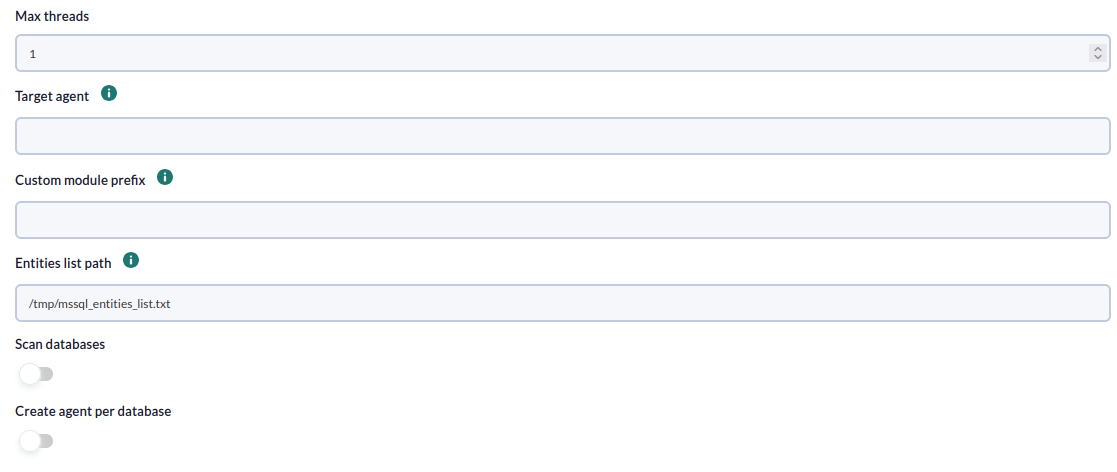
- Max threads: To optimize execution time, you can configure multiple threads to monitor the task's agents. Keep in mind that configuring multiple threads may increase the CPU usage of the task.
- Target agent: List of target agents for the Microsoft SQL Server targets to be monitored. These are the names under which agents for each defined target in the task will be generated. It should be a comma-separated or newline-separated list. The position of the names in the list should match the position of the Microsoft SQL Server targets in their list, meaning the first name will be used for the first target, and so on. If the list is separated by lines, blank lines will be ignored. If no agent name is specified for a target, its IP or FQDN will be used as the agent name.
- Custom module prefix: Text included as a prefix for all generated module names. It's useful for locating modules generated by the task or distinguishing them from others.
- Entities list path : Entities list path, by default : "/tmp/mssql_entities_list.txt"
- Scan databases: Activate to monitor the databases of the instances.
- Create agent per database: Activate to create an agent for each monitored database.
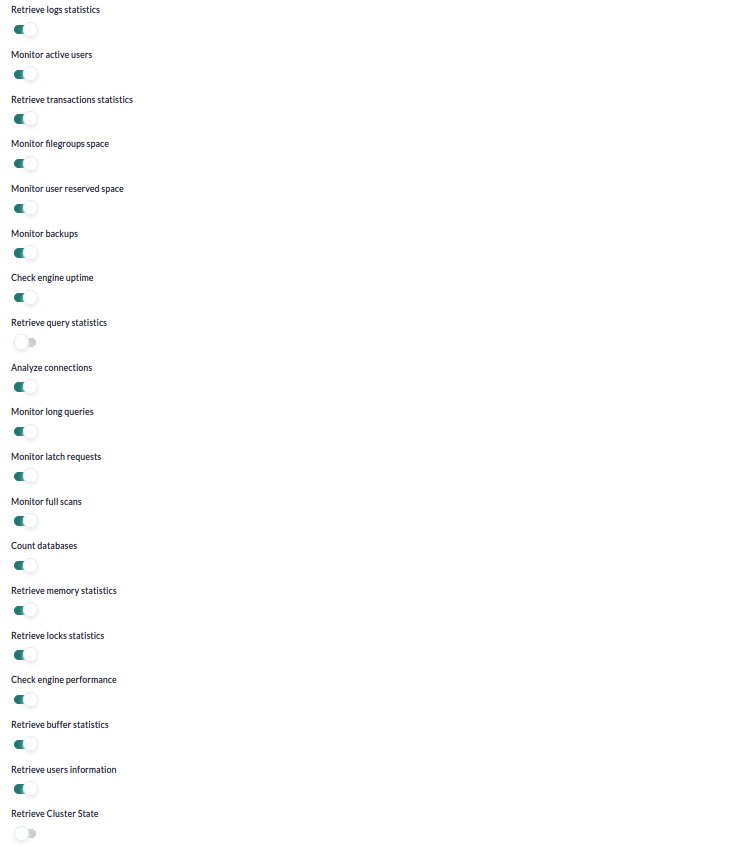
-
Retrieve logs statistics: If enabled, it will monitor log statistics.
-
Monitor active users: If enabled, it will monitor active users.
-
Retrieve transactions statistics: If enabled, it will monitor transaction statistics.
-
Monitor filegroups space: If enabled, it will monitor filegroup space usage.
-
Monitor user reserved space: If enabled, it will monitor user reserved space.
-
Monitor backups: If enabled, it will monitor backup status.
-
Check engine uptime: If enabled, it will monitor engine/instance uptime.
-
Retrieve query statistics: If enabled, it will monitor query statistics.
-
Analyze connections: If enabled, it will monitor connections.
-
Monitor long queries: If enabled, it will monitor long-running queries.
-
Monitor latch requests: If enabled, it will monitor latch requests.
-
Monitor full scans: If enabled, it will monitor executed full scans.
-
Count databases: If enabled, it will monitor the number of databases.
-
Retrieve memory statistics: If enabled, it will monitor memory statistics.
-
Retrieve locks statistics: If enabled, it will monitor lock statistics.
-
Check engine performance: If enabled, it will monitor engine/instance performance.
-
Retrieve buffer statistics: If enabled, it will monitor buffer statistics.
-
Retrieve users information: If enabled, it will monitor user information.
-
Retrieve Cluster State: If enabled, it will monitor the cluster state.
-
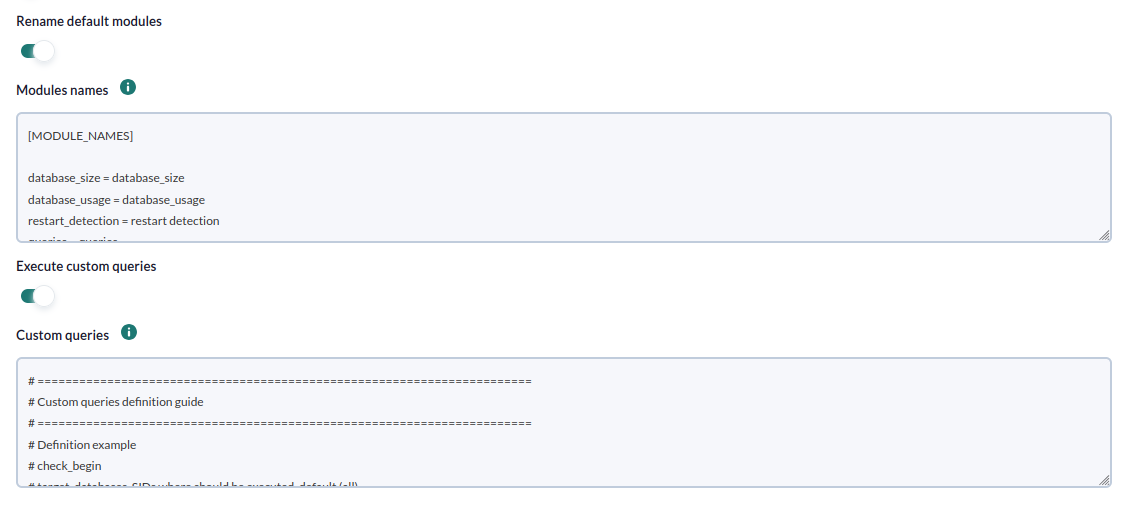
Rename default modules: If enabled, it will allow renaming the default modules.
-
Modules names: Configuration block to define the names of the default modules.
-
Execute custom queries: If enabled, it will allow executing custom queries on each Microsoft SQL Server target.
-
Custom queries: Configuration block to define the custom queries to be executed. Each query will generate a new module for each task agent.
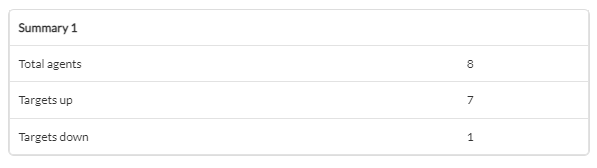
Successfully completed tasks will have an execution summary with the following information:
- Total agents: Total number of agents generated by the task.
- Targets up: Total number of targets successfully connected to.
- Targets down: Total number of targets that could not be connected to.
Tasks that do not complete successfully will have an execution summary that records the errors encountered.
Agents and modules generated by the plugin
The plugin will create one agent for each target database.
Instance metrics
|
server_startup
|
Monitors the uptime (in days) of the database server
|
|
locks_used
|
Monitors percentage of used lock and lock owner blocks |
|
workspace_memory
|
Monitors amount of memory that is used for executing processes such as hash, sort, bulk copy, and index creation operations |
|
average_waittime
|
SQL Server Average Lock Wait Time |
Each agent will contain the following modules if "engine_uptime" is activated:
| restart_detection |
It will be 0 if an unexpected restart is detected, and 1 if this is not the case. When a server restarts unexpectedly, there can be a disruption in database access, and potentially, transactions or data may not be saved correctly, leading to data integrity issues. |
If "query_stats" is activated, each agent will contain the following modules:
| queries | The total number of queries. Monitoring queries is essential for understanding the workload running on the server and assessing the overall system performance. By monitoring the total number of queries, you can identify activity spikes, optimize performance, and detect potential issues such as inefficient or excessive queries. |
| update | The number of UPDATE queries. UPDATE queries are used to modify existing data in the database. Monitoring UPDATE queries is important to assess the frequency and efficiency of data updates. You can identify UPDATE queries that affect a large number of rows or have a significant impact on server performance. This allows you to optimize queries, review table structures, or take measures to reduce the load generated by updates. |
| delete | The number of DELETE queries. DELETE queries are used to remove data from the database. Monitoring DELETE queries is useful to assess the frequency and efficiency of data deletions. You can identify DELETE queries that affect a large number of rows or have a significant impact on server performance. This allows you to optimize queries, review table structures, or take measures to reduce the load generated by deletions. |
| insert | The number of INSERT queries. INSERT queries are used to add new data to the database. Monitoring INSERT queries allows you to assess the frequency and efficiency of data insertions. You can identify INSERT queries that are generating a high load on the server or may be causing performance issues. This enables you to optimize queries, review table structures, or consider strategies like deferred insertion to enhance performance in high-concurrency environments. |
If "analyze_connections" is activated, each agent will contain the following modules:
| session usage | The number of current connections relative to the total maximum connections. Monitoring session usage in SQL Server is important for optimizing performance, identifying locking issues, enhancing security and auditing, and efficiently planning server resources. |
If "retrieve_memory_statistics" is activated, each agent will contain the following modules :
|
lock_memory
|
Monitors amount of allocated lock memory in Bytes |
|
connection_memory
|
Monitors amount of connection memory in Bytes
|
|
optimizer_memory
|
Monitors amount of optimizer memory in Bytes |
|
sqlcache_memory
|
Monitors amount of SQL cache memory in Bytes
|
|
total_memory
|
Monitors total amount of dynamic server memory in Bytes
|
Si esta activado retrieve_locks_statistics:
|
retrieve_locks_statistics
|
Monitors the number of deadlocks per second
|
|
lock_timeouts
|
Monitor the number of lock-timeouts per second
|
|
lock_requests
|
Monitor the number of lock-requests per second |
|
lock_waits
|
Monitor the number of lock-waits per second
|
Si esta activado retrieve_buffer_statistics:
|
buf_cachehit_ratio
|
Percentage of pages found in the buffer cache without having to read from the disk
|
|
free_connections
|
Monitors % free connections to SQL Server instance
|
|
page_reads
|
Monitors the number of database page reads per second
|
|
page_writes
|
Monitors the number of database page writes per second
|
Si esta activado monitor_latch_requests:
|
latch_waits
|
Monitors the number of latch requests per second
|
Si esta activado monitor_full_scans:
|
full_scans
|
Monitors the number of full scans (table or index) per second
|
Si esta activado check_engine_performance:
|
server_cpu
|
Monitors % of CPU usage by SQL Server instance
|
|
io_busy
|
Monitors % of I/O busy for SQL Server instance
|
|
server_io
|
Monitors % of I/O busy for SQL Server instance
|
Si esta activado retrieve_users_information:
|
active_connection_ratio
|
Monitors ratio of active connections to total allowed connections
|
|
locked_users
|
Monitors the number of users suspended by locks |
|
blocked_users
|
Monitors the number of users suspended by locks
|
|
active_users
|
Monitors the number of users currently logged onto the server
|
Si esta activado monitor_long_queries:
|
long_queries
|
Monitors long running queries (in seconds)
|
|
long_queries_string
|
Complete output of long running queries
|
Si esta activado retrieve_cluster_state:
|
aag_cluster_quorum_state
|
State: < desc >. Monitors AlwaysOn WSFC quorum State.
|
|
aag_cluster_members_state
|
State: < desc >. Monitors AlwaysOn WSFC nodes state
|
|
aag_synchronization_health
|
State: <desc >. Monitors the synchronization health of an availability group
|
|
aag_replica_synchronization_health
|
State: < desc >. Role: < role > . Monitors the synchronization health of an availability replica
|
|
aag_replica_connected_state
|
State: < desc >. Role: < rol > .Monitors connected state of an availability replica
|
|
aag_replica_recovery_health
|
State: < desc >. Role: < rol> . Monitors the recovery health of an availability replica
|
|
aag_replica_operational_state
|
State: < state >. Role: < rol >. Monitors the Current operational state of the availability replica
|
|
aag_db_replica_synchronization_state
|
State: < desc >. Monitors the synchronization state of databases on availability replica
|
|
aag_listener_state
|
State: < desc >. Role: < rol >. Monitor the AlwaysOn availability Group Listener state
|
Database metrics
If monitor_active_users is enabled :
| active users |
Monitors the number of active user transactions per database
|
If retrieve_transactions_statistics is enabled:
| transactions |
Monitors the number of transactions per second
|
| active transactions |
Active Transactions
|
If retrieve_logs_statistics is enabled:
| log_flush_waits |
Monitors the number of log flush waits per second
|
| log_file_growths |
Monitors the usage (growth) of the transaction logs
|
| log_file_shrinks |
Monitors the usage (shrinking) of the transaction logs
|
| logfile_size |
Monitors logfile size
|
| logfile_usage |
Monitors free space in log files
|
If monitor_backups is enabled:
| backup_status_minutes |
Monitors number of minutes since last backup
|
| backup_status_last_backup |
Monitors when last backup was done
|
If monitor_filegroups_space is enabled:
| fg_free_space |
Monitors free space in filegroups
|
If monitor_user_reserved_space is enabled:
| Monitors reserved space in user tables |
Monitors reserved space in user tables
|
| Monitors reserved space free data % in user tables |
Monitors reserved space free data % in user tables
|
The plugin will also create one module for each custom query defined in the configuration file.