# 8. Monitorización web

<span style="background-color: transparent; font-family: Arial; font-size: 11pt; font-style: normal; font-variant-ligatures: normal; font-variant-caps: normal; font-weight: 400; white-space: pre-wrap;">Para este último ejemplo haremos uso del componente web server de Pandora FMS que sirve para realizar monitorización básica de HTTP y HTTPS. Este elemento nos permitirá realizar comprobaciones web simples o algo más complejas (en varios casos), utilizando llamadas a bajo nivel. Es útil para ver que nuestras páginas siguen en línea, verificar que podemos realizar una serie de pasos (por ejemplo, rellenar ciertos formularios) y/o que contienen una palabra determinada. Además de **verificar que funcionan**, podemos **medir el tiempo total** que tardan.</span>

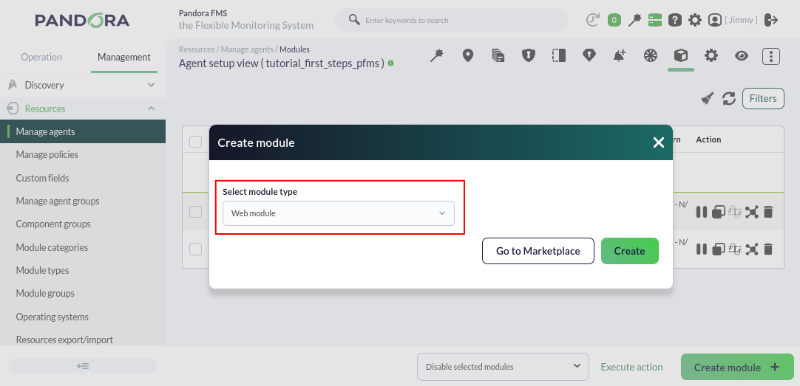
<span style="font-size: 11pt; font-family: Arial; background-color: transparent; font-weight: 400; font-style: normal; font-variant: normal; text-decoration: none; vertical-align: baseline; white-space: pre-wrap;">Para crear un módulo de este tipo tendremos que escoger para la creación del módulo uno de tipo **Web module**: </span>

[![pfms-first_steps-web_monitoring-image_010.png](https://pandorafms.com/guides/public/uploads/images/gallery/2026-02/scaled-1680-/pfms-first-steps-web-monitoring-image-010.png)](https://pandorafms.com/guides/public/uploads/images/gallery/2026-02/pfms-first-steps-web-monitoring-image-010.png)

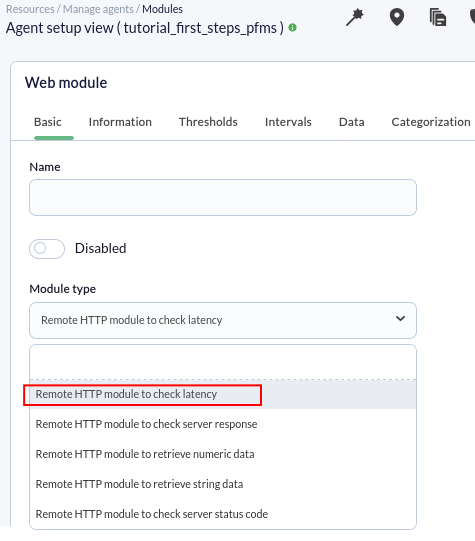
<span style="font-size: 11pt; font-family: Arial; background-color: transparent; font-weight: 400; font-style: normal; font-variant: normal; text-decoration: none; vertical-align: baseline; white-space: pre-wrap;">Una vez pulsemos el botón </span><span style="font-size: 11pt; font-family: Arial; background-color: transparent; font-weight: bold; font-style: normal; font-variant: normal; text-decoration: none; vertical-align: baseline; white-space: pre-wrap;">Create</span><span style="font-size: 11pt; font-family: Arial; background-color: transparent; font-weight: 400; font-style: normal; font-variant: normal; text-decoration: none; vertical-align: baseline; white-space: pre-wrap;"> veremos un formulario en el que deberemos rellenar los campos necesarios para poder monitorizar una web. Lo más importante será elegir el tipo de chequeo. </span><span style="font-size: 11pt; font-family: Arial; background-color: transparent; font-weight: 400; font-style: normal; font-variant: normal; text-decoration: none; vertical-align: baseline; white-space: pre-wrap;">Vamos a crear un módulo que nos permita comprobar el tiempo de carga de una web y que debe contener las palabras "**View license comparison".**</span>

<span style="font-size: 11pt; font-family: Arial; background-color: transparent; font-weight: 400; font-style: normal; font-variant: normal; text-decoration: none; vertical-align: baseline; white-space: pre-wrap;">Para ello seleccionaremos el tipo de módulo </span><span style="font-size: 11pt; font-family: Arial; background-color: transparent; font-weight: bold; font-style: normal; font-variant: normal; text-decoration: none; vertical-align: baseline; white-space: pre-wrap;">Remote HTTP module to check latency</span><span style="font-size: 11pt; font-family: Arial; background-color: transparent; font-weight: 400; font-style: normal; font-variant: normal; text-decoration: none; vertical-align: baseline; white-space: pre-wrap;">, que nos permitirá ver el número de segundos que tarda en responder el servidor. </span>

[![pfms-first_steps-web_monitoring-image_020.png](https://pandorafms.com/guides/public/uploads/images/gallery/2026-02/scaled-1680-/pfms-first-steps-web-monitoring-image-020.png)](https://pandorafms.com/guides/public/uploads/images/gallery/2026-02/pfms-first-steps-web-monitoring-image-020.png)

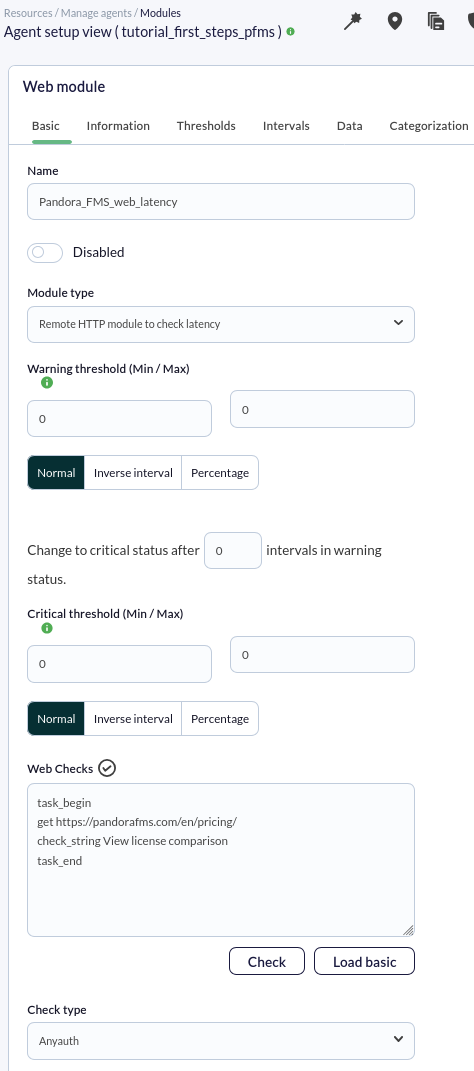
<span style="font-size: 11pt; font-family: Arial; background-color: transparent; font-weight: 400; font-style: normal; font-variant: normal; text-decoration: none; vertical-align: baseline; white-space: pre-wrap;">En este caso haremos solo una petición y comprobaremos que la respuesta devuelva una frase, para ello agregaremos el siguiente código a la caja **Web checks**:</span>

```
task_begin
get https://pandorafms.com/en/pricing/
check_string View license comparison
task_end 
```

**El chequeo quedará como sigue:**

[![pfms-first_steps-web_monitoring-image_030.png](https://pandorafms.com/guides/public/uploads/images/gallery/2026-02/scaled-1680-/pfms-first-steps-web-monitoring-image-030.png)](https://pandorafms.com/guides/public/uploads/images/gallery/2026-02/pfms-first-steps-web-monitoring-image-030.png)
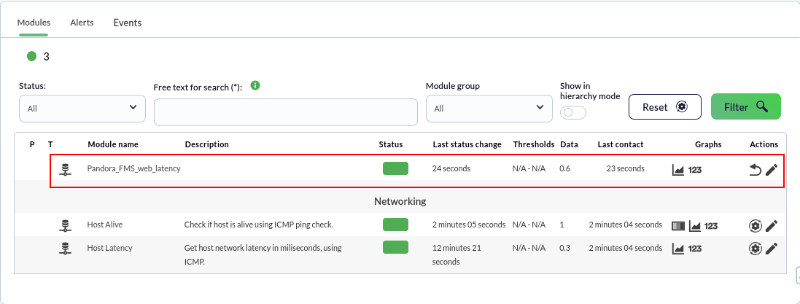
Como siempre, tras unos segundos, ya habremos recibido algunos datos de este módulo, en este caso, los segundos que tarda la petición en completarse:

[![pfms-first_steps-web_monitoring-image_040.png](https://pandorafms.com/guides/public/uploads/images/gallery/2026-02/scaled-1680-/pfms-first-steps-web-monitoring-image-040.png)](https://pandorafms.com/guides/public/uploads/images/gallery/2026-02/pfms-first-steps-web-monitoring-image-040.png)
<p class="callout info"><span style="font-weight: normal;"><span style="font-size: 11pt; font-family: Arial; background-color: transparent; font-weight: 400; font-style: normal; font-variant: normal; white-space: pre-wrap;">Pandora FMS también ofrece la posibilidad de monitorizar transacciones web complejas gracias a la </span>[Experiencia Web de Usuario](https://pandorafms.com/manual/es/documentation/pandorafms/monitoring/13_user_monitorization "WUX"), la cual<span style="font-size: 11pt; font-family: Arial; background-color: transparent; font-weight: 400; font-style: normal; font-variant: normal; text-decoration-skip-ink: none; white-space: pre-wrap;"> es una funcionalidad más avanzada.</span></span></p>

¿No se están logrando los resultados explicados en el capítulo? Acceda a la sección de [ayuda](https://pandorafms.com/guides/public/books/primeros-pasos-con-pandora-fms/page/21-donde-mirar-en-caso-de-problemas) o [soporte](https://pandorafms.com/guides/public/books/primeros-pasos-con-pandora-fms/page/22-soporte)