# 8. Supervision Web

<span style="background-color: transparent; font-family: Arial; font-size: 11pt; font-style: normal; font-variant-ligatures: normal; font-variant-caps: normal; font-weight: 400; white-space: pre-wrap;">Pour ce dernier exemple, nous utiliserons le composant serveur Web de Pandora FMS, qui sert à effectuer une surveillance de base HTTP et HTTPS. Cet élément nous permettra de réaliser des vérifications Web simples ou un peu plus complexes (dans plusieurs cas), en utilisant des appels de bas niveau. Il est utile pour s'assurer que nos pages restent en ligne, vérifier que nous pouvons effectuer une série d'étapes (par exemple, remplir certains formulaires) et/ou qu'elles contiennent un mot déterminé. En plus de **vérifier qu'elles fonctionnent**, nous pouvons **mesurer le temps total** qu'elles prennent.</span>

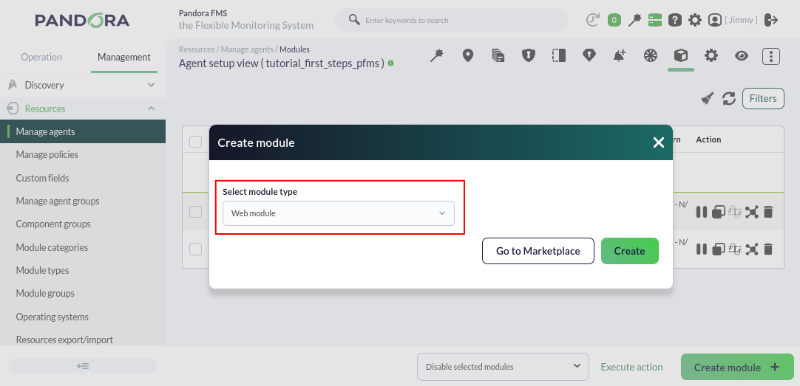
<span style="font-size: 11pt; font-family: Arial; background-color: transparent; font-weight: 400; font-style: normal; font-variant: normal; text-decoration: none; vertical-align: baseline; white-space: pre-wrap;">Pour créer un module de ce type, nous devrons choisir, lors de la création du module, un type **Web module** : </span>

[![pfms-first_steps-web_monitoring-image_010.png](https://pandorafms.com/guides/public/uploads/images/gallery/2026-02/scaled-1680-/pfms-first-steps-web-monitoring-image-010.png)](https://pandorafms.com/guides/public/uploads/images/gallery/2026-02/pfms-first-steps-web-monitoring-image-010.png)

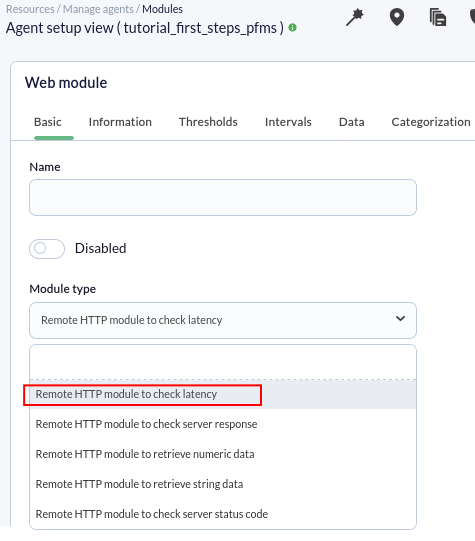
<span style="font-size: 11pt; font-family: Arial; background-color: transparent; font-weight: 400; font-style: normal; font-variant: normal; text-decoration: none; vertical-align: baseline; white-space: pre-wrap;">Une fois que nous aurons appuyé sur le bouton </span><span style="font-size: 11pt; font-family: Arial; background-color: transparent; font-weight: bold; font-style: normal; font-variant: normal; text-decoration: none; vertical-align: baseline; white-space: pre-wrap;">Create</span><span style="font-size: 11pt; font-family: Arial; background-color: transparent; font-weight: 400; font-style: normal; font-variant: normal; text-decoration: none; vertical-align: baseline; white-space: pre-wrap;">, nous verrons un formulaire dans lequel nous devrons remplir les champs nécessaires pour surveiller un site Web. Le plus important sera de choisir le type de vérification. Nous allons créer un module qui nous permettra de vérifier le temps de chargement d'un site Web et qui doit contenir les mots « **View license comparison ».**</span>

<span style="font-size: 11pt; font-family: Arial; background-color: transparent; font-weight: 400; font-style: normal; font-variant: normal; text-decoration: none; vertical-align: baseline; white-space: pre-wrap;">Pour ce faire, nous sélectionnerons le type de module </span><span style="font-size: 11pt; font-family: Arial; background-color: transparent; font-weight: bold; font-style: normal; font-variant: normal; text-decoration: none; vertical-align: baseline; white-space: pre-wrap;">Remote HTTP module to check latency</span><span style="font-size: 11pt; font-family: Arial; background-color: transparent; font-weight: 400; font-style: normal; font-variant: normal; text-decoration: none; vertical-align: baseline; white-space: pre-wrap;">, ce qui nous permettra de voir le nombre de secondes que le serveur met à répondre. </span>

[![pfms-first_steps-web_monitoring-image_020.png](https://pandorafms.com/guides/public/uploads/images/gallery/2026-02/scaled-1680-/pfms-first-steps-web-monitoring-image-020.png)](https://pandorafms.com/guides/public/uploads/images/gallery/2026-02/pfms-first-steps-web-monitoring-image-020.png)

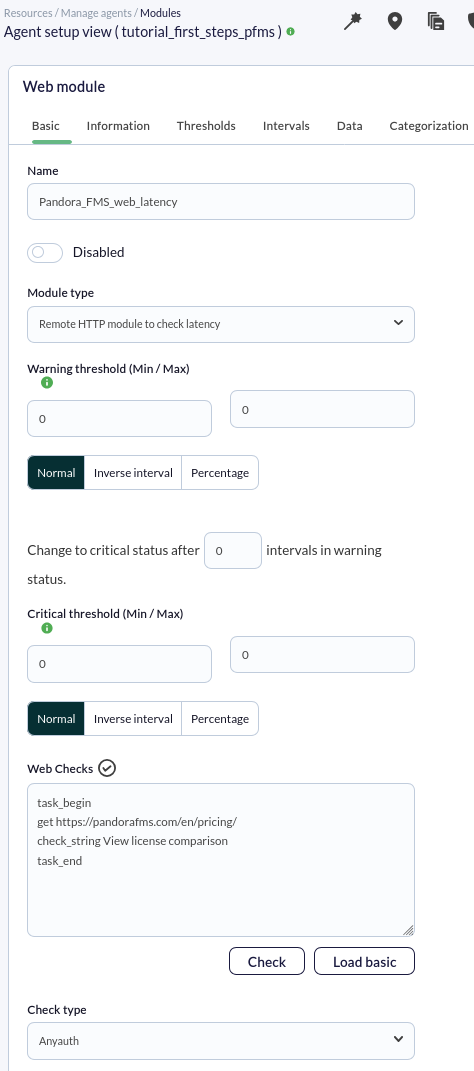
<span style="font-size: 11pt; font-family: Arial; background-color: transparent; font-weight: 400; font-style: normal; font-variant: normal; text-decoration: none; vertical-align: baseline; white-space: pre-wrap;">Dans ce cas, nous ferons une seule requête et nous vérifierons que la réponse renvoie une phrase ; pour cela, nous ajouterons le code suivant dans la boîte **Web checks** :</span>

```
task_begin
get https://pandorafms.com/en/pricing/
check_string View license comparison
task_end 
```

**La vérification se présentera comme suit :**

[![pfms-first_steps-web_monitoring-image_030.png](https://pandorafms.com/guides/public/uploads/images/gallery/2026-02/scaled-1680-/pfms-first-steps-web-monitoring-image-030.png)](https://pandorafms.com/guides/public/uploads/images/gallery/2026-02/pfms-first-steps-web-monitoring-image-030.png)
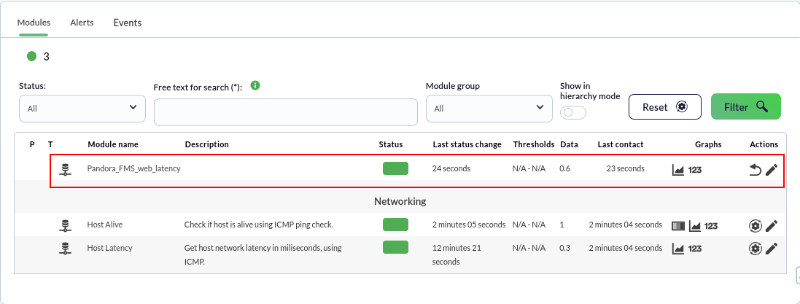
Comme toujours, après quelques secondes, nous aurons déjà reçu quelques données de ce module, dans ce cas, le nombre de secondes que la requête met à se terminer :

[![pfms-first_steps-web_monitoring-image_040.png](https://pandorafms.com/guides/public/uploads/images/gallery/2026-02/scaled-1680-/pfms-first-steps-web-monitoring-image-040.png)](https://pandorafms.com/guides/public/uploads/images/gallery/2026-02/pfms-first-steps-web-monitoring-image-040.png)
<p class="callout info"><span style="font-weight: normal;"><span style="font-size: 11pt; font-family: Arial; background-color: transparent; font-weight: 400; font-style: normal; font-variant: normal; white-space: pre-wrap;">Pandora FMS offre également la possibilité de surveiller des transactions Web complexes grâce à l'</span>[Expérience Web Utilisateur (WUX)](https://pandorafms.com/manual/fr/documentation/pandorafms/monitoring/13_user_monitorization "WUX"), qui<span style="font-size: 11pt; font-family: Arial; background-color: transparent; font-weight: 400; font-style: normal; font-variant: normal; text-decoration-skip-ink: none; white-space: pre-wrap;"> est une fonctionnalité plus avancée.</span></span></p>

Vous n'obtenez pas les résultats expliqués dans ce chapitre ? Accédez à la section d'[aide](https://pandorafms.com/guides/public/books/premiers-pas-avec-pandora-fms/page/21-ou-chercher-en-cas-de-probleme) ou de [support](https://pandorafms.com/guides/public/books/premiers-pas-avec-pandora-fms/page/22-assistance).