# 5. Détection et supervision des équipements réseau et Windows avec Discovery

<span style="font-size: 11pt; font-family: Arial; background-color: transparent; font-weight: 400; font-style: normal; font-variant: normal; text-decoration: none; vertical-align: baseline; white-space: pre-wrap;">Voyons maintenant une tâche de découverte plus complexe [que la précédente](https://pandorafms.com/guides/public/books/premiers-pas-avec-pandora-fms/page/4-detection-et-supervision-de-nouveaux-systemes-avec-discovery "4. Détection et surveillance de nouveaux systèmes avec Discovery"), en configurant cette fois-ci **SNMP** et **WMI**, deux protocoles utilisés pour surveiller à distance les périphériques, tant réseau (SNMP) que MS Windows® (WMI).</span>

<p class="callout info"><span style="font-size: 11pt; font-family: Arial; background-color: transparent; font-weight: 400; font-style: normal; font-variant: normal; text-decoration: none; vertical-align: baseline; white-space: pre-wrap;">Menu **Management** </span>**→ Discovery<span style="font-size: 11pt; font-family: Arial; background-color: transparent; font-style: normal; font-variant: normal; text-decoration: none; vertical-align: baseline; white-space: pre-wrap;"> </span>→ Host &amp; Devices<span style="font-size: 11pt; font-family: Arial; background-color: transparent; font-style: normal; font-variant: normal; text-decoration: none; vertical-align: baseline; white-space: pre-wrap;"> </span>→ Network scan**.</p>

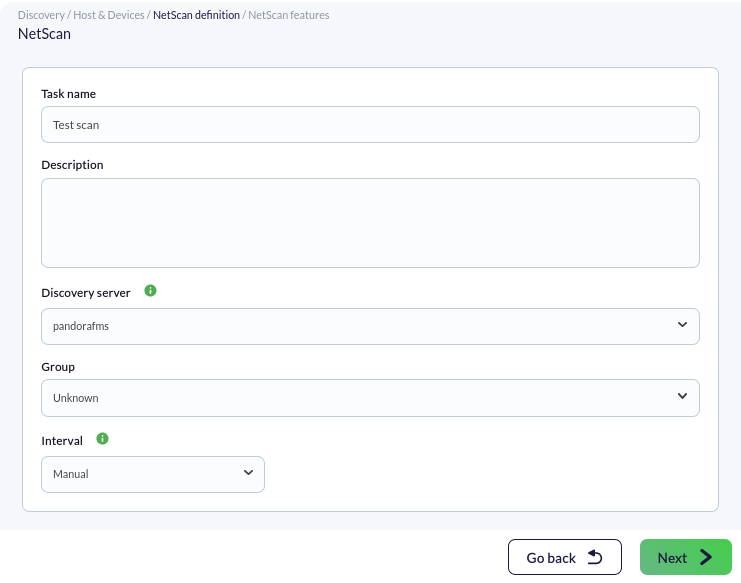
[![pfms-discovery-network_scan-image_010.png](https://pandorafms.com/guides/public/uploads/images/gallery/2026-01/scaled-1680-/pfms-discovery-network-scan-image-010.png)](https://pandorafms.com/guides/public/uploads/images/gallery/2026-01/pfms-discovery-network-scan-image-010.png)

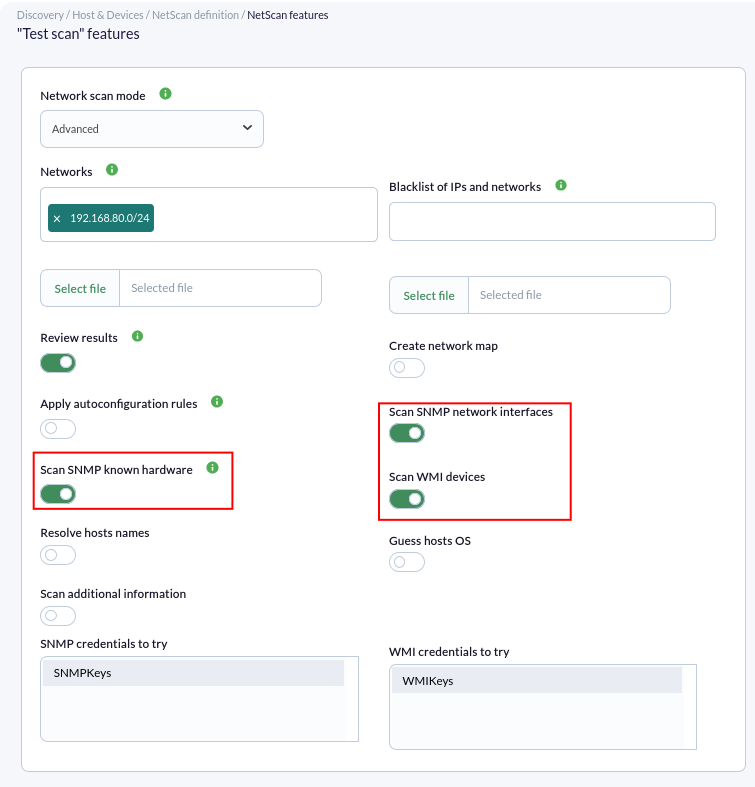
<span style="font-size: 11pt; font-family: Arial; background-color: transparent; font-weight: 400; font-style: normal; font-variant: normal; text-decoration: none; vertical-align: baseline; white-space: pre-wrap;">Le processus de configuration est similaire au précédent, en sélectionnant cette fois le mode avancé, et nous accéderons aux options de configuration de la tâche de découverte dans la partie inférieure :</span>

<span style="font-weight: normal;">[![pfms-discovery-network_scan-image_020.png](https://pandorafms.com/guides/public/uploads/images/gallery/2026-01/scaled-1680-/pfms-discovery-network-scan-image-020.png)](https://pandorafms.com/guides/public/uploads/images/gallery/2026-01/pfms-discovery-network-scan-image-020.png) </span>

<span style="font-size: 11pt; font-family: Arial; background-color: transparent; font-weight: 400; font-style: normal; font-variant: normal; text-decoration: none; vertical-align: baseline; white-space: pre-wrap;">Pour activer la surveillance avec SNMP et WMI, nous devrons activer le *token* correspondant et fournir les données requises par chaque protocole. </span>

- <span style="font-size: 11pt; font-family: Arial; background-color: transparent; font-weight: 400; font-style: normal; font-variant: normal; text-decoration: none; vertical-align: baseline; white-space: pre-wrap;">**SNMP** dispose de « communautés » qui sont comme des *mots de passe* d'accès. Si vous ne connaissez pas votre **communauté SNMP**, essayez `public`. Vous pouvez en saisir autant que vous le souhaitez, afin qu'elles soient toutes testées.</span>
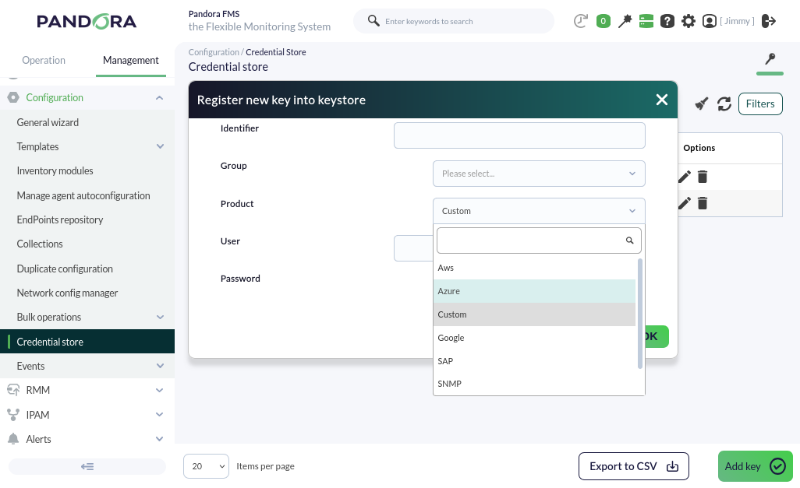
- <span style="font-size: 11pt; font-family: Arial; background-color: transparent; font-weight: 400; font-style: normal; font-variant: normal; text-decoration: none; vertical-align: baseline; white-space: pre-wrap;">Les identifiants pour le service **WMI** (et autres) peuvent être définis dans </span>**<span style="font-size: 11pt; font-family: Arial; background-color: transparent; font-style: normal; font-variant: normal; text-decoration: none; vertical-align: baseline; white-space: pre-wrap;">Management</span>**<span style="font-style: normal; font-variant: normal; background-color: transparent; font-size: 11pt; font-family: Arial; white-space-collapse: preserve;"> **→ Configuration**<span style="font-style: normal; font-variant: normal; background-color: transparent; font-size: 11pt; font-family: Arial; white-space-collapse: preserve;"> **→ Credential store**.</span></span>

<p class="callout info">**Les *credential store*** sont des magasins sécurisés d'utilisateur/mot de passe utilisés ultérieurement pour les vérifications à distance, les configurations d'équipements, l'accès à distance, etc. Ainsi, ils peuvent être réutilisés à différents endroits de Pandora FMS :</p>

[![pfms-discovery-network_scan-image_030.png](https://pandorafms.com/guides/public/uploads/images/gallery/2026-01/scaled-1680-/pfms-discovery-network-scan-image-030.png)](https://pandorafms.com/guides/public/uploads/images/gallery/2026-01/pfms-discovery-network-scan-image-030.png)

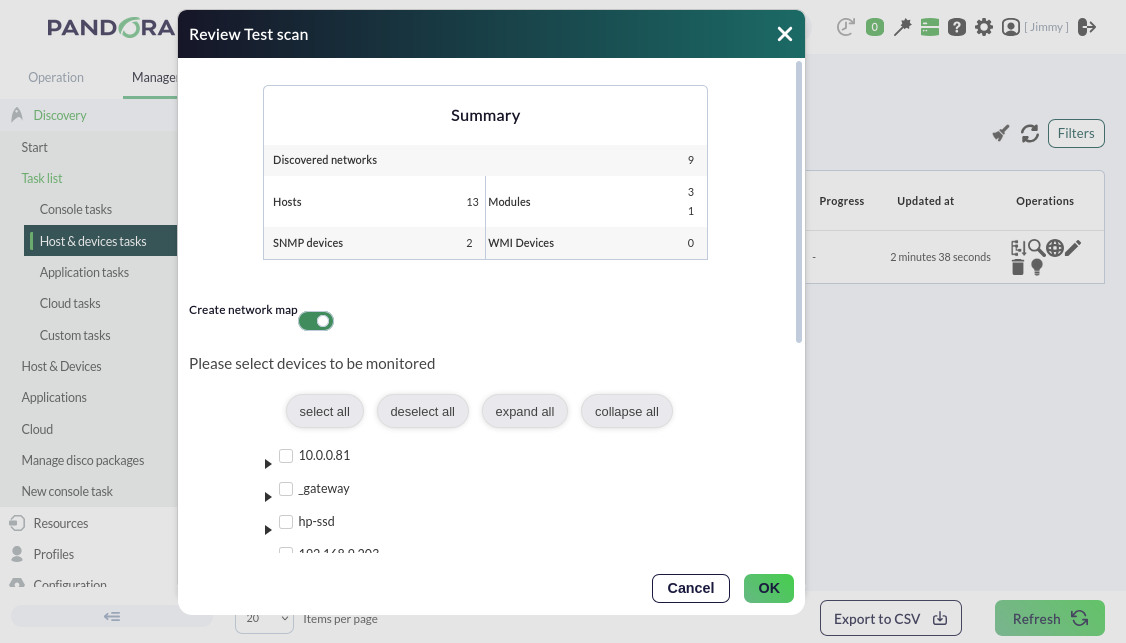
<span style="font-size: 11pt; font-family: Arial; background-color: transparent; font-weight: 400; font-style: normal; font-variant: normal; text-decoration: none; vertical-align: baseline; white-space: pre-wrap;">Nous activerons également le token **Review results**, qui nous permettra de voir les composants trouvés par Pandora FMS lors de la tâche de découverte une fois terminée, affichant ce qu'il a trouvé et permettant de l'ajouter à la surveillance à distance de l'agent en un seul clic.</span>

[![pfms-management-discovery-host-and-devices-netscan-11.png](https://pandorafms.com/guides/public/uploads/images/gallery/2026-01/scaled-1680-/pfms-management-discovery-host-and-devices-netscan-11.png)](https://pandorafms.com/guides/public/uploads/images/gallery/2026-01/pfms-management-discovery-host-and-devices-netscan-11.png)

Si vous n'avez pas besoin de plus de surveillance ou de configuration, passons aux alertes de métriques [ici](https://pandorafms.com/guides/public/books/premiers-pas-avec-pandora-fms/page/13-alertes-par-email).

<p class="callout info">Vous n'obtenez pas les résultats expliqués dans ce chapitre ? Accédez à la section d'[aide](https://pandorafms.com/guides/public/books/premiers-pas-avec-pandora-fms/page/21-ou-chercher-en-cas-de-probleme) ou de [support](https://pandorafms.com/guides/public/books/premiers-pas-avec-pandora-fms/page/22-assistance).</p>