# 21. Où chercher en cas de problème ?

<span style="font-size: 11pt; font-family: Arial; background-color: transparent; font-weight: 400; font-style: normal; font-variant: normal; text-decoration: none; vertical-align: baseline; white-space: pre-wrap;">Face à n'importe quel problème, Pandora FMS nous propose différents outils pour agir :</span>

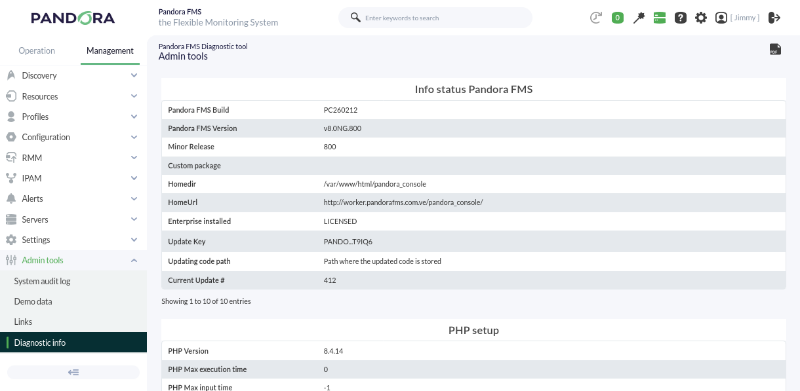
- <span style="font-size: 11pt; font-family: Arial; background-color: transparent; font-weight: 400; font-style: normal; font-variant: normal; text-decoration: none; vertical-align: baseline; white-space: pre-wrap;">Outil de diagnostic : dans </span><span style="font-size: 11pt; font-family: Arial; background-color: transparent; font-weight: bold; font-style: normal; font-variant: normal; text-decoration: none; vertical-align: baseline; white-space: pre-wrap;">Management →</span><span style="font-size: 11pt; font-family: Arial; background-color: transparent; font-weight: bold; font-style: normal; font-variant: normal; text-decoration: none; vertical-align: baseline; white-space: pre-wrap;"> Admin tools</span><span style="font-size: 11pt; font-family: Arial; background-color: transparent; font-weight: bold; font-style: normal; font-variant: normal; text-decoration: none; vertical-align: baseline; white-space: pre-wrap;"> →</span><span style="font-size: 11pt; font-family: Arial; background-color: transparent; font-weight: bold; font-style: normal; font-variant: normal; text-decoration: none; vertical-align: baseline; white-space: pre-wrap;"> </span><span style="font-size: 11pt; font-family: Arial; background-color: transparent; font-weight: bold; font-style: normal; font-variant: normal; text-decoration: none; vertical-align: baseline; white-space: pre-wrap;">Diagnostic info</span><span style="font-size: 11pt; font-family: Arial; background-color: transparent; font-weight: 400; font-style: normal; font-variant: normal; text-decoration: none; vertical-align: baseline; white-space: pre-wrap;">, il vous fournira une liste d'informations système essentielles.</span>

[![pfms-first_steps-where_to_look-image_010.png](https://pandorafms.com/guides/public/uploads/images/gallery/2026-03/scaled-1680-/pfms-first-steps-where-to-look-image-010.png)](https://pandorafms.com/guides/public/uploads/images/gallery/2026-03/pfms-first-steps-where-to-look-image-010.png)

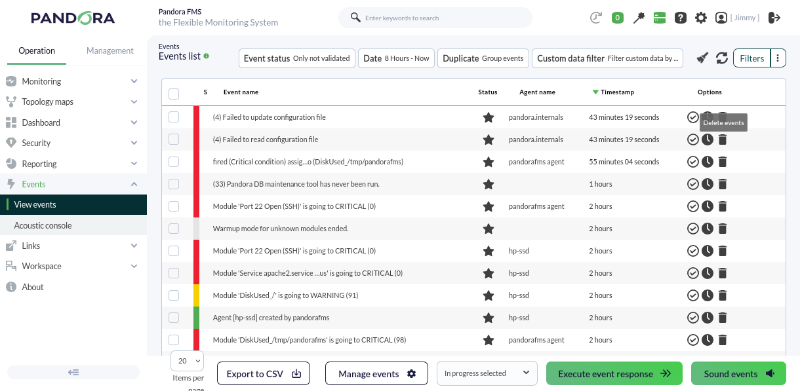
- <span style="font-size: 11pt; font-family: Arial; background-color: transparent; font-weight: 400; font-style: normal; font-variant: normal; text-decoration: none; vertical-align: baseline; white-space: pre-wrap;">Visionneuse d'événements. Dans </span><span style="font-size: 11pt; font-family: Arial; background-color: transparent; font-weight: bold; font-style: normal; font-variant: normal; text-decoration: none; vertical-align: baseline; white-space: pre-wrap;">Operation **→ E**vents **→** View events</span><span style="font-size: 11pt; font-family: Arial; background-color: transparent; font-weight: 400; font-style: normal; font-variant: normal; text-decoration: none; vertical-align: baseline; white-space: pre-wrap;">. Elle nous permettra de visualiser tous les événements générés dans notre environnement et d'interagir avec eux simplement.</span>

[![pfms-first_steps-where_to_look-image_020.png](https://pandorafms.com/guides/public/uploads/images/gallery/2026-03/scaled-1680-/pfms-first-steps-where-to-look-image-020.png)](https://pandorafms.com/guides/public/uploads/images/gallery/2026-03/pfms-first-steps-where-to-look-image-020.png)

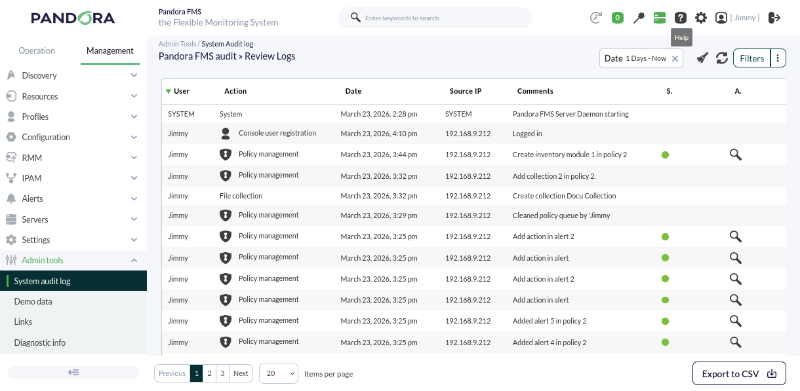
- <span style="font-size: 11pt; font-family: Arial; background-color: transparent; font-weight: 400; font-style: normal; font-variant: normal; text-decoration: none; vertical-align: baseline; white-space: pre-wrap;">Visionneuse d'audit. Dans </span>**Management →**<span style="font-style: normal; font-variant: normal; background-color: transparent; font-size: 11pt; font-family: Arial; font-weight: bold; white-space-collapse: preserve;"> A</span><span style="font-size: 11pt; font-family: Arial; background-color: transparent; font-weight: bold; font-style: normal; font-variant: normal; text-decoration: none; vertical-align: baseline; white-space: pre-wrap;">dmin Tools **→** System audit log</span><span style="font-size: 11pt; font-family: Arial; background-color: transparent; font-weight: 400; font-style: normal; font-variant: normal; text-decoration: none; vertical-align: baseline; white-space: pre-wrap;">. Elle nous montrera des informations détaillées sur l'environnement de surveillance.</span>

[![pfms-first_steps-where_to_look-image_030.png](https://pandorafms.com/guides/public/uploads/images/gallery/2026-03/scaled-1680-/pfms-first-steps-where-to-look-image-030.png)](https://pandorafms.com/guides/public/uploads/images/gallery/2026-03/pfms-first-steps-where-to-look-image-030.png)

#### <span style="font-weight: 400;">Sources d'information avancées  
</span>

<span style="font-weight: 400;">Sources d'information (*logs*) où nous pouvons chercher plus d'informations, des erreurs, etc. :</span>

- <span style="font-weight: 400;">`/var/log/pandora/pandora_server.log` Fichier *log* du serveur, contient des indices très importants. Si vous voulez plus de détails, modifiez le paramètre "verbosity" du fichier de configuration du serveur.</span>
- <span style="font-weight: 400;">`/var/log/pandora/pandora_server.error` Fichier *log* des erreurs non capturées du serveur, contient les traces d'erreurs non gérées par le serveur, souvent des sujets d'importance.</span>
- <span style="font-weight: 400;">`/var/log/pandora/pandora_agent.log` Fichier *log* de l'agent Unix.</span>
- <span style="font-weight: 400;">`%PROGRAM_FILES%\pandora_agent\pandora_agent.log` Fichier *log* de l'agent sous MS Windows.</span>
- <span style="font-weight: 400;">`/var/www/html/pandora_console/log/console.log` Fichier *log* de la Console Web de Pandora FMS.</span>
- <span style="font-weight: 400;">`/var/log/httpd/error_log` Fichier log d'erreurs du serveur Apache (**httpd**).</span>
- <span style="font-weight: 400;">`/var/log/messages` Fichier *log* du système.</span>

```