# Módulos Generados por el Plug-in

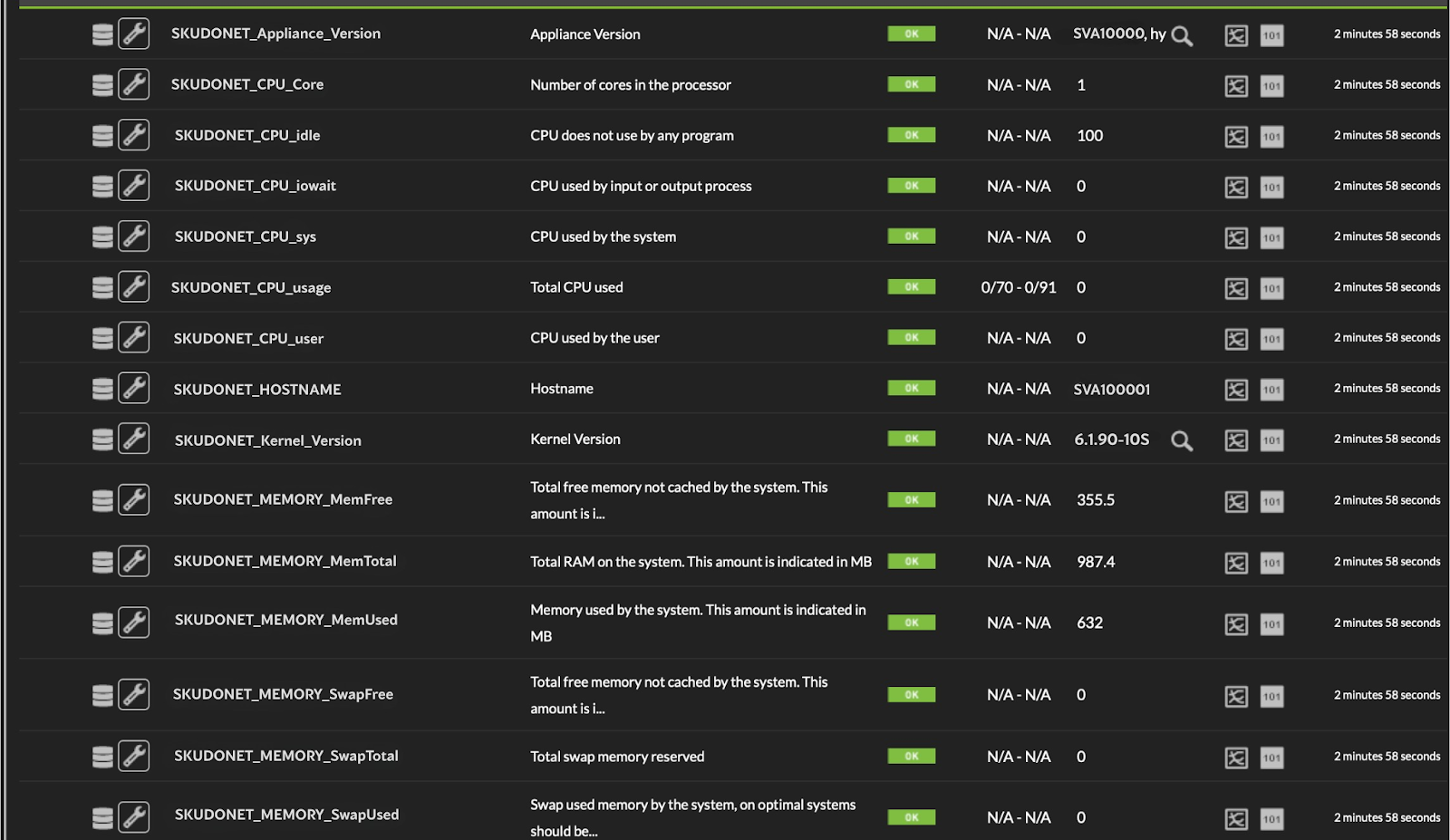
Se toman los datos de aplicación del balanceador, los mismos que podemos ver en la GUI del producto

[<span style="font-size: 10.5pt; font-family: Roboto, sans-serif; color: rgb(17, 85, 204); font-weight: 400; font-style: normal; font-variant: normal; text-decoration-line: underline; text-decoration-skip-ink: none; white-space-collapse: preserve;"><span style="border-width: initial; border-style: none; display: inline-block; overflow: hidden; width: 602px; height: 93px;">![](https://pandorafms.com/guides/public/uploads/images/gallery/2025-11/embedded-image-flo3l67a.png)**SKUDONET GUI**</span></span>](https://drive.google.com/file/d/1b-rXJ1eGrx8fQum97pw6dn2g0ouw7mKs/view?usp=sharing)

**SKUDONET GUI**

<span id="bkmrk--2" style="font-weight: normal;">[<span style="font-size: 10.5pt; font-family: Roboto, sans-serif; color: rgb(17, 85, 204); font-weight: 400; font-style: normal; font-variant: normal; text-decoration-line: underline line-through; text-decoration-skip-ink: none; white-space-collapse: preserve;"><span style="border-width: initial; border-style: none; display: inline-block; overflow: hidden; width: 562px; height: 332px;">![](https://pandorafms.com/guides/public/uploads/images/gallery/2025-11/embedded-image-4zppnrd8.png)</span></span>](https://drive.google.com/file/d/1QFiit_MvFQQ5w70qV3qtPWVuhQGQJd3y/view?usp=sharing)</span>

**PandoraFMS**

Se muestran los datos de las granjas (farms) de todas las que tenga configurada el equipo

[<span id="bkmrk--3" style="font-weight: normal;"></span>](https://pandorafms.com/guides/public/uploads/images/gallery/2021-06/image-1624924809040.png)[<span style="font-size: 10.5pt; font-family: Roboto, sans-serif; color: rgb(17, 85, 204); background-color: rgb(255, 255, 255); font-weight: 400; font-style: normal; font-variant: normal; text-decoration-skip-ink: none; white-space-collapse: preserve;"><span style="border-width: initial; border-style: none; display: inline-block; overflow: hidden; width: 593px; height: 151px;">![](https://pandorafms.com/guides/public/uploads/images/gallery/2025-11/embedded-image-ktizgnoe.png)</span></span>](https://drive.google.com/file/d/1HlGBcg1wJ--bH1dyVq-vylkL2S6ittVm/view?usp=sharing)
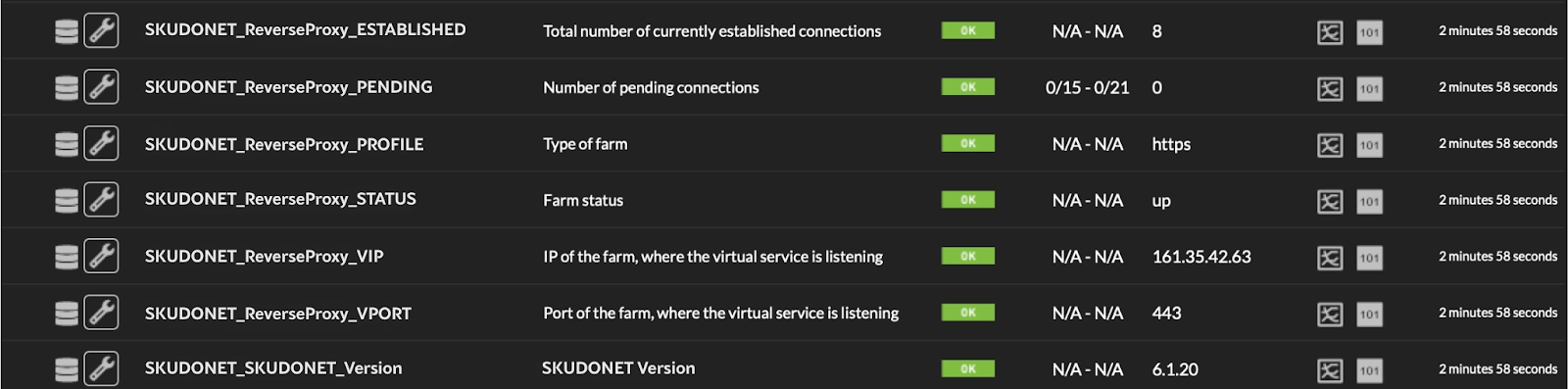
**Ejemplo granja ReverseProxy**

También se ven todas las placas de red y los datos de tráfico de las mismas

[<span id="bkmrk--5" style="font-weight: normal;"></span>](https://pandorafms.com/guides/public/uploads/images/gallery/2021-06/image-1624924891654.png)[<span style="font-size: 10.5pt; font-family: Roboto, sans-serif; color: rgb(17, 85, 204); background-color: rgb(255, 255, 255); font-weight: 400; font-style: normal; font-variant: normal; text-decoration-skip-ink: none; white-space-collapse: preserve;"><span style="border-width: initial; border-style: none; display: inline-block; overflow: hidden; width: 602px; height: 144px;">![](https://pandorafms.com/guides/public/uploads/images/gallery/2025-11/embedded-image-nh2pazwx.png)</span></span>](https://drive.google.com/file/d/15iD9eeXHxdgOrK1h41Gd1OQXpeo0FrMz/view?usp=sharing)
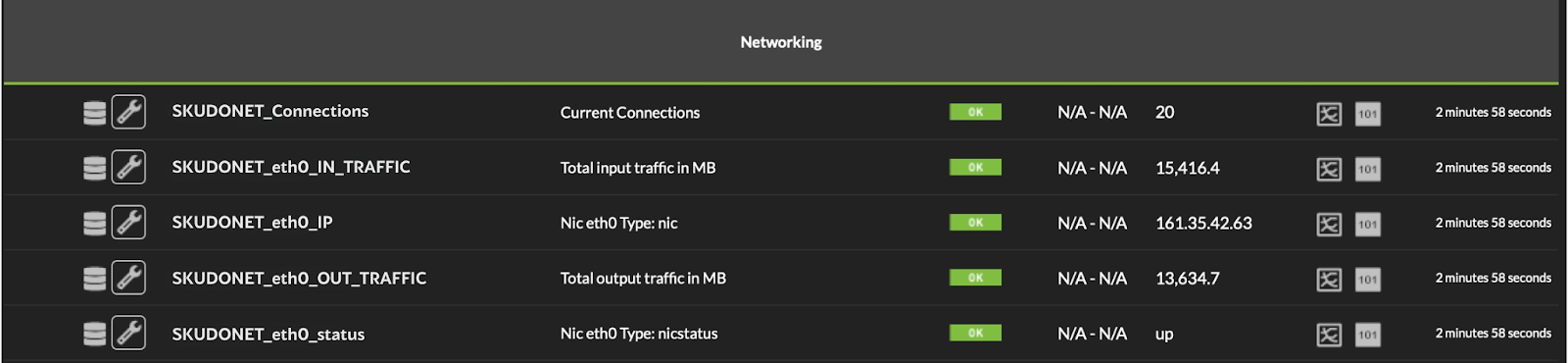
**Ejemplo con una placa de red eth0**

Si se activa el valor Cluster Data en 1 se obtienen estas métricas adicionales

<span id="bkmrk--7" style="font-weight: normal;">[<span style="font-size: 10.5pt; font-family: Roboto, sans-serif; color: rgb(17, 85, 204); font-weight: 400; font-style: normal; font-variant: normal; text-decoration-line: underline; text-decoration-skip-ink: none; white-space-collapse: preserve;"><span style="border-width: initial; border-style: none; display: inline-block; overflow: hidden; width: 602px; height: 99px;">![](https://pandorafms.com/guides/public/uploads/images/gallery/2025-11/embedded-image-dorcxkz1.png)</span></span>](https://drive.google.com/file/d/131Y1vCq0VZQhtLTTDQ6k2RK13ik1ZewQ/view?usp=sharing)</span>

**Ejemplo de un Cluster en modo master**

Todos los datos generados son dinámicos y se ven reflejados si se realiza cualquier cambio en el balanceador cómo crear una nueva granja (Farm), agregar una nueva placa de red, etc.

[&lt; ANTERIOR ](https://pandorafms.com/guides/public/books/plugin-zevenet/page/agregar-monitor-para-ejecucion-plug-in)