# Agregar Monitor para Ejecución Plug-in

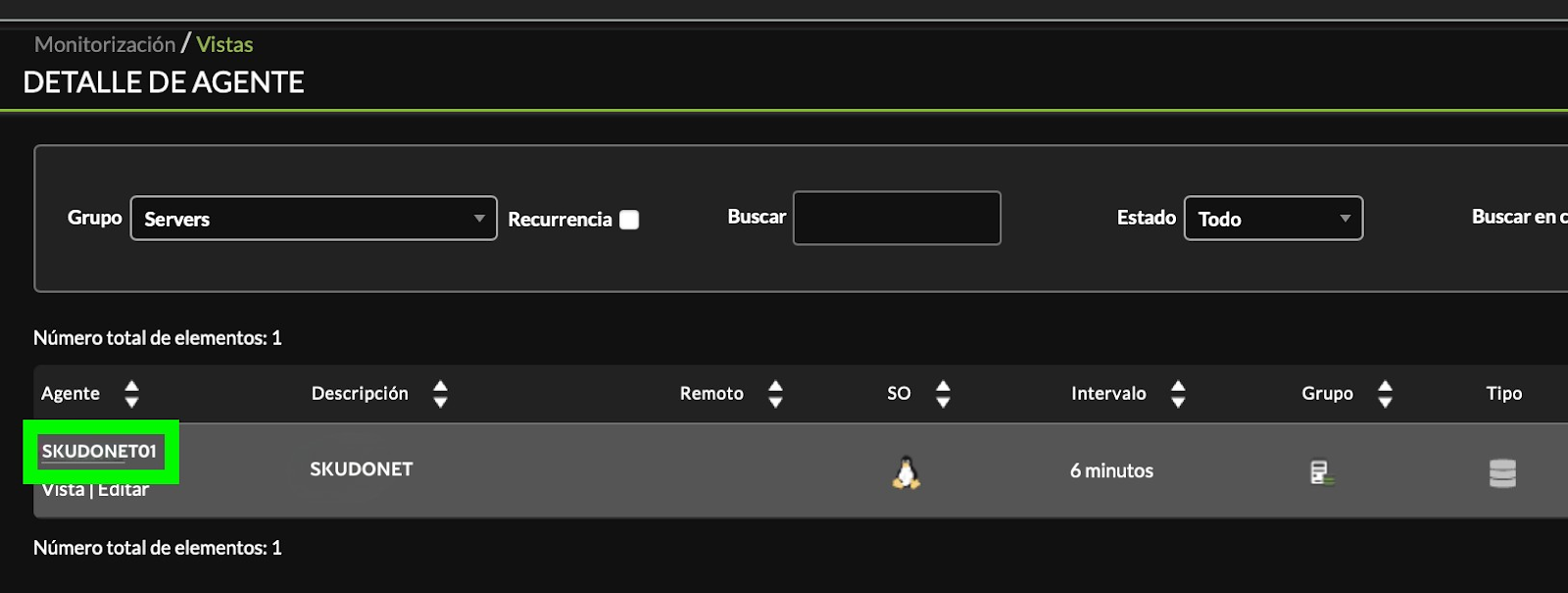
Buscamos el agente creado en el paso anterior lo encontraremos en el grupo **Servers,** vamos a Monitorización -&gt; Vista -&gt; Vista de Grupo

[![image-1625613137486.png](https://pandorafms.com/guides/public/uploads/images/gallery/2021-07/scaled-1680-/image-1625613137486.png)](https://pandorafms.com/guides/public/uploads/images/gallery/2021-07/image-1625613137486.png)

Buscamos el agente **SKUDONET01** creado en nuestra ejecución Manual, hacemos click en el nombre para editarlo

<span id="bkmrk--2" style="font-weight: normal;">[<span style="font-size: 10.5pt; font-family: Roboto, sans-serif; color: rgb(17, 85, 204); font-weight: 400; font-style: normal; font-variant: normal; text-decoration-line: underline; text-decoration-skip-ink: none; white-space-collapse: preserve;"><span style="border-width: initial; border-style: none; display: inline-block; overflow: hidden; width: 602px; height: 228px;">![](https://pandorafms.com/guides/public/uploads/images/gallery/2025-11/embedded-image-zxzopfib.png)</span></span>](https://drive.google.com/file/d/1Uqbkmbcf9mFm9dXu2CqBC7GCAquAmN18/view?usp=sharing)</span>

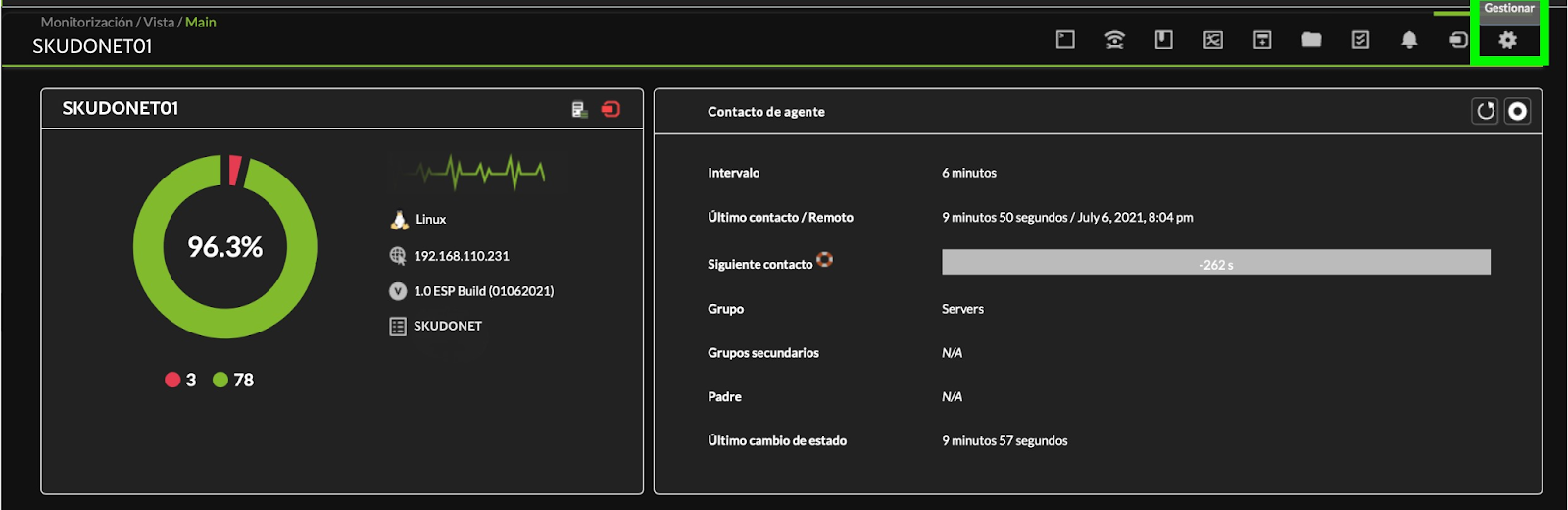
Desde el icono del engranaje -&gt; **Gestionar**

<span id="bkmrk--4" style="font-weight: normal;">[<span style="font-size: 10.5pt; font-family: Roboto, sans-serif; color: rgb(17, 85, 204); font-weight: bold; font-style: normal; font-variant: normal; text-decoration-line: underline; text-decoration-skip-ink: none; white-space-collapse: preserve;"><span style="border-width: initial; border-style: none; display: inline-block; overflow: hidden; width: 602px; height: 200px;">![](https://pandorafms.com/guides/public/uploads/images/gallery/2025-11/embedded-image-kv1ensp5.png)</span></span>](https://drive.google.com/file/d/1Jm5t61PSBawxkfiKjaIkzwk3e8hfEo7M/view?usp=sharing)</span>

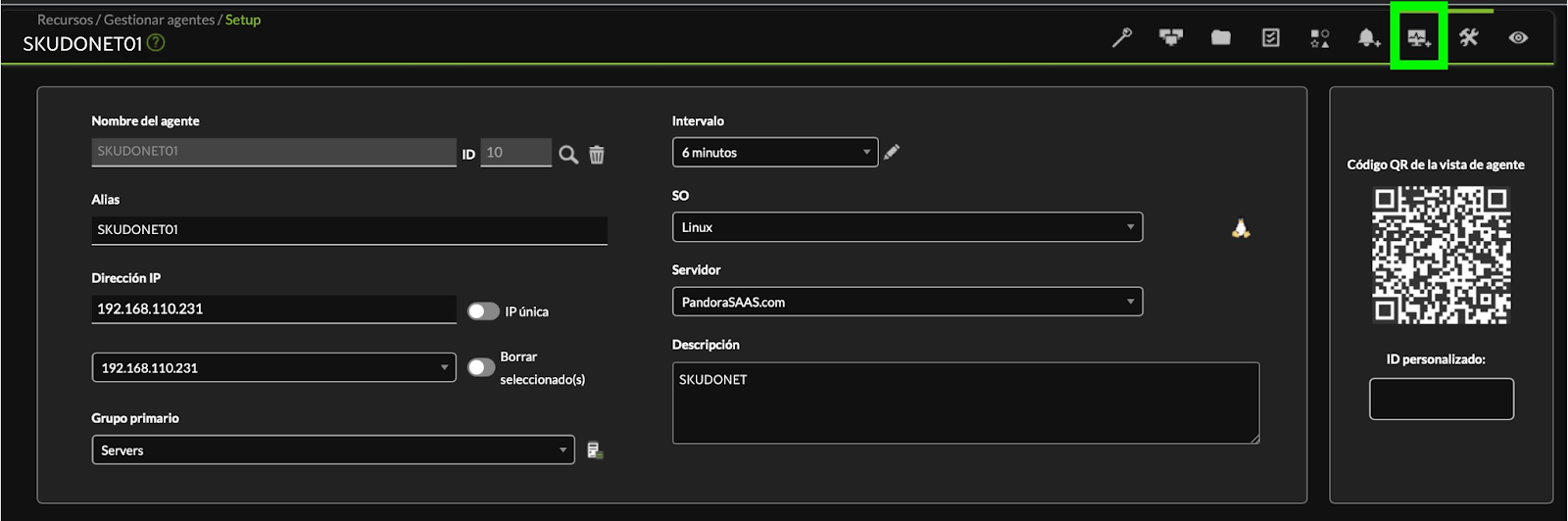
Seleccionamos -&gt; **Módulos**

[<span id="bkmrk--6" style="font-weight: normal;"></span>](https://pandorafms.com/guides/public/uploads/images/gallery/2021-07/image-1625613553798.png)[<span style="font-size: 10.5pt; font-family: Roboto, sans-serif; color: rgb(17, 85, 204); background-color: rgb(255, 255, 255); font-weight: bold; font-style: normal; font-variant: normal; text-decoration-skip-ink: none; white-space-collapse: preserve;"><span style="border-width: initial; border-style: none; display: inline-block; overflow: hidden; width: 602px; height: 204px;">![](https://pandorafms.com/guides/public/uploads/images/gallery/2025-11/embedded-image-m7v8qpwr.png)</span></span>](https://drive.google.com/file/d/1Kya6uocNgBzh9UcuBG7TpXEFSRwAkcB6/view?usp=sharing)
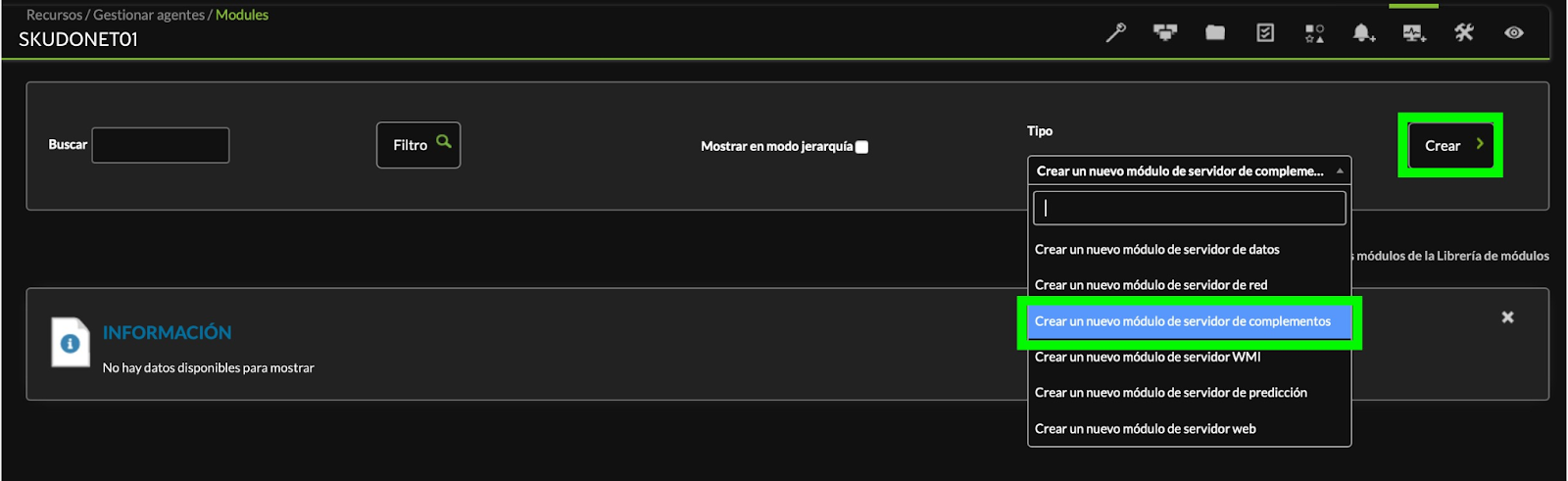
Seleccionamos **Crear un nuevo módulo del servidor de complementos** y luego **Crear**

[<span id="bkmrk--8" style="font-weight: normal;"></span>](https://pandorafms.com/guides/public/uploads/images/gallery/2021-07/image-1625611074679.png)[<span style="font-size: 10.5pt; font-family: Roboto, sans-serif; color: rgb(17, 85, 204); background-color: rgb(255, 255, 255); font-weight: bold; font-style: normal; font-variant: normal; text-decoration-skip-ink: none; white-space-collapse: preserve;"><span style="border-width: initial; border-style: none; display: inline-block; overflow: hidden; width: 602px; height: 187px;">![](https://pandorafms.com/guides/public/uploads/images/gallery/2025-11/embedded-image-xijbpknp.png)</span></span>](https://drive.google.com/file/d/1sHVzvwczZGATFA_NgQ1vwxkur3t8npH9/view?usp=sharing)
Nota: si no disponemos de esta opción es necesario activar el módulo de complementos en PandoraFMS

Nombre: **SKUDONET01**  
Tipo: **Generic boolean** Plugin: **SKUDONET\_API**[<span style="font-size: 10.5pt; font-family: Roboto, sans-serif; color: rgb(17, 85, 204); font-weight: bold; font-style: normal; font-variant: normal; text-decoration-line: underline line-through; text-decoration-skip-ink: none; white-space-collapse: preserve;"><span style="border-width: initial; border-style: none; display: inline-block; overflow: hidden; width: 602px; height: 268px;">![](https://pandorafms.com/guides/public/uploads/images/gallery/2025-11/embedded-image-jpzr8sx7.png)</span></span>](https://drive.google.com/file/d/1UYeCzuGLdniAkniHWBMkHdv28gR0EDgc/view?usp=sharing)
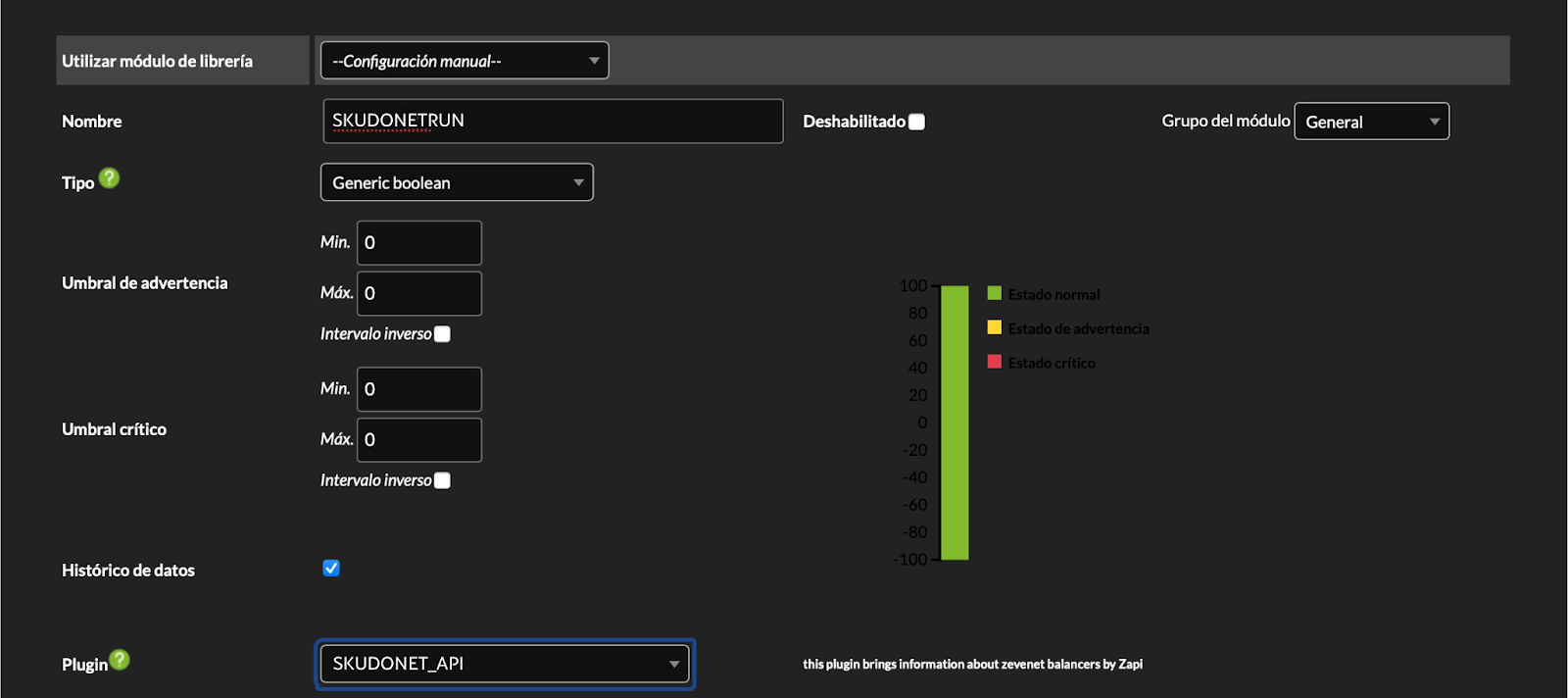
Luego de Seleccionar el plugin vamos a tener disponibles las opciones de configuración del plug-in

IP: **Dirección IP o nombre DNS del Balanceador**  
SKUDONET API Key: **Clave de acceso a API Rest generada en el Balanceador**  
Agent Name: **Nombre del Agente en nuestro Servidor de PandoraFMS, el mismo que creamos en el paso anterior**  
Cluster Data: **Si tiene un balanceador con HA configurado poner el valor en 1**

[<span id="bkmrk--10" style="font-weight: normal;"></span>](https://pandorafms.com/guides/public/uploads/images/gallery/2021-07/image-1625613696210.png)[<span style="font-size: 10.5pt; font-family: Roboto, sans-serif; color: rgb(17, 85, 204); background-color: rgb(255, 255, 255); font-weight: 400; font-style: normal; font-variant: normal; text-decoration-skip-ink: none; white-space-collapse: preserve;"><span style="border-width: initial; border-style: none; display: inline-block; overflow: hidden; width: 602px; height: 159px;">![](https://pandorafms.com/guides/public/uploads/images/gallery/2025-11/embedded-image-0jocrjig.png)</span></span>](https://drive.google.com/file/d/1KkLB37UfjgRGtQKZIJki2rvmOKZZWM7O/view?usp=sharing)
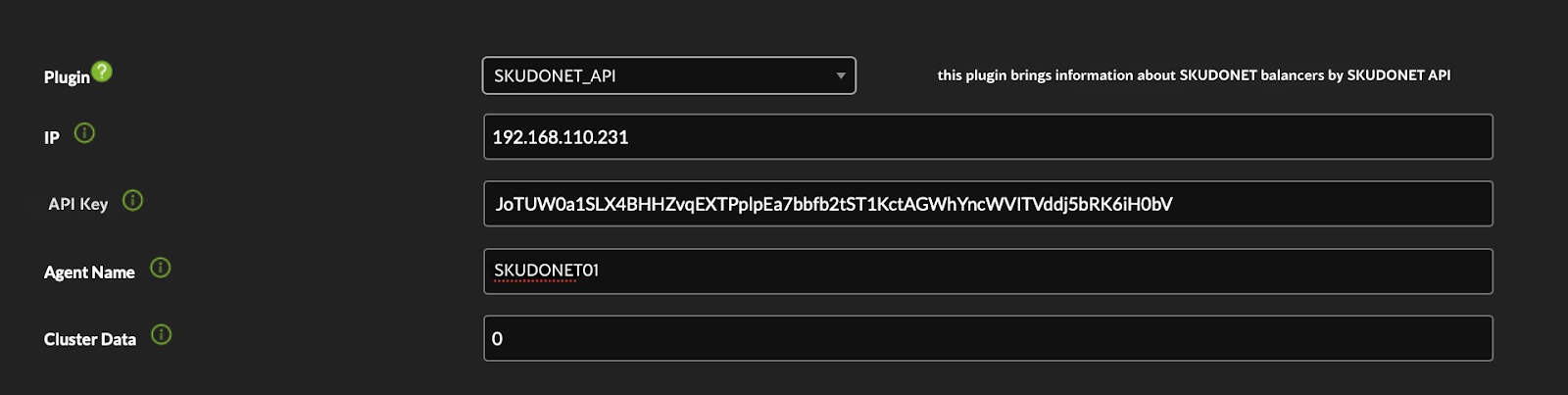
Completando los datos correspondientes a su entorno seleccionar el botón Crear

[![image-1624924173066.png](https://pandorafms.com/guides/public/uploads/images/gallery/2021-06/scaled-1680-/image-1624924173066.png)](https://pandorafms.com/guides/public/uploads/images/gallery/2021-06/image-1624924173066.png)

<span id="bkmrk--13" style="font-weight: normal;"><span style="font-size: 10.5pt; font-family: Roboto, sans-serif; color: rgb(0, 0, 0); font-weight: bold; font-style: normal; font-variant: normal; text-decoration-line: line-through; text-decoration-skip-ink: none; white-space-collapse: preserve;"><span style="border-width: initial; border-style: none; display: inline-block; overflow: hidden; width: 602px; height: 67px;">![](https://pandorafms.com/guides/public/uploads/images/gallery/2025-11/embedded-image-mmbsuhum.png)</span></span></span>

Con este módulo se ejecuta el plug-in de servidor cada 6 minutos

<span id="bkmrk--15" style="font-weight: normal;">[<span style="font-size: 10.5pt; font-family: Roboto, sans-serif; color: rgb(17, 85, 204); font-weight: 400; font-style: normal; font-variant: normal; text-decoration-line: underline; text-decoration-skip-ink: none; white-space-collapse: preserve;"><span style="border-width: initial; border-style: none; display: inline-block; overflow: hidden; width: 602px; height: 77px;">![](https://pandorafms.com/guides/public/uploads/images/gallery/2025-11/embedded-image-ua1cv4od.png)</span></span>](https://drive.google.com/file/d/1GNl761dldbscLowdHrThfWCmbEsBQXZC/view?usp=sharing)</span>

Finalizada la creación si todo es correcto en veremos que se generó un nuevo monitor con el nombre SKUDONETRUN que devuelve un 1 si la ejecución es correcta, en el siguiente ejemplo vemos el resultado de tomar datos de 3 Balanceadores 2 en HA y uno independiente

<span id="bkmrk--17" style="font-weight: normal;">[<span style="font-size: 10.5pt; font-family: Roboto, sans-serif; color: rgb(17, 85, 204); font-weight: 400; font-style: normal; font-variant: normal; text-decoration-line: underline; text-decoration-skip-ink: none; white-space-collapse: preserve;"><span style="border-width: initial; border-style: none; display: inline-block; overflow: hidden; width: 602px; height: 69px;">![](https://pandorafms.com/guides/public/uploads/images/gallery/2025-11/embedded-image-98ujhvjy.png)</span></span>](https://drive.google.com/file/d/1Q8PHPnySkZygRsIzkTCmLFYP83rlQK81/view?usp=sharing)</span>

[&lt; ANTERIOR](https://pandorafms.com/guides/public/books/plugin-zevenet/page/primera-ejecucion-manual) [SIGUIENTE&gt;](https://pandorafms.com/guides/public/books/plugin-zevenet/page/modulos-generados-por-el-plug-in)