# Plugin postgreSQL remoto

# Introducción

**Ver**. 07-03-2022  
  
Con este plug-in podremos monitorear postgreSQL mediante consultas personalizadas.

<div id="bkmrk-tipo%3A-plug-in-de-ser"><div>**Tipo**: Plug-in de servidor</div></div>

# Matriz de compatibilidad

<table border="1" id="bkmrk-sistemas-donde-se-ha" style="width: 92.0988%;"><tbody><tr><td style="width: 33.6895%;">**Sistemas donde se ha probado**</td><td style="width: 66.3105%;">CentOS 7, Fedora, rocky linux

</td></tr><tr><td style="width: 33.6895%;">**Sistemas donde debería funcionar**</td><td style="width: 66.3105%;">Cualquier sistema linux

</td></tr></tbody></table>

# Pre requisitos

- Tener el **Data Server** de Pandora FMS habilitado
- Tener el **Plugin Server** de Pandora FMS habilitado

# Parámetros

<table border="1" id="bkmrk-par%C3%A1metro-descripci%C3%B3" style="border-collapse: collapse; width: 100%; height: 458px;"><tbody><tr style="height: 29px;"><td style="width: 50%; height: 29px;">**Parámetro**</td><td style="width: 50%; height: 29px;">**Descripción**</td></tr><tr style="height: 29px;"><td style="width: 50%; height: 29px;">-d,--database</td><td style="width: 50%; height: 29px;">Nombre de la base de datos (obligatorio)</td></tr><tr style="height: 29px;"><td style="width: 50%; height: 29px;">-u,--user</td><td style="width: 50%; height: 29px;">Nombre del user de postgreSQL(obligatorio)</td></tr><tr style="height: 29px;"><td style="width: 50%; height: 29px;">-p,-password</td><td style="width: 50%; height: 29px;">Password de postgreSQL (obligatorio)</td></tr><tr style="height: 29px;"><td style="width: 50%; height: 29px;">-i,--ip</td><td style="width: 50%; height: 29px;">ip del server (obligatorio)</td></tr><tr style="height: 31px;"><td style="width: 50%; height: 31px;">--port</td><td style="width: 50%; height: 31px;">puerto del server. Por defecto 5432 (opcional)</td></tr><tr style="height: 29px;"><td style="width: 50%; height: 29px;">--tentacle\_port</td><td style="width: 50%; height: 29px;">Puerto de tentacle.Por defecto 41121(opcional)</td></tr><tr style="height: 29px;"><td style="width: 50%; height: 29px;">--tentacle\_address</td><td style="width: 50%; height: 29px;">Ip del servidor tentacle al que mandar los datos(opcional)</td></tr><tr style="height: 29px;"><td style="width: 50%; height: 29px;">--agent\_name</td><td style="width: 50%; height: 29px;">Para ponerle un nombre al agente que contendrá los módulos de las custom querys, por defecto : "PostgreSQL". (opcional)</td></tr><tr style="height: 29px;"><td style="width: 50%; height: 29px;">--prefix\_module</td><td style="width: 50%; height: 29px;">Para ponerle un prefijo a los módulos por si se quieren diferenciar de otras ejecuciones.(opcional)</td></tr><tr style="height: 29px;"><td style="width: 50%; height: 29px;">--conf</td><td style="width: 50%; height: 29px;">Path del archivo conf con las querys (obligatorio)</td></tr><tr style="height: 29px;"><td style="width: 50%; height: 29px;">-g,--group</td><td style="width: 50%; height: 29px;">Grupo de destino de Pandora FMS (opcional)</td></tr><tr style="height: 46px;"><td style="width: 50%; height: 46px;">--data\_dir</td><td style="width: 50%; height: 46px;">Directorio de datos de Pandora FMS. **Por defecto** es */var/spool/pandora/data\_in/* (opcional)</td></tr><tr style="height: 63px;"><td style="width: 50%; height: 62px;">--transfer\_mode</td><td style="width: 50%; height: 62px;">Método de transferencia de los XML, las dos opciones posibles son: tentacle o local.</td></tr></tbody></table>

**Pandora\_postgresql.conf**

En este archivo se introducirán las querys que crearán módulos en PandoraFMS.

El formato para añadir las querys es el siguiente:

```
nombre_modulo:query:tipo:descripción
```

**\* La descripción no es obligatoria, si no se introduce se quedará vacía.**

Ejemplo:

```
number_connections:SELECT count(*) FROM pg_stat_activity;:generic_data:Number of Connections or running backend
connections_waiting_in_locks:SELECT count(*) FROM pg_stat_activity WHERE wait_event = 'Lock';:generic_data:Number of connections/backends waiting on locks
connections_idle_in_transaction:SELECT count(*) FROM pg_stat_activity WHERE wait_event = 'idle in transaction';:generic_data:Number of backends in a transaction, but are currently not doing anything and could be waiting for an input from the end user.
number_users:SELECT COUNT(usename) FROM pg_stat_activity;:generic_data:Number users conected in postgreSQL
number_roles:SELECT count(*) FROM pg_roles;:generic_data:A role can be thought of as either a database user, or a group of database users, depending on how the role is set up.
psql_version:SELECT version();:generic_data_string:PostgrSQL version
num_blocks:SELECT COUNT(*) FROM pg_locks;:generic_data:A high number of deadlocks indicates that there is a higher probability that two or more processes will attempt to access the same resource.
number_commits:SELECT sum(xact_commit) FROM (pg_database AS db JOIN pg_stat_database sdb ON db.datname=sdb.datname) WHERE db.datname = _database_;:generic_data:Number of commits the current transaction. All changes made by the transaction become visible to others and are guaranteed to be durable if a crash occurs.
number_rollbacks:SELECT sum(xact_rollback) FROM (pg_database AS db JOIN pg_stat_database sdb ON db.datname=sdb.datname) WHERE db.datname = _database_;:generic_data:This metric represents the number of times, per transaction during the sample period, that users manually issue the ROLLBACK statement or an error occurred during a user's transactions.
tuples_returned:SELECT sum(tup_returned) FROM (pg_database AS db JOIN pg_stat_database sdb ON db.datname=sdb.datname) WHERE db.datname = _database_;:generic_data:Number of rows returned by queries in this database
tuples_searched:SELECT sum(tup_fetched) FROM (pg_database AS db JOIN pg_stat_database sdb ON db.datname=sdb.datname )WHERE db.datname = _database_;:generic_data:Number of tuples searched
tuples_inserted:SELECT sum(tup_inserted) FROM (pg_database AS db JOIN pg_stat_database sdb ON db.datname=sdb.datname) WHERE db.datname = _database_;:generic_data:Number of rows inserted into table
tuples_updated:SELECT sum(tup_updated) FROM (pg_database AS db JOIN pg_stat_database sdb ON db.datname=sdb.datname) WHERE db.datname = _database_;:generic_data:Number of tuples updated
tuples_removed:SELECT sum(tup_deleted) FROM (pg_database AS db JOIN pg_stat_database sdb ON db.datname=sdb.datname) WHERE db.datname = _database_;:generic_data:Number of tuples removed
state:SELECT state FROM pg_stat_activity WHERE datname = _database_;:generic_data_string:Database status
number_databases_list:select * from pg_database;:generic_data_string
```

# Ejecución manual

Con tentacle se puede realizar una ejecución manual para visualizar los agentes rápidamente en PandoraFMS.

```
./pandora_postgresql -d <database> -u <user> -p <password> -i <ip> --port <port> --conf <path conf> --transfer_mode tentacle
```

[![image-1687859172741.png](https://pandorafms.com/guides/public/uploads/images/gallery/2023-06/scaled-1680-/image-1687859172741.png)](https://pandorafms.com/guides/public/uploads/images/gallery/2023-06/image-1687859172741.png)

<p class="callout warning">La ruta por defecto de "data\_dir" es /var/spool/pandora/data\_in , si esta no existe en la máquina que se esta ejecutando el plugin dará error, de ser este el caso, se debe cambiar la ruta con el parámetro "--data\_dir" para elegir otra ruta donde se crearán los XML que posteriormente se envíaran.</p>

# Configuracion en PandoraFMS

**Como plugin de servidor**

**Instalación desde consola**

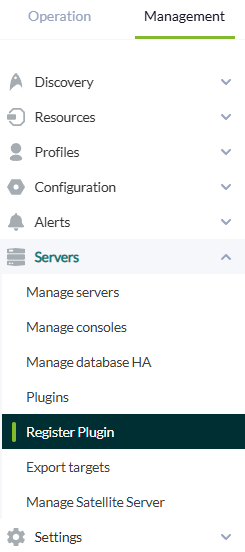
Para el registro del plugin, desde la consola, se debe ir al apartado "registrar plugin".

[![register plugin.png](https://pandorafms.com/guides/public/uploads/images/gallery/2025-07/scaled-1680-/register-plugin.png)](https://pandorafms.com/guides/public/uploads/images/gallery/2025-07/register-plugin.png)
Daremos a seleccionar archivo.

[![plugin registration.png](https://pandorafms.com/guides/public/uploads/images/gallery/2025-07/scaled-1680-/plugin-registration.png)](https://pandorafms.com/guides/public/uploads/images/gallery/2025-07/plugin-registration.png)
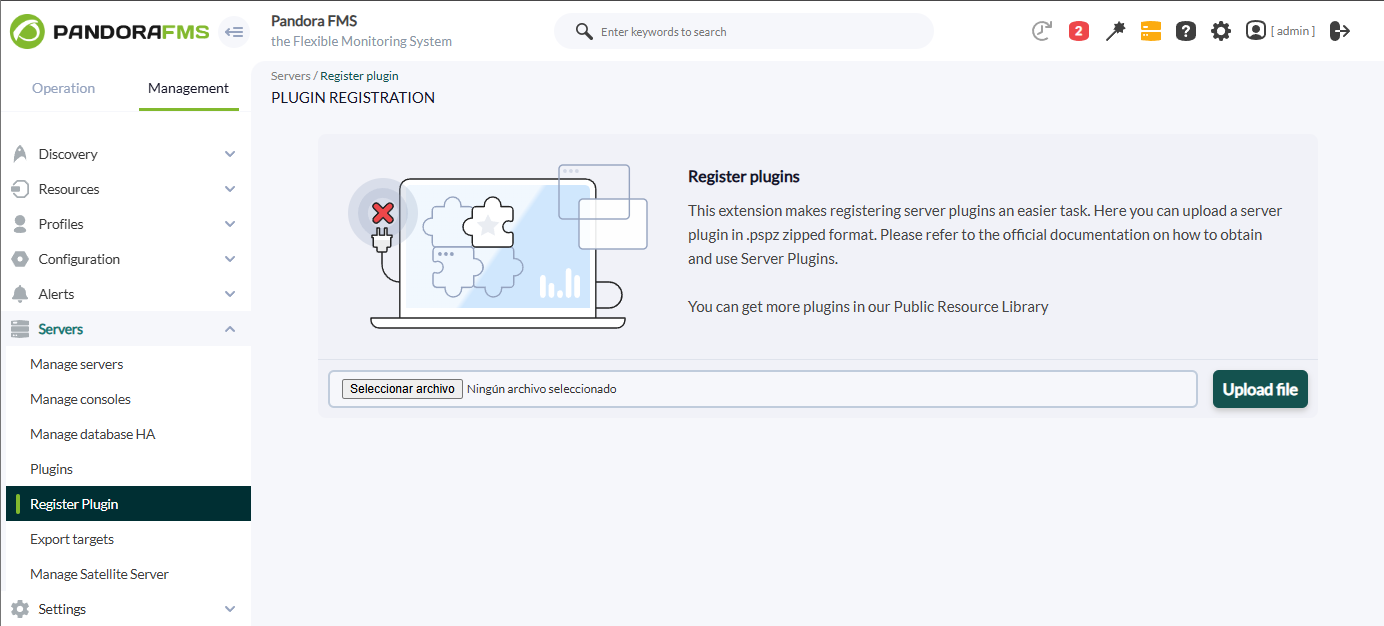
Seleccionaremos el fichero pspz2 que contiene el plugin

**[![register1_postgresql.png](https://pandorafms.com/guides/public/uploads/images/gallery/2022-04/scaled-1680-/register1-postgresql.png)](https://pandorafms.com/guides/public/uploads/images/gallery/2022-04/register1-postgresql.png)**

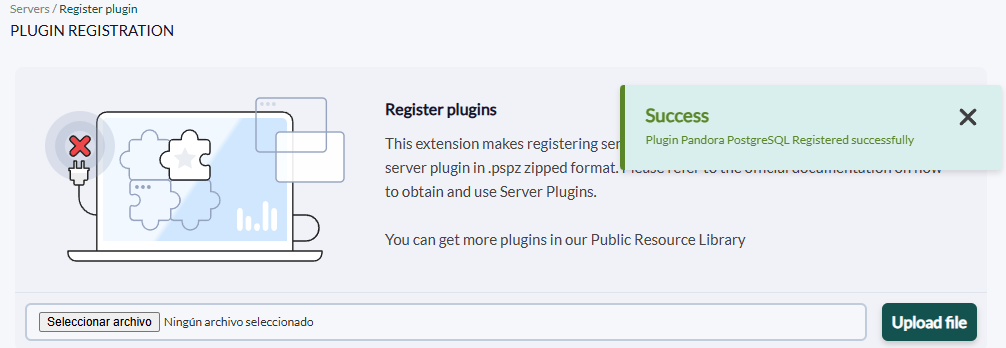
Se nos mostrará un mensaje indicando que se ha registrado correctamente.

[![image.png](https://pandorafms.com/guides/public/uploads/images/gallery/2025-07/scaled-1680-/Wnkimage.png)](https://pandorafms.com/guides/public/uploads/images/gallery/2025-07/Wnkimage.png)
Una vez registrado el plugin, lo veremos en el apartado plugins.

[![image.png](https://pandorafms.com/guides/public/uploads/images/gallery/2025-07/scaled-1680-/nYrimage.png)](https://pandorafms.com/guides/public/uploads/images/gallery/2025-07/nYrimage.png)
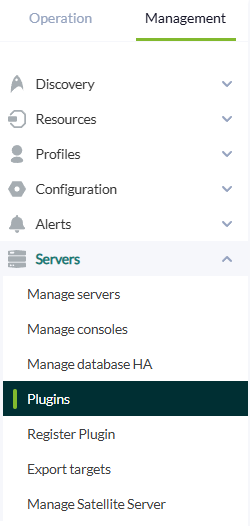
Pinchando en el título del plugin se podrá acceder al menu de este.

[![image.png](https://pandorafms.com/guides/public/uploads/images/gallery/2025-07/scaled-1680-/yAwimage.png)](https://pandorafms.com/guides/public/uploads/images/gallery/2025-07/yAwimage.png)

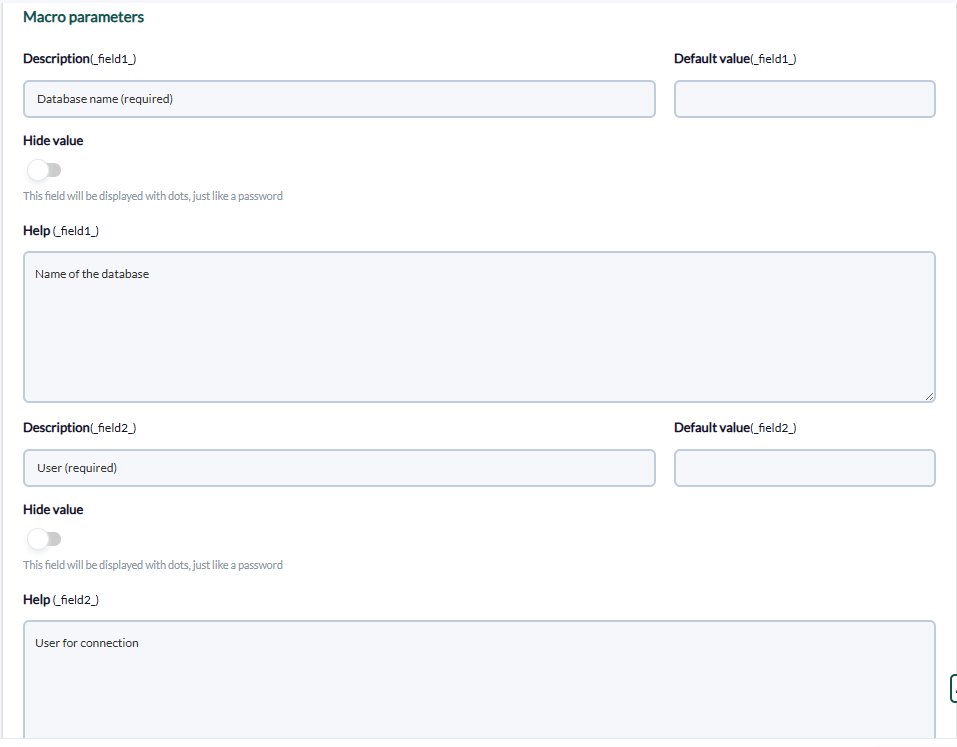
En macros aparecerán todas las que tiene el plugin, recuerda que no todas son obligatorias, solo las que así se especifican.

[![image.png](https://pandorafms.com/guides/public/uploads/images/gallery/2025-07/scaled-1680-/uJoimage.png)](https://pandorafms.com/guides/public/uploads/images/gallery/2025-07/uJoimage.png)
Abajo se le podrá asignar el valor requerido a cada variable.

[![image.png](https://pandorafms.com/guides/public/uploads/images/gallery/2025-07/scaled-1680-/yyKimage.png)](https://pandorafms.com/guides/public/uploads/images/gallery/2025-07/yyKimage.png)
**Instalación manual**

Iremos a servidores &gt; plugins:

[![image.png](https://pandorafms.com/guides/public/uploads/images/gallery/2025-07/scaled-1680-/nYrimage.png)](https://pandorafms.com/guides/public/uploads/images/gallery/2025-07/nYrimage.png)

Pinchamos en añadir:

[![image.png](https://pandorafms.com/guides/public/uploads/images/gallery/2025-07/scaled-1680-/v2Simage.png)](https://pandorafms.com/guides/public/uploads/images/gallery/2025-07/v2Simage.png)
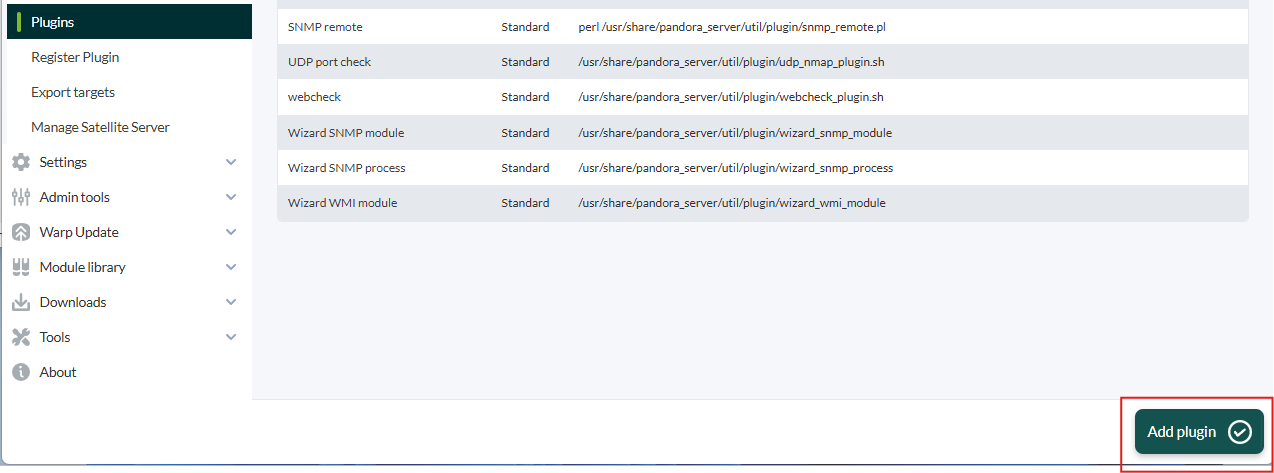
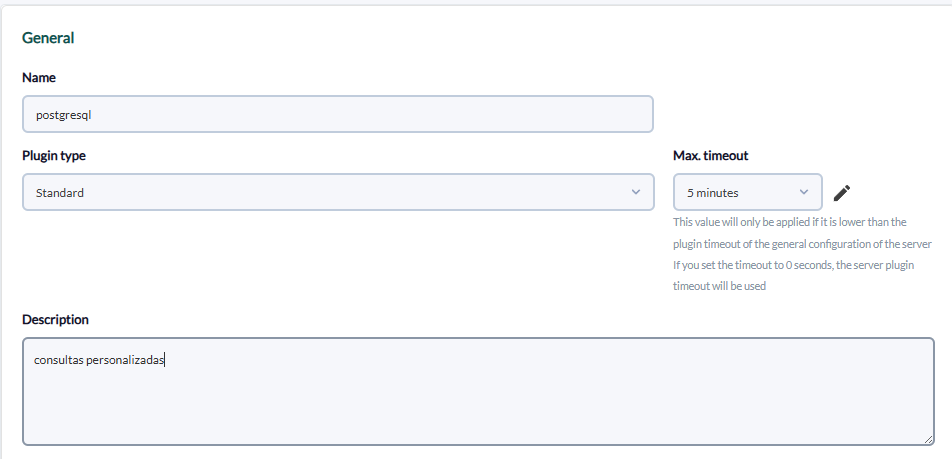
Le ponemos en nombre y la descripción que se prefiera:

[![image.png](https://pandorafms.com/guides/public/uploads/images/gallery/2025-07/scaled-1680-/alnimage.png)](https://pandorafms.com/guides/public/uploads/images/gallery/2025-07/alnimage.png)
Metemos como comando la ejecución con la ruta del plugin:

```
/path_pandora_postgresql
```

[![image.png](https://pandorafms.com/guides/public/uploads/images/gallery/2025-07/scaled-1680-/uJoimage.png)](https://pandorafms.com/guides/public/uploads/images/gallery/2025-07/uJoimage.png)

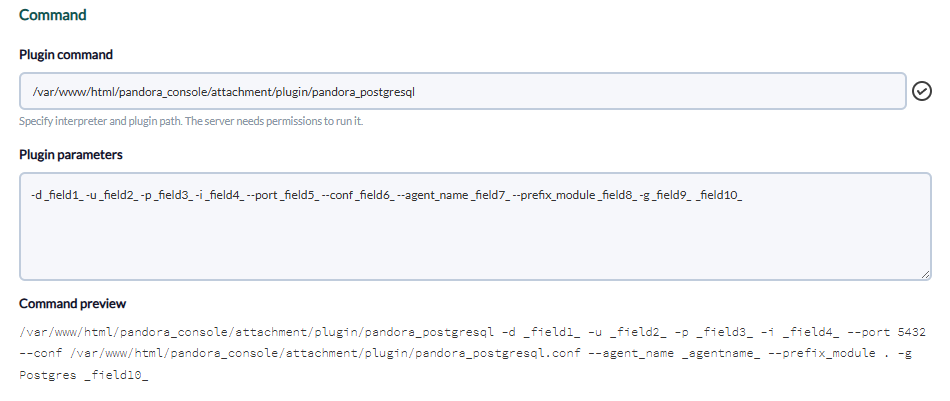
Y en parámetros del plugin introduciremos estos seguidos de la macro "\_field\_", los obligatorios para que el plugin funcione son -d,-u,-p,-i,--port, --transfer\_mode y --conf.

Definiremos estos con las macros abajo.

**Database**

[![image.png](https://pandorafms.com/guides/public/uploads/images/gallery/2025-07/scaled-1680-/Aqvimage.png)](https://pandorafms.com/guides/public/uploads/images/gallery/2025-07/Aqvimage.png)

**user**

[![image.png](https://pandorafms.com/guides/public/uploads/images/gallery/2025-07/scaled-1680-/265image.png)](https://pandorafms.com/guides/public/uploads/images/gallery/2025-07/265image.png)

**password**

[![image.png](https://pandorafms.com/guides/public/uploads/images/gallery/2025-07/scaled-1680-/zghimage.png)](https://pandorafms.com/guides/public/uploads/images/gallery/2025-07/zghimage.png)

**ip**

[![image.png](https://pandorafms.com/guides/public/uploads/images/gallery/2025-07/scaled-1680-/m3simage.png)](https://pandorafms.com/guides/public/uploads/images/gallery/2025-07/m3simage.png)

**puerto**

[![image.png](https://pandorafms.com/guides/public/uploads/images/gallery/2025-07/scaled-1680-/xb7image.png)](https://pandorafms.com/guides/public/uploads/images/gallery/2025-07/xb7image.png)

**conf**

[![image.png](https://pandorafms.com/guides/public/uploads/images/gallery/2025-07/scaled-1680-/GhWimage.png)](https://pandorafms.com/guides/public/uploads/images/gallery/2025-07/GhWimage.png)

**transfer\_mode**

[![image.png](https://pandorafms.com/guides/public/uploads/images/gallery/2025-07/scaled-1680-/mAIimage.png)](https://pandorafms.com/guides/public/uploads/images/gallery/2025-07/mAIimage.png)

Una vez hecho esto, daremos a "crear".

Puedes comprobar que has introducido bien los valores ejecutando el comando de vista previa por terminal

Si no da errores es que se ha introducido bien.

Una vez hecho esto, solo queda llamarlo por lo que iremos a la vista de algún agente y crearemos un módulo de complementos:

[![image.png](https://pandorafms.com/guides/public/uploads/images/gallery/2025-07/scaled-1680-/Zguimage.png)](https://pandorafms.com/guides/public/uploads/images/gallery/2025-07/Zguimage.png)
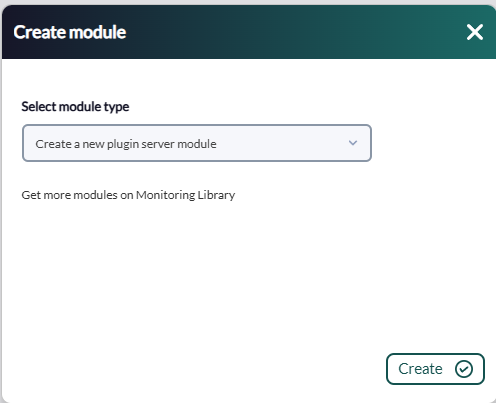
Le daremos un nombre y en el apartado "plugin" pondremos el que acabamos de configurar.

[![image.png](https://pandorafms.com/guides/public/uploads/images/gallery/2025-07/scaled-1680-/S4timage.png)](https://pandorafms.com/guides/public/uploads/images/gallery/2025-07/S4timage.png)
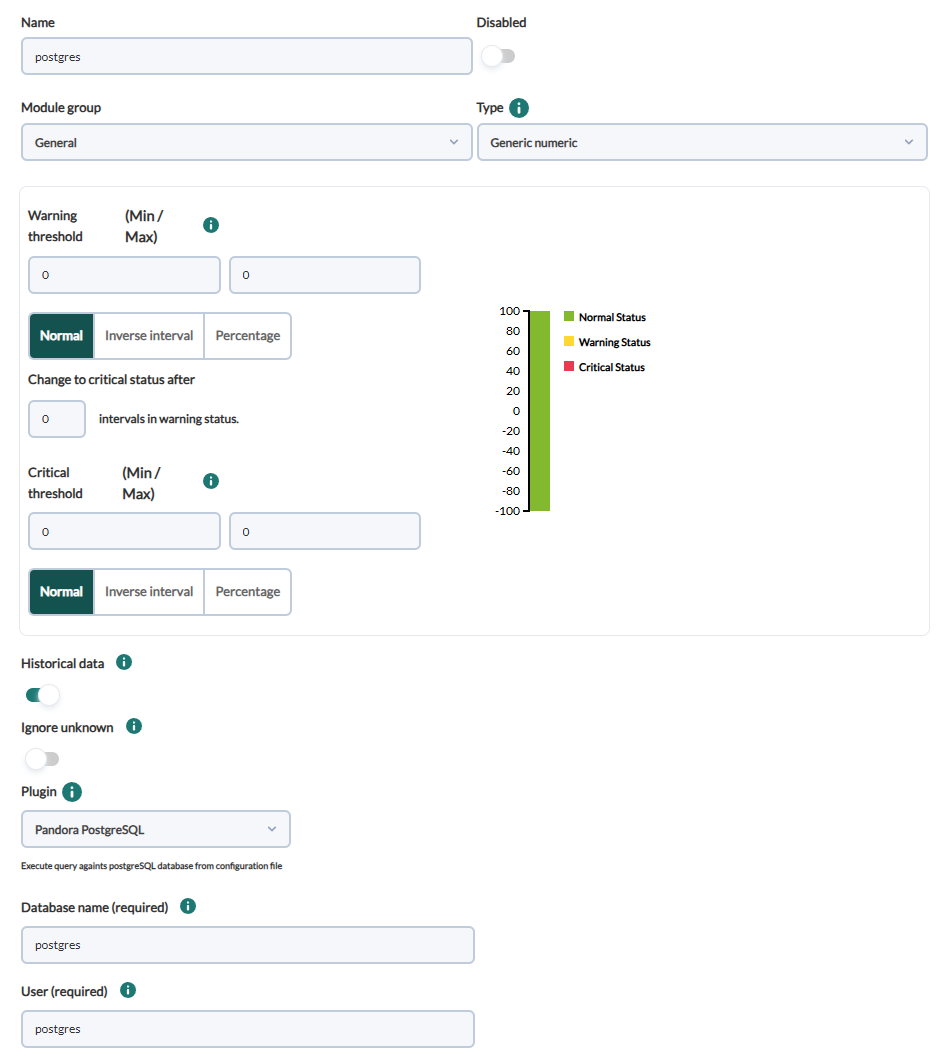
Una vez hecho esto, damos a crear.

Si el modulo se muestra con 1, quiere decir que se esta ejecutando correctamente

[![image.png](https://pandorafms.com/guides/public/uploads/images/gallery/2025-07/scaled-1680-/kt5image.png)](https://pandorafms.com/guides/public/uploads/images/gallery/2025-07/kt5image.png)

# Módulos generados por el plugin

El plugin creará un agente con el nombre que le hayamos puesto con el parámetro "--agent\_name" si no se usa este parámetro se quedara con "PostgreSQL" por defecto:

[![image.png](https://pandorafms.com/guides/public/uploads/images/gallery/2025-07/scaled-1680-/L7fimage.png)](https://pandorafms.com/guides/public/uploads/images/gallery/2025-07/L7fimage.png)

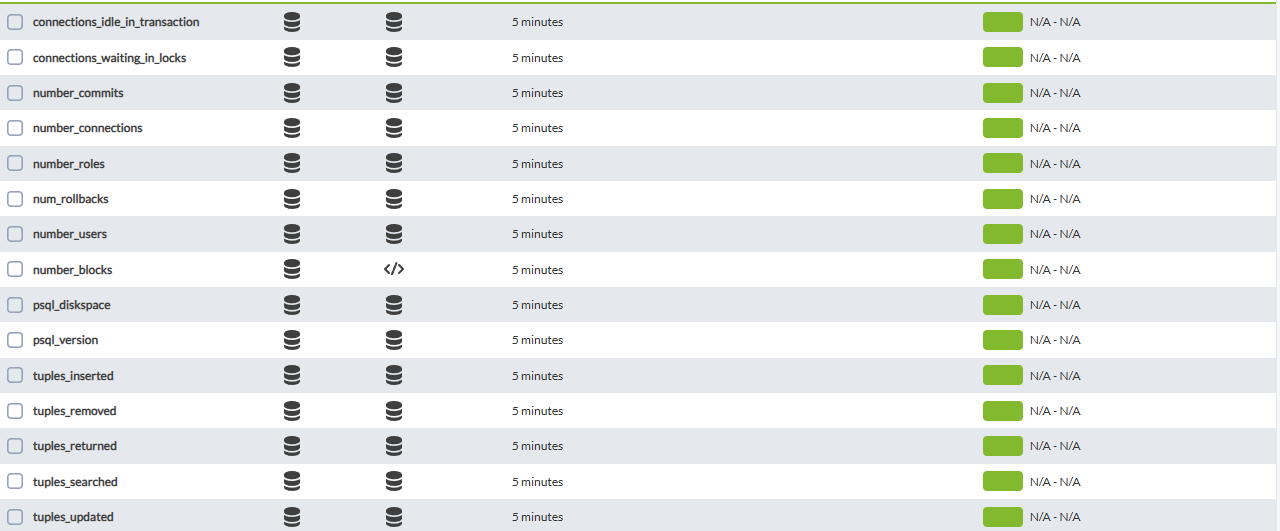
En este agente se crearán un módulo por cada consulta personalizada especificada en pandora\_postgresql.conf, con el nombre que le hayamos asignado a cada una de estas.

Por ejemplo el siguiente conf:

```
number_connections:SELECT count(*) FROM pg_stat_activity;:generic_data:Number of Connections or running backend
connections_waiting_in_locks:SELECT count(*) FROM pg_stat_activity WHERE wait_event = 'Lock';:generic_data:Number of connections/backends waiting on locks
connections_idle_in_transaction:SELECT count(*) FROM pg_stat_activity WHERE wait_event = 'idle in transaction';:generic_data
number_users:SELECT COUNT(usename) FROM pg_stat_activity;:generic_data
number_roles:SELECT count(*) FROM pg_roles;:generic_data
psql_version:SELECT version();:generic_data_string
num_blocks:SELECT COUNT(*) FROM pg_locks;:generic_data
psql_diskspace:SELECT ROUND(SUM(pg_database_size(oid))/1024/1024) FROM pg_database;:generic_data
number_commits:SELECT sum(xact_commit) FROM (pg_database AS db JOIN pg_stat_database sdb ON db.datname=sdb.datname) WHERE db.datname = 'postgres';:generic_data
number_rollbacks:SELECT sum(xact_rollback) FROM (pg_database AS db JOIN pg_stat_database sdb ON db.datname=sdb.datname) WHERE db.datname = 'postgres';:generic_data
tuples_returned:SELECT sum(tup_returned) FROM (pg_database AS db JOIN pg_stat_database sdb ON db.datname=sdb.datname) WHERE db.datname = 'postgres';:generic_data
tuples_searched:SELECT sum(tup_fetched) FROM (pg_database AS db JOIN pg_stat_database sdb ON db.datname=sdb.datname )WHERE db.datname = 'postgres';:generic_data
tuples_inserted:SELECT sum(tup_inserted) FROM (pg_database AS db JOIN pg_stat_database sdb ON db.datname=sdb.datname) WHERE db.datname = 'postgres';:generic_data
tuples_updated:SELECT sum(tup_updated) FROM (pg_database AS db JOIN pg_stat_database sdb ON db.datname=sdb.datname) WHERE db.datname = 'postgres';:generic_data
tuples_removed:SELECT sum(tup_deleted) FROM (pg_database AS db JOIN pg_stat_database sdb ON db.datname=sdb.datname) WHERE db.datname = 'postgres';:generic_data
state:SELECT state FROM pg_stat_activity WHERE datname = 'postgres';:generic_data_string
```

Creará los siguientes módulos:

[![image.png](https://pandorafms.com/guides/public/uploads/images/gallery/2025-07/scaled-1680-/MZGimage.png)](https://pandorafms.com/guides/public/uploads/images/gallery/2025-07/MZGimage.png)