# Plugin Configuration

Before running the plugin to export SIEM alerts to MISP, you need to locate the script, set permissions, and configure API credentials for both platforms.

#### 1. Script Location and Permissions

It is recommended to place the script **`pandora_to_misp.py`** in the standard Pandora FMS server plugin directory.

Upload the file to the server and run the following command to make it executable:

```bash
chmod +x /usr/share/pandora_server/util/plugin/pandora_to_misp.py
```


---

#### 2. Script Parameters

The script works via command-line arguments. It includes an **auto-classification engine (Triage)** that reads alert content and automatically assigns threat level, MITRE ATT&amp;CK tags, and category. You can override these values using optional parameters.

**Mandatory Parameters:**

- `-u` or `--url`: URL of your MISP API instance.
- `-k` or `--key`: MISP API Key.
- `-a` or `--agent`: Name of the SIEM agent that generated the alert.
- `-n` or `--alert-name`: Descriptive name of the alert.
- `-d` or `--alert-data`: Raw alert data (raw log). The script will automatically extract the attacker IP from this.

**Optional Parameters:**

<div class="TyagGW_tableContainer" id="bkmrk-parameter-descriptio"><div class="group TyagGW_tableWrapper flex flex-col-reverse w-fit" tabindex="-1"><table class="w-fit min-w-(--thread-content-width)" data-end="1767" data-start="1201"><thead data-end="1244" data-start="1201"><tr data-end="1244" data-start="1201"><th class="" data-col-size="sm" data-end="1213" data-start="1201">Parameter</th><th class="" data-col-size="md" data-end="1227" data-start="1213">Description</th><th class="" data-col-size="sm" data-end="1244" data-start="1227">Default Value</th></tr></thead><tbody data-end="1767" data-start="1289"><tr data-end="1389" data-start="1289"><td data-col-size="sm" data-end="1303" data-start="1289">`-t, --tlp`</td><td data-col-size="md" data-end="1374" data-start="1303">TLP (Traffic Light Protocol) level. Example: `tlp:red`, `tlp:amber`.</td><td data-col-size="sm" data-end="1389" data-start="1374">`tlp:green`</td></tr><tr data-end="1490" data-start="1390"><td data-col-size="sm" data-end="1408" data-start="1390">`-s, --sharing`</td><td data-col-size="md" data-end="1485" data-start="1408">Event sharing level in MISP (0=Your Org, 1=Community, 2=Connected, 3=All).</td><td data-col-size="sm" data-end="1490" data-start="1485">0</td></tr><tr data-end="1605" data-start="1491"><td data-col-size="sm" data-end="1514" data-start="1491">`-l, --threat-level`</td><td data-col-size="md" data-end="1588" data-start="1514">Force the threat level, ignoring auto-triage (1=High, 2=Medium, 3=Low).</td><td data-col-size="sm" data-end="1605" data-start="1588">Auto-assigned</td></tr><tr data-end="1685" data-start="1606"><td data-col-size="sm" data-end="1625" data-start="1606">`-c, --category`</td><td data-col-size="md" data-end="1668" data-start="1625">Force the IP attribute category in MISP.</td><td data-col-size="sm" data-end="1685" data-start="1668">Auto-assigned</td></tr><tr data-end="1767" data-start="1686"><td data-col-size="sm" data-end="1701" data-start="1686">`-g, --tags`</td><td data-col-size="md" data-end="1750" data-start="1701">Add extra tags to the event (comma-separated).</td><td data-col-size="sm" data-end="1767" data-start="1750">Auto-assigned</td></tr></tbody></table>

</div></div>---

#### 3. Configuring Triggers in Pandora FMS

To enable automatic export, you must configure **Command**, **Action**, and **Template** in Pandora FMS alerts to pass environment variables directly to the script using macros.

##### Step 1: Create the Alert Command

1. Navigate to: **Management → Alerts → Commands**
2. Click **Create +**.
3. Fill the Command form with:

- - **Name:** `Export SIEM to MISP`
    - **Command:** Use Pandora macros to inject data. Replace the fixed values like URL and KEY in the Action later:

```bash
/usr/bin/python3 /usr/share/pandora_server/util/plugin/pandora_to_misp.py -u "_field1_" -k "_field2_" -a "_field3_" -n "_field4_" -d "_field5_" _field6_
```

<p class="callout info">Note: Macros must be in double quotes to correctly handle spaces, except the field6 which -if needed- will include all the optional parameters.</p>

- - **Description:** Executes `pandora_to_misp.py` to send the event to MISP via API call.
    - **Field Description / Values:**

<div class="TyagGW_tableContainer" id="bkmrk-field-description-fi"><div class="group TyagGW_tableWrapper flex flex-col-reverse w-fit" tabindex="-1"><table class="w-fit min-w-(--thread-content-width) align-center" data-end="2878" data-start="2629"><thead data-end="2664" data-start="2629"><tr data-end="2664" data-start="2629"><th class="align-center" data-col-size="sm" data-end="2649" data-start="2629">Field Description</th><th class="align-center" data-col-size="sm" data-end="2664" data-start="2649">Field Value</th></tr></thead><tbody data-end="2878" data-start="2700"><tr data-end="2723" data-start="2700"><td data-col-size="sm" data-end="2711" data-start="2700">MISP URL</td><td data-col-size="sm" data-end="2723" data-start="2711"> </td></tr><tr data-end="2751" data-start="2724"><td data-col-size="sm" data-end="2739" data-start="2724">MISP API Key</td><td data-col-size="sm" data-end="2751" data-start="2739"> </td></tr><tr data-end="2778" data-start="2752"><td data-col-size="sm" data-end="2765" data-start="2752">Agent Name</td><td data-col-size="sm" data-end="2778" data-start="2765">`_agent_`</td></tr><tr data-end="2810" data-start="2779"><td data-col-size="sm" data-end="2792" data-start="2779">Alert Name</td><td data-col-size="sm" data-end="2810" data-start="2792">`_alert_name_`</td></tr><tr data-end="2843" data-start="2811"><td data-col-size="sm" data-end="2831" data-start="2811">Alert Description</td><td data-col-size="sm" data-end="2843" data-start="2831">`_data_`</td></tr><tr data-end="2878" data-start="2844"><td data-col-size="sm" data-end="2866" data-start="2844">Optional Parameters</td><td data-col-size="sm" data-end="2878" data-start="2866"> </td></tr></tbody></table>

</div></div><span style="color: rgb(170, 170, 170);">Example:</span>

[![image.png](https://pandorafms.com/guides/public/uploads/images/gallery/2026-03/scaled-1680-/7Vhimage.png)](https://pandorafms.com/guides/public/uploads/images/gallery/2026-03/7Vhimage.png)

##### Step 2: Create the Alert Action

1. Navigate to: **Management → Alerts → Actions**
2. Click **Create +**
3. Fill the Action form with:

- - **Name:** `Create MISP Event`
    - **Command:** Select `Export SIEM to MISP`
    - Enter your actual credentials in the fields:
        
        
        - **Field 1:** URL of your MISP (e.g., `https://misp.yourdomain.com`)
        - **Field 2:** Your MISP API Key
        - **Fields 3-5:** Keep as they are from the command
        - **Field 6 (Optional):** Add extra flags if you want all alerts triggering this action to use the same advanced configuration. For different alert types, create separate templates and customize Field 6 in each template instead of the action.

Example:

[![image.png](https://pandorafms.com/guides/public/uploads/images/gallery/2026-03/scaled-1680-/QfBimage.png)](https://pandorafms.com/guides/public/uploads/images/gallery/2026-03/QfBimage.png)

[![image.png](https://pandorafms.com/guides/public/uploads/images/gallery/2026-03/scaled-1680-/lofimage.png)](https://pandorafms.com/guides/public/uploads/images/gallery/2026-03/lofimage.png)

[![image.png](https://pandorafms.com/guides/public/uploads/images/gallery/2026-03/scaled-1680-/Ukoimage.png)](https://pandorafms.com/guides/public/uploads/images/gallery/2026-03/Ukoimage.png)

##### Step 3: Create the Alert Template

1. Navigate to: **Management → Alerts → Templates**
2. Click **Create +**
3. Fill the Template form with:

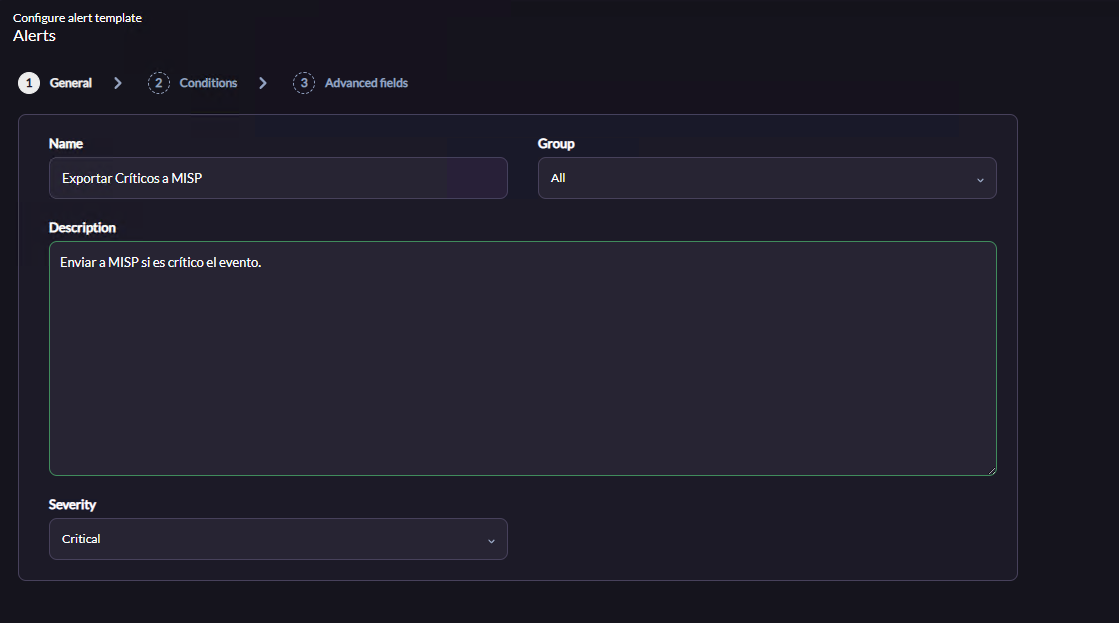
- - **General Tab:** Assign a descriptive name (e.g., `Export Critical Alerts to MISP`)
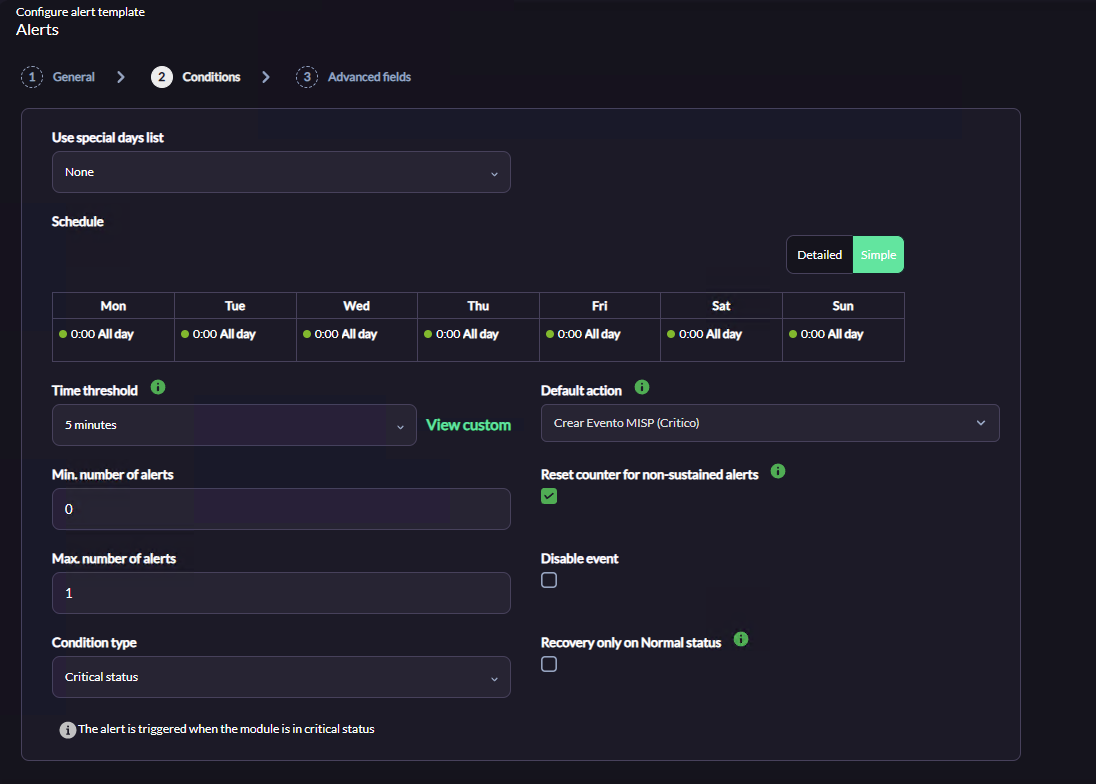
    - **Conditions Tab:** Set parameters to avoid false positives and control event flow to MISP:
        
        
        - **Time threshold:** 5 minutes
        - **Min. number of alerts:** 0
        - **Max. number of alerts:** 1 (prevents duplicate events in MISP)
        - **Condition type:** `Critical status`
        - **Default action:** Select the action created above (`Create MISP Event`)
        - **Reset counter for non-sustained alerts:** Enabled
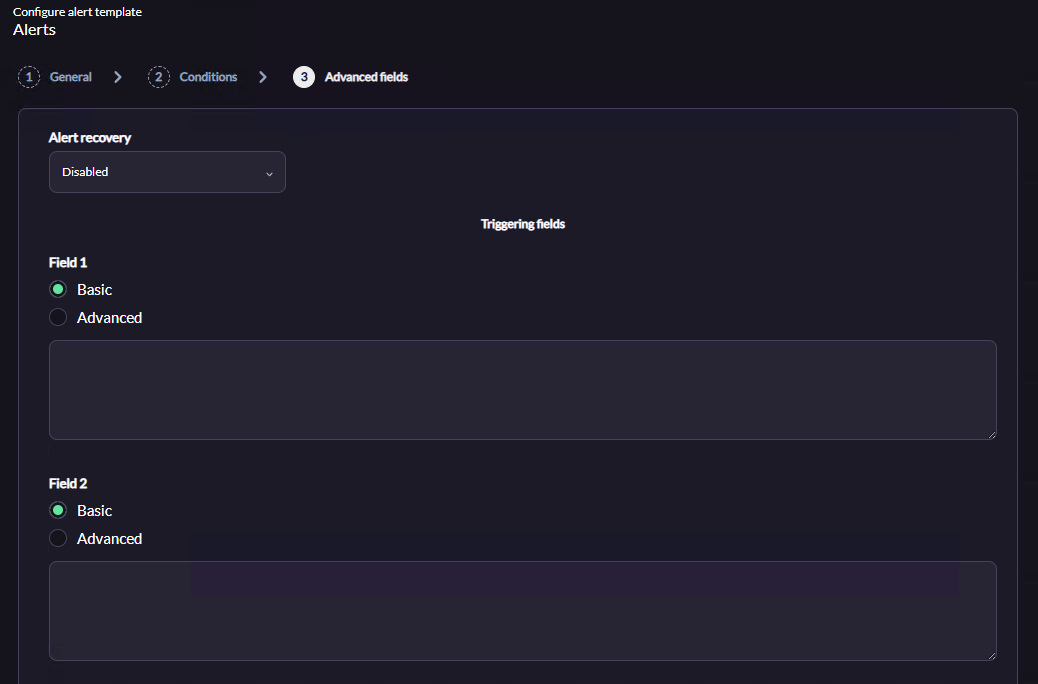
    - **Advanced Fields Tab:**
        
        
        - **Alert Recovery:** Disabled
        - **Leave Fields 1-5 empty** (values are inherited from the action/command)
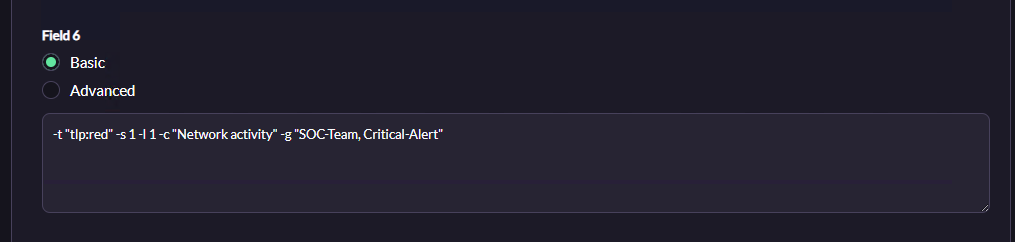
        - **Field 6:** Inject optional script flags to override default behavior (e.g., auto-triage)

**Example of all optional parameters for field6:**

```bash
-t "tlp:red" -s 1 -l 1 -c "Network activity" -g "SOC-Team, Critical-Alert"
```

1. `-t "tlp:red"`: Labels the event with TLP Red
2. `-s 1`: Shares the event with MISP Community
3. `-l 1`: Forces Threat Level to High
4. `-c "Network activity"`: Classifies the extracted IP in this category in MISP
5. `-g "SOC-Team, Critical-Alert"`: Adds these custom tags

<p class="callout info">Recommended: Create multiple templates with different optional parameters for different alert types.</p>

Finalize the wizard, save changes, and ensure the template is **enabled**.

Example:

[![image.png](https://pandorafms.com/guides/public/uploads/images/gallery/2026-03/scaled-1680-/hElimage.png)](https://pandorafms.com/guides/public/uploads/images/gallery/2026-03/hElimage.png)[![image.png](https://pandorafms.com/guides/public/uploads/images/gallery/2026-03/scaled-1680-/Y66image.png)](https://pandorafms.com/guides/public/uploads/images/gallery/2026-03/Y66image.png)[![image.png](https://pandorafms.com/guides/public/uploads/images/gallery/2026-03/scaled-1680-/3kzimage.png)](https://pandorafms.com/guides/public/uploads/images/gallery/2026-03/3kzimage.png)[![image.png](https://pandorafms.com/guides/public/uploads/images/gallery/2026-03/scaled-1680-/pnYimage.png)](https://pandorafms.com/guides/public/uploads/images/gallery/2026-03/pnYimage.png)