# Plugin openweathermap

# Introducción

**Ver**. 22-08-2022  
  
Plugin con el que recolectar datos meteorológicos y mostrarlos en PandoraFMS.

<div id="bkmrk-tipo%3A-plug-in-de-ser"><div>**Tipo**: Plug-in de servidor</div></div>

# Matriz de compatibilidad

<table border="1" id="bkmrk-sistemas-donde-se-ha"><tbody><tr><td>**Sistemas donde se ha probado**</td><td>Fedora

</td></tr><tr><td>**Sistemas donde debería funcionar**</td><td>Cualquier sistema linux

</td></tr></tbody></table>

# Pre requisitos

- Tener el **Data Server** de Pandora FMS habilitado
- Tener el **Plugin Server** de Pandora FMS habilitado

# Parámetros

<table border="1" id="bkmrk-par%C3%A1metro-descripci%C3%B3" style="height: 220px;"><tbody><tr style="height: 29px;"><td style="height: 29px; width: 128.578px;">**Parámetro**</td><td style="height: 29px; width: 680.422px;">**Descripción**</td></tr><tr style="height: 29px;"><td style="height: 29px; width: 128.578px;">--lat</td><td style="height: 29px; width: 680.422px;">Coordenada geográfica (latitud).</td></tr><tr style="height: 29px;"><td style="height: 29px; width: 128.578px;">--lon</td><td style="height: 29px; width: 680.422px;">Coordenada geográfica (longitud).</td></tr><tr style="height: 29px;"><td style="height: 29px; width: 128.578px;">--key</td><td style="height: 29px; width: 680.422px;"><span>Su clave API única (siempre puede encontrarla en la página de su cuenta en la pestaña "clave api"</span><span> )</span></td></tr><tr style="height: 29px;"><td style="height: 29px; width: 128.578px;">-g,--group</td><td style="height: 29px; width: 680.422px;">Grupo de destino de Pandora FMS (opcional)</td></tr><tr style="height: 29px;"><td style="height: 29px; width: 128.578px;">--data\_dir</td><td style="height: 29px; width: 680.422px;">Directorio de datos de Pandora FMS. **Por defecto** es /var/spool/pandora/data\_in/ (opcional)</td></tr><tr style="height: 46px;"><td style="height: 46px; width: 128.578px;">--as\_agent\_plugin</td><td style="height: 46px; width: 680.422px;">Es opcional, si quieres que el plugin sea de agente y te meta los módulos en el agente de pandora, ejecuta esto con un 1 (opcional)</td></tr></tbody></table>

# Ejecución manual

Con una ejecución con "as\_agent\_plugin" en 1 podremos ver el xml por terminal.

```
❯ ./pandora_openweathermap --lat <latitud> --lon <longitud> --key <api key> --as_agent_plugin 1
```

[![image-1661174592581.png](https://pandorafms.com/guides/public/uploads/images/gallery/2022-08/scaled-1680-/image-1661174592581.png)](https://pandorafms.com/guides/public/uploads/images/gallery/2022-08/image-1661174592581.png)

# Configuración en PandoraFMS

**Instalacion pspz2** Se puede instalar el plugin desde servidores &gt; registrar plugin

[![Captura desde 2025-07-21 11-44-32.png](https://pandorafms.com/guides/public/uploads/images/gallery/2025-07/scaled-1680-/captura-desde-2025-07-21-11-44-32.png)](https://pandorafms.com/guides/public/uploads/images/gallery/2025-07/captura-desde-2025-07-21-11-44-32.png)

En esa página se podrá cargar el archivo pspz2 del plugin

[![Captura desde 2025-07-21 11-40-46.png](https://pandorafms.com/guides/public/uploads/images/gallery/2025-07/scaled-1680-/captura-desde-2025-07-21-11-40-46.png)](https://pandorafms.com/guides/public/uploads/images/gallery/2025-07/captura-desde-2025-07-21-11-40-46.png)

**Instalación manual**

Iremos a servidores &gt; plugins:

[![servers_plugins.png](https://pandorafms.com/guides/public/uploads/images/gallery/2025-07/scaled-1680-/servers-plugins.png)](https://pandorafms.com/guides/public/uploads/images/gallery/2025-07/servers-plugins.png)

Pinchamos en añadir plugin:

[![add_plugin.png](https://pandorafms.com/guides/public/uploads/images/gallery/2025-07/scaled-1680-/add-plugin.png)](https://pandorafms.com/guides/public/uploads/images/gallery/2025-07/add-plugin.png)

Le ponemos en nombre y la descripción que se prefiera

Metemos como comando la ejecución con la ruta del plugin:

```
/path pandora_openweathermap
```

<p class="callout info align-center">Recuerda que la ruta recomendada para el uso de los plugins de servidor es: /usr/share/pandora\_server/util/plugin/</p>

Y en parámetros del plugin introduciremos estos seguidos de la macro "\_field&lt;N&gt;\_", los obligatorios para que el plugin funcione son --lat, --lon y --key .

Una vez hecho esto, daremos a "crear".

**Configuración en agente**

Una vez hecho esto, solo queda llamarlo por lo que iremos a la vista de algún agente y crearemos un módulo de complementos:

[![Captura desde 2025-07-21 11-51-43.png](https://pandorafms.com/guides/public/uploads/images/gallery/2025-07/scaled-1680-/captura-desde-2025-07-21-11-51-43.png)](https://pandorafms.com/guides/public/uploads/images/gallery/2025-07/captura-desde-2025-07-21-11-51-43.png)
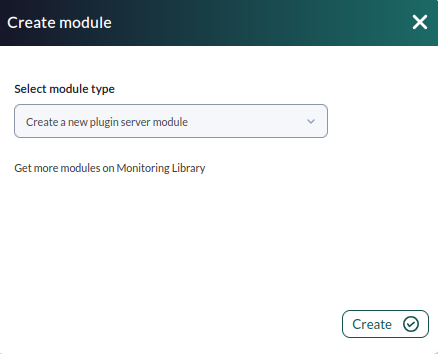
Le daremos un nombre y en el apartado "plugin" pondremos el que acabamos de configurar.

Una vez hecho esto, damos a crear.

Si el modulo se muestra con 1, quiere decir que se esta ejecutando correctamente

# Módulos generados por el plugin

El plugin creará un agente con los siguientes módulos:

<table border="1" id="bkmrk-current-dt-current-s" style="border-collapse: collapse; width: 100%; height: 493px;"><tbody><tr style="height: 29px;"><td style="width: 100%; height: 29px;">Current dt</td></tr><tr style="height: 29px;"><td style="width: 100%; height: 29px;">Current sunrise</td></tr><tr style="height: 29px;"><td style="width: 100%; height: 29px;">Current sunset</td></tr><tr style="height: 29px;"><td style="width: 100%; height: 29px;">Current temp</td></tr><tr style="height: 29px;"><td style="width: 100%; height: 29px;">Current feels like</td></tr><tr style="height: 29px;"><td style="width: 100%; height: 29px;">Current pressure</td></tr><tr style="height: 29px;"><td style="width: 100%; height: 29px;">Current humidity</td></tr><tr style="height: 29px;"><td style="width: 100%; height: 29px;">Current dew point</td></tr><tr style="height: 29px;"><td style="width: 100%; height: 29px;">Current wind speed</td></tr><tr style="height: 29px;"><td style="width: 100%; height: 29px;">Current uvi</td></tr><tr style="height: 29px;"><td style="width: 100%; height: 29px;">Current clouds</td></tr><tr style="height: 29px;"><td style="width: 100%; height: 29px;">Current visibiity</td></tr><tr style="height: 29px;"><td style="width: 100%; height: 29px;">Current wind deg</td></tr><tr style="height: 29px;"><td style="width: 100%; height: 29px;">Current weather id</td></tr><tr style="height: 29px;"><td style="width: 100%; height: 29px;">Current weather Main</td></tr><tr style="height: 29px;"><td style="width: 100%; height: 29px;">Current weather description</td></tr><tr style="height: 29px;"><td style="width: 100%; height: 29px;">Current weather icon</td></tr></tbody></table>

[![Captura desde 2025-07-21 12-11-04.png](https://pandorafms.com/guides/public/uploads/images/gallery/2025-07/scaled-1680-/captura-desde-2025-07-21-12-11-04.png)](https://pandorafms.com/guides/public/uploads/images/gallery/2025-07/captura-desde-2025-07-21-12-11-04.png)

Más info sobre estas métricas en la página de [openweathermap](https://openweathermap.org/current#one)