# Openweathermap

# Introduction

**Ver.** 22-08-2022

Plugin to collect weather data and display them in PandoraFMS.  
  
**Type:** Server plug-in

# Compatibility matrix

<table border="1" id="bkmrk-sistemas-donde-se-ha"><tbody><tr><td>**Systems where tested**</td><td>Fedora

</td></tr><tr><td>**Systems where it should work**</td><td>Cualquier sistema linux

</td></tr></tbody></table>

# Pre requisites

<div id="bkmrk-"></div>- Pandora FMS Data Server enabled
- Pandora FMS Plugin Server enabled

# Parameters

<table border="1" id="bkmrk-par%C3%A1metro-descripci%C3%B3" style="height: 220px;"><tbody><tr style="height: 29px;"><td style="height: 29px; width: 128.578px;">**Parámeter**</td><td style="height: 29px; width: 680.422px;">**Description**</td></tr><tr style="height: 29px;"><td style="height: 29px; width: 128.578px;">--lat</td><td style="height: 29px; width: 680.422px;">Geographic coordinate (latitude).</td></tr><tr style="height: 29px;"><td style="height: 29px; width: 128.578px;">--lon</td><td style="height: 29px; width: 680.422px;">Geographic coordinate (longitude).</td></tr><tr style="height: 29px;"><td style="height: 29px; width: 128.578px;">--key</td><td style="height: 29px; width: 680.422px;">Your unique API key (you can always find it on your account page in the "api key" tab).</td></tr><tr style="height: 29px;"><td style="height: 29px; width: 128.578px;">-g,--group</td><td style="height: 29px; width: 680.422px;">Pandora FMS target group (optional)</td></tr><tr style="height: 29px;"><td style="height: 29px; width: 128.578px;">--data\_dir</td><td style="height: 29px; width: 680.422px;">Pandora FMS data directory. By default it is /var/spool/pandora/data\_in/ (optional)</td></tr><tr style="height: 46px;"><td style="height: 46px; width: 128.578px;">--as\_agent\_plugin</td><td style="height: 46px; width: 680.422px;">It is optional, if you want the plugin to be an agent plugin and put the modules in the pandora agent, execute this with a 1 (optional)</td></tr></tbody></table>

# Manual execution

With an execution with "as\_agent\_plugin" in 1 we will be able to see the xml by terminal.

```
❯ ./pandora_openweathermap --lat <latitud> --lon <longitud> --key <api key> --as_agent_plugin 1
```

[![image-1661174592581.png](https://pandorafms.com/guides/public/uploads/images/gallery/2022-08/scaled-1680-/image-1661174592581.png)](https://pandorafms.com/guides/public/uploads/images/gallery/2022-08/image-1661174592581.png)

# Configuration in PandoraFMS

**pspz2 installation**

You can install the plugin from servers &gt; register plugin

[![Captura desde 2025-07-21 11-44-32.png](https://pandorafms.com/guides/public/uploads/images/gallery/2025-07/scaled-1680-/captura-desde-2025-07-21-11-44-32.png)](https://pandorafms.com/guides/public/uploads/images/gallery/2025-07/captura-desde-2025-07-21-11-44-32.png)

On this page you can load the pspz2 file for the plugin

[![Captura desde 2025-07-21 11-40-46.png](https://pandorafms.com/guides/public/uploads/images/gallery/2025-07/scaled-1680-/captura-desde-2025-07-21-11-40-46.png)](https://pandorafms.com/guides/public/uploads/images/gallery/2025-07/captura-desde-2025-07-21-11-40-46.png)

**Manual installation**

Go to servers &gt; plugins:

[![servers_plugins.png](https://pandorafms.com/guides/public/uploads/images/gallery/2025-07/scaled-1680-/servers-plugins.png)](https://pandorafms.com/guides/public/uploads/images/gallery/2025-07/servers-plugins.png)

Click on add:

[![add_plugin.png](https://pandorafms.com/guides/public/uploads/images/gallery/2025-07/scaled-1680-/add-plugin.png)](https://pandorafms.com/guides/public/uploads/images/gallery/2025-07/add-plugin.png)

We put in name and the description that you prefer.

We put as command the execution with the path of the plugin:

```
/path pandora_openweathermap
```

<p class="callout info align-center">Recuerda que la ruta recomendada para el uso de los plugins de servidor es: /usr/share/pandora\_server/util/plugin/</p>

And in plugin parameters we will introduce these followed by the macro "\_field&lt;N&gt;\_", the obligatory ones for the plugin to work are --lat, --lon and --key .

Once this is done, click on "create".

**Agent configuration**

Once this is done, the only thing left to do is to call it so we will go to the view of some agent and create a plugin module:

[![Captura desde 2025-07-21 11-51-43.png](https://pandorafms.com/guides/public/uploads/images/gallery/2025-07/scaled-1680-/1GIcaptura-desde-2025-07-21-11-51-43.png)](https://pandorafms.com/guides/public/uploads/images/gallery/2025-07/1GIcaptura-desde-2025-07-21-11-51-43.png)
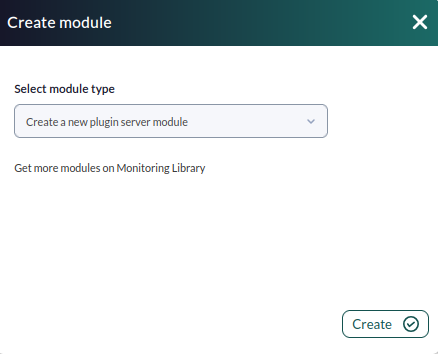
We will give it a name and in the section "plugin" we will put the one we have just configured.

Once this is done, click on create.

If the module is shown with 1, it means that it is running correctly.

# Modules generated  by the plugin

The plugin will create an agent with the following modules:

<table border="1" id="bkmrk-current-dt-current-s" style="border-collapse: collapse; width: 100%; height: 493px;"><tbody><tr style="height: 29px;"><td style="width: 100%; height: 29px;">Current dt</td></tr><tr style="height: 29px;"><td style="width: 100%; height: 29px;">Current sunrise</td></tr><tr style="height: 29px;"><td style="width: 100%; height: 29px;">Current sunset</td></tr><tr style="height: 29px;"><td style="width: 100%; height: 29px;">Current temp</td></tr><tr style="height: 29px;"><td style="width: 100%; height: 29px;">Current feels like</td></tr><tr style="height: 29px;"><td style="width: 100%; height: 29px;">Current pressure</td></tr><tr style="height: 29px;"><td style="width: 100%; height: 29px;">Current humidity</td></tr><tr style="height: 29px;"><td style="width: 100%; height: 29px;">Current dew point</td></tr><tr style="height: 29px;"><td style="width: 100%; height: 29px;">Current wind speed</td></tr><tr style="height: 29px;"><td style="width: 100%; height: 29px;">Current uvi</td></tr><tr style="height: 29px;"><td style="width: 100%; height: 29px;">Current clouds</td></tr><tr style="height: 29px;"><td style="width: 100%; height: 29px;">Current visibiity</td></tr><tr style="height: 29px;"><td style="width: 100%; height: 29px;">Current wind deg</td></tr><tr style="height: 29px;"><td style="width: 100%; height: 29px;">Current weather id</td></tr><tr style="height: 29px;"><td style="width: 100%; height: 29px;">Current weather Main</td></tr><tr style="height: 29px;"><td style="width: 100%; height: 29px;">Current weather description</td></tr><tr style="height: 29px;"><td style="width: 100%; height: 29px;">Current weather icon</td></tr></tbody></table>

[![Captura desde 2025-07-21 12-11-04.png](https://pandorafms.com/guides/public/uploads/images/gallery/2025-07/scaled-1680-/ewOcaptura-desde-2025-07-21-12-11-04.png)](https://pandorafms.com/guides/public/uploads/images/gallery/2025-07/ewOcaptura-desde-2025-07-21-12-11-04.png)

More info about these metrics in the [openweathermap](https://openweathermap.org/current#one)