Meraki discovery
This document describes the Meraki functionality of PandoraFMS, composed by the discovery plugin.
- Introduction
- Pre rrequisites
- Parameters
- Manual execution
- Discovery
- Agent and modules generated by the plugin
Introduction
The purpose of this plugin is to monitor meraki devices, appliance, switch and wireless.
The plugin connects with the rest api of Meraki, in order to obtain all the metrics.
Pre rrequisites
- The system running the plugin must have connectivity and be able to remotely reach the meraki switches.
Parameters
| --conf | Path to configuration file |
base_url = API connection url
bearer_token = Bearer token needed for authentication
organization = ID of the organization in which the networks will be scanned.
network = Meraki network or regexp pattern; all networks that match this will be monitored. Use `.*` to monitor all of them.
location = Secondary groups added to the agent

api_url = Url of the pandora api
api_user = User of the pandora api
api_pass = Password of the pandora api
api_user_pass = Password of the user of the pandora api

agents_group_name = Group for the agents
agent_prefix = Prefix for the agents
module_prefix = Prefix for the modules

interval_monitoring = Monitoring interval for switch port statistics.

agentname_hostname = Activate with 1 to use the hostname as agent name. With 0 the agent name will have the serial code.

scan_appliance = Enable to monitor Appliance type devices
scan_switch = Enable to monitor switch type devices
scan_wireless = Enable to monitor wireless type devices
scan_traffic_appliance_network = Enable monitoring of appliance device traffic at the Network level.
scan_cellular_gateway = Enable to monitor cellular gateway devices

tentacle_address = Tentacle address
tentacle_port = Tentacle portPath to configuration filebase_url = https://api.meraki.com/api/v1
bearer_token = 45gagsag7f707dadadafasfafe442c1b0a0
organization = 61474184758433340
network = .*
location = SHOP
api_url = http://localhost
api_user = admin
api_pass = 1234
api_user_pass = pandora
agents_group_name = MerakiAgents
agent_prefix = Meraki
module_prefix = Meraki_
interval_monitoring = 3600
agentname_hostname = 1
scan_appliance = 1
scan_switch = 1
scan_wireless = 1
scan_traffic_appliance_network = 1
scan_cellular_gateway = 1
tentacle_address = 172.42.42.101
tentacle_port = 41121Manual execution
The format of the plugin execution is as follows:
./pandora_meraki --conf < path to the configuration file >For example:
./pandora_meraki --conf /usr/share/pandora_server/util/plugin/meraki.confThe execution will return an output in JSON format with information about the execution, and will generate an XML file for each monitored agent that will be sent to the Pandora FMS server by the transfer method indicated in the configuration.path to the configuration file.
Discovery
This plugin can be integrated with Pandora FMS Discovery.
To do so, you must load the “.disco” package that you can download from the Pandora FMS library:
https://pandorafms.com/library/
Once loaded, Horizon environments can be monitored by creating Discovery tasks from the Management > Discovery > App section.
The following minimum data will be requested for each task:
- Token: Token bearer required for authentication.
- Url: API connection Url
- Organization: ID of the organization in which the networks will be scanned.
- Network: Meraki network or regexp pattern; all networks that match this will be monitored. Use `.*` to monitor all of them.
- Location: Secondary groups added to the agent
- Tentacle IP: Tentacle address
- Tentacle port: Tentacle port
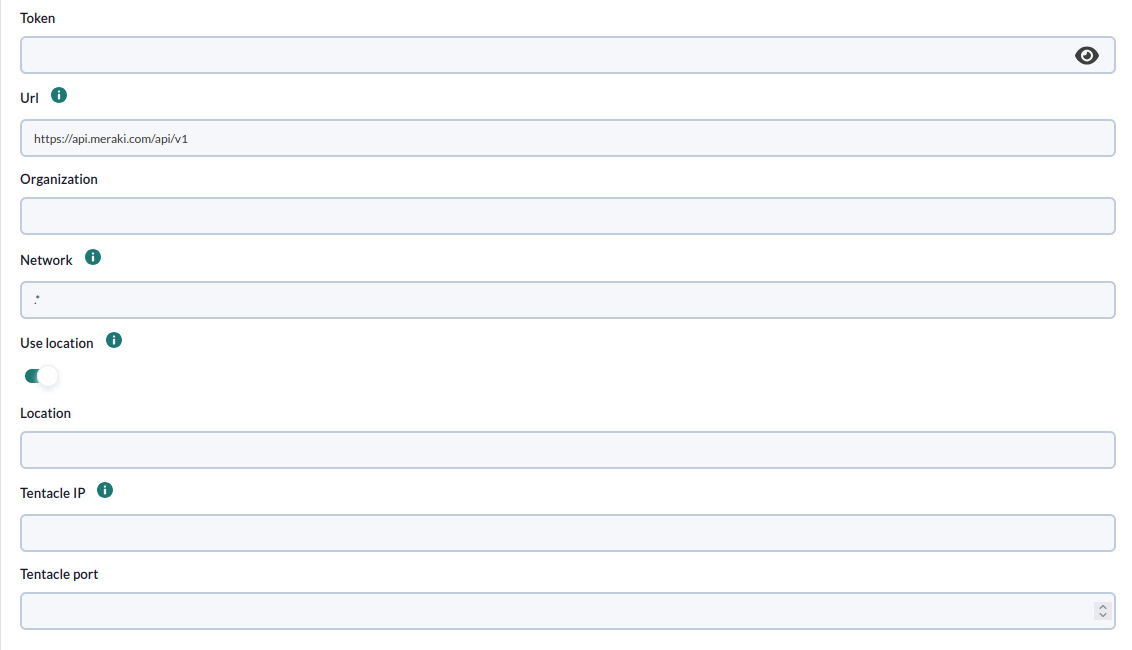
On the next page we will be asked for the following :
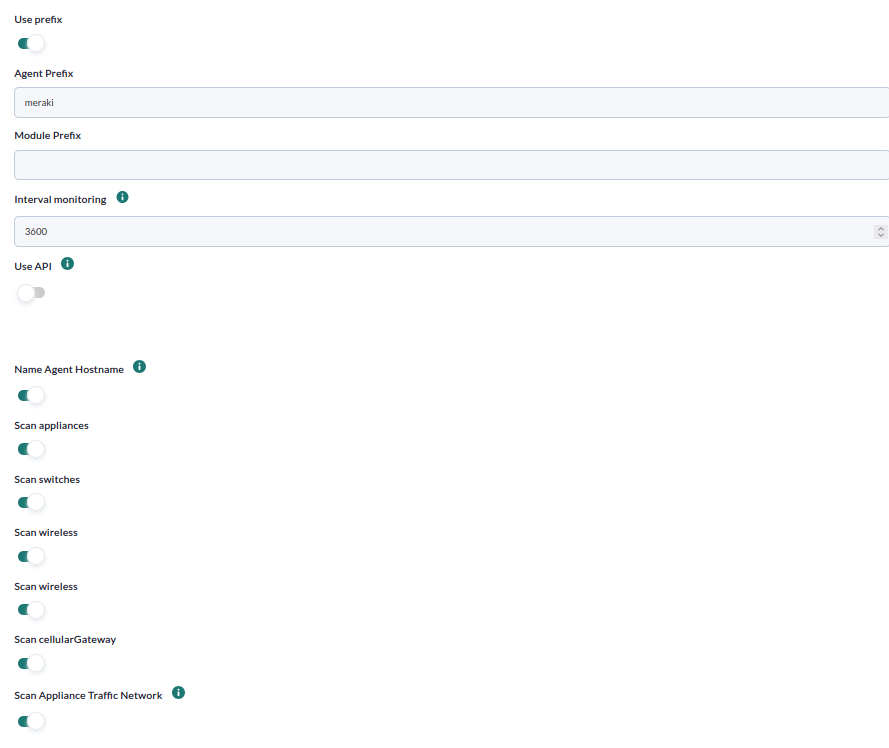
-
Agent prefix: Prefix for agents
-
Module prefix: Prefix for modules
-
Interval monitoring: Monitoring interval for switch port statistics.
-
API Url: Url of pandora api
-
API Password: Password of pandora api
-
API User: Pandora api user
-
API User password: Pandora api user password
- Name Agent Hostname: Enabled will use the devices hostname as the agent name. Without activating the serial code.
-
Scan Appliances: Enable to monitor Appliance type devices
-
Scan Switches: Enable to monitor switch type devices
-
Scan Wireless: Enable to monitor wireless type devices.
- Scan Appliance Traffic Network: Enabled will use the devices hostname as the agent name. Without activating the serial code.
- Scan cellularGateway:Enable to monitor cellularGateway type devices.
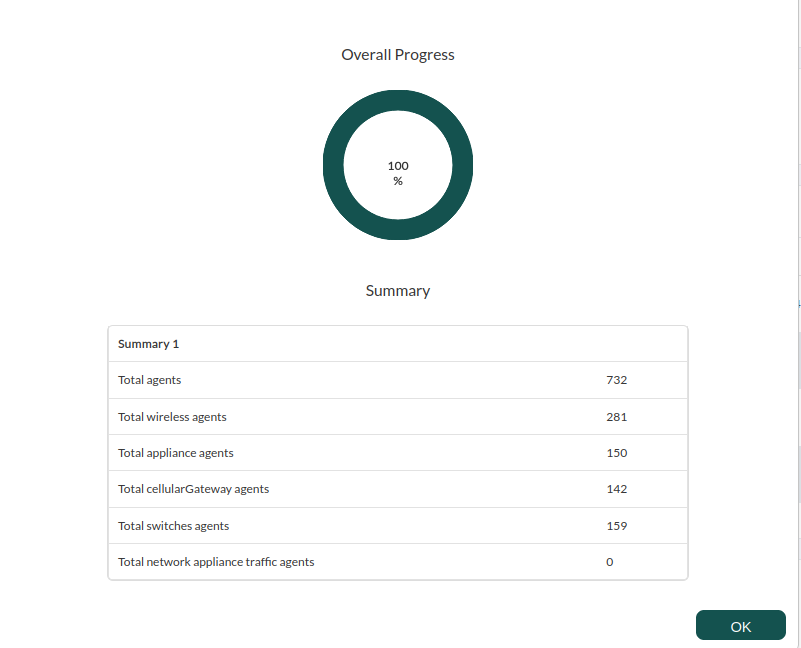
The successfully completed tasks will have an execution summary with the following information:
- Total agents : Total number of agents generated by the task.
- Total wireless agents: Total number of wireless agents generated by the task.
- Total appliance agents: Total number of Appliance agents generated by the task.
- Total cellularGateway agents:
- Total network appliance traffic agents:
- Total switches agents: Total number of Switch agents generated by the task:
Agent and modules generated by the plugin
The plugin execution will create the following agents and modules:
One agent for each Appliance type deviceThe system running the plugin must have connectivity and be able to remotely reach the meraki switches.
-
<module_prefix>status -
<module_prefix>perfScore(if present) -
<module_prefix>Uplink <interfaz>_ifOperStatus(one for each interface detected) -
<module_prefix>uplink_sent_bytes -
<module_prefix>uplink_recv_bytes
One agent for each Switch type deviceOne for each port
-
<module_prefix>status -
<module_prefix>Port <portId>_ifOperStatus(one for each port) -
<module_prefix>Port <portId>_ifOutOctets(one for each port) -
<module_prefix>Port <portId>_ifInOctets(one for each port)
One agent for each Wireless device
-
<module_prefix>status -
<module_prefix>totalKbps(if available) -
<module_prefix>sentKbps(if available) -
<module_prefix>receivedKbps(if available) -
<module_prefix>clientCount(if available)
An agent with network-level traffic data from Appliance devices.
-
<module_prefix>Traffic appliance <network> total_sent -
<module_prefix>Traffic appliance <network> total_recv <module_prefix>Traffic appliance <network> total_clients