# Examples

You can launch the script manually:

```bash
./pandora_kvm.64 [kvm.conf]
```

For example, this is the output as XML dump of the modules generated by the plugin.

```bash
<module>
    <name><![CDATA[(local) KVM Server status]]></name>
    <type></type>
    <data><![CDATA[1]]></data>
    <description><![CDATA[Status of the KVM server. 1 instances of libvirtd]]></description>
    <module_group>KVM</module_group>
</module>
<module>
    <name><![CDATA[(local) KVM Server RAM usage]]></name>
    <type>generic_data</type>
    <data><![CDATA[0]]></data>
    <description><![CDATA[RAM usage by the KVM server]]></description>
    <module_group>KVM</module_group>
</module>
<module>
    <name><![CDATA[(local) KVM Server CPU usage]]></name>
    <type>generic_data</type>
    <data><![CDATA[0]]></data>
    <description><![CDATA[CPU usage by the KVM server]]></description>
    <module_group>KVM</module_group>
</module>
<module>
    <name><![CDATA[(local) Number of VMs]]></name>
    <type>generic_data</type>
    <data><![CDATA[2]]></data>
    <description><![CDATA[Shows the number of available VMs in the KVM system]]></description>
    <module_group>KVM</module_group>
</module>
<module>
    <name><![CDATA[(local) Status of ubuntu22.04]]></name>
    <type>generic_proc</type>
    <data><![CDATA[1]]></data>
    <description><![CDATA[Status of ubuntu22.04: running]]></description>
    <module_group>KVM</module_group>
</module>
<module>
    <name><![CDATA[(local) Status of crc]]></name>
    <type>generic_proc</type>
    <data><![CDATA[0]]></data>
    <description><![CDATA[Status of crc: shut]]></description>
    <module_group>KVM</module_group>
</module>
<module>
    <name><![CDATA[(local) CPU usage of ubuntu22.04]]></name>
    <type></type>
    <data><![CDATA[4,5]]></data>
    <description><![CDATA[CPU usage of ubuntu22.04]]></description>
    <module_group>KVM</module_group>
</module>
<module>
    <name><![CDATA[(local) Virtual CPU usage of ubuntu22.04]]></name>
    <type></type>
    <data><![CDATA[0,5]]></data>
    <description><![CDATA[Virtual CPU usage of ubuntu22.04]]></description>
    <unit><![CDATA[%]]></unit>
    <module_group>KVM</module_group>
</module>
<module>
    <name><![CDATA[(local) Virtual memory usage of ubuntu22.04]]></name>
    <type></type>
    <data><![CDATA[100.00]]></data>
    <description><![CDATA[Mem usage of ubuntu22.04 4194304 of 4194304]]></description>
    <unit><![CDATA[%]]></unit>
    <module_group>KVM</module_group>
</module>
```

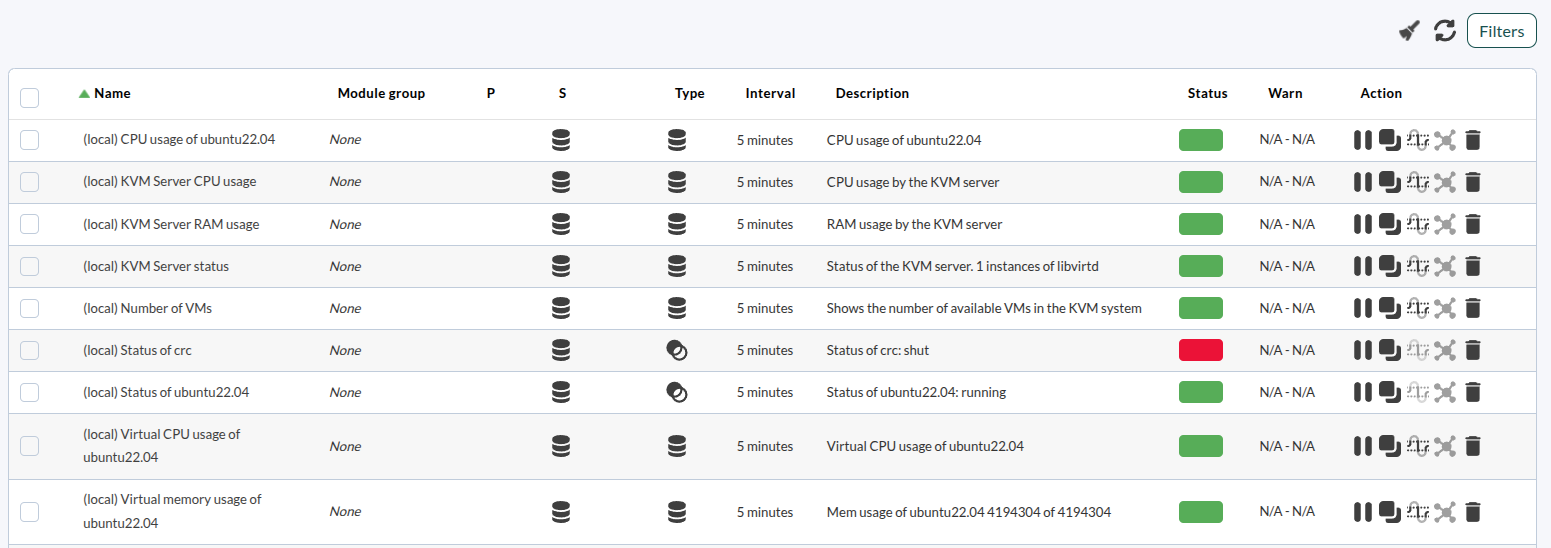
And these are the modules in the PandoraFMS console:

[![imagen (3).png](https://pandorafms.com/guides/public/uploads/images/gallery/2026-08/scaled-1680-/imagen-3.png)](https://pandorafms.com/guides/public/uploads/images/gallery/2026-08/imagen-3.png)