Configuring the MQTT server
Configuring the MQTT server
This script allows you to subscribe to an MQTT topic, receive messages and store them in a SQLite database. The following describes the steps to configure and run it correctly.
1. Configuration file setup
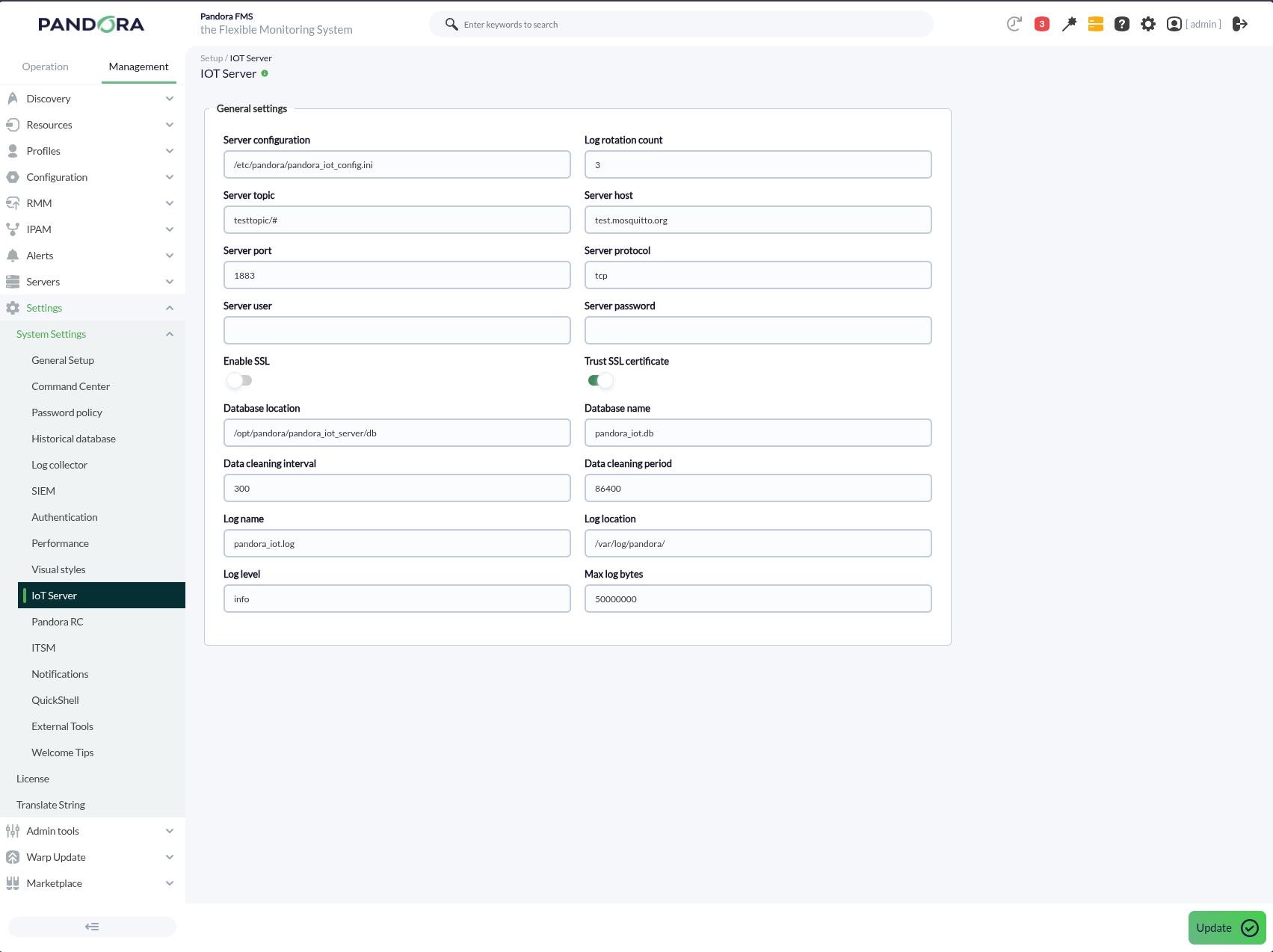
Before running the script, a configuration file in .ini format must be created. This file contains the parameters needed for the MQTT broker connection, the database and the log configuration. An example of a configuration file is the following:
[DEFAULT]

;; topic = testtopic/#                                              (single topic)
;; topic = ["factory/+/temperature","factory/+/humidity"]           (multi-topic)
topic = < Topic to subscribe to in order to receive messages. To use more than one, use a single-line JSON array >

;; connection
host = test.mosquitto.org
port = 1883
;; protocol supports:  tcp, websockets, unix
; protocol = websockets
; user = ro
; password = readonly
; ssl = 0
; trust_ssl = 1

;; Database
dblocation = /opt/pandora/pandora_iot_server/db
dbname = pandora_iot.db
; data_cleaning_interval = 300
; data_cleaning_period = 86400

;; Logs
log_name = pandora_iot.log
log_location = /var/log/pandora/
; log_level = debug
; max_log_bytes = 50_000_000
; log_rotation_count = 3
Key parameters:
-
topic: Defines the MQTT topic the script will subscribe to (for example,testtopic/#). To use more than one, use a single-line JSON array. -
host: Specifies the MQTT broker address. -
port: Specifies the MQTT broker port. -
protocol: The protocol to use for the MQTT connection (for example,tcporwebsockets). -
ssl: Enables or disables the SSL connection. (0 to disable, 1 to enable). -
trust_ssl: Controls whether the broker's SSL certificates are to be trusted. -
dblocation: Directory where the SQLite database will be stored. -
dbname: Name of the SQLite database. - data_cleaning_interval: Time interval (in seconds) between each run of the data cleaning process.
- data_cleaning_period: Time (in seconds) to remove old data from the database.
- log_name: Name of the file where the logs will be stored.
-
log_location: Directory where the log files will be stored. -
log_level: Log detail level (for example,debug). - max_log_bytes: Maximum size (in bytes) a log file can reach before being rotated.
- log_rotation_count: Maximum number of log files kept before deleting the oldest ones.
2. Starting the service.
The service can be started with the following command:
systemctl start pandora_iot_server
To stop receiving and storing messages, the service can be paused with:
systemctl stop pandora_iot_server
The service must be restarted after every configuration change for it to take effect:
systemctl restart pandora_iot_server
3. Starting the server from the console
In version 783 the IoT server is included as part of the server installation, so it is not necessary to manage the service manually.
A token is added to enable the IOT server, and the Pandora server itself manages the service.
A section is also added to manage the IoT server configuration when it is activated.
To enable the IOT server, go to Settings > General Setup > Features, then enable the Enable IOT server field and, finally, press Update.
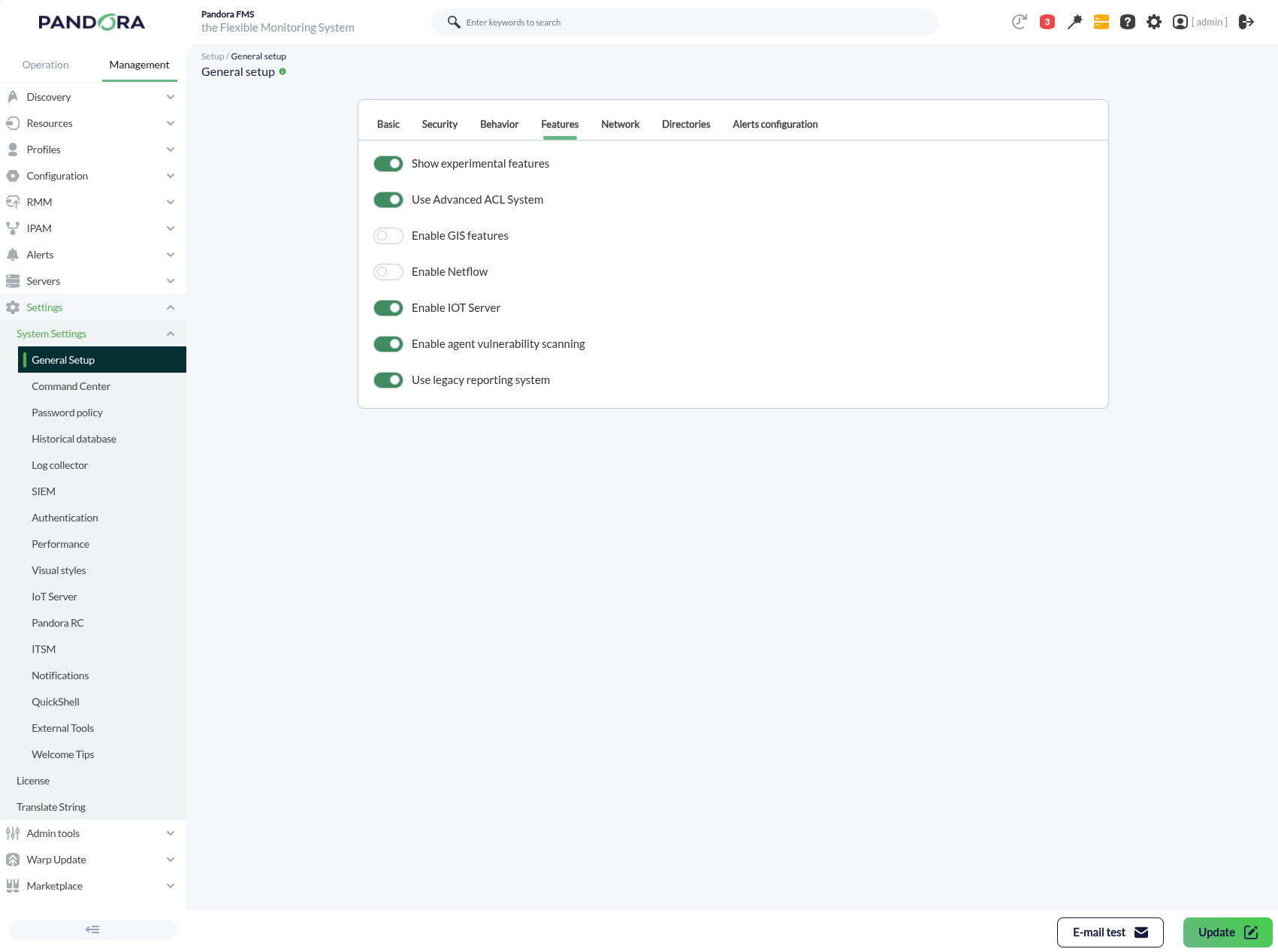
This will enable a new menu inside System Settings, where the full configuration can be managed.