# GLPI

# Introduction

**The purpose of this plugin is to be able to manage the GLPI ticket system in PandoraFMS**, through alerts that will create calls for the creation of tickets and their follow-up.

The plugin performs all these actions through the glpi REST API.

# Compatibility matrix

<table border="1" id="bkmrk-systems-where-it-has" style="border-collapse: collapse; width: 100%; height: 59.5938px;"><colgroup><col style="width: 50%;"></col><col style="width: 50%;"></col></colgroup><tbody><tr style="height: 29.7969px;"><td style="height: 29.7969px;">Systems where it has been tested</td><td style="height: 29.7969px;">Rocky Linux, Fedora 34  
</td></tr><tr style="height: 29.7969px;"><td style="height: 29.7969px;">Systems where it works</td><td style="height: 29.7969px;">Any Linux system</td></tr></tbody></table>

# Prerequisites

- Connectivity to the GLPI REST API is required.
- The PandoraFMS user connecting to the API must have sufficient permissions to perform the actions.

# Parameters

**Parameters GLPI**

<table border="1" id="bkmrk--u%2C--user-glpi-user." style="border-collapse: collapse; width: 100%; height: 152.781px;"><colgroup><col style="width: 50%;"></col><col style="width: 50%;"></col></colgroup><tbody><tr style="height: 29.7969px;"><td style="height: 29.7969px;">**-u,--user**</td><td style="height: 29.7969px;">GLPI user. Example: glpi. **Required**.</td></tr><tr style="height: 29.7969px;"><td style="height: 29.7969px;">**-x,--password**</td><td style="height: 29.7969px;">GLPI password, Example: glpi. **Required**</td></tr><tr style="height: 46.5938px;"><td style="height: 46.5938px;">**-i, --url**</td><td style="height: 46.5938px;">GLPI URL (with port), Example: http://localhost:8200. **Required**</td></tr><tr style="height: 46.5938px;"><td style="height: 46.5938px;">**-a, --app\_token**</td><td style="height: 46.5938px;">Application token, Example: xZvyKomCYHSSva5oTXTNmMiy4SWzfi7O1FF. **Required**</td></tr></tbody></table>

**Ticket Parameters**

<table border="1" id="bkmrk--t%2C--ticket_name-tit" style="border-collapse: collapse; width: 100%;"><colgroup><col style="width: 50.0618%;"></col><col style="width: 50.0618%;"></col></colgroup><tbody><tr><td>**-t,--ticket\_name**  
</td><td>Title or name for the ticket. Example: Module 8025 incident. **Required**  
</td></tr><tr><td>**-d,--ticket\_description**  
</td><td>Message or description for the ticket. Example:

 "  
2023-11-30 11:49:03  
Free RAM  
172.34.56.1  
"  
**. Required**

</td></tr><tr><td>**-p,--ticket\_priority**  
</td><td>Ticket priority. Example: 4. **Required \***  
</td></tr><tr><td>**-c,--ticket\_category**  
</td><td>Category for the ticket. Example: Category1. **Required**  
</td></tr><tr><td>**-g,--ticket\_group**  
</td><td>Group for the ticket. Example: Group1. **Required**</td></tr><tr><td><div><div>**-j,--ticket\_request\_type**</div></div></td><td>Type of request to add to the ticket (field   
requesttypes\_id),  
 default: 8.</td></tr><tr><td><div><div><div><div>**-k,--ticket\_name\_error**</div></div></div></div></td><td>Title of the ticket that will be added to tickets created when no computer is found.</td></tr></tbody></table>

**Macros for ticket\_name and ticket\_description**

<table border="1" id="bkmrk-%25ticketid%25-add-the-g" style="border-collapse: collapse; width: 100%;"><colgroup><col style="width: 50%;"></col><col style="width: 50%;"></col></colgroup><tbody><tr><td>**%ticketID%**</td><td>Add the GLPI ticket number to the ticket description/title.</td></tr></tbody></table>

Example of use:

```
./pandora_glpi --user "glpi" --password "glpi" --url "http://127.0.0.1:8090/" --app_token "IwSQ9070LzaAQyg3vJKuRQZxPSfXuD16cOKOK7EA" --alias_agent "Rocky Linux 8" --id_module "1" --ticket_name "Incidencia modulo %ticketID%" --ticket_priority 4 --ticket_category 1 --ticket_group 1 --log_file "/tmp/glpi_logfile.txt" --recovery 0 --ticket_description "2023-11-30 11:49:03 Free RAM 172.34.56.1 ID ticket %ticketID%" --ticket_name_error "Error: No se encontró el equipo %ticketID%"
```

[![image.png](https://pandorafms.com/guides/public/uploads/images/gallery/2026-01/scaled-1680-/qYFimage.png)](https://pandorafms.com/guides/public/uploads/images/gallery/2026-01/qYFimage.png)

**Pandora Parameters**

<table border="1" id="bkmrk--n%2C--alias_agent-age" style="border-collapse: collapse; width: 100%; height: 59.5938px;"><colgroup><col style="width: 50.0618%;"></col><col style="width: 50.0618%;"></col></colgroup><tbody><tr style="height: 29.7969px;"><td style="height: 29.7969px;">**-n,--alias\_agent**  
</td><td style="height: 29.7969px;">Agent alias. Example: RockyLinux8. **Required**.  
</td></tr><tr style="height: 29.7969px;"><td style="height: 29.7969px;">**-m,--id\_module**  
</td><td style="height: 29.7969px;">Module ID. Example: 8025. **Required**</td></tr></tbody></table>

**Pandora API parameters**

<table border="1" id="bkmrk---api_url-pandora-ap" style="border-collapse: collapse; width: 100%;"><colgroup><col style="width: 50.0618%;"></col><col style="width: 50.0618%;"></col></colgroup><tbody><tr><td>**--api\_url**  
</td><td>Pandora API URL. Example: http://172.42.42.101  
**Default**: http://localhost  
</td></tr><tr><td>**--api\_user**  
</td><td>Pandora API user. Example: admin. **Default**: admin  
</td></tr><tr><td>**--api\_pass**  
</td><td>Pandora API user password. Example: pandora. **Default**: pandora  
</td></tr><tr><td>**--api\_user\_pass**  
</td><td>Pandora API user password. Example: 1234. **Default**: 1234</td></tr></tbody></table>

**Additional parameters**

<table border="1" id="bkmrk--l%2C--logfile-path-wh" style="border-collapse: collapse; width: 100%;"><colgroup><col style="width: 50.0618%;"></col><col style="width: 50.0618%;"></col></colgroup><tbody><tr><td>**-l,--logfile**  
</td><td>Path where the log file will be added. Example: /tmp/glpi\_logfile.txt. **Default**: /tmp/glpi\_logfile.txt  
</td></tr><tr><td>**-r, --recovery**  
</td><td>To activate recovery mode. Example: 1. **Required**</td></tr></tbody></table>

- The priority must be specified numerically. The table below shows each value and its corresponding priority.

<table border="1" id="bkmrk-value-priority-1-ver" style="border-collapse: collapse; width: 100%; height: 208.578px;"><colgroup><col style="width: 50.0618%;"></col><col style="width: 50.0618%;"></col></colgroup><tbody><tr style="height: 29.7969px;"><td style="height: 29.7969px;">**Value**</td><td style="height: 29.7969px;">**Priority**</td></tr><tr style="height: 29.7969px;"><td style="height: 29.7969px;">1</td><td style="height: 29.7969px;">Very low</td></tr><tr style="height: 29.7969px;"><td style="height: 29.7969px;">2</td><td style="height: 29.7969px;">Low</td></tr><tr style="height: 29.7969px;"><td style="height: 29.7969px;">3</td><td style="height: 29.7969px;">Medium</td></tr><tr style="height: 29.7969px;"><td style="height: 29.7969px;">4</td><td style="height: 29.7969px;">High</td></tr><tr style="height: 29.7969px;"><td style="height: 29.7969px;">5</td><td style="height: 29.7969px;">Very High</td></tr><tr style="height: 29.7969px;"><td style="height: 29.7969px;">6</td><td style="height: 29.7969px;">Essential</td></tr></tbody></table>

**Help**

<table border="1" id="bkmrk-help-the-plugin-has-" style="border-collapse: collapse; width: 100%; height: 46.5938px;"><colgroup><col style="width: 50.0618%;"></col><col style="width: 50.0618%;"></col></colgroup><tbody><tr style="height: 46.5938px;"><td style="height: 46.5938px;">**Help**</td><td style="height: 46.5938px;">The plugin has a help option where you can see all its parameters and their descriptions.</td></tr></tbody></table>

<p class="callout info">If you want to see the plugin help, run it with this parameter only.</p>

# Manual execution

The plugin execution format is as follows:

```
./pandora_glpi --user < user > --password < password > --url < url > --app_token < app token > \
--alias_agent < id_module > --id_module < id module > \
--ticket_name < ticket name > --ticket_message < ticket message > --ticket_priority < ticket priority > \
--ticket_category < ticket category > --ticket_group < ticket group > \
--log_file < log file > --recovery < 1 or 0 >
```

Example:

```
./pandora_glpi --user "glpi" --password "glpi" --url "http://localhost:8200" --app_token "xZvyKomCYHSSva5oTXTNmMiy4SWzfi7O1FFt" \
--alias_agent < "Rocky linux 8" > --id_module "8025" \
--ticket_name " Incidendia modulo 8025" \
--ticket_priority 4 \
--ticket_category "Categoria1" --ticket_group "grupo1" \
--log_file "/tmp/glpi_logfile.txt" --recovery 1 --ticket_message"
2023-11-30 11:49:03
Free RAM
172.34.56.1
"
```

# Configuration in PandoraFMS

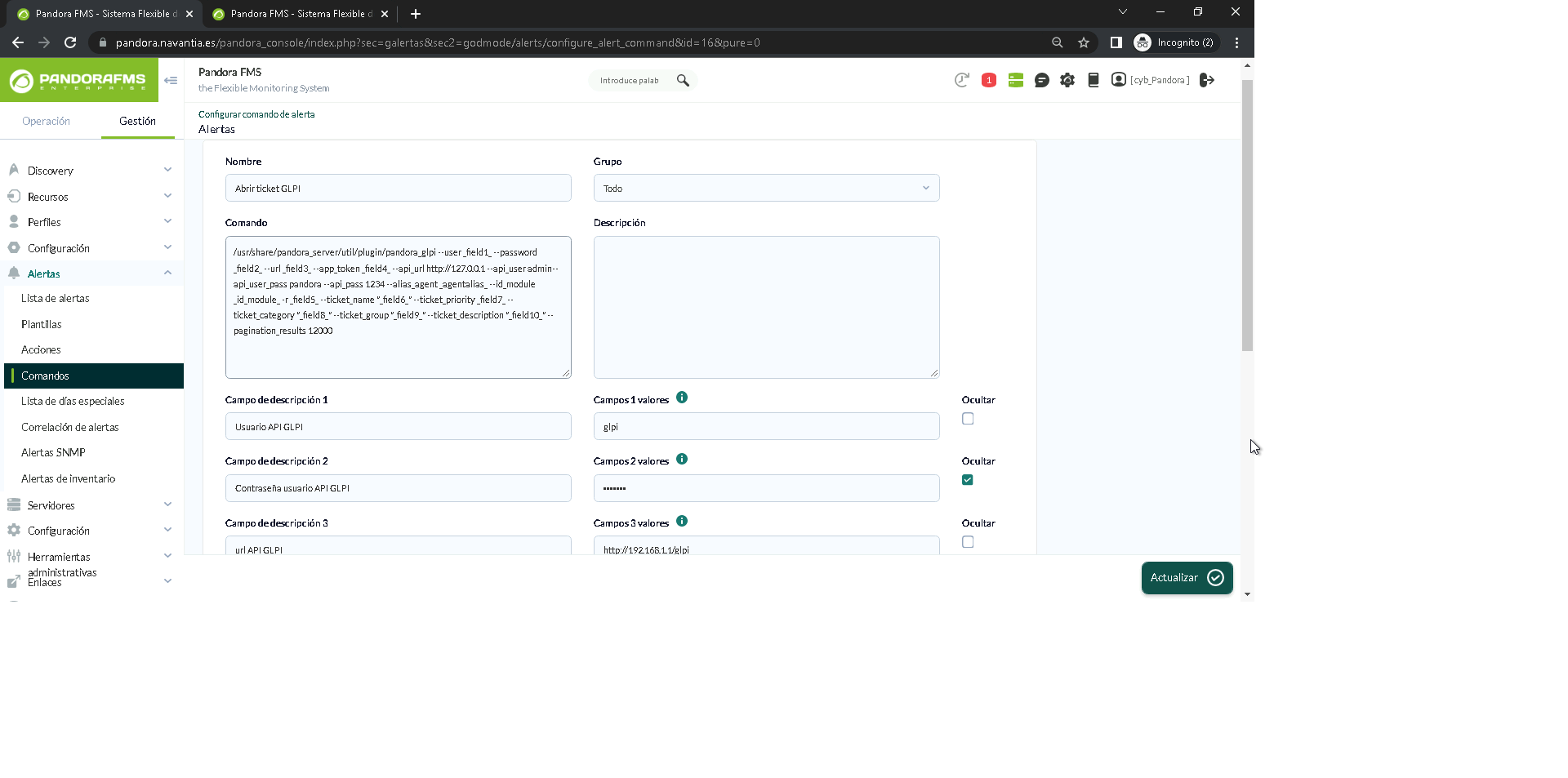
To configure the plugin, you need to set up an alert command using the plugin parameters to create custom executions.

This can be done from the alerts menu in commands:

[![ouqimage.png](https://pandorafms.com/guides/public/uploads/images/gallery/2026-01/scaled-1680-/ouqimage.png)](https://pandorafms.com/guides/public/uploads/images/gallery/2026-01/ouqimage.png)
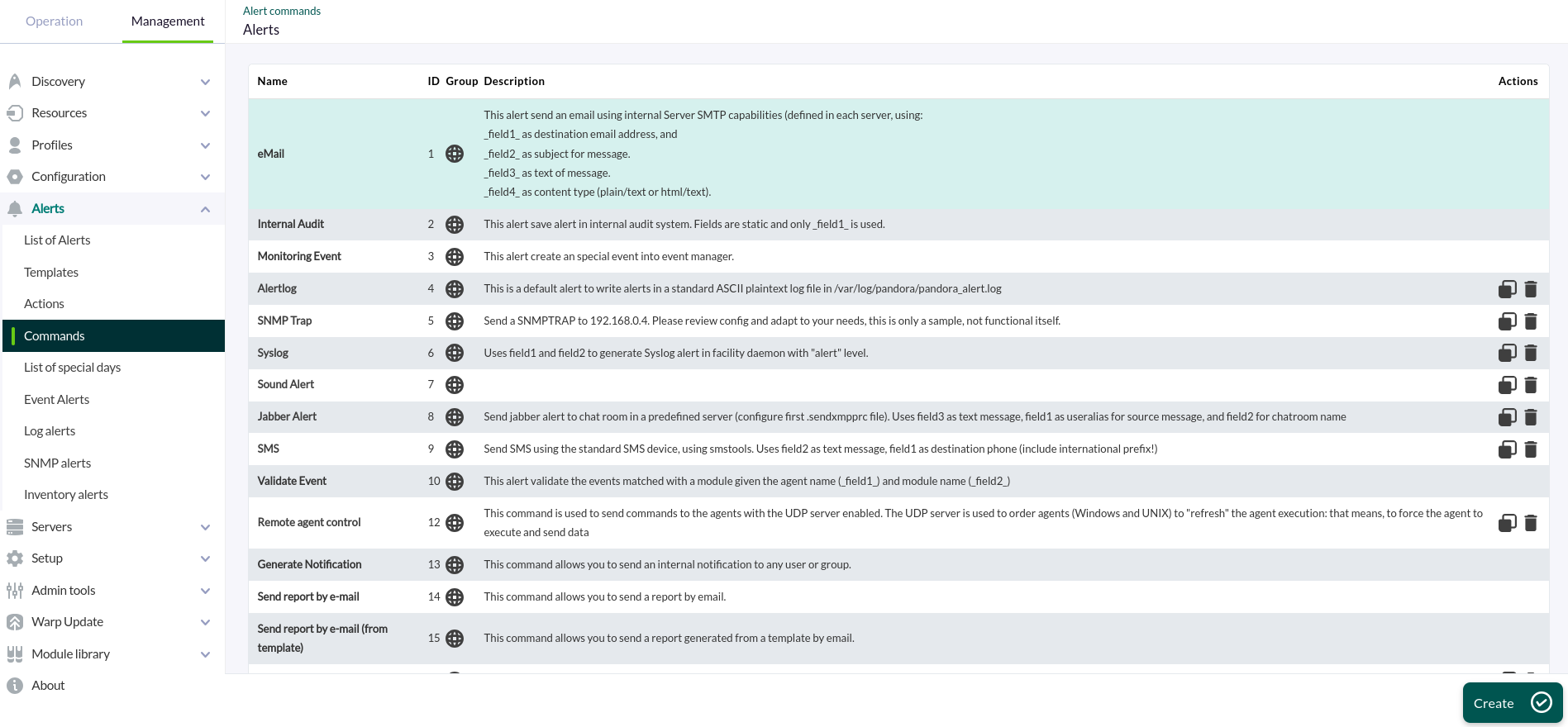
You must enter a name, group, and command, using the macro \_fieldx\_ as values for the parameters, where x is the parameter number (there is no specific order; each macro simply needs to have a different number).

Once configured, you can set the macro value below in the description fields.

[![2.png](https://pandorafms.com/guides/public/uploads/images/gallery/2026-01/scaled-1680-/2.png)](https://pandorafms.com/guides/public/uploads/images/gallery/2026-01/2.png)