Pandora FMS allows the real-time visualization of all happenings in our monitored systems; with this information we can perform the necessary actions according to the event created.
Information is shown ranging from any module status change, triggered or recovered alerts, to system restarts or custom events. Depending on the information carried by the event, it will appear in one color or another. For example, if an information event arrives stating that a module has entered a critical state, this event will appear in red. Thanks to this default view, we can observe active "problems" in real time. [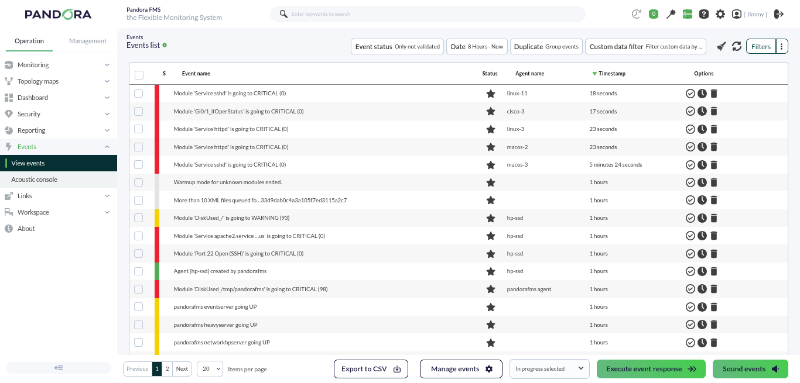](https://pandorafms.com/guides/public/uploads/images/gallery/2026-03/pfms-first-steps-events-image-010.png)Events for transitioning to an incorrect state, *critical* or *warning*, are automatically validated upon recovering normality. This is what we call event auto-validation in Pandora and it is an essential functionality, as it allows hiding information that is no longer relevant in the event console.
There is the possibility in Pandora FMS to set alerts on events, so that instead of acting on each module, it can be done on a certain group of modules, generalizing monitoring and making alert deployment much easier. Furthermore, correlation rules can be created on events, developing authentic logical heuristics when dealing with events. Obviously, these are advanced and complex features that are not covered in this quick guide.Are you not achieving the results explained in this chapter? Access the [help](https://pandorafms.com/guides/public/books/first-steps-with-pandora-fms/page/21-where-to-look-if-problems-arise) or [support](https://pandorafms.com/guides/public/books/first-steps-with-pandora-fms/page/22-support) section.