Exchange
Plugin for monitoring an Exchange server, works on versions later than Exchange 2010.
- Introduction
- Compatibility matrix
- Pre requisites
- Parameters
- Manual execution
- Configuration in PandoraFMS
- Modules generated by the plugin
Introduction
Ver. 01-27-2023
Plugin for monitoring an Exchange server, works on versions later than Exchange 2010.
Type: Agent plugin
Compatibility matrix
| Systems where it has been tested |
Exchange 2016 |
| Systems where it should work |
Exchange versions 2013 and above |
Pre requisites
- Have the PandoraFMS agent installed.
- An Exchange 2013 or later server and have PowerShell and the Exchange shell available.
The plugin must be run by a user with permissions to connect to the Exchange management shell according to the server we want to connect to. That user must have sufficient privileges to use the cmdlets necessary to obtain the information.
To prepare for the use of the Exchange administration shell, you must have a user with access privileges for some of the cmdlets. If you have the necessary permissions, a default installation of the Pandora agent is sufficient, and no additional configuration is required.
Parameters
| -all | Get all modules |
| -mailbox | Get the mailbox modules. |
| -cas | Get the cas modules |
| -services | To monitor detected Exchange services |
Manual execution
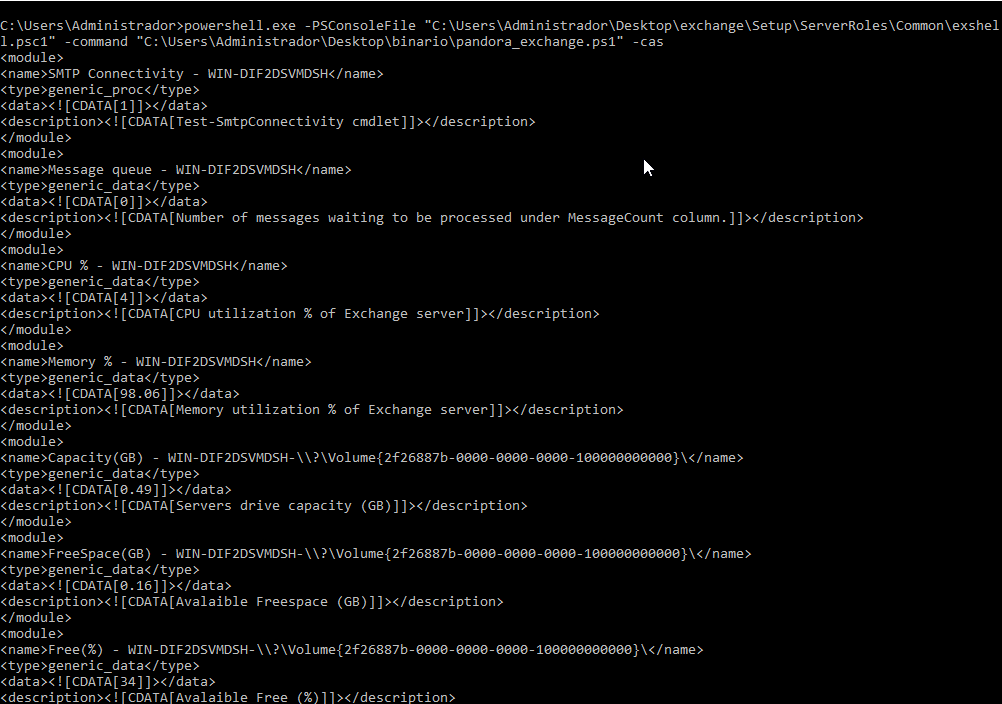
powershell.exe -PSConsoleFile “<path_to_exchange_shell>\exshell.psc1” -command “C:\‘<path_to_plugin>\Pandora_Plugin_Exchange.ps1’ <parameters> 3> $NULL”Example
Configuration in PandoraFMS
To obtain the information, the exchange plugin must be configured in the Pandora agent.
To be able to monitor from Pandora FMS with the plugin, we must call it from the EndPoint config file located in the following path:
/etc/pandora/pandora_agent.confWe will call it in the last line of the conf with the module_plugin command, followed by the following command:
module_plugin powershell.exe -PSConsoleFile "<exchange_shell_directory>\exshell.psc1" -command "C:\'<plugin_directory>\Pandora_Plugin_Exchange.ps1' <parameters> 3> $NULL"This can also be done from the console if remote configuration is enabled.
Modules generated by the plugin
The plugin will remove the following modules:
| Message count <server> |
| CPU Average <server> |
| MEM Average <server> |
| Capacity(GB) <server> <unidad> |
| FreeSpace(GB) <server> <unidad> |
| Free(%) <server> <unidad> |
Mailbox
| Database replication |
| Mapi connectivity |
| Dag status |
CAS
| OWA |
| ActiveSync |
| Web Services |
| Remote powershell |
| POP |
| IMAP |
| ECP |
| Autodiscover |
| Outlook client connectivity |
| SMTP connectivity |
If the “-services” parameter is used, a separate module will be created for each detected service.