# Dynamic snmp

# Introduction

**Ver**. 22-05-2025

This plugin is designed to perform dynamic SNMP scans (e.g. interfaces where the OID changes between restarts).

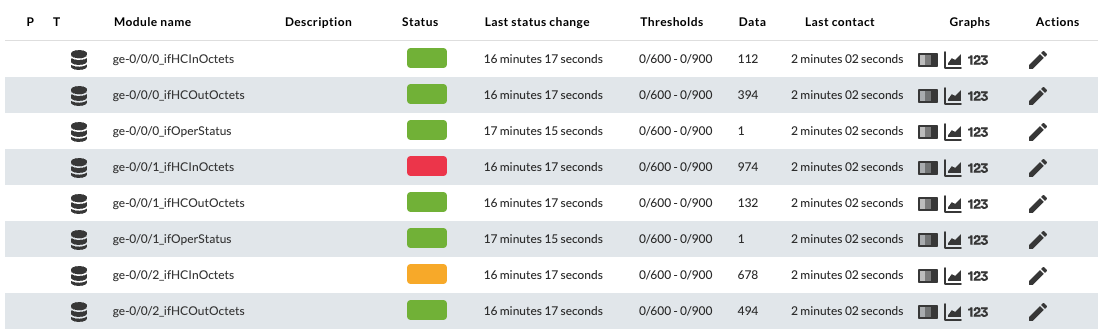
Running it by default, it monitors the status of interfaces and their incoming and outgoing traffic. Its capabilities include filtering interfaces by name, as well as assigning thresholds and alerts to the modules it generates.

**Tipo**: Plug-in server, Agent Plug-in

# Compatibility matrix

<table border="1" id="bkmrk-sistemas-donde-se-ha-1" style="width: 83.2099%; height: 59.5938px;"><tbody><tr style="height: 29.7969px;"><td style="width: 52.3669%; height: 29.7969px;">**Tested and developed with**</td><td style="width: 47.6331%; height: 29.7969px;">Rocky linux 8/9, Fedora 34</td></tr><tr style="height: 29.7969px;"><td style="width: 52.3669%; height: 29.7969px;">**Expected to work with**</td><td style="width: 47.6331%; height: 29.7969px;">Any linux system</td></tr></tbody></table>

# Pre requisites

- Connectivity to the host and the community to be scanned.

# Parameters

Required parameters:

<table border="1" id="bkmrk--c-comunidad--v-vers" style="width: 100%; border-collapse: collapse; border-width: 1px;"><colgroup><col style="width: 25.0933%;"></col><col style="width: 74.9067%;"></col></colgroup><tbody><tr><td><div><div>-v *version*</div></div></td><td>SNMP version</td></tr><tr><td><div><div>-h *IP*</div></div></td><td>Target IP address</td></tr></tbody></table>

SNMP specific parameters:

<table border="1" id="bkmrk--c%C2%A0community-comunid" style="width: 100%; height: 305.563px;"><colgroup><col style="width: 25.2098%;"></col><col style="width: 74.7902%;"></col></colgroup><tbody><tr style="height: 29.7969px;"><td style="height: 29.7969px;"><div><div>-c *community*</div></div></td><td style="height: 29.7969px;">SNMP community (SNMP v1 y v2c)</td></tr><tr style="height: 29.7969px;"><td style="height: 29.7969px;">-u *user*</td><td style="height: 29.7969px;"><div><div>SNMP user name (SNMPv3 only)</div></div></td></tr><tr style="height: 29.7969px;"><td style="height: 29.7969px;">-n *context*</td><td style="height: 29.7969px;"><div><div>Context (SNMPv3 only)</div></div></td></tr><tr style="height: 46.5938px;"><td style="height: 46.5938px;">-l *securityLevel*</td><td style="height: 46.5938px;"><div><div>Security level (SNMPv3 only). Accepted values are "noAuthNoPriv", "authNoPriv" and "authPriv".</div></div></td></tr><tr style="height: 29.7969px;"><td style="height: 29.7969px;">-a *authProtocol*</td><td style="height: 29.7969px;"><div><div>Authentication protocol (SNMPv3 only). It can be "MD5" or "SHA".</div></div></td></tr><tr style="height: 46.5938px;"><td style="height: 46.5938px;">-A *authKey*</td><td style="height: 46.5938px;"><div><div>Authentication Key used in combination with the specified authentication protocol (SNMPv3 only).</div></div></td></tr><tr style="height: 46.5938px;"><td style="height: 46.5938px;">-x *privProtocol*</td><td style="height: 46.5938px;"><div><div>Privacy protocol to be used for encrypting the transmitted data (SNMPv3 only). Accepted values are "DES" and "AES".</div></div></td></tr><tr style="height: 46.5938px;"><td style="height: 46.5938px;">-X *privKey*</td><td style="height: 46.5938px;"><div><div>The privacy key used in conjunction with the privacy protocol to encrypt and decrypt transmitted data (SNMPv3 only).</div></div></td></tr></tbody></table>

Optional plugin parameters:

<table border="1" id="bkmrk--agent-agentname-nom" style="width: 100%; height: 546.719px;"><colgroup><col style="width: 25.2154%;"></col><col style="width: 74.7846%;"></col></colgroup><tbody><tr style="height: 46.5938px;"><td style="height: 46.5938px;"><div><div>-agent *agentname*</div></div></td><td style="height: 46.5938px;">Agent name (only if running as a Server Plugin). If this parameter is omitted, the plugin will work as Agent Plugin.</td></tr><tr style="height: 46.5938px;"><td style="height: 46.5938px;"><div><div>-only *regex*</div></div></td><td style="height: 46.5938px;">Text string or regular expression to filter items. Only branches containing this expression in their name branch will be monitored.</td></tr><tr style="height: 46.5938px;"><td style="height: 46.5938px;"><div><div>-reject *regex*</div></div></td><td style="height: 46.5938px;">Text string or regular expression to filter items. Branches containing this expression in their name branch will be excluded.</td></tr><tr style="height: 29.7969px;"><td style="height: 29.7969px;">-p *port*</td><td style="height: 29.7969px;">SNMP port of the target device. Default: 161</td></tr><tr style="height: 29.7969px;"><td style="height: 29.7969px;">-d *data\_type*</td><td style="height: 29.7969px;">Data type (auto-detected by default)</td></tr><tr style="height: 29.7969px;"><td style="height: 29.7969px;">-o *OID*</td><td style="height: 29.7969px;">Base OID for monitoring (this is the starting point for the -branches and -names OIDs).</td></tr><tr style="height: 29.7969px;"><td style="height: 29.7969px;"><div><div>-names *namesOID*</div></div></td><td style="height: 29.7969px;">Sub-branch to be used as name for the modules (part of the OID denoted by -o)</td></tr><tr style="height: 80.1719px;"><td style="height: 80.1719px;"><div><div>-branches *branches*</div></div></td><td style="height: 80.1719px;">This option specifies the branches to retrieve under the provided OIDs (part of the OID indicated by -o). The format is Branch1:OID1,Branch2:OID2,....

For example: ‘OperStatus:.8,AdminStatus:.7’.

</td></tr><tr style="height: 29.7969px;"><td style="height: 29.7969px;"><div><div>-wmin *wmin*</div></div></td><td style="height: 29.7969px;">Minimum warning threshold for the generated modules</td></tr><tr style="height: 29.7969px;"><td style="height: 29.7969px;"><div><div>-wmax *wmax*</div></div></td><td style="height: 29.7969px;">Maximum warning threshold for the generated modules</td></tr><tr style="height: 29.7969px;"><td style="height: 29.7969px;"><div><div>-cmin *cmin*</div></div></td><td style="height: 29.7969px;">Minimum critical threshold for the generated modules</td></tr><tr style="height: 29.7969px;"><td style="height: 29.7969px;"><div><div>-cmax *cmax*</div></div></td><td style="height: 29.7969px;">Maximum critical threshold for the generated modules</td></tr><tr style="height: 29.7969px;"><td style="height: 29.7969px;"><div><div>-alrt *alerts*</div></div></td><td style="height: 29.7969px;">Global alerts for generated modules (e.g. ‘Critical condition’)</td></tr><tr style="height: 29.7969px;"><td style="height: 29.7969px;"><div><div>-group *modulegroup*</div></div></td><td style="height: 29.7969px;">Group for the generated modules</td></tr><tr style="height: 28.7969px;"><td style="height: 28.7969px;"><div><div>-nodefaults 1</div></div></td><td style="height: 28.7969px;">Disables monitoring by default (used in conjunction with -o, -names and -branches).</td></tr><tr><td><div><div>-interval</div></div></td><td>Set the interval for the agent (By default 300)</td></tr></tbody></table>

Data transfer to Pandora FMS (only when running as a server plugin):

<table border="1" id="bkmrk--m%C2%A0mode-modo-de-tran" style="border-collapse: collapse; width: 100%; border-width: 1px;"><colgroup><col style="width: 25.2159%;"></col><col style="width: 74.7841%;"></col></colgroup><tbody><tr><td><div><div>-m mode</div></div></td><td>Transfer mode, tentacle or localcopy. Default: ‘tentacle’.</td></tr><tr><td><div><div>-t_ip tentacleIP</div></div></td><td>Tentacle IP (only with ‘tentacle’ transfer mode). Default: 127.0.0.1</td></tr><tr><td><div><div>-t_port tentaclePort</div></div></td><td>Tentacle port (only with ‘tentacle’ transfer mode). Default: 41121</td></tr><tr><td><div><div>-t_opts tentacleOpts</div></div></td><td>Extra Tentacle options (only with ‘tentacle’ transfer mode)</td></tr><tr><td><div><div>-t_file_path tentaclePath</div></div></td><td>Tentacle path (only with ‘localcopy’ transfer mode). Default: "/var/spool/pandora/data\_in/"</td></tr></tbody></table>

# Manual execution

The plugin execution format is as follows:

```
./dynamic_snmp -agent <agentname> -h <host> -v <version> [-c <community>] [-u <username>] [-a <authProtocol>] [-A <authKey>] [-x <privProtocol>] [-X <privPassword>] [-l <securityLevel>] [-o <base oid>] [-names <instance>] [-branches <branches>] [-nodefaults 1] [-t_ip <tentacleIP>] [-t_port <tentaclePort>] [-t_opts "<tentacleOptions>"] [-t_file_path "<tentaclePath>"] [-m <transferMode>] [-wmin <wmin>] [-wmax <wmax>] [-cmin <cmin>] [-cmax <cmax>] [-alrt <alert_name>] [-group <moduleGroup>]
```

Example of basic monitoring with SNMPv2, with everything by default and launched as an Agent plugin. It will generate OperStatus, ifInOctets and ifOutOctets modules (ifHCInOctets and ifHCOutOctets if available):

```
./dynamic_snmp -h "192.168.51.1" -v "2c" -c "mycommunity"
```

Example of basic monitoring with SNMPv2, running as a Server plugin and using the inclusion and exclusion filters. The interfaces whose name contains ‘Ge’ will be monitored, but not for those containing ‘0/3’, and will be included in the agent whose agentname is ‘Test-agentname’:

```
./dynamic_snmp -agent "Test-agentname" -h "192.168.51.1" -v "2c" -c "mycommunity" -only "Ge" -reject "0/3"
```

Same example, but using SNMPv3:

```
./dynamic_snmp -agent "Test-agentname" -h "192.168.51.1" -v "3" -l "authPriv" -u "snmpv3user" -a "SHA" -A "PASSWORD1" -x "AES" -X "PASSWORD2" -only "Ge" -reject "0/3"
```

Example of custom monitoring with SNMPv2, running as a Server plugin, deactivating the default monitoring and manually choosing the branches to monitor:

```
./dynamic_snmp -agent "Test-agentname" -h "192.168.51.1" -v "2c" -c "mycommunity"  -o ".1.3.6.1.2.1" -names ".2.2.1.2" -branches "OperStatus:.2.2.1.8,AdminStatus:.2.2.1.7" -nodefaults 1
```

Note: The quotation marks shown in the examples above are not necessary, but may avoid problems.

# Configuration in Pandora FMS

To configure this as a Server plugin in Pandora FMS, you can follow these steps:

**1. Upload the plugin to Pandora FMS, for example at the following path.**

```
/usr/share/pandora_server/util/plugin
```

**2. Create a server plugin in the Plugins section.**

[![image.png](https://pandorafms.com/guides/public/uploads/images/gallery/2025-05/scaled-1680-/image.png)](https://pandorafms.com/guides/public/uploads/images/gallery/2025-05/image.png)

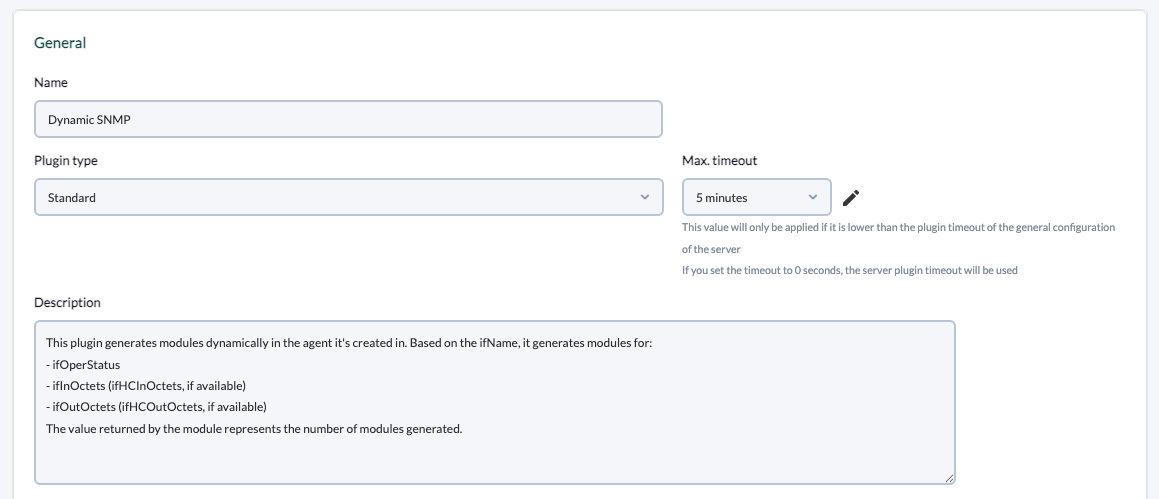
 **3. Add name, description and timeout.**

<p class="callout warning">This plugin may take some time to execute, so it is recommended to configure a timeout of at least 20 seconds. It is possible that the global parameter ‘plugin\_timeout’ of the pandora\_server.conf should be adjusted as well.</p>

[![Captura de pantalla 2025-05-22 a las 13.40.05.png](https://pandorafms.com/guides/public/uploads/images/gallery/2025-05/scaled-1680-/captura-de-pantalla-2025-05-22-a-las-13-40-05.png)](https://pandorafms.com/guides/public/uploads/images/gallery/2025-05/captura-de-pantalla-2025-05-22-a-las-13-40-05.png)

Description used in the example:

> This plugin generates modules dynamically in the agent it's created in. Based on the ifName, it generates modules for:  
> \- ifOperStatus  
> \- ifInOctets (ifHCInOctets, if available)  
> \- ifOutOctets (ifHCOutOctets, if available)  
> The value returned by the module represents the number of modules generated.

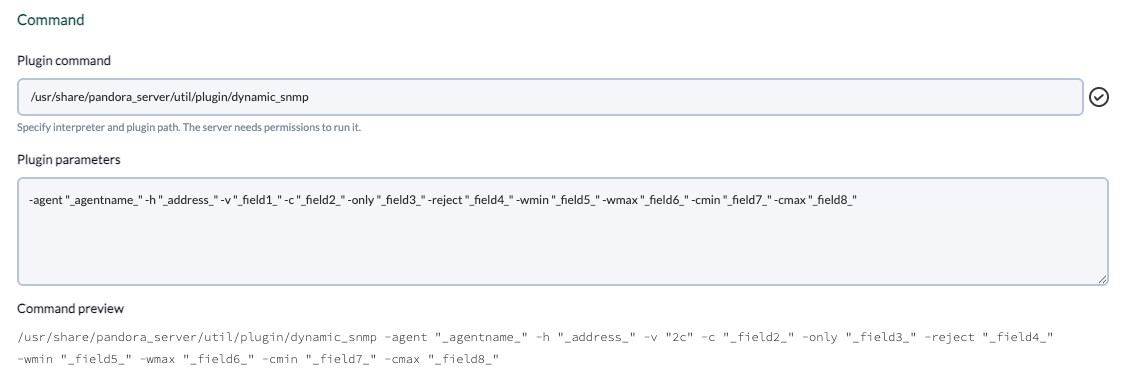
**4. Add the path to the plugin in the command and the necessary parameters for its execution.**

This example is configured for monitoring interfaces with SNMPv2, indicating filters for the interfaces and status thresholds for the generated modules. The \_agentname\_ and \_address\_ server macros will be used to avoid having to manually indicate the agent name and IP address of the device in each execution.

<p class="callout info">For each parameter a macro must be configured, the syntax of this macro being the following : \_fieldx\_, where x is the positional number of the parameter. </p>

[![Captura de pantalla 2025-05-22 a las 13.43.29.png](https://pandorafms.com/guides/public/uploads/images/gallery/2025-05/scaled-1680-/captura-de-pantalla-2025-05-22-a-las-13-43-29.png)](https://pandorafms.com/guides/public/uploads/images/gallery/2025-05/captura-de-pantalla-2025-05-22-a-las-13-43-29.png)

Plugin parameters used in the example:

```
-agent "_agentname_" -h "_address_" -v "_field1_" -c "_field2_" -only "_field3_" -reject "_field4_" -wmin "_field5_" -wmax "_field6_" -cmin "_field7_" -cmax "_field8_"
```

**5. Configure the macros shown above, adding in each one the description of the parameter.**

[![image.png](https://pandorafms.com/guides/public/uploads/images/gallery/2025-05/scaled-1680-/Okgimage.png)](https://pandorafms.com/guides/public/uploads/images/gallery/2025-05/Okgimage.png)
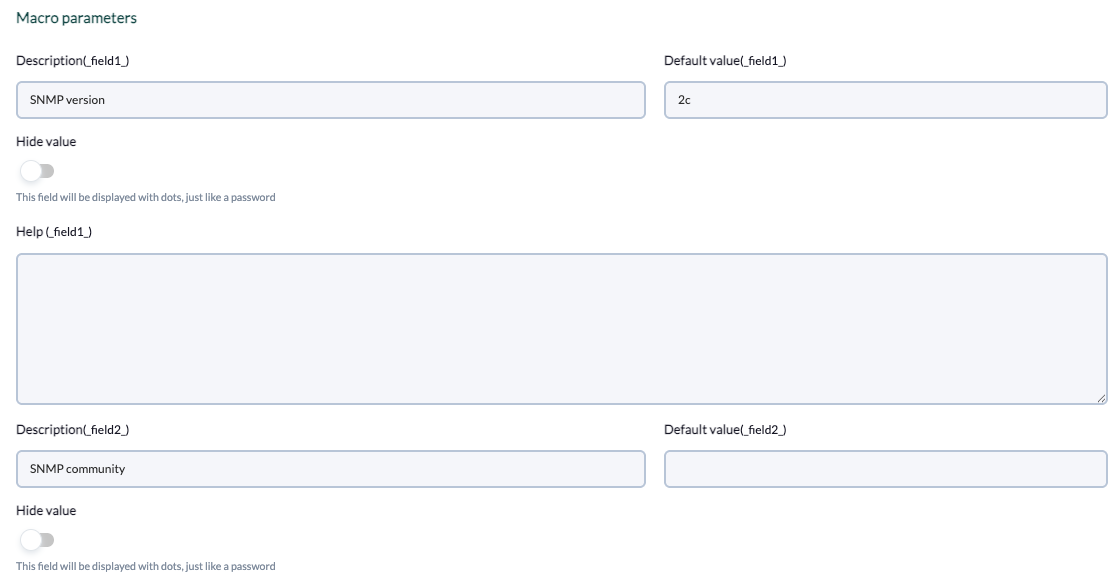
Fields included in the example:

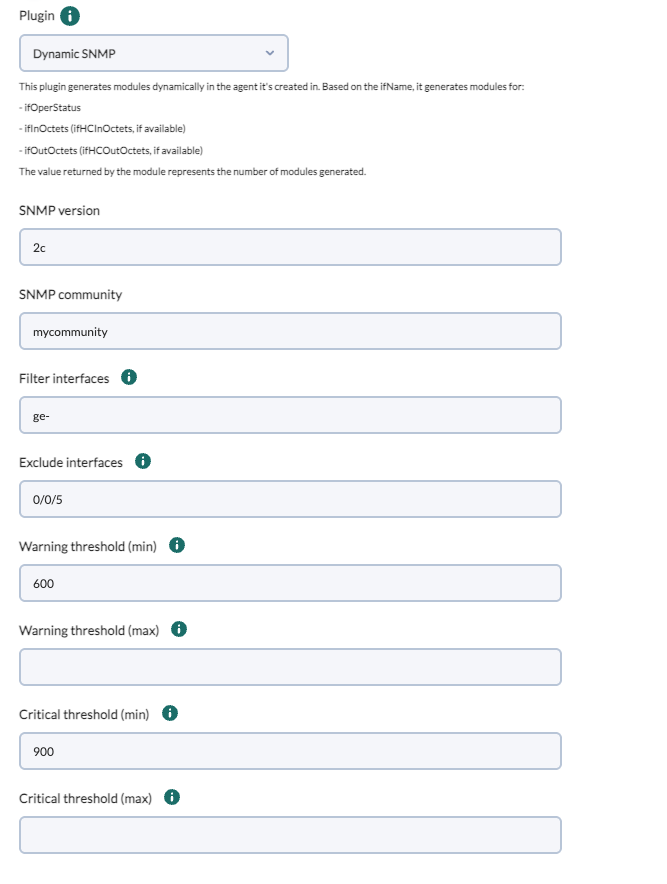
- Field 1 
    - Description: `SNMP version`
    - Default value: `2c`
- Field 2 
    - Description: `SNMP community`
- Field 3: 
    - Description: `Filter interfaces by name`
    - Help: `Optional: allows filtering interfaces by name, separated by commas. For example: ‘ge,fe’, will only generate modules for interfaces whose name contains ‘ge’ or ‘fe’.`
- Field 4: 
    - Description: `Exclude interfaces by name`
    - Help: `Optional: allows to exclude interfaces by name, separated by comma. For example: ‘ge,fe’ will generate modules for all available interfaces except if their name contains ‘ge’ or ‘fe’.`
- Field 5: 
    - Description: `Warning threshold (min)`
    - Help: `Optional: Allows to specify the min threshold for Warning status in the generated modules.`
- Field 6: 
    - Description: `Warning threshold (max)`
    - Help: `Optional: Allows to specify the max threshold for Warning status in the generated modules.`
- Field 7: 
    - Description: `Critical threshold (min)`
    - Help: `Optional: Allows to specify the min threshold for Critical status in the generated modules.`
- Field 8: 
    - Description: `Critical threshold (max)`
    - Help: `Allows to specify the max threshold for Critical status in the generated modules.`

**6. Once configured, you must create a module in an agent that will execute the plugin. In the module menu of an agent, create a module of plugin server type.**

[![Captura de pantalla 2025-05-22 a las 16.05.33.png](https://pandorafms.com/guides/public/uploads/images/gallery/2025-05/scaled-1680-/Htucaptura-de-pantalla-2025-05-22-a-las-16-05-33.png)](https://pandorafms.com/guides/public/uploads/images/gallery/2025-05/Htucaptura-de-pantalla-2025-05-22-a-las-16-05-33.png)
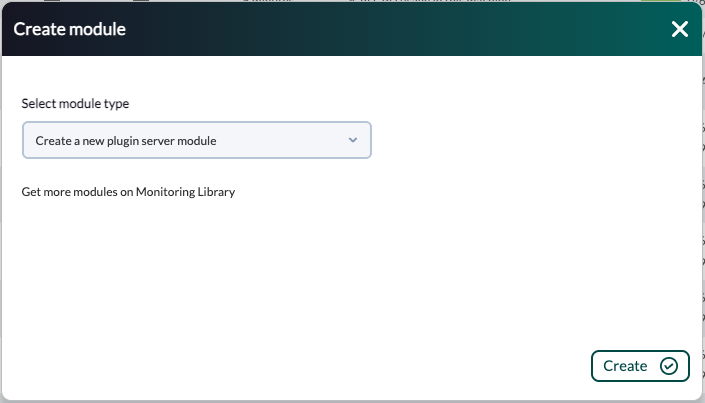
**7. In the module configuration menu, enter a name, select the plugin and fill in the required fields.**

[![Captura de pantalla 2025-05-22 a las 15.51.20.png](https://pandorafms.com/guides/public/uploads/images/gallery/2025-05/scaled-1680-/captura-de-pantalla-2025-05-22-a-las-15-51-20.png)](https://pandorafms.com/guides/public/uploads/images/gallery/2025-05/captura-de-pantalla-2025-05-22-a-las-15-51-20.png)
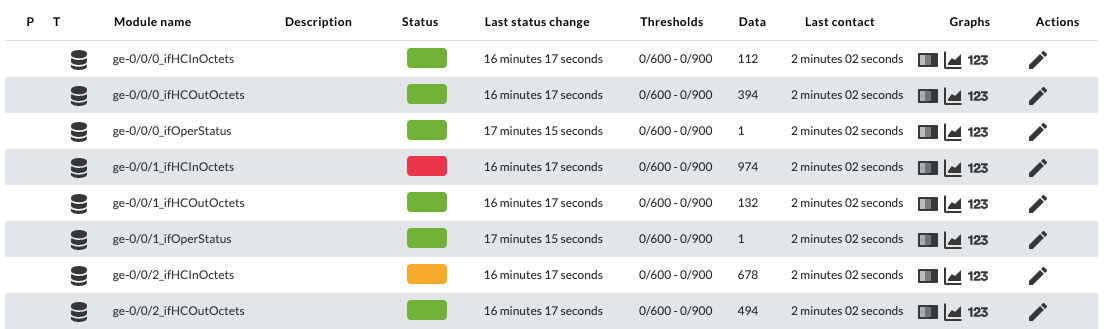
**8. Once the module is created, the plugin will run and generate the modules that match the specified filters.**

[![Captura de pantalla 2025-05-22 a las 15.56.12.png](https://pandorafms.com/guides/public/uploads/images/gallery/2025-05/scaled-1680-/captura-de-pantalla-2025-05-22-a-las-15-56-12.png)](https://pandorafms.com/guides/public/uploads/images/gallery/2025-05/captura-de-pantalla-2025-05-22-a-las-15-56-12.png)
# Agents and modules generated by the plugin

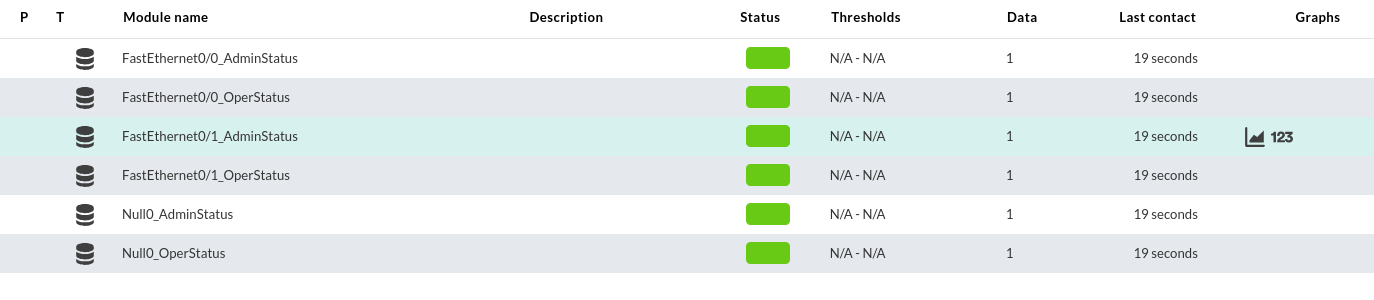
The plugin will create the modules in the selected agent with the -agent parameter. If the agentname specified does not correspond to any existing agent, a new one will be created automatically.

[![image.png](https://pandorafms.com/guides/public/uploads/images/gallery/2024-02/scaled-1680-/rAdimage.png)](https://pandorafms.com/guides/public/uploads/images/gallery/2024-02/rAdimage.png)
[![Captura de pantalla 2025-05-22 a las 15.56.12.png](https://pandorafms.com/guides/public/uploads/images/gallery/2025-05/scaled-1680-/i5zcaptura-de-pantalla-2025-05-22-a-las-15-56-12.png)](https://pandorafms.com/guides/public/uploads/images/gallery/2025-05/i5zcaptura-de-pantalla-2025-05-22-a-las-15-56-12.png)