# Prerrequisites
- AWS API Connectivity
The plugin is a binary that contains the packaged dependencies so it is not necessary to install any type of dependency for its use.
- Permissions
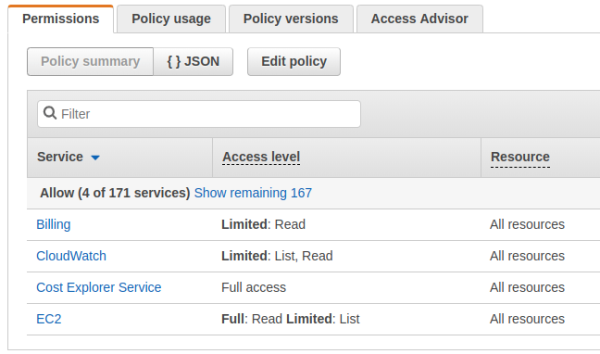
To make requests through the API, the account used to authenticate during execution requires certain permissions.
[](https://pandorafms.com/guides/public/uploads/images/gallery/2023-09/aXDimage.png)
Billing (read)
CloudWatch (list,read)
Cost Explorer Service (Full access)
EC2 (full read, limited: list)
Permission Assignment
Create a policy in JSON like the following:
```
{
"Version": "2012-10-17",
"Statement": [
{
"Sid": "VisualEditor0",
"Effect": "Allow",
"Action": [
"ec2:DescribeInstances",
"ec2:DescribeVolumes",
"aws-portal:ViewBilling",
"cloudwatch:GetMetricStatistics",
"ec2:DescribeAddresses",
"ce:GetCostAndUsage",
"ce:GetTags"
],
"Resource": "*"
}
]
}
```
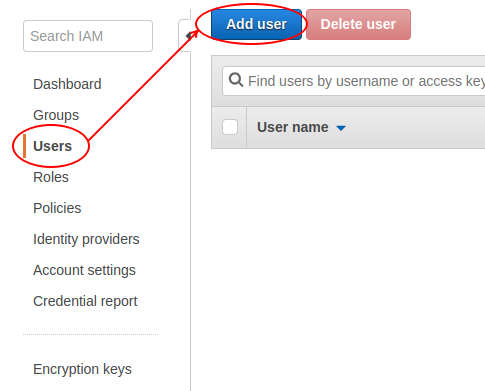
The previous policy must be assigned to a new user.
[](https://pandorafms.com/guides/public/uploads/images/gallery/2023-09/jMGimage.png)
The user who has these permissions will be able to access AWS EC2 monitoring through this plugin.
To obtain advanced statistics for EC2 instances, detailed monitoring must be enabled on the specific instance. This is done from the instance menu in AWS.
Actions -> Monitoring and troubleshooting -> Manage detailed monitoring -> Enable