Apache Discovery
This document describes the Apachefunctionality of PandoraFMS, composed by the discovery plugin.
- Introduction
- Prerrequisites
- Parameters
- Manual execution
- Discovery
- Agent and modules generated by the plugin
Introduction
This Apache discovery plugin for Pandora FMS is designed to automate the monitoring of your Apache HTTP Server web servers, taking advantage of the detailed information provided by the mod_status module. By interacting with the (server-status) page, the plugin can collect vital real-time metrics that are crucial to understanding the performance and health of your Apache environment.
Prerrequisites
- The plug-in is a compiled version that contains all the necessary dependencies for its use.
Parameters
Simple Mode
| Parameter | Description |
|---|---|
| --urls | url of the apache server |
| --user | user name if the apache server requires it, optional. |
| --password | password if the apache server requires it, optional |
| --ssl | to verify if the url is https certified or not, optional. |
| --transfer_mode | name of the transfer mode, optional. |
| --tentacle_ip | ip of the tentacle, optional. |
| --tentacle_port | port of the tentacle, optional. |
| --user_agent | custom User-Agent header sent to Apache, optional. |
Advance Mode
| Parameter | Description |
|---|---|
| --conf | configuration file path |
Archivo de configuración (--conf)
urls= url of the apache server
agent_name= name of the agent optional
module_prefix= prefix name for the modules optional
username= user name if the apache server requires it optional
password= password if the apache server requires it optional
verify_ssl= to verify if the url is https certified or not optional
transfer_mode= name of the transfer mode optional
tentacle_ip= ip of the tentacle optional
tentacle_port= port of the tentacle optional
user_agent= custom User-Agent header sent to Apache, optional
Ejemplo
urls=https://192.168.0.1/example
agent_name=example
module_prefix=apache
username=admin
password=12345
verify_ssl=true
transfer_mode=tentacle
tentacle_ip=127.0.0.1
tentacle_port=41121
user_agent=Mozilla/5.0 (Windows NT 10.0; Win64; x64) AppleWebKit/537.36 (KHTML, like Gecko) Chrome/125.0.0.0 Safari/537.36
Manual execution
The format of the plugin execution is as follows:
./pandora_apache --url <apache server url> --user <apache user name> --password <apache server password> --ssl <serial or dummy if required> --transfer_mode <transfer mode name> --tentacle_ip <tentacle port> --tentacle_port <tentacle port> --conf <path to configuration file> --string_conf <path to configuration file>Examples:
to run in simple mode
./pandora_apache --url http://192.168.0.1/server --ssl false --transfer_mode tentacle --tentacle_ip 127.0.0.1 --tentacle_port 41121to run in advanced mode
./pandora_apache --url http://192.168.0.1/server --ssl false --transfer_mode tentacle --tentacle_ip 127.0.0.1 --tentacle_port 41121 --conf /file/file.confThe execution will return an output in JSON format with information about the execution, and will generate an XML file for each monitored agent that will be sent to the Pandora FMS server by the transfer method indicated in the configuration.
Discovery
This plugin can be integrated with Pandora FMS Discovery.
To do so, you must load the ".disco" package that you can download from the Pandora FMS Marketplace:
Once loaded, Apache services can be monitored by creating discovery tasks from the Management > Discovery > Application > Apache section.
The following minimum data will be requested for each task:
- Apache urls: apache server url
- User: server user if required, optional
- Password: server password if required, optional
- Verify SSL: active if it is necessary to verify that the url has an SSL certificate; by default active
- Tentacle Mode: transfer mode name, optional
- Tentacle IP: tentacle ip, optional
- Tentacle port: tentacle port, optional
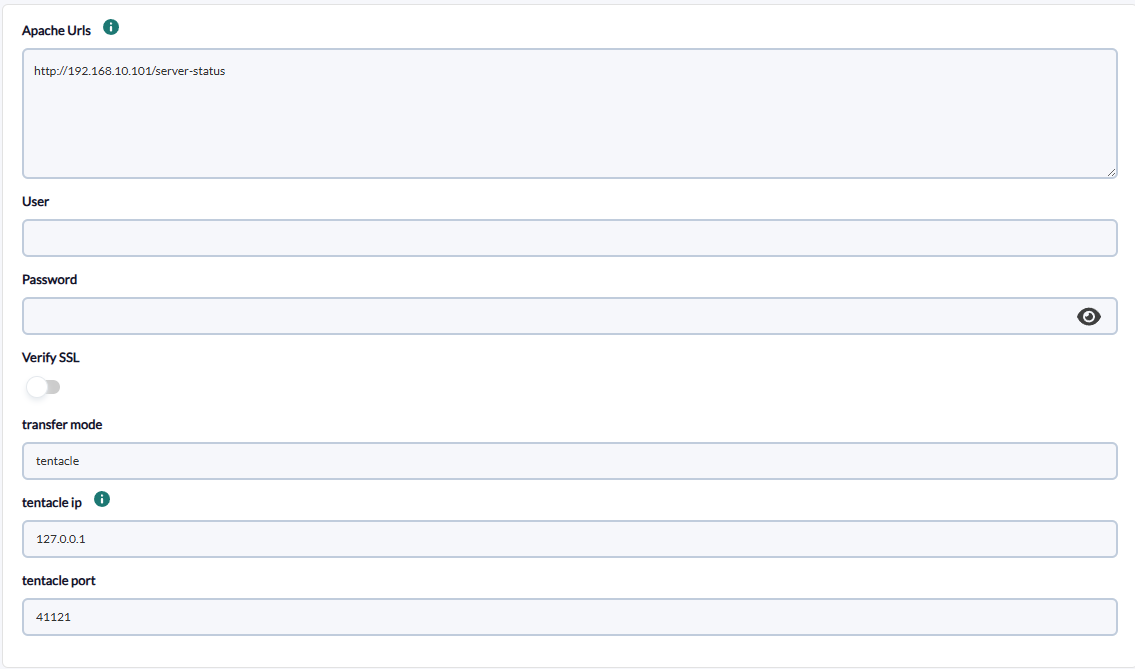
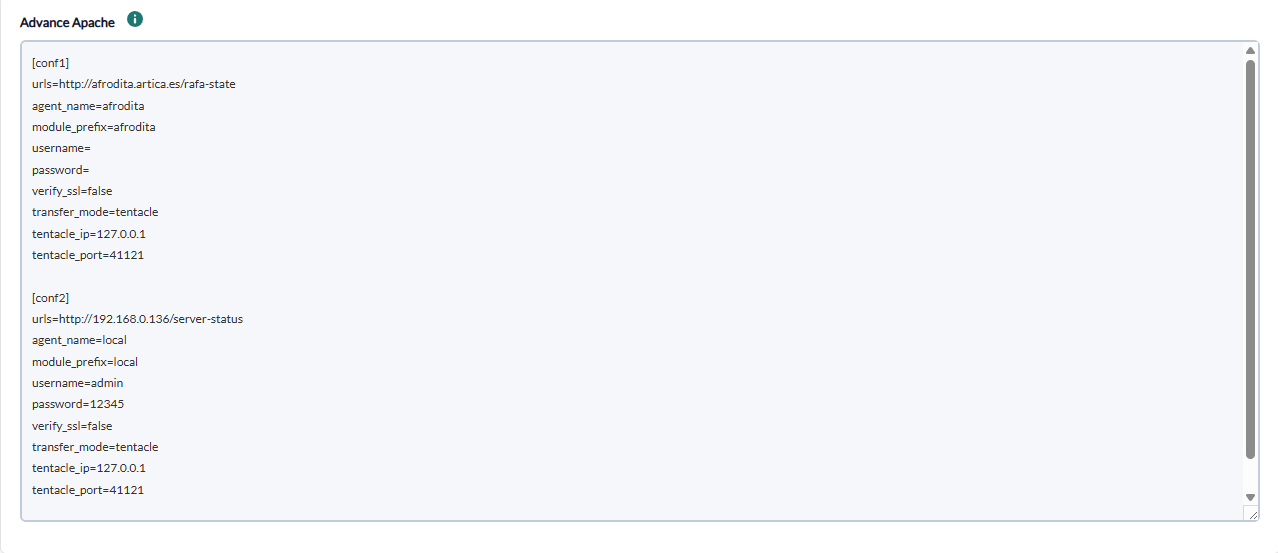
On the next page we will be asked for the following :
text area to add the configuration of each of the apache blocks to be monitored
- Block: name of block example [conf] is required.
- Apache urls: apache server url, optional
- Agent name: specific agent name, optional
- Module Prefi: prefix for any module
- User: server user if required, optional
- Password: server password if required, optional
- Verify SSL: active if it is necessary to verify that the url has ssl certificate, by default active
- User-Agent: custom User-Agent header sent to Apache, optional
- Tentacle Mode: transfer mode name, optional
- Tentacle IP: tentacle ip, optional
- Tentacle port: tentacle port, optional
There is also a field to add a custom user agent at the task level.
Successfully completed tasks will have an execution summary with the following information:
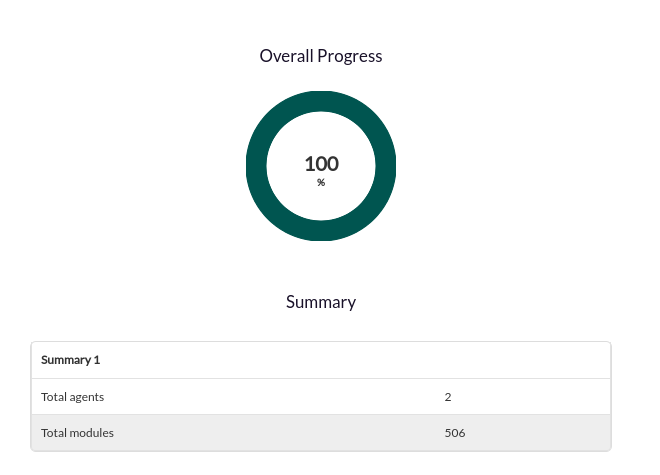
- Total agents: Total number of agents generated by the task
- Total modules: Total number of modules generated by the task
Agent and modules generated by the plugin
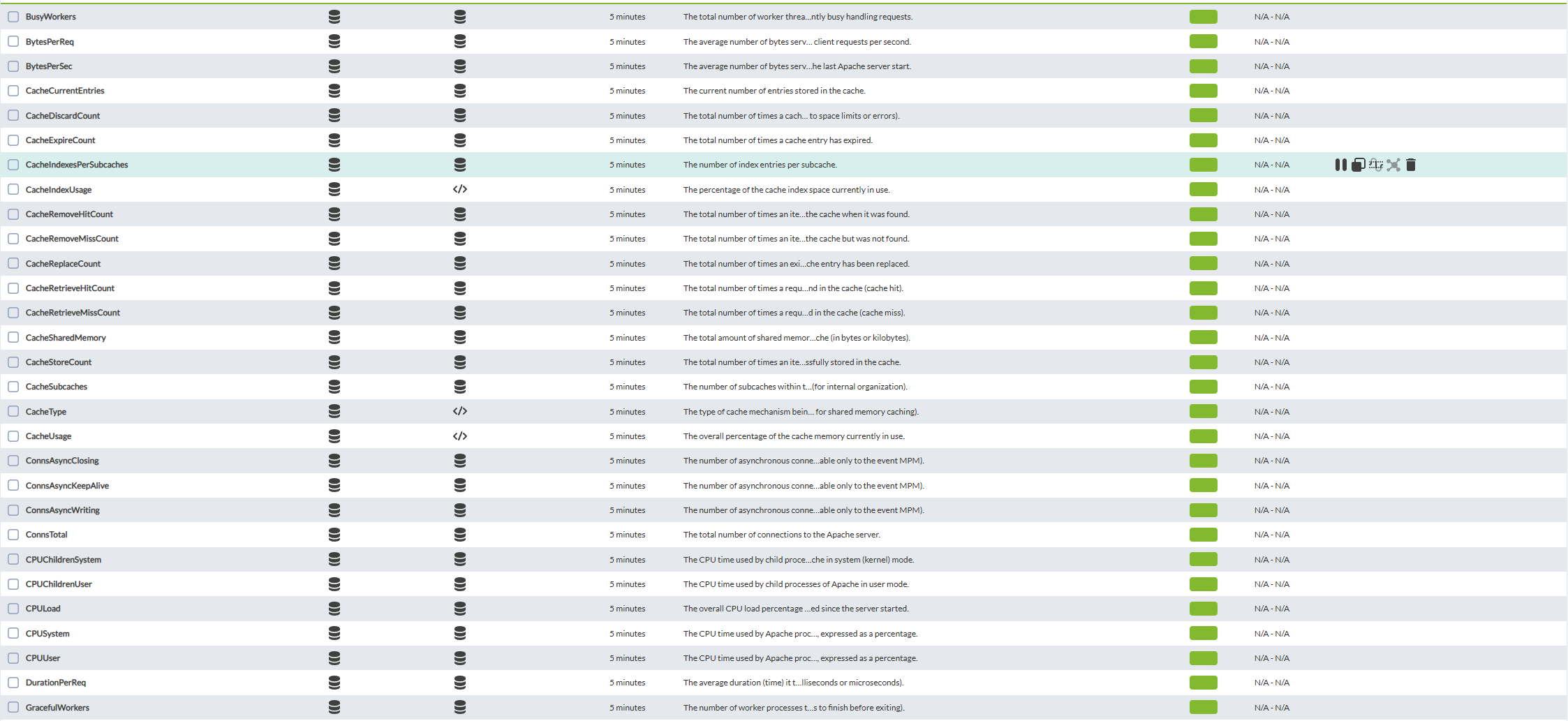
The plugin will create one agent per instance. In simple mode, the name will be taken from the URL. In advanced mode, one agent will be created for each block sent, and the name will be defined by the agent name field; if not specified, the name will be taken from the URL. The metrics depend on the configuration and version of the Apache server. On a recent Apache installation with all features enabled, you will get all metrics. Each agent will contain the modules obtained by interacting with the server status page. The modules to be created are as follows:
Translated with DeepL.com (free version)
| Module | Description |
|---|---|
| ServerVersion | The Apache service version (e.g., Apache/2.4.62) |
| ServerMPM | The Multi-Processing Module (MPM) currently in use by Apache (e.g., event, prefork, worker) |
| ServerBuilt | The date and time when the Apache server binary was compiled |
| ParentServerConfigGeneration | The configuration generation of the parent Apache process. Increments with each graceful restart. |
| ParentServerMPMGeneration | The MPM generation of the parent Apache process |
| ServerUptimeSeconds | The service uptime expressed in seconds |
| Load1 | The system load average over the last 1 minute |
| Load5 | The system load average over the last 5 minutes |
| Load15 | The system load average over the last 15 minutes |
| TotalAccesses | The total number of client requests received by the server since its last start/restart. Calculated as a rate of change for the Total requests statistics. |
| TotalKBytes | The total kilobytes of data served by the Apache server since its last start/restart |
| TotalDuration | The cumulative time spent processing all requests since the server started (in microseconds or milliseconds, depending on Apache version and configuration) |
| CPUUser | The CPU time used by Apache processes in user mode since the server started, expressed as a percentage |
| CPUSystem | The CPU time used by Apache processes in system (kernel) mode since the server started, expressed as a percentage |
| CPUChildrenUser | The CPU time used by child processes of Apache in user mode |
| CPUChildrenSystem | The CPU time used by child processes of Apache in system (kernel) mode |
| CPULoad | The overall CPU load percentage consumed by all Apache processes combined since the server started |
| Uptime | The human-readable representation of the server's uptime (e.g., '2 days 4 hours 40 minutes'). Derived from ServerUptimeSeconds. |
| ReqPerSec | The average number of requests served per second since the server was started/restarted. Not used, as it counts the average since the last Apache server start. |
| BytesPerSec | The average number of bytes served per second since the server was started/restarted. Not used, as it counts the average since the last Apache server start. |
| BytesPerReq | The average number of bytes served per request since the server was started/restarted |
| DurationPerReq | The average duration (time) it took to serve each request since the server was started/restarted (in milliseconds or microseconds) |
| BusyWorkers | The total number of worker threads/processes that are currently busy handling requests |
| GracefulWorkers | The number of worker processes that are currently in a graceful shutdown state |
| IdleWorkers | The total number of worker threads/processes that are currently idle and ready to handle new requests |
| Processes | The number of active Apache processes (not threads) currently running |
| Stopping | The number of worker processes that are in a stopping state |
| ConnsTotal | The total number of connections to the Apache server |
| ConnsAsyncWriting | The number of asynchronous connections in writing state (applicable only to the event MPM) |
| ConnsAsyncKeepAlive | The number of asynchronous connections in keep-alive state (applicable only to the event MPM) |
| ConnsAsyncClosing | The number of asynchronous connections in closing state (applicable only to the event MPM) |
| CacheType | The type of cache mechanism being used by Apache (e.g., SHMCB for shared memory caching) |
| CacheSharedMemory | The total amount of shared memory allocated for the cache (in bytes or kilobytes) |
| CacheCurrentEntries | The current number of entries stored in the cache |
| CacheSubcaches | The number of subcaches within the main cache |
| CacheIndexesPerSubcaches | The number of index entries per subcache |
| CacheIndexUsage | The percentage of the cache index space currently in use |
| CacheUsage | The overall percentage of the cache memory currently in use |
| CacheStoreCount | The total number of times an item has been successfully stored in the cache |
| CacheReplaceCount | The total number of times an existing cache entry has been replaced |
| CacheExpireCount | The total number of times a cache entry has expired |
| CacheDiscardCount | The total number of times a cache entry has been discarded (e.g., due to space limits or errors) |
| CacheRetrieveHitCount | The total number of times a requested item was found in the cache (cache hit) |
| CacheRetrieveMissCount | The total number of times a requested item was not found in the cache (cache miss) |
| CacheRemoveHitCount | The total number of times an item was successfully removed from the cache when it was found |
| CacheRemoveMissCount | The total number of times an item was attempted to be removed from the cache but was not found |